
Likko LKM01 Manuale utente

Likko LKM012 MP3/CD Portable Player
User’s Guide
Likko Electronic Co. Ltd.
URL: http://www.likko.com
Email: [email protected]
© Copyright 2000, by Likko Electronic Co. Ltd.
All rights reserved, including those to reproduce this guide or
parts thereof, in any form without the express written
permission of Likko Electronic Co. Ltd.
Features and specifications are subject to change without
notice. Trademarks and/or registered trademarks are the
properties of their respective owners.

LIKKO LKM012 MP3 Portable Player User’s Guide
1
Table of Contents
1. Getting Started: .................................................................................................................................... 2
Safety Instructions ...................................................................................................................................... 3
Parts Introduction ........................................................................................................................................ 4
Power Sources ............................................................................................................................................ 8
2. Using Your Player: .................................................…............................................................................ 9
Playing MP3 and Normal CDs .......................................….......................................................................... 10
Play Modes ...................................................................…........................................................................... 11
Using the Program and Repeat Modes ....................................................................................................... 12
Using Directories ......................................................................................................................................... 13
Using the DIR Program Mode ...................................................................................................................... 14
Using the Record Feature ............................................................................................................................ 15
3. Reference: ........................................................................................……................................................. 16
Troubleshooting and Tips ...........................................................................…................................................ 17
Specifications and Accessories ...................................................................................................................... 18

LIKKO LKM012 MP3 Portable Player User’s Guide
2
CHAPTER 1
Getting Started
The world is being changed by MP3 music. The MP3/CD Portable Player saves your summer!
The Likko MP3/CD Player plays MP3, CD Audio, CD, CD-R. It supports long file names,
directories, and 10 solid hours of CD Quality music!
IN THIS CHAPTER...
■ Safety Instructions on page 3.
■ Parts Introduction on page 4.
■ Power Sources on page 8.

LIKKO LKM012 MP3 Portable Player User’s Guide
3
Safety Instructions
STORAGE:
! Never use or store the player in the cold, hot, humid or dusty places.
! Do not leave the cover open if the player is not being used for a long time.
! Exposure to direct sunlight or extreme heat (such as inside a parked car for more than 2 hours) may cause damage or malfunction.
USAGE:
! Never attempt to play cracked or warped discs in the player as they may jam and damage the player.
! Avoid using the headphones/earphones at a high volume.
ROAD SAFETY:
! Do not use earphones while driving, cycling, or operating any motorized vehicle.
CARRYING:
! Please use the soft bag that comes with the player to protect it against scratches.
POWER SOURCE:
! Only charge the batteries for their respected recharge time. Charging longer can cause battery leaks, or an overload on the recharge
circuit.
! Remove dry batteries (not chargeable) from battery case when using AC power supply.
LIKKO LKM012 MP3 Portable Player User’s Guide
4
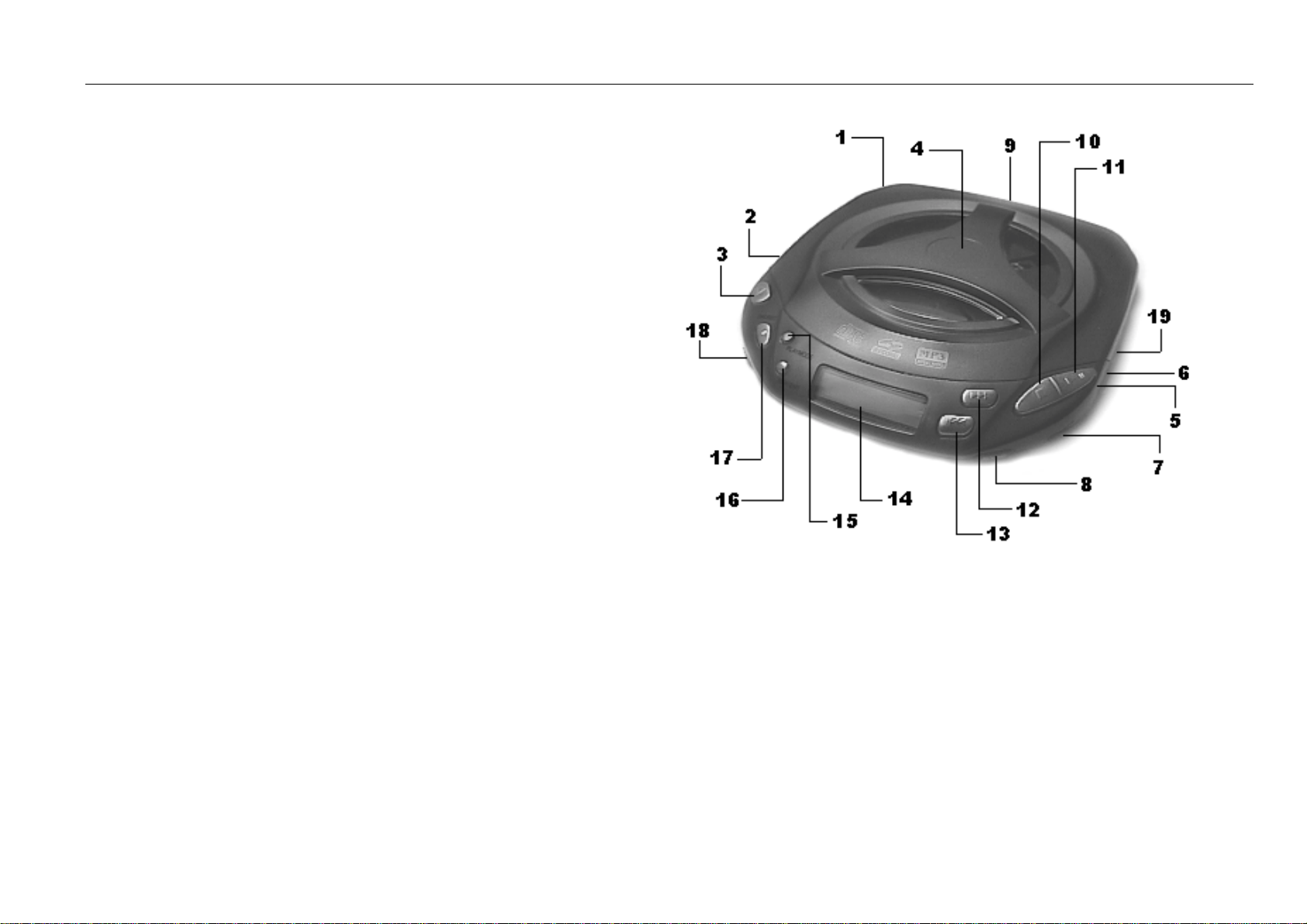
Parts Introduction
1. Battery case (on the back of the player):
Holds two AA batteries.
2. External 5V power socket:
For connecting the supplied AC power adapter.
3. Open button:
Press to open the disc cover.
Note: Do not open the cover while playing, or the player will be turned off
automatically.
4. Disc cover
5. Headphone jack:
For connecting a set of headphones.
6. MIC jack:
For connecting a microphone (when using the REC option.)
7. Volume control:
Use to adjust the volume of earphone. Does not effect the LINE OUT.
8. SOUND button:
Used to change sound settings:
Setting 1: Normal
Setting 2: Super bass
Setting 3: Bass

LIKKO LKM012 MP3 Portable Player User’s Guide
5
Setting 4: Treble
Setting 5: Super Treble
9. Line out:
Line output for connection to an amplifier.
10. Stop button:
Press to stop playback of a track. When in DIR mode, press to return to the last level directory.
11. Play/Pause button:
Press to turn on power and begin to play when the power is turned off. Press to pause while playing, and to continue playing when
paused.
12. Fast forward:
Press once to skip to the next track. Press and hold to fast forward through the current track.
13. Rewind:
Press once to return to the beginning of the track, and twice to play the previous track. Hold down to rewind the current track.
14. LCD display panel:
Use to display working status.

LIKKO LKM012 MP3 Portable Player User’s Guide
6
15. PLAY MODE button:
Sets the playback mode (refer to Chapter 2 for detailed information.)
16. REP/ENT button:
Set repeat playback of CD and MP3 discs. Also used as enter in programming status.
17. DIR/REC:
Use to toggle between DIR and FILE mode when playing MP3 discs. In recording status, use to record.
18. RESU/NOR/HOLD (Left/Center/Right):
NOR : Play from the beginning.
RESU: Play from where you stopped the last time.
HOLD: Use to lock the buttons from accidental presses.
19. PLAYER/RECORDER switch:
Switches between player and recorder modes.

LIKKO LKM012 MP3 Portable Player User’s Guide
7
Power Sources
Using the AC Power Adapter:
First turn off the player, then plug the AC power adapter into the wall. Connect the output jack of the adapter to external power jack of the
player. Note: Only use the supplied AC power adapter.
Using Batteries:
Insert two 1.5V AA batteries into the battery case (refer to figure).
Note: Your player will be damaged if you try to charge non-rechargeable batteries.
Take batteries out when the external power is being used.
Remove batteries if the player is not going to be used for a long time.
Do not mix new batteries with old ones.
Do not use Mn-Zn batteries.
Using Rechargeable Batteries:
New batteries need be charged before use. When the batteries are weak. The player will beep to
remind you to charge the batteries.
Steps for Recharging the Batteries:
1. Turn off the player if it is playing.
2. Insert the batteries and plug in the AC power adapter .
3. Switch RESU/NOR/HOLD to HOLD, and press the PLAY button. Power indicator in the LCD should flash and CHG will display in the
LCD. The Power indicator will stop flashing when the batteries are full, and the player will automatically turn off.

LIKKO LKM012 MP3 Portable Player User’s Guide
8
Note:
* Charging time of an 850mAH NI-CD battery is about 5-6 hours. Only charge the batteries for their respected recharge time. Charging longer
can cause battery leaks, or an overload on the recharge circuit. This will damage the player!!
* Always keep alkaline battery (not chargeable) away from the battery case when using AC power supply.
! If the batteries can only be used for short time after charging, they can no longer hold a charge. Please replace the battery.
! Charging time depends on the volume of the battery. The larger the battery volume is, the longer the time it will take to charge.
! If the battery is new, it may not be charged completely until you recharge it several times.
! To extend the life of the battery, recharge only when the battery is completely discharged.

LIKKO LKM012 MP3 Portable Player User’s Guide
9
CHAPTER 2
Using Your Player
This chapter is your guide on how to use all of the features that make up your Likko
MP3/CD Player. Learn how to enjoy and manage over 10 hours of CD quality music!
IN THIS CHAPTER...
■Playing MP3 and Normal CDs on page 10.
■Play Modes on page 11.
■ Using the Program and Repeat Modes on page 12
■ Using Directories on page 13
■ Using the DIR PROGRAM mode on page 13
■ Using the Record Feature on page 14.
Questo manuale è adatto per i seguenti modelli
1
Indice


