LogicMark 30911 Manuale utente

OPERATING INSTRUCTIONS
Model No. 30911
v6.3
Enjoy the Freedom of Independent Living
English

2Guardian Alert 911tm
Note: Battery must be installed before use.
Thank you for choosing the Guardian Alert 911 – your personal link to the 911
emergency operator when you need it.
PLEASE READ THIS MANUAL COMPLETELY AND SAVE IT FOR
REFERENCE.
Contents:
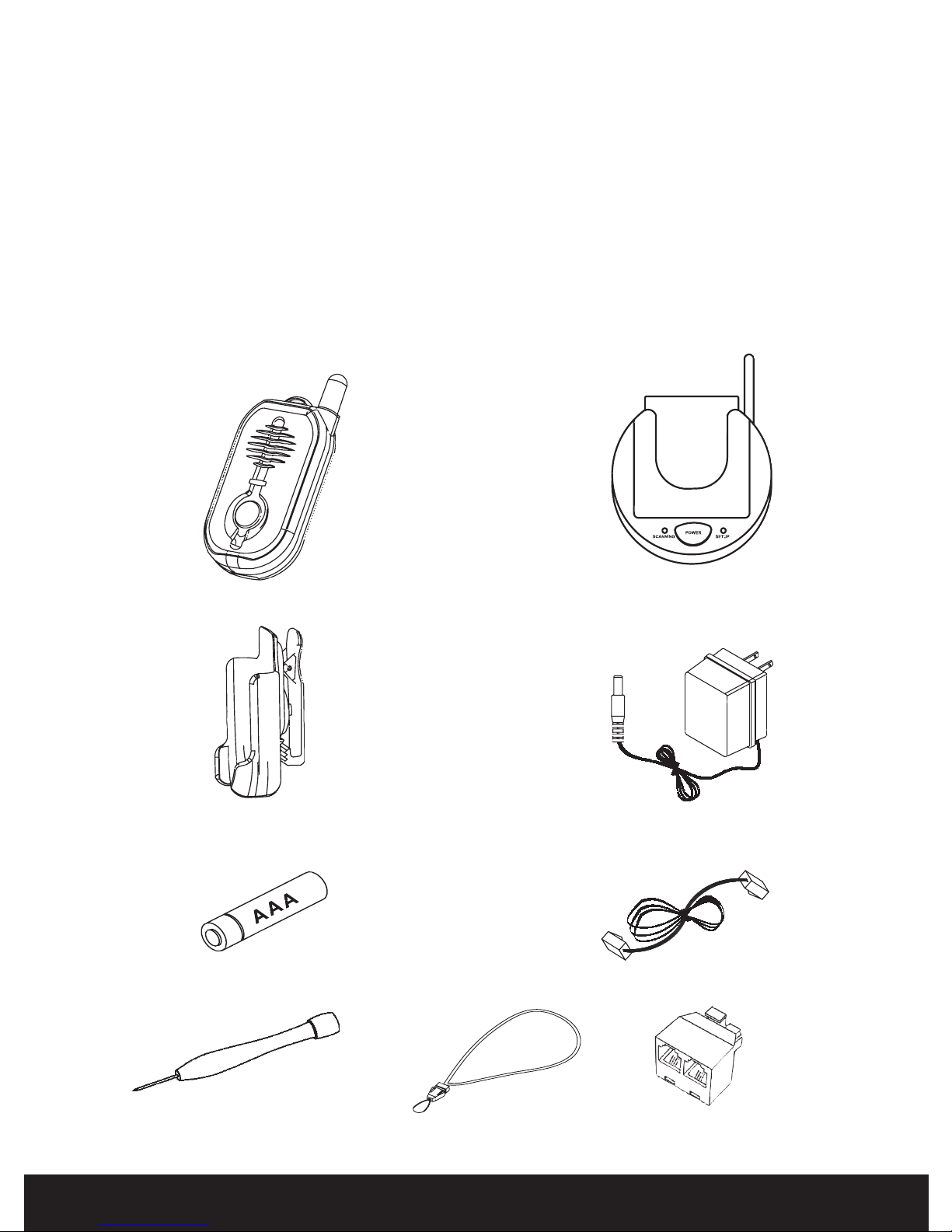
The items below are included with your Guardian Alert 911 . Additional parts
or replacements can be ordered from LogicMark, LLC by calling our Customer
Service department at 703-934-7934.
Pendant
AAA Alkaline Battery
Screwdriver
Base Unit
AC Adapter
Phone Cord
Line Splitter
Belt Clip
Lanyard

Guardian Alert 911tm 3
TABLE OF CONTENTS
Overview of the Guardian Alert 911 .......................................................4
Installing the Battery ................................................................................4
Locating the Base Unit..............................................................................5
Pendant Features ......................................................................................5
Base Unit Features ....................................................................................6
Connecting the Guardian Alert 911
The Standard Connection................................................................6
Connecting a Second Phone............................................................7
If Your Home Has DSL...................................................................7
Operating the Guardian Alert 911
About the Pendant...........................................................................7
Attaching the Lanyard.....................................................................8
Water Resistance.............................................................................8
Battery Check..................................................................................9
System Check................................................................................10
Emergency Dialing Using the Panic Button ................................. 11
Hanging Up................................................................................... 11
Troubleshooting Guide ...........................................................................12
Optional Accessories:
Battery Backup #30912

4Guardian Alert 911tm
Overview Of The Guardian Alert 911:
The Guardian Alert 911 is a tiny cordless speaker phone, small enough to be worn
around your neck. It is smaller than most cell phones.
By pressing a single button, the Guardian Alert 911automatically dials the universal
911 emergency number. You will then be able to speak directly to the 911 operator
about your emergency.
It has enough range to cover most homes and even into the yard. It is NOT a cell
phone, and therefore will not work far from your home. It is designed to be used
primarily inside the home. You can use the System Check feature (see page 10) to
conrm that the PENDANT is within range of the BASE UNIT.
The Guardian Alert 911 PENDANT has its own replaceable battery. The battery
must be installed prior to use. It will last at least 6 to 12 months in standby mode.
Because the PENDANT never needs charging, it can be kept with you at all times.
We recommend that the PENDANT battery be replaced every six months.
Like most cordless phones, the Guardian Alert 911 must be plugged into a power
outlet using an AC adapter (included) to work. An optional battery backup is avail-
able which can keep the Guardian Alert 911 BASE UNIT working for up to 24 hours
in case of a power failure. It can be ordered from the Customer Service number on
the back of this manual. Ask for part number 30912.
Installing the Battery:
It is important to know that the PENDANT requires
oneAAAbattery. We recommend using a fresh, high
quality alkaline or lithium cell from a recognized
brand. Under normal use, the unit will remain on
standby and ready for use for at least six months.
When activated during an emergency, you can talk
for a minimum of 30 minutes. Follow the diagram
to the right to install the battery which came with
your kit.
To insure that your Guardian Alert 911 will be ready
when you need it, replace the battery every 6 months.
NOTE: The battery cover will only t eaily on the case one direction.
“+”
Terminal

Guardian Alert 911tm 5
Locating the Base Unit:
For best results and longest range, locate the BASE UNIT in an area away
from household appliances which could present electrical interference. These
include microwave ovens, televisions, electric mixers or blenders, hairdryers,
or other cordless phones.
If more than one Guardian Alert 911 is to be used in one home, it is recom-
mended that the BASE UNITS be located at least 10’ apart.
Pendant Features:
Good Location Bad Location

6Guardian Alert 911tm
Base Unit Features:
Connecting The Guardian Alert 911:
The Standard Connection:
No special phone line or special service is required to use your Guardian Alert
911. Your phone will work with your existing touch-tone phone line and existing
service. It works the same way as any cordless phone.
Simply plug in the AC ADAPTER and TELEPHONE LINE CORD as shown.
AC Adapter
Telephone
Line Cord

Guardian Alert 911tm 7
Caution: Do not plug the AC ADAPTER into an outlet which is controlled by a
switch. The switch could accidentally be turned off, thus rendering the BASE
UNIT inoperable.
Connecting A Second Phone
You may need to plug a conventional
telephone into same outlet used by the
GuardianAlert 911. This is done very
simply by using the telephone line
splitter (included). See illustration
on right.
If Your Home Has DSL
If your home has DSL service for your computer,
you will need to use a DSL lter in line with the
Guardian Alert 911 OR IT WILL NOT WORK.
This lter can be obtained from a local electron-
ics supplier or your DSL service provider. See
illustration to the right.
Operating the Guardian Alert 911
About The Pendant:
The PENDANT is a tiny, cordless speaker phone. It may be worn around the neck,
on a belt using the supplied clip, or kept in your pocket.
There is a large blue button on the front of the PENDANT which activates the
system and automatically dials the 911 emergency number when pressed for more
than ½ second.
Once connected, you can speak directly with the 911 operator and explain the nature
of your emergency.
To 911
To Second Phone

8Guardian Alert 911tm
Attaching The Lanyard
If the neck strap is to be used, attach it as shown
to the right.
Water Resistance
The Guardian Alert 911 will resist occasional splashes from water. How-
ever, it should never be submerged or exposed to water continuously.

Guardian Alert 911tm 9
Battery Check
The Guardian Alert 911 has a built-in
battery tester. When you press the button
on the bottom of the PENDANT, a voice
announcement will inform you of the
battery condition. One of the following
messages will be heard:
“Battery is OK.”
Check the battery condition once
per week.
“Replace battery soon.”
The battery should be replaced within the next few days.
“Replace battery now.”
The battery should be replaced the same day.
Please note: If there is no response after pressing the button for one second
or more, the battery is dead and must be replaced immediately.
The battery should be tested twice a month along with the
System Check outlined on the next page. If the battery is tested
every day, it will be drained much more quickly and will not
last as long.

10 Guardian Alert 911tm
System Check
The button on the bottom of the case which is
used to perform the BATTERY CHECK, will
also perform a SYSTEM CHECK. Press and
hold this button for more than four (4) seconds.
One of the following announcements will be
made.
“System check, OK.”
This conrms the following:
Battery status.
The PENDANT is working.
The BASE UNIT is working.
The BASE UNIT is connected to a working phone line.
The PENDANT is within range of the BASE UNIT.
“System check failed.”
This conrms one or more of the following:
The PENDANT has malfunctioned.
The BASE UNIT has malfunctioned.
The PENDANT and BASE UNIT are not communicating with each other
or are out of range.
The BASE UNIT is not connected to the phone line or can not get a dial
tone for some reason.
If you receive a “System check failed.” notication, please refer to the
TROUBLESHOOTING guide at the back of this manual to determine the
cause.
This feature is very useful - allowing you to conrm that the system has
coverage from all parts of your home. Simply walk to the various parts
of your home and push the Battery Check / System Check button until
you hear the dial tone and the “SYSTEM CHECK OK” voice prompt.
Altri manuali per 30911
3
Questo manuale è adatto per i seguenti modelli
2
Indice
Altri manuali LogicMark Telefono