
Logitek Pilot Manuale utente

Logitek Electronic Systems
Logitek Electronic Systems
Pilot Reference Manual
Revision 1.0
Oct 2010

Logitek Electronic Systems, Inc.
5622 Edgemoor Drive
Houston, Texas 081
USA
Tel 8 -231-58 0
+1- 13-664-44 0 (outside U.S. and Canada)
Fax +1- 13-664-44 9
Email [email protected]
Web www.logitekaudio.com
Contents © 2010 Logitek Electronic Systems, Inc
Notice
Every effort has been made to supply complete and accurate information. However, Logitek Electronic Systems, Inc. assumes no
responsibility for its use, nor any infringement of patents or other rights of third parties, which would result.
Worldwide rights reserved. Except for your own personal use, no part of this publication may be stored in a retrieval system,
transmitted or reproduced in any way, including but not limited to photocopy, photograph, magnetic or other record, without the
prior agreement and written permission of Logitek Electronic Systems, Inc.
Logitek, JetStream, and Pilot are trademarks of Logitek Electronic Systems, Inc.
All other trademarks acknowledged.
All specifications are subject to change without notice.


Document Revisions
Date Revision Author Notes
September 2010 0.5 Paul Dengate Preliminary release of Pilot manual
October 2010 1.0 John Davis, CBNT First release of Pilot manual
Logitek Pilot Reference Manual 4

Contents
Document Revisions................................................................................................................... 4
Contents 5
1 Introduction.............................................................................................................................. 6
2 Unpacking 10
3 P ysical Installation................................................................................................................ 11
4 Configuration...........................................................................................................................17
5 Operation 23
6 Maintenance............................................................................................................................ 26
Appendix A Release Notes......................................................................................................... 29
Appendix B Specifications.........................................................................................................30
Appendix C Pinouts....................................................................................................................32
Two Year Limited Warranty......................................................................................................33
Logitek Pilot Reference Manual 5

1 Introduction
About t is Manual
This manual describes the installation and operation of the Logitek Pilot control surface.
Intended Audience
This manual is aimed at Engineers responsible for installing, configuring and supporting a Logitek
Networked Console ystem with the Pilot surface.
In the context of a system installation, or to become familiar with the entire Logitek Networked
Console ystem, the reader should also reference:
JetStream Reference Manual
AEConfig Reference Manual
CommandBuilder Reference Manual
Manual Conventions
The following conventions are used in this manual:
This text indicates a menu choice to be made, with an arrow separating a multi-level selection,
eg Control Panel
Users & Passwords. This can be a menu choice in a Logitek application, or
within indows.
Indicates a “see-also” section in this manual, or another Logitek manual.
The exclamation symbol signifies an important note or critical information.
This text represents a command, script block example, instruction to
be typed, or directory path.
TIP: A useful tip from our knowledge base!
Logitek Pilot Reference Manual 6
About Pilot
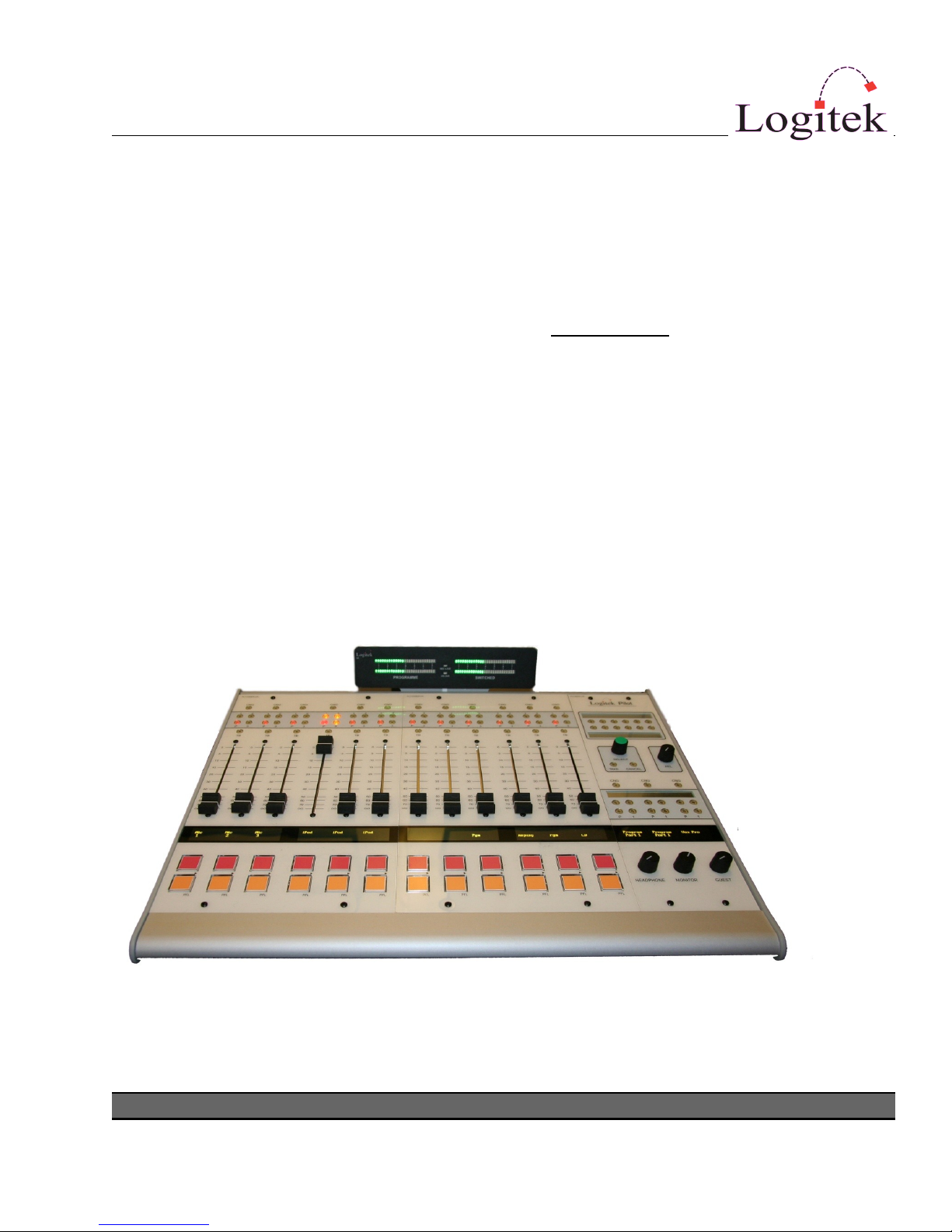
The Pilot control surface from Logitek Electronic ystems brings you the flexibility of a router based
audio console system with the look, feel and easy handling that novice operators will understand,
and experienced console operators will appreciate.
The Pilot offers full access to the sources available on Logitek’s Jet tream routers, along with simple
bus selection and intuitive monitor controls. The Pilot is not compatible with the Logitek Audio
Engine.
The Pilot surface can be configured with 6, 12, 18 or 24 Faders. There is also a Monitor Module
containing the Monitoring and Selection functions. The module types include:
PLT-FADER 6 Fader Module
PLT-MON Monitor Control Module
In addition, a Meter Bridge (PLT-MTR) is available.
The main frame is available in a number of different sizes to accommodate the variety of fader
numbers. The frame is designed to be mounted on a desk for semi-permanent installation, but as no
cutouts are required it can easily be relocated.
The Pilot UK Console
Logitek Pilot Reference Manual 7
System Requirements
Pilot is designed to connect to a Logitek Jet tream running DSP version 4.x. Contact Logitek
Electronic ystems or your reseller if you are unsure of compatibility, or are adding a Pilot surface
to a pre-existing Logitek facility.
System Arc itecture
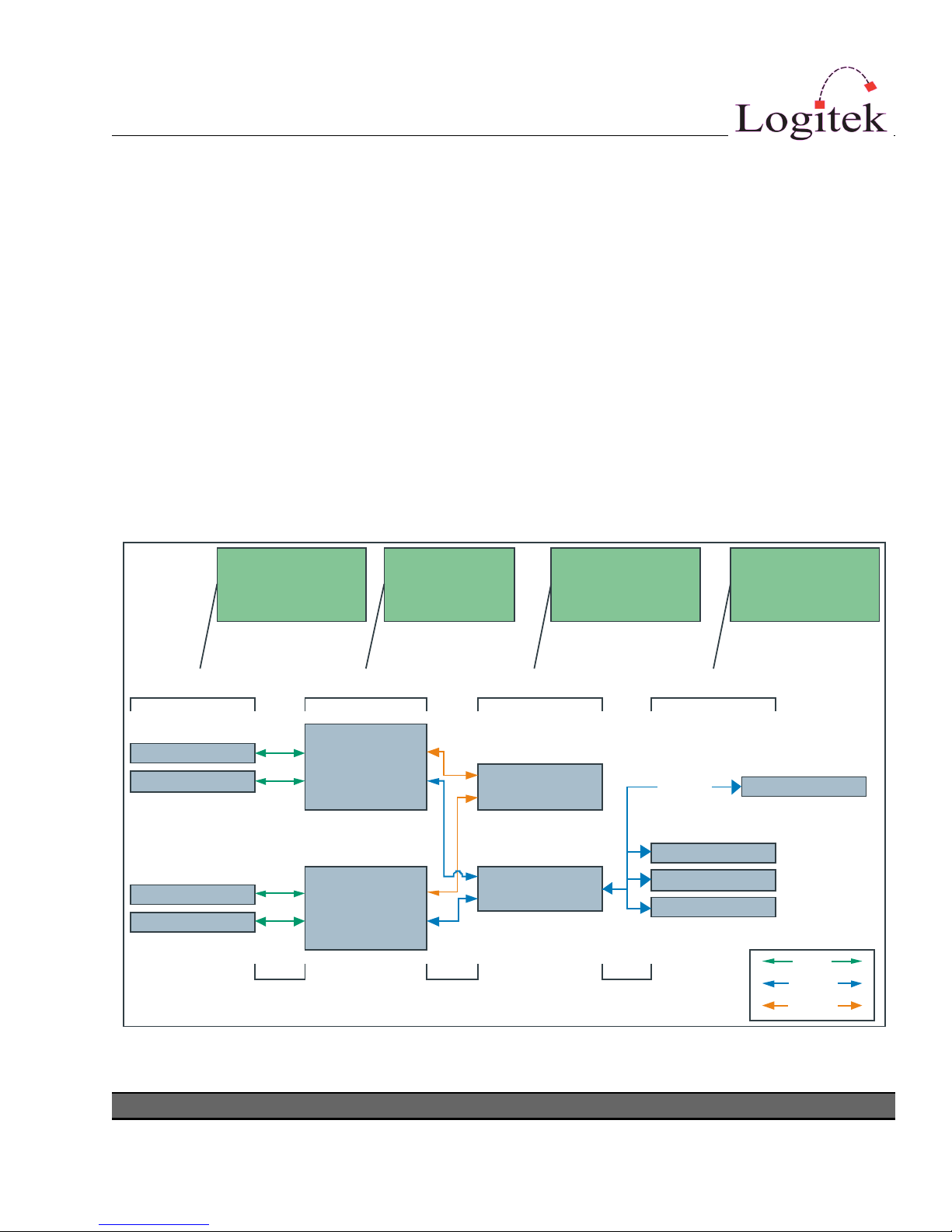
Put simply, the Pilot surface is just a remote control panel for the JetStream. Unlike traditional
analog consoles, no audio passes through the Pilot or its faders (with the exception of the cue
speaker audio). The Pilot talks to the JetStream using the Logitek Command Protocol, with all audio
processing occurring inside the router.
The mixing, routing and processing of audio is not dependent upon the embedded PC included
with the JetNet Audio Networking Module. However, additional functionality, such as macro
buttons, scene snapshots, intercoms, delay control and software tools interface to the system using
the JetStream Server application that is bundled with the module.
Logitek Pilot Reference Manual 8
Console Surfaces Jetstream
1 Audio
Network
Surfaces Audio Engines Ethernet Switches
Control Panels
Console Surfaces Jetstream
2
Control Panels
Business
Network
Serial Comms IP TCP/IP
Remote Support
Software vTools
Software vTools
Surfaces are remote
control panels for
Audio En ine
Audio En ines
process Audio and
GPI control events
Network switches
distribute audio,
control & sync
Client PCs
Software tools provide
remote control &
system maintenance
internet
Software vTools
Serial
TCP/IP
UDP/IP
Figure 1 - Logitek System Architecture (v4.x)

Compatibility Matrix
Pilot is designed for use ONLY with the Jet tream Router v4.x.
The Pilot retains compatibility with other surfaces for the majority of its features.
Following is the minimum software release version/date that is required for Pilot support on a
Jet tream Router v4.x system.
Component General upport Additional Features
JSM-DSP Controller v1.41
JetStream Server v4.0
CommandBuilder v3.6
AEConfig v3.6
Logitek Pilot Reference Manual 9

2 Unpacking
This section details what you should do when unpacking your newly arrived Pilot surface.
Parts List
The exact list of parts received will vary depending on your order, but should generally include:
1 x Pilot Power Supply (external brick-style)
1 x fully assembled Pilot frame, containing modules as ordered
1 x meter bridge assembly (option)
You will receive a parts list with the system that is specific to the modules on your order.
Unpacking
Carefully unpack the cartons whilst looking for any signs of shipping damage. You may wish to save
the shipping cartons until the operation of the system is verified.
Report any damage to the shipping carrier immediately. Verify that the contents of each box match
the packing list and report any discrepancies immediately to Logitek in writing.
Contacting Logitek
In the event of a shipping problem, you can contact Logitek Electronic ystems in several ways:
U. . Mail Logitek Electronic Systems, Inc.
5622 Edgemoor Drive
Houston, Texas 081
USA
Telephone 8 -231-58 0
+1- 13-664-44 0 (outside U.S. and Canada)
Fax +1- 13-664-44 9
Email [email protected]
Website www.logitekaudio.com
Logitek Pilot Reference Manual 10
Indice
Altri manuali Logitek Mixer musicale


