Look Solutions Cobra 3.1 Manuale utente

1
Operating manual
aLook Solutions product
cobra
3.1

2
Set of Equipment supplied
Original operating manual, version 2/2018
– 1 Cobra 3.1 fog generator incl. Duct Adaptor/Protection against contact
– 1 Tank lid with Quick Connector
– 1 mains cable 2 m with Powercon True plug
– 1 Operating manual
Please check whether all the products you ordered are supplied.

3
Contents
1. Introduction 4
2. Security instructions 5
3. Description of the parts 6
4. Fluid 8
4.1 General Notes 8
4.2 Changing the fluid container 8
5. Operating the Cobra 3.1 8
5.1 Selecting the location 8
5.2 Putting into operation 9
5.3 Putting into operation 9
5.4 Operation 10
5.4.1 Adjusting the Pump performance curve/characteristic 12
5.4.2 Manual operation 13
5.4.3 Operating via analogue 14
5.4.4 Operating via DMX 15
5.4.5 Operating via Ethernet 17
5.4.5.1 Artnet 17
5.4.5.2 sACN 18
5.4.5.3 IP-Configuration 19
5.4.6 Using the internal Timer 20
5.4.7 More adjustments 21
5.4.7.1 Settings 2 21
— Pump Adjustment 21
— Screensaver 21
— Brightness 22
— Standby 22
5.4.7.2 Settings 3 22
— Operating hours counter 22
— Machine Info 23
— Factory Reset 23
5.5 Wiring of the connectors 24
6. Cleaning, Care and Maintenance 24
7. Troubleshooting 25
8. Specifications 26
9. Warranty conditions 27

4
1. Introduction
The Cobra 3.1 is a powerful fog generator, that sets new Standards concerning noise
and handling.
With its novel nozzle, that can be unscrewed and cleaned as needed, the machine is
very silent - the noise level at full output is 82.5 dBA (in comparison: the Viper 2.6 with
2600 Watt generates 100.5 dBA at full output.)
The use of two pumps ensures a very constant fog output at any pump level.
The Touchscreen makes the handling of the Cobra 3.1 easy and intuitive. Beside the
analogue and DMX 512 control, the machine can also be operated via Ethernet (Artnet
and sACN).
The machine is equipped with the following RDM-features:
— Status: Ready, Re-heating, Error messages (E-1, E-2 etc)
— DMX-Patch
— Temperature: Heating element, PCB
— Adjusting the Personality
— General Informations about the machine
Furthermore, the Cobra 3.1 has an internal working hours counter, that saves heating
and fogging durations.
A Firmware update can be made by the customer.
The machine is supplied with a duct adaptor that also functions as a protection
against contact.
Please read the manual carefully before starting the device to ensure a correct
operation!

5
2. Safety instructions
A fog machine is not a toy!
• Very hot steam escapes from the nozzle. Danger of getting burnt.
• Occasionally very hot droplets of fluid may escape when in operation. Thus never
aim at persons directly and keep a minimum distance of 3 m to the nozzle.
• Never touch the nozzle when in operation. Danger of getting burnt.
• The location for the machine must be non-flammable, non-combustible and not
sensitive to heat. It has to be twice as big as the machine.
• Keep a minimum distance of 60 cm to all flammable, combustible objects and objects
sensitive to heat.
• Glycol is alcohol and burns with a slightly bluish, almost invisible flame. Never point
the fog at strong sources of ignition like fire or pyrotechnic effects.
• Never open the machine and leave the machine unattended when connected to a
power supply.
• It is only allowed to fly/hang the machine by using the original hanging set.
• The visibility has to be more than 2 m in rooms where people walk around.
• Do not swallow the fog fluid. Keep it away from children. In case of eye contact,
rinse with a lot of water. Consult a doctor should you have accidentally swallowed
some fluid.
• Spilled fluid or splashed fluid droplets can cause slip hazard. Mop up the fluid and
dispose of it according to regulations.
• Fog may activate smoke detectors.
Artificially-made fog can be produced in many different ways. The method used here
to produce fog, with a device which works according to the vaporizer principle, is the
most harmless one.
No case has so far been reported in which a sound human being has been harmed be-
cause of using our device to produce artificial fog. However, this can only be guaranteed
if the professional fog generators are used accordingly, i.e. at the correct vaporization
temperatures as well as with the correctly mixed fog fluid.
We, however, recommend: People with health problems or problems of the re-
spiratory tract or with an inclination for allergies should avoid any contact with
artificially-made fog.

6
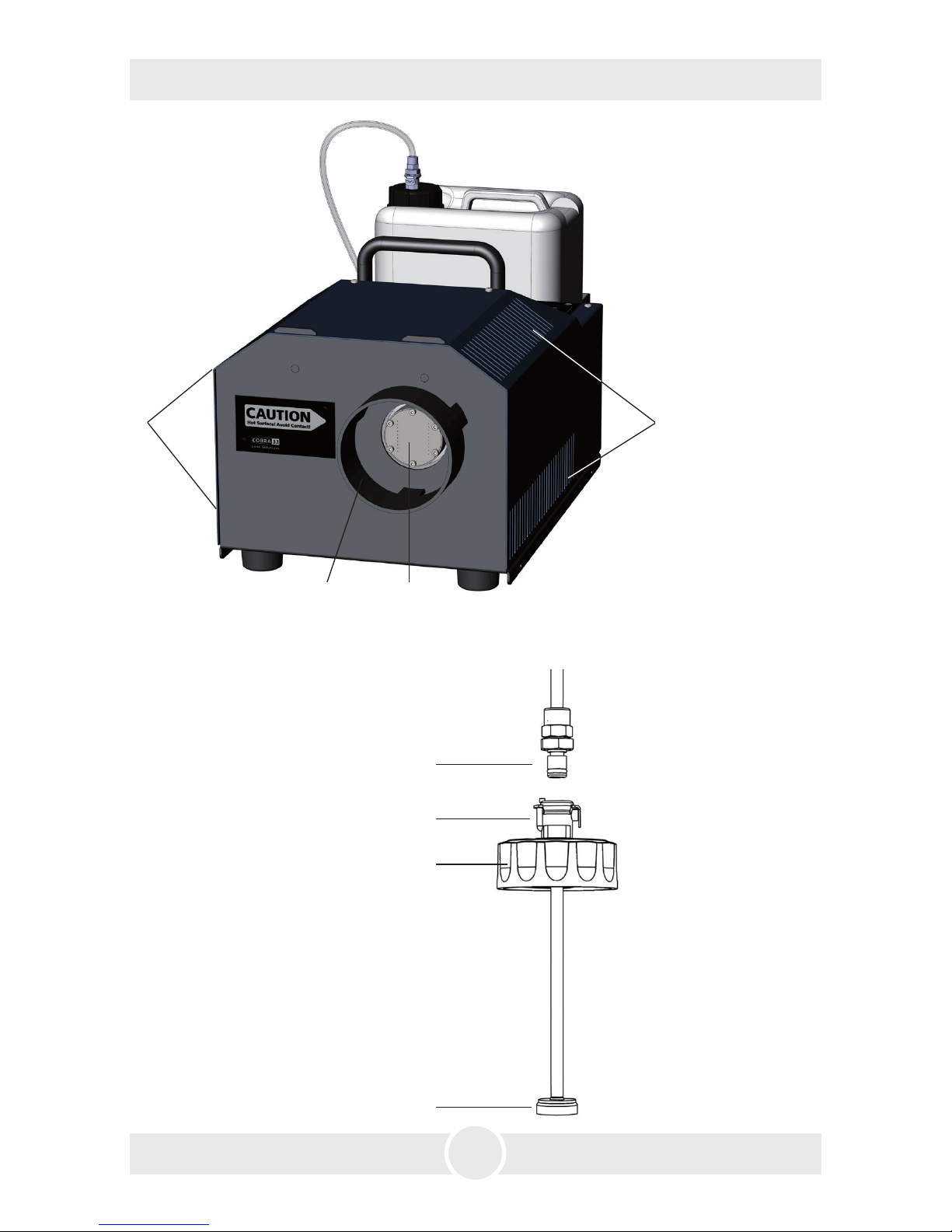
3. Description of the parts
11
13
12
14
Tank lid
1
3
2
3
1: · Fog nozzle
2: · Duct Adaptor/
Protection against contact
3: · Air vents
Front view
· Coupling
· Collar
· Tank lid
· Check valve
11:
12:
13:
14:

7
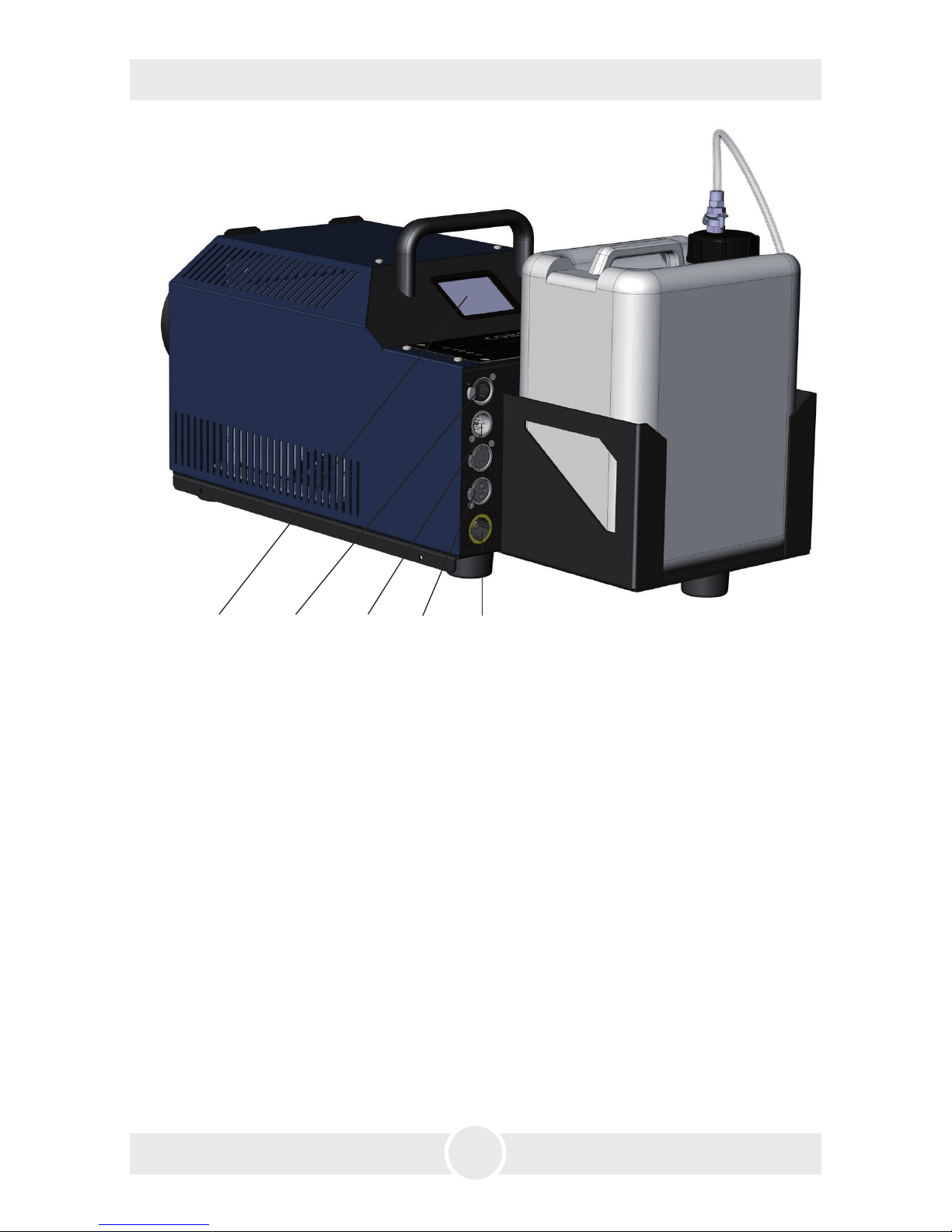
Rear view
3. Description of the parts
4: · Touchscreen/Control Panel
5: · Ethernet-Connector RJ45/Ethercon
6: · DMX512 in/out 5pin-XLR
7: · Analogue in 3pin-XLR
8: · Power in/out for Powercon True plug
7 86
54

8
4. Fluid
5. Operating the Cobra 3.1
4.2 Changing the fluid bottle
– Disconnect the fluid tube from the lid by pressing the lever on the collar [12] and
removing the coupling [11].
– Remove the bottle from the tank housing of the Cobra 3.1
– Unscrew the lid [13] of the empty bottle and screw it onto the new container.
– Place the full can into the tank housing.
– Push the coupling [11] into the collar [12] until you hear a click. The collar is now
locked firmly.
4.1 General Notes
The Cobra 3.1 has been designed to be used with Look fog fluids.
The following Look fog fluids are available:
Quick-Fog thick, quick disappearing fog fluid
Regular-Fog thick, long lasting fog fluid
Slow-Fog thick, extremely long lasting fog fluid
If fluids have been used other than Look fog fluids we can‘t grant warranty on parts
that have been in contact with the fluid.
PLEASE NOTE: The vaporizer of our machines does not have to be cleaned! Cleaners,
available on the market, can damage the vaporizer! We cannot grant warranty in this
case.
5.1 Selecting the location
The location in which the Cobra 3.1 is to be operated must
– be dry,
– be free from dusty or polluted air,
– be free from vibrations,
– be a non-flammable place or surface,
– be well-ventilated with fog-free air keeping the ambient operating temperature
between 5° C and 45° C and the relative air humidity below 80%.

9
5. Operating the Cobra 3.1
5.2 Putting into operation
Connect the fluid container and - if needed - the corresponding cable for operating
via analogue, DMX or Ethernet.
Connect the supplied PowerCon mains cable to the plug [8] and twist the Powercon
True plug until it is locked.
Now connect the Cobra 3.1 to the mains supply. Make sure the correct voltage is
selected (230V/50 Hz). The main screen will appear on the display.
The machine needs approx. 15 minutes to heat up. The heating is indicated by the
READY-STATUS. Once the machine is heated up, the START-button changes from red
to green.
Fig. 1: Machine not ready Fig. 2: Machine ready
5.3 Switching the device off
At manual operation, disconnect the mains plug or switch the machine to Standby.
You can get into the Standby-Mode via Settings 2 —> Standby (—> see chapter 5.4.7.1).
The heating element will be switched off, the display turns black. A dot appears in
the right lower corner.
If you press BACK, you will get back to Settings or the main screen without saving
the values.
If the Cobra 3.1 stops receiving any data/information via DMX, Artnet or sACN, it
switches into the Standby-Mode after 10 seconds.
The heating element will be switched off, the display turns black. A dot appears in
the right lower corner.

10
5. Operating the Cobra 3.1
5.4 Operating
The Cobra 3.1 can be controlled manually, analogue, via DMX or Ethernet.
The following control hierarchy is valid:
1. Manual operation - will be overwritten with all other controls
2. Operation via analogue
3. Operation via DMX
4. Operation via Ethernet, overwrites everything else
The chosen/active function will be highlighted at the Touchscreen in cyan.
In the printed black and white Operating manual, the active function appears
darker than the other panels.
All control choices as well as more adjustments will be described on the following
pages.
Altri manuali per Cobra 3.1
1
Indice
Altri manuali Look Solutions Attrezzatura per DJ