
Lumigon T3 Manuale utente

LUMIGON T3
USER MANUAL

LUMIGON T3 – USER MANUAL
Copyright © 2016 Lumigon A/S - All rights reserved
2
Dear Customer,
First of all, thank you for buying the Lumigon T3. This phone takes our belief in style, strength and real-world functionality to another level.
Your Lumigon T3 will be a constant companion in both your professional and private life, and you rightly expect a lot from it. But great looks,
crystal-clear calls, fast, faultless on-demand internet access and punchy, dynamic music playback is just half our story. What makes the
Lumigon T3 so special is that every unique feature has been created to meet a genuine everyday need; every design aspect and choice of
material serves a practical purpose. So it’s not only gorgeous to look at, it’s also tough, dependable and an enduring pleasure to use.
This manual will show you how to use the Lumigon T3 functions and apps. It doesn’t cover the operating system itself. If you’re not familiar
with Android as an operating system there are excellent free guides available online.
We deeply appreciate your decision to choose the Lumigon T3. We can assure you it was the right one!
Kind regards,
The Lumigon team

LUMIGON T3 – USER MANUAL
Copyright © 2016 Lumigon A/S - All rights reserved
3
Contents
1 First steps 8
1.1 Inside the box 8
1.2 Overview 9
1.3 Get started 10
1.4 Insert SIM card 11
1.5 Charge the phone 13
1.6 Turn on the phone 14
1.7 Follow the onscreen instructions 15
1.8 Setting up - Tips and tricks 16
2 Keys and connectors 17
2.1 Physical keys vs. onscreen keys 17
2.2 Using the keys and connectors 18
3 Settings 20
3.1 Accessing the settings 20
3.2 Wireless and networks - settings overview 21
3.3 Device - settings overview 22

LUMIGON T3 – USER MANUAL
Copyright © 2016 Lumigon A/S - All rights reserved
4
3.4 Personal - settings overview 24
3.5 System - settings overview 27
4 SIM cards 29
4.1 Using dual SIM 29
4.2 Setting up your SIM cards 29
4.3 Mobile data 29
4.4 Calls 30
4.5 Text messages 30
5 Fingerprint reader 31
5.1 About ngerprint reader 31
5.2 Setting up the ngerprint reader 31
6 The Home screen and its elements 32
6.1 About Home screen 32
6.2 Status bar and Notications panel 33
6.3 The Dock and the Dock icons 34
6.4 Personalise your Home screen 35
7 Sidewinder launcher 39
7.1 About Sidewinder 39

LUMIGON T3 – USER MANUAL
Copyright © 2016 Lumigon A/S - All rights reserved
5
7.2 Activating Sidewinder 39
7.3 Setting up Sidewinder 39
8 Accounts 42
8.1 About Accounts 42
8.2 Add an Account 42
8.3 Remove an Account 43
9 ActionKey 44
9.1 About ActionKey 44
9.2 Enabling and disabling the ActionKey 45
9.3 Conguring the ActionKey 45
9.4 Using the ActionKey in the Camera app 46
10 Gestures 47
10.1 Handwave 47
10.2 Wakeup 48
11 BackTouch 49
11.1 About BackTouch 49
11.2 Enabling BackTouch for standard apps 49
11.3 Enabling BackTouch for specic apps 50

LUMIGON T3 – USER MANUAL
Copyright © 2016 Lumigon A/S - All rights reserved
6
12 Notication light 51
12.1 About notication light 51
12.2 Enable and disable the notication light 51
13 Vault 52
13.1 About Vault 52
13.2 Enter the Vault 52
13.3 Import existing or add new contacts into the Vault 53
13.4 Import images/video into the Vault 53
13.5 Export or delete images/videos from the Vault 54
13.6 Private web browser 55
13.7 Private notes 55
13.8 Import an app into the Vault 56
14 Use your phone as a universal remote control 57
14.1 About the remote control feature 57
14.2 Create your rst remote control 57
14.3 Create multiple remote controls 62

LUMIGON T3 – USER MANUAL
Copyright © 2016 Lumigon A/S - All rights reserved
7
14.4 Navigate between your remote controls 63
14.5 Back up your remote controls 63
15 Update your phone 64
15.1 About updating phone 64
15.2 Check for new rmware manually 64
15.3 Change Updater settings 64
16 Take photos and record videos 66
16.1 About cameras 66
16.2 Opening the cameras 66
16.3 Switching between Camera and Video modes 67
16.4 Switch between the front and back cameras 67
16.5 Take a photo 68
16.6 Record a video 68
16.7 Record in slow motion 68
16.8 Take a panoramic photo 69
16.9 Take a picture-in-picture (PIP) photo or video 69
16.10 Using the Night vision camera 69
16.11 Adjust camera settings 70

LUMIGON T3 – USER MANUAL
Copyright © 2016 Lumigon A/S - All rights reserved
8
17 Legal 71
17.1 Legal information 71
17.2 Limitation of damages 71
17.3 Copyright 72

LUMIGON T3 – USER MANUAL
Copyright © 2016 Lumigon A/S - All rights reserved
9
1 First steps
1.1 Inside the box
• T3 smartphone
• USB charging cable
• USB power adapter
• H2 headset
• A leaet containing a Quick start guide, Safety guide, Warranty terms and End-user license agreement
If something’s missing, please contact the outlet where you bought your phone.
NOTE: The items supplied with your phone may vary, depending on your mobile service
provider and the country or region where you buy your Lumigon smartphone.
To buy additional Lumigon accessories, visit www.lumigon.com or contact your local Lumigon retailer.
LUMIGON T3 – USER MANUAL
Copyright © 2016 Lumigon A/S - All rights reserved
10
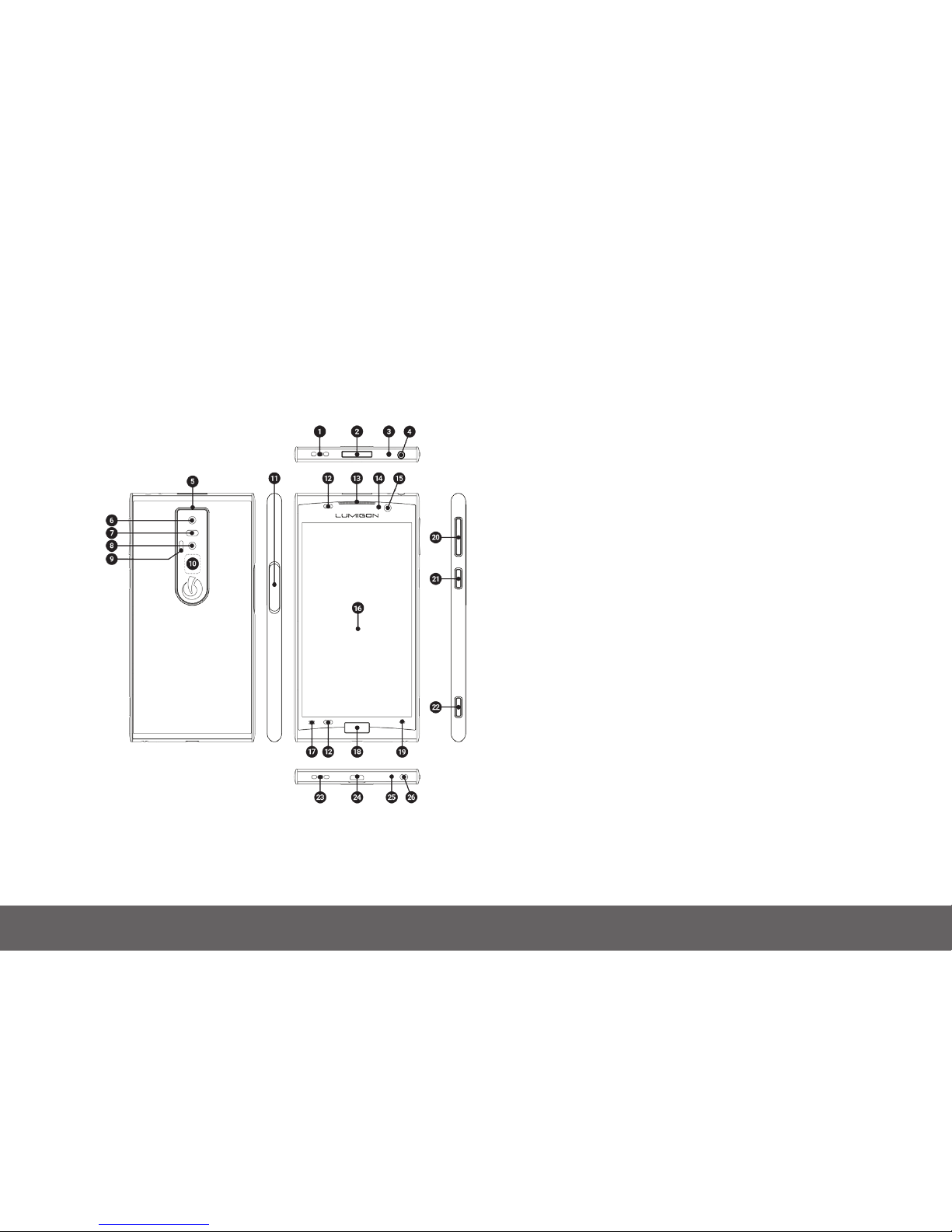
1.2 Overview
A detailed description of the keys functions is found in the “Keys and connectors” section
1. Speaker (top)
2. Power key
3. Infrared transmitter/receiver
4. Audio jack connector (3.5 mm)
5. Noise cancellation microphone
6. 13 megapixel main camera
7. Main camera ash
8. Infrared camera
9. Infrared LED light
10. BackTouch area
11. SIM card tray
12. Proximity sensor
13. Earpiece
14. Front camera ash
15. 2.4 megapixel front camera
16. Actvive area
17. Overview key
18. Home key with ngerprint reader
19. Back key
20. Volume / Zoom keys
21. ActionKey
22. Camera key
23. Speaker (bottom)
24. Micro USB connector
25. Microphone
26. Lanyard attachment point
Indice
Altri manuali Lumigon Telefono cellulare


