Lynx ADP-12S Manuale utente

USER MANUAL
V.12.11
ADP-12S
Lynx Pro Audio S.L.
Valencia, Spain - www.lynxproaudio.com - info@lynxproaudio.com

LYNX Pro Audio S.L. - Valencia, Spain www.lynxproaudio.com -info@lynxproaudio.com
ADP-12S
Class D Powered
Integrated Digital Processing
Internal temperature control
Electronic protection
High quality components
Online monitoring available

Manufacturer
CB SCHEME, IEC SYSTEM FOR CONFORMITY TESTING AND CERTIFICATION
OF ELECTRICAL EQUIPMENT
CE CERTIFICACTION, EUROPEAN PRODUCT
ADP-12S bass-reflex sub unit
LYNX Pro Audio S.L.
Calle 7 - Pol. Ind. Picassent
E-46220 Picassent (Valencia)
This user manual is property of Lynx Pro Audio S.L. Any reproduction of this manual, by any means is strictly prohibited.
Copyright 2012. All rights reserved.

LYNX Pro Audio S.L. - Valencia, Spain www.lynxproaudio.com -info@lynxproaudio.com
ADP-12S
CONTENTS
-SAFETYPRECAUTIONS 5
-CABINET INTRO
SPECIFICATIONS 6
BACKPANEL 7
CONNECTORSANDCONNECTIONS 7
-CONFIGURINGTHECABINET DSPOPTIONS
CONFIGURATIONPANEL 9
SELECTANDRUNPRESET 9
ONLINECONTROLSYSTEM 11
CONFIGURINGETHERNET 12
-SOFTWARE,RAINBOW
ACOUSTICALPREDICTIONSOFTWARE 18
FEATURES 19
-ACCESSORIES 20
-GUARANTEE 21

LYNX Pro Audio S.L. - Valencia, Spain www.lynxproaudio.com -info@lynxproaudio.com
ADP-12S
Before starting tousethisdevice, please read thisinstructionmanual carefully.
Keep theseinstructionsin the place where the equipment will be used and witheasy accessto them.
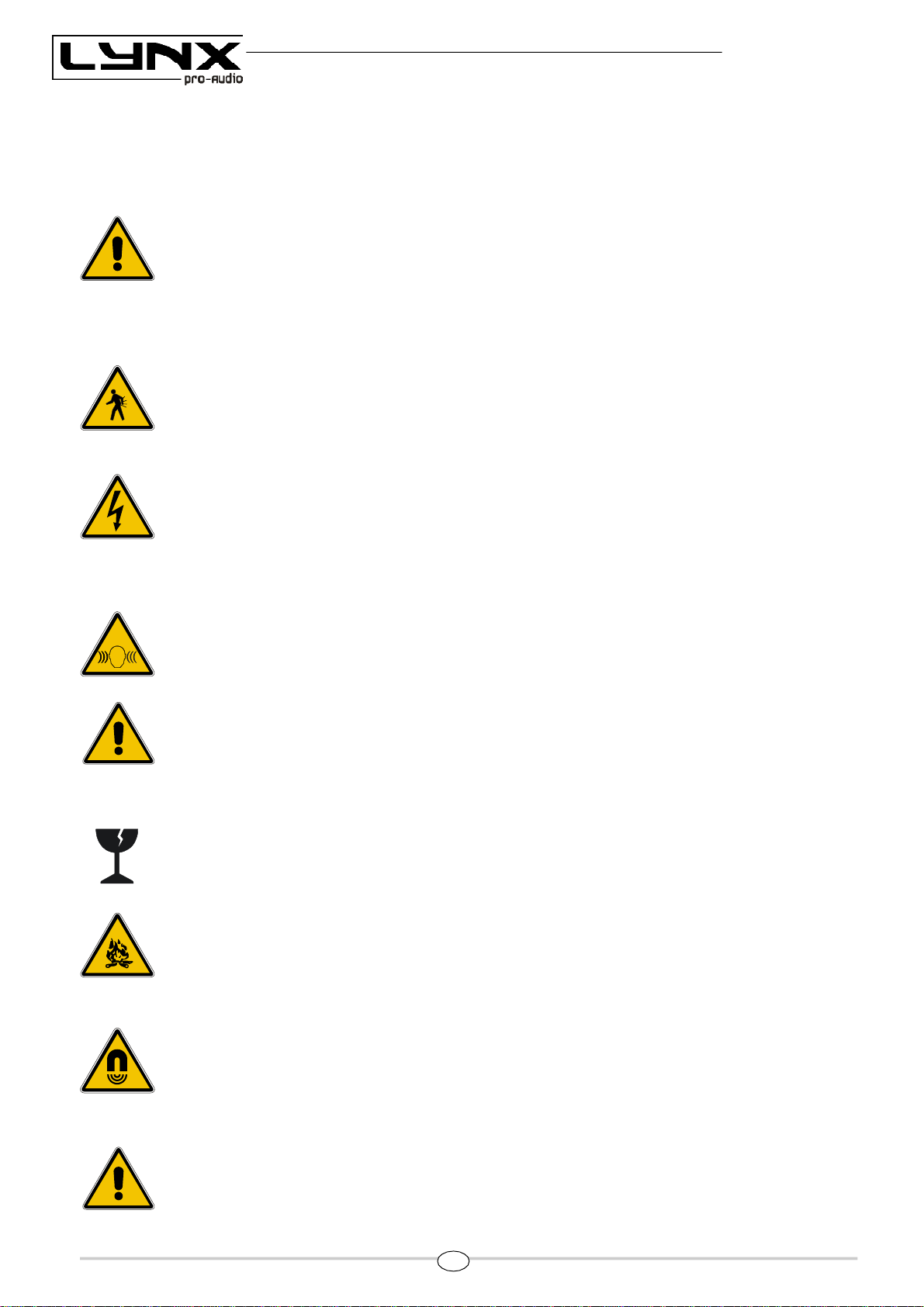
- Electrical appliance.
Theexclamation mark within atriangle identifies the presenceof electricity. Use the system carefully
without wet handsor feet.Avoidinstallingthe speakerin wet or excesivelly humidplaces. Do not place
material that containsliquidonor near theunit.Avoiddrippingor splashingwater or any liquidoverthe
unit. Regularly check the condition of the cables and make sure these are not being walked on or
pinched. Connect the speaker to bipolar, earthed mains. The mains plug must be connected to the
appropriate protection (fuse or breaker). Connection to any other type of mains could result in an
electrical shockandviolatelocalelectrical codes.CAUTION: DONOTCONNECTORDISCONNECT
THEACPOWERCONNECTORSUNDERLOAD.
- Heavy equipment.
Apply back protection when using the system. Avoid loading andunloadingat heights.
-Electrical shockrisk.
Thediagonal mark withina triangle identifies thepresenceof dangerousvoltage.
Do not open or handle the interior of the box. These parts are not to be adjusted by the user. For
maintenance and/or repair please goto an authorized service centre.
In order to reduce the risk of electric shock, disconnect from AC before plug in or unpluggingAudio
signal cables. Reconnect toAC only if all signal connectionsare made and secured.
Nevermanipulatethegroundtypeplugprovided.
TheAC mainsplugs should always remain accessible for operation.
Unplug theloudspeaker during storms or when it’s being used for a long time.
- Hearing damage risk.
These systems can reproduce large quantities of sound pressure which can damage hearing. Take
precautions if you aregoing to benear them for extended amountsof time anddo not get too close.
- Hanging – Flying.
Donot hangthecabinetsfrom thehandlesor from anyother partother thanthe designatedhanging
point. Whenflyingthissystem please observethetechnical and softwaredatacarefully. Never exceed
the maximum safe working loads or ignore the instructions included within this manual. Use Only
flying accessoriesprovided by Lynx ProAudio S.L.
Rigging mustbe always carried out by professionals.
- Delicate Material.
Pleaseensurenoforeignobjectorwaterentersthespeaker. Onlycleantheunit withdrycloths.Donot
use solvents.
-Overheating – Fire risk.
Toreduce therisk of the speakeroverheating, avoiddirect contactwithsunlight.Avoidplacingthe unit
closeto heat inducing objects such asradiators.Do not cover the equipment in use and donot block
anyventilationopenings. Do not put nakedflame, suchaslightedcandles, closeoron top of theunit.
- Electromagnetic and interferente emissions.
Avoid placing objects which through electromagnetic waves can damage the unit, such as mobile
phones, lap tops, magnetic strip cards etc.
Thissystem complieswith normatives EN55103-1(1)
EN55103-2(2)
(1) This device may not causeharmful interferences.
(2) This device may receive interference includinginterferencesthatmay causeundesired working.
-IMPORTANT NOTE.
This Equipment must be used in accordance with these instructions and by trained professional
personnel only.
Thisequipmentshouldnotbeusedinplaceswithextremetropicalclimates.Don’texposethisapparatus
toextremehumidityandortemperaturevalues.
5

LYNX Pro Audio S.L. - Valencia, Spain www.lynxproaudio.com -info@lynxproaudio.com
ADP-12S
INTRODUCTION
To facilitate, correct and reliable use of the powered cabinetADP-12S we have designed this instruction manual.
Please read the manualcarefullybeforeproceedingto install thesystem.
Pleaseobserve the technical data carefully anddo not ignore the instructions included within thismanual.
6
SPECIFICATIONS:
FREQUENCY RANGE 40Hz -180Hz
FREQUENCY RESPONSE 45Hz- 150Hz ± 3dB
COVERAGE 360º one unit
MAX SPL 131dB/ 134dB peak 1w@ 1m
TRANSDUCER 12" Custom Neodimium + 4’’ ISV voice coil
CONFIGURATION Bass-reflex, Direct radiation
POWER AMPLIFIER 1000W Class D with Switching Power supply
DSP Internal LYNX digital processor DSPB-22®
CABINET ADJUSTMENT Back panel LCD screen
INTERNAL CONTROLS Temperature sensor / Fan Speed control
SIGNAL CONNECTION NEUTRIK connectors XLR Male Input
XLR Female Loop Thru
CONTROL CONNECTIONS USB (DSP programming),
ETHERNET* (Online Monitoring System OMS®)
AC POWER 230v / 115v selectable. 50/60 Hz 5A
AC CONNECTIONS 16A NEUTRIK POWERCON with Looping Output
CONSTRUCTION 18 mm Premium Birch plywood
FINISH High resistant water-based black paint
FRONT DESIGN Black antirust steel grille
DIMENSIONS (H x W x D) 495 x 380 x 644 mm
WEIGHT 29 Kg (64 lbs)
*Ethernet connection is optional.

LYNX Pro Audio S.L. - Valencia, Spain www.lynxproaudio.com -info@lynxproaudio.com
ADP-12S
7
CONNECTORS AND CONNECTIONS
1.- SIGNAL INPUT.
2.- SIGNAL LINK.
3.- AC INPUT.
4.- AC LINK (máx. +2 cabinets).
5.- USB.
6.- DSP CONTROL.
7.- ETHERNET (optional)
ADP-12S BACK PANEL.-
XLRAEREALCONNECTORS
Connecttooutput
Connecttoinput
2 Live(+)
3 Live(-)
1 Earth
3 Live(-)
1 Earth
2 Live(+)
1
2
3
4
5
6
7

LYNX Pro Audio S.L. - Valencia, Spain www.lynxproaudio.com -info@lynxproaudio.com
ADP-12S
8
OUTPUTS
1.- EARTH
2.- LIVE (+)
3.- LIVE (-)
1
3
2
INPUTS
1.- EARTH
2.- LIVE (+)
3.- LIVE (-)
2
3
1
XLRSOCKETCONNECTORS
CONNECTION EXAMPLE: 6 ADP-12S CABINETS
Connectto
signaloutput
Connectto
ACoutput
SOCKET POWERCON CONNECTORS
L - Line
N - Neutral
- Earth
CAUTION:
DONOTCONNECTOR DISCONNECTTHEACPOWERCONNECTORS
UNDER LOAD.
CAUTION: Do not connect or
disconnect the AC Power
connectors under load.
Connectto
signaloutput

LYNX Pro Audio S.L. - Valencia, Spain www.lynxproaudio.com -info@lynxproaudio.com
ADP-12S
CONFIGURING THECABINET DSP OPTIONS
From the buttons below the display on the cabinet’s back panel you are able to configure the Basic adjustment
functionsof theinternalDSP. Depending onthemodel,youcanfindthefollowingconfigurations:
Note:
You must apply the desiredconfiguration in eachonecabinet. Thisis donevia the buttons locatedon the back panel
of thecabinet and requires electrical power towork.
9

LYNX Pro Audio S.L. - Valencia, Spain www.lynxproaudio.com -info@lynxproaudio.com
ADP-12S
Fig 1
Fig 2 Fig 3 Fig4
CONFIGURATIONPANEL
On the back panel you will see 3 buttons and an information screen, on which you can read the established
parametersandinformation such asamplification module temperature,input signal level and nameof thecurrent
preset (Fig1). If changesarenotmadethedisplaywill automaticallydim to saveenergy andavoid unnecessary light
in situationswhere light is not wanted. To re-activate thelight simply press the OK button.
SELECT ANDRUNPRESET
To change thepreset configurationjust presstheup button (Fig2(1))anddown button (Fig2(2)) until yousee the
title andpreset number required. Once found,pressOK (Fig2(3)) until the progressbar finishes(Fig3).The
displaywill indicate“LoadingDSP” (Fig4)
Note:
In case of a power cut, the DSP will save its last configuration when restarted.
10
Indice
Altri manuali Lynx Subwoofer