Magnum Dynalab MD 301 Manuale utente

Magnum Dynalab MD 301
HYBRID INTEGRATED AMPLIFIER
INSTRUCTION MANUAL

- -
2
TABLE OF CONTENTS
TABLE OF CONTENTS DEAR VALUED CUSTOMER......................................................... 2
DEAR VALUED CUSTOMER .............................................................................................. 3
UNPACKING YOUR MD 301 HYBRID INTEGRATED AMPLIFIER................................... 4
SETTING UP THE MD 301 HYBRID INTEGRATED AMPLIFIER ...................................... 5
CONNECTING ADDITIONAL SOURCES TO THE MD 301 HYBRID INTEGRATED AMPLIFIER .. 5
SET UP THE MD 301 HYRBID INTEGRATED AMPLIFIER WITH AN EXTERNAL HOME
THEATER PROCESSOR ............................................................................................ 7
HOOKING UP A SUBWOOFER TO YOUR SYSTEM......................................................... 7
OPTIONAL DIGITAL AUDIO CONVERTER (D.A.C)........................................................... 8
A6 REMOTE CONTROL...................................................................................................... 8
CONTROL/DISPLAY FUNCTIONS .............................................................................. 9
DIAGRAM OF MD 301 HYBRID INTEGRATED AMPLIFIER........................................... 10
TROUBLE SHOOTING ....................................................................................................... 11
SPECIFICATIONS .............................................................................................................. 12
SAFETY SHEET ................................................................................................................. 13
LIMITED WARRANTY ...................................................................................................... 14

- -
3
Dear Valued Customer
Thank you for choosing the Magnum Dynalab
MD 301 Hybrid Integrated Amplifier
.
Great care has been given to the design, manufacturing and selection of
components for the
MD 30
1
Hybrid Integrated Amplifier
. This complete process
insures optimum listening enjoyment for many years.
When using these high grade components, a considerable length of time is required
for the
MD 301 Hybrid Integrated Amplifier
to reach its full potential. Using either a
high quality break-in disc or white noise from a FM tuner will help ensure optimum
performance as quickly as possible.
Once again, thank you for including a MAGNUM DYNALAB product in your
entertainment system. We are sure that you will have years of listening pleasure
from your
MD 301
Hybrid Integrated Amplifier
. Please be sure to register your
product at www.magnumdynalab.com, and if there is anything else we can do,
please call us on our toll free number, 1-800-551-4130, or contact us via email:
Respectfully yours,
Larry Zurowski
President

- -
4
UNPACKING YOUR MD 301 HYBRID INTEGRATED AMPLIFIER
Carefully inspect all sides of the shipping carton for damage. If there are marks or
holes in the carton make note of the location in relation to the unit inside. Any
obvious dents or scuff marks should alert you to the possibility of damage. Carefully
remove the MD 301 Hybrid Integrated Amplifier from the end caps and wrapping,
inspect all sides. Pay special attention to the corresponding areas on the unit where
damage was found to the shipping carton. If damage is evident, document the type
and extent of the damage, then repack the unit and call the dealer.
KINDLY DO NOT SEND THE UNIT BACK TO THE SHIPPER UNTIL YOU HAVE BEEN
ASKED TO DO SO.
DO NOT DISCARD THE PACKING MATERIALS AND CARTONS. Should there be a
necessity to return the unit for any reason, it must arrive safely and suitably
packaged in order for our receiver to accept it from the carrier. If the unit has
incurred damage as a result of improper packaging, it is not likely that a claim for
the damage against the carrier will be successful.
Likewise, we will ship your unit back to you only in factory-approved packaging,
however, if the unit were to arrive at the factory on anything other than factory
approved packaging, we reserve the right to return the unit in factory-approved
packaging and charge the cost of the packaging to the shipper. This is the only way
we can assure you of a safe return (damage by carrier excepted).

- -
5
SETTING UP THE MD 301 HYBRID INTEGRATED AMPLIFIER
1. Position the unit away from any spot which may have extremes in temperatures.
2. Place the unit on a very rigid surface capable of holding 75 pounds (34 KG).
3. The heat sinks located inside the unit are used to keep the unit at a safe
operating temperature. It is important that they are not covered and that the unit
is not installed in a closed area where there is little air circulation. Ensure at
least 2” of clearance on the left and right of the device, and 5” of clearance
above the unit to allow for proper ventilation.
4. Unwrap the EIA AC cord and plug the EIA end into the rear socket marked
Power
Input
. Plug the other end of the AC cord into a 120/220/230/240 volt
continuous AC power supply. Be sure that the voltage marked on the rear of the
unit is the same as the AC source that you are using.
5. Hook up your speakers to the back of the unit insuring that the positive (+)
terminal on the speaker is hooked up to the positive (+) output terminal on the
MD 301, likewise that the negative (-) is correctly hooked up. Be sure that all the
connections are tightly affixed.
6. Turn on the power switch on the front panel
CONNECTING ADDITIONAL SOURCES TO THE MD 301 HYBRID INTEGRATED
AMPLIFIER
CAUTION
As standard practice, you should always turn off the main power to the MD 301
Hybrid Integrated Amplifier whenever any source component, interconnect or
loudspeaker is being changed in your system.
1. Using your RCA cables, plug your source(s) into one of the inputs marked in the
back of the MD 301
2. Power up you Hybrid Integrated Amplifier and set the input to match the input on
the rear of the unit that the other source is plugged into.

- -
6
3. With volume set to zero, power up the source, initialize the playback, and slowly
adjust volume to desired level.

- -
7
SET UP THE MD 301 HYRBID INTEGRATED AMPLIFIER WITH AN EXTERNAL HOME
THEATER PROCESSOR
The MD 301 Hybrid Integrated Amplifier is equipped with a unity gain input (A3/SSP
Mode Input on the Pre-Amplifier section). This is a switchable input, meaning the
input can be used as a normal pre-amplifier input or in unity gain mode.
To Connect to a Home Theater Processor
1. Turn all the power off to the MD 301 and unplug the power cord.
2. Connect your theater processor Main Left and Right interconnects into the MD
301 Hybrid Integrated Amplifier through the A3 input.
3. Connect your Main Left and Right speakers to the MD 301 Hybrid Integrated
Amplifier speaker connections.
4. Re-connect the power to the MD 301 Hybrid Integrated Amplifier. Push the
“POWER” button to the “ON” position.
5. Push the input button or use the remote to select input Aux 3. On the remote
Select input and 00. You will see the display switch to P1 and then the volume
display will go dark, indicating that there is no volume being controlled by the MD
301.
6. Input P1 is now the dedicated input and the volume is controlled by your home
theater processor. To go back to normal operation push the input 00 button on
the remote.
HOOKING UP A SUBWOOFER TO YOUR SYSTEM
1. Unplug the power cord to the MD 301 Hybrid Integrated Amplifier.
2. Using RCA cables, connect one end to the
Pre Out
output marked on the rear of
the MD 301, the other end to your subwoofer.
3. Turn the subwoofer “ON”.
4. Re-connect the power to the MD 301 Hybrid Integrated Amplifier. Push the
“POWER” button to the “ON” position and adjust the volume level to suit you.
Please note the volume of the subwoofer is controlled by the volume control on the
Hybrid Integrated Amplifier.

- -
8
OPTIONAL DIGITAL AUDIO CONVERTER (D.A.C)
The Digital Audio Converter (D.A.C.) provides an additional USB, and two (2) coaxial
inputs or one optical and one RCA in the back of the MD 301 Hybrid Integrated
Amplifier.
1. Connect an external source to the USB, or either of the coaxial inputs.
2. Set the input displayed on the unit to correspond to the input selected on the
back of the unit.
A6 REMOTE CONTROL
REMOTE OPERATION ON INTEGRATED AMPLIFIERS AND
RECEIVERS WITH THE A6 REMOTE
1. The remote is activated with the “Audio” button. You may
program other components.
2. Turn your amplifier on/off with the “ON “ button.
3. Volume is controlled by the volume “Up” and “Down”
button.
4. To change inputs you first touch the “Input” key and then
the corresponding numbered key for the input you want
as follows: Input 1 thru 4 are AUX , 5 is blank 6 to 8 is
for digital inputs which is an option
5. To audio mute touch the “Mute” button and to Un-mute
touch it again.

- -
9
CONTROL/DISPLAY FUNCTIONS
1. POWER BUTTON-Turns on main power
2. MUTE –Turns audio output off or back on
3. INPUT - Sequentially moves through the inputs on the rear of the MD 301
4. VOLUME CONTROL – The digitally controlled precision volume control allows you
to vary the volume from 0-99. Normal operating range is 40-85. Note that it is
not a linear volume control – therefore volume changes will vary more as you turn
the control at higher levels than at lower levels. The volume control has been
calibrated so that the volume level can not exceed the safe operating parameters
of the system

- -
10
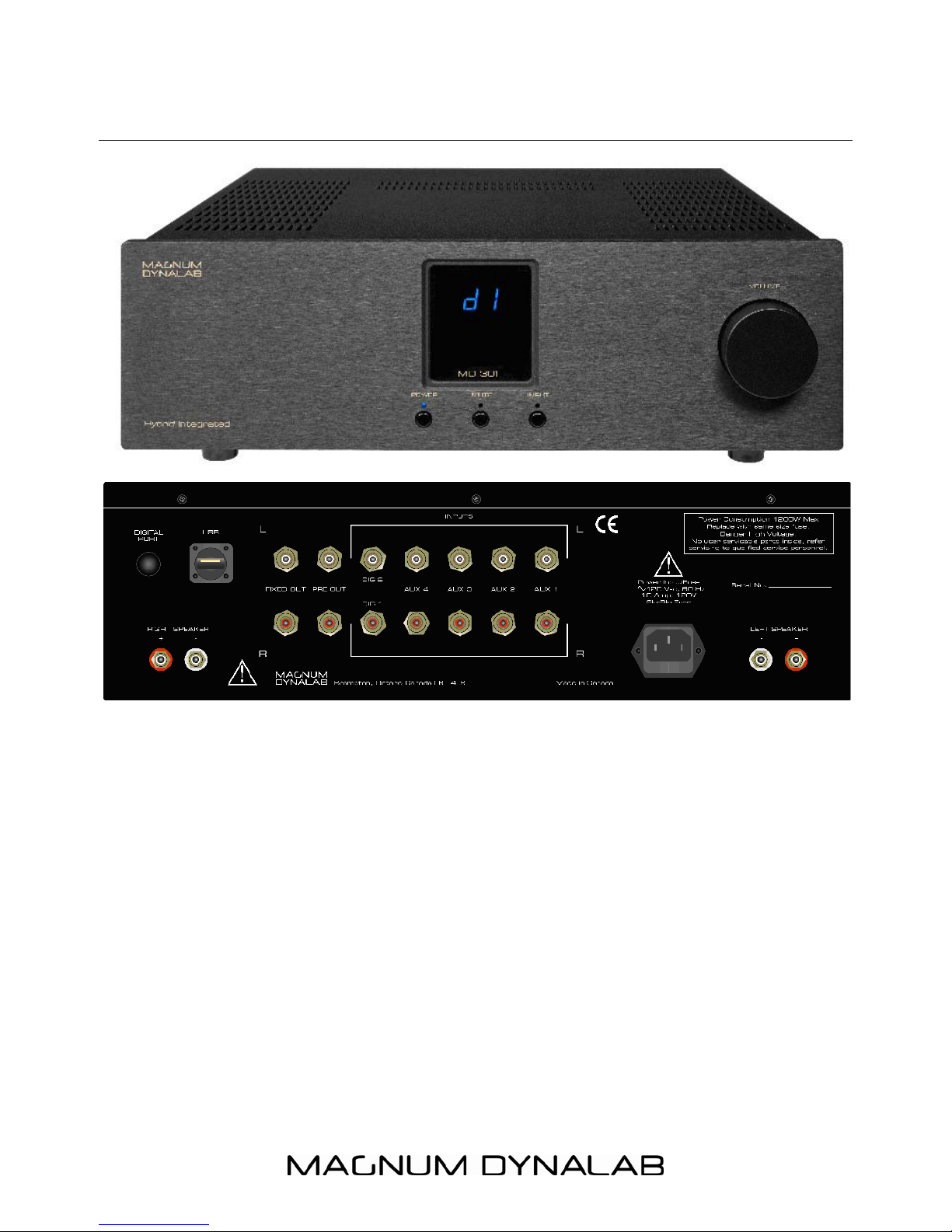
DIAGRAM OF MD 301 HYBRID INTEGRATED AMPLIFIER
Questo manuale è adatto per i seguenti modelli
1
Indice
Altri manuali Magnum Amplificatore