
Majestic SATMAR60 Manuale utente

SATMAR60 User Manual
www.majestic-global.co.nz
Page
1
1 Introduction
Specification………………….…………………………………………………….5
Antenna System Overview…………………………………………………….6
Direct Broadcast Satellite Overview………………………….…………..7
System Components……………………………………………………………8
2 Installation
Unpac ing the Unit………………………………..…………………….......10
Preparing for the installation……………………………………………….11
Selecting the location………….……………………………………….……...12
Equipment and cable installation…………..…………………………….14
3 Operation
Receiving Satellite TV Signals…………….……………………………….16
Operating the IDU……………………………………….…………………..17
4 Troubleshooting
Simple Chec ……………………………………………..………………….22
Causes and Remedies……………………………….……..……………….23
Appendix A
Satellite Coverage Map - New Zealand…………………………………….24
Appendix B
Satellite Coverage Map - Australia…………………………………………..25

SATMAR60 User Manual
www.majestic-global.co.nz
Page
2
Figures
FiguresFigures
Figures
Figure 1-1 System Diagram……………………………..………………………..6
Figure 1-2 Satellite Bloc age…………..………………………………………..7
Figure 1-3 System Components…………………………….………………….8
Figure 2-1 Unpac ing the Unit……………………………………………….10
Figure 2-2 Selecting the Location…………………………………..……….13
Figure 3-3 Functions of LCD Display………………………………………17
Table
TableTable
Tables
ss
s
Table 1-1 Specification……..…………………………………….………………..5
Table 2-1 Parts included…………...…………………………………………….10

SATMAR60 User Manual
www.majestic-global.co.nz
Page
3
Notes, Cautions, and Warnings
Caution – Improper handling by unqualified personnel can cause serious
damage to this equipment. Unqualified personnel who tamper with this
equipment may be held liable for any resulting damage to the equipment.
Install under DRY condition ONLY! Do not install this system in the rain,
or in any wet conditions.
Moisture may affect electronics and void warranty!
Warning – Need 2 people to install the antenna onto the roof. Do not try to
install the antenna by yourself.
Note – Before you begin, carefully read each of the procedures in this
manual. If you have not performed similar operations on comparable
equipment, do not attempt to perform these procedures.

SATMAR60 User Manual
www.majestic-global.co.nz
Page
4
The SATMAR60 satellite antenna system is the innovative and a technologically
advanced satellite In-Motion system. The SATMAR60 has a unique combination of
state-of-the art components with the most sophisticated satellite acquisition and tracking
programs to provide the following features :
■Fast satellite acquisition
■Compatible with any Satellite Receiver
NZ - Freeview or Sky
AU - Foxtel or Austar
■Compatible with all Direct Broadcast Satellites (DBS)
■Built-in Digital Broadcast Receiver(DVB)
■Capable of High Definition receiving
Specification………………….…………………………………………………….7
Antenna System Overview…………………………………………………….8
Direct Broadcast Satellite Overview………………………….…………..9
System Components……………………………………………………………10

SATMAR60 User Manual
www.majestic-global.co.nz
Page
5
Specification
SpecificationSpecification
Specification
Antenna Type Parabola / Prime Focus
Frequency Band Ku Band
Operating Frequency 11.7GHz to 12.75GHz
Dish Dimension 600mm
Radome Height 700mm
Antenna Weight 18kg
Antenna Gain 33dBi
Minimum EIRP 49dBW
Polarization V/H or RHCP/LHCP
Type of Stabilization 2-Axis Step Motor
Elevation Range 5°to 90°
Azimuth Range Unlimited
Tracking Rate 50°/sec
Temperate Range -20°to 70°
Power 12~24VDC
Table 1-1 Specification
SATMAR60 User Manual
www.majestic-global.co.nz
Page
6
Antenna System Overview
Antenna System OverviewAntenna System Overview
Antenna System Overview
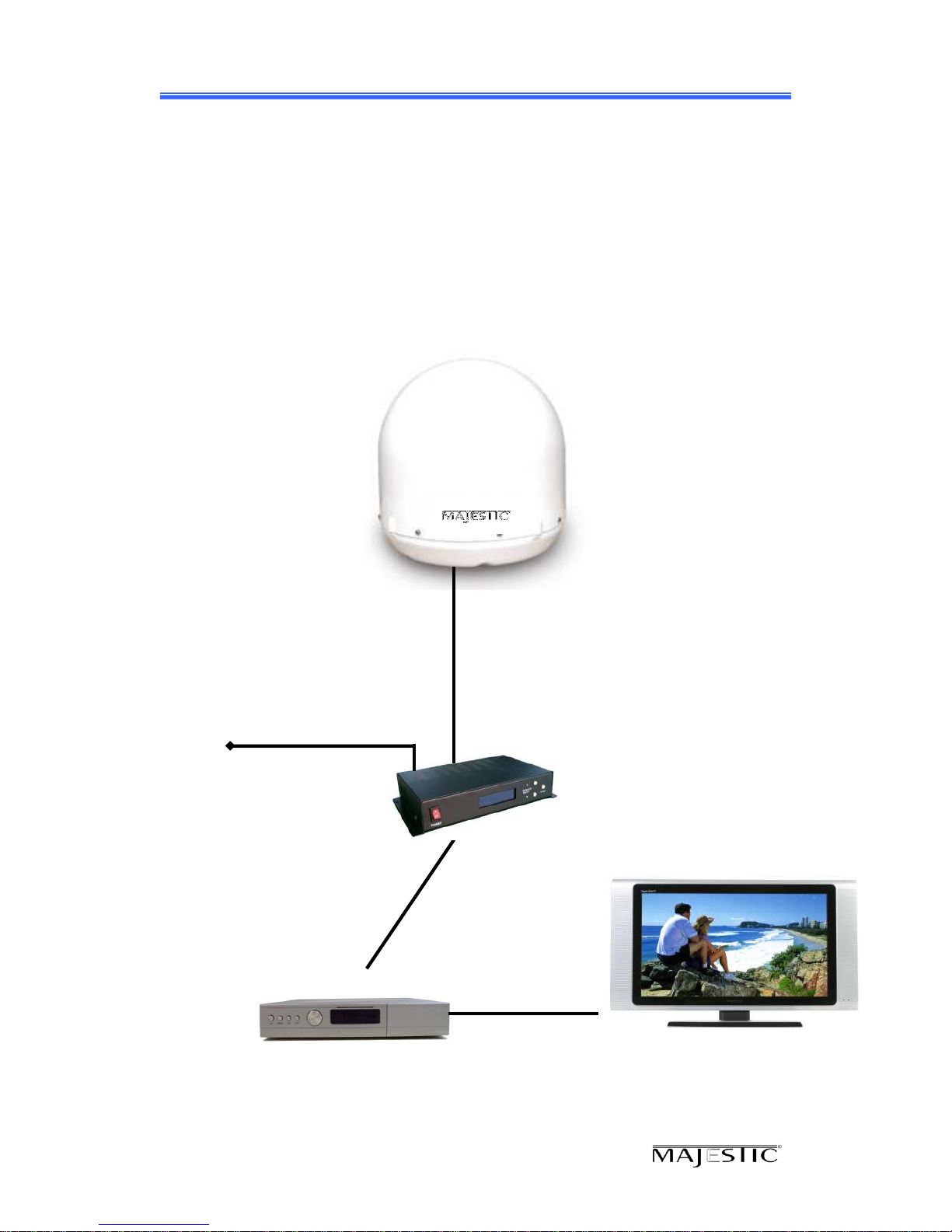
A complete satellite TV system, illustrated in Figure 1-1, includes the SATMAR60
antenna connected to a IDU, a satellite TV receiver, and a television set.
SATMAR60
Antenna Unit
I U(In oor Unit)
Satellite Receiver
Vessel Power
12~24 V C
Figure 1-1 System Diagram
V/H
Antenna Receiver
SATMAR60 User Manual
www.majestic-global.co.nz
Page
7
Direct Broadcast Satellite Overview
Direct Broadcast Satellite OverviewDirect Broadcast Satellite Overview
Direct Broadcast Satellite Overview
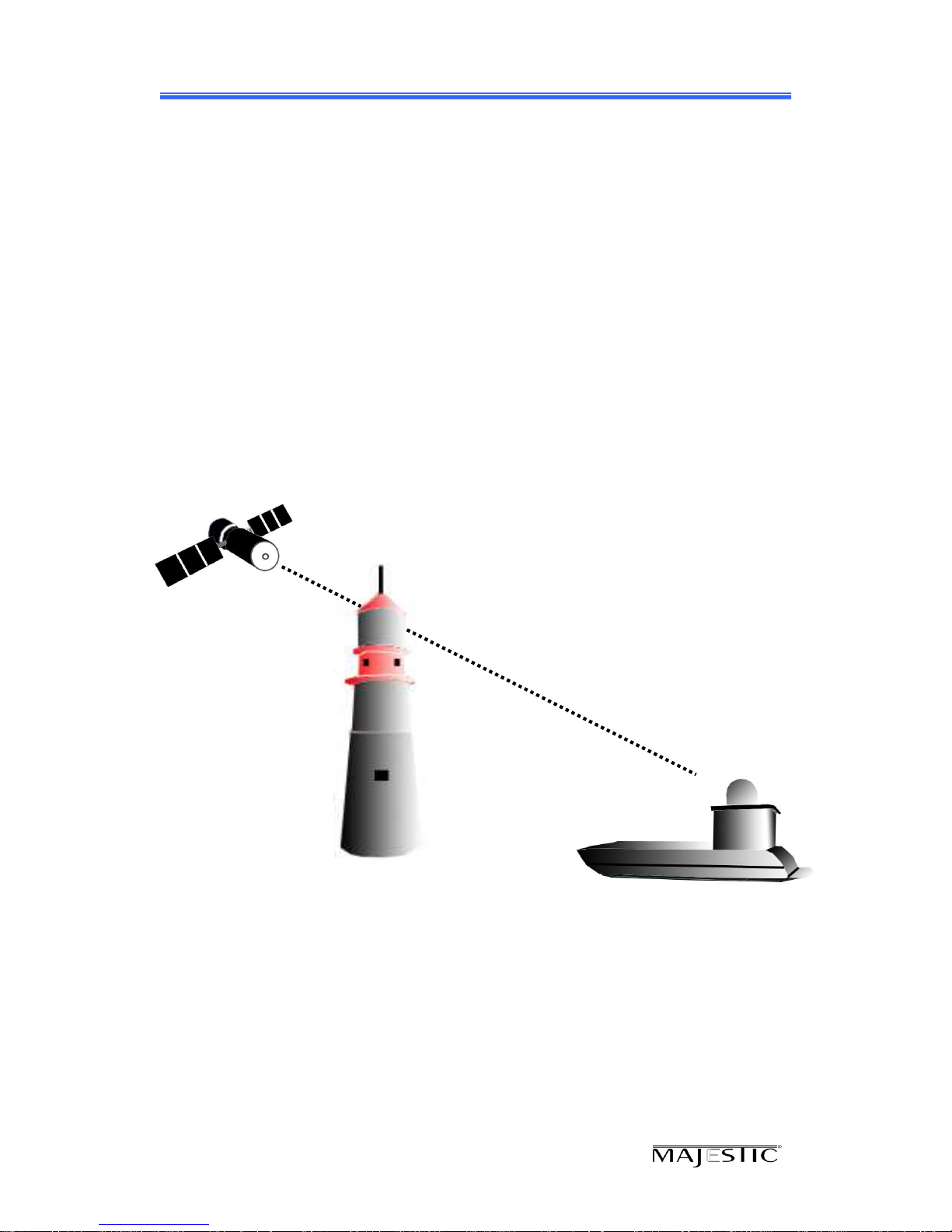
Direct Broadcast Service (DBS) satellites broadcast audio, video and data information
from satellites located 22,000 miles in space. A receiving station, such as the
SATMAR60 antenna, should include a dish and satellite receiver to receive the signals
and process them for use by the consumer audio and video equipment. The system
requires a clear view of the satellite to maximize the signal reception.
Blocked !
Figure 1-2 Satellite Bloc age
SATMAR60 User Manual
www.majestic-global.co.nz
Page
8
Objects such as a tall lighthouse, bridges and big ships that block this view will cause a
loss of signal. The signal will be quickly restored once the antenna has a clear line of
sight again. Heavy rain, cloud, snow or ice may also interfere with the signal reception
quality. If the satellite signal is lost due to blockage or severe weather conditions,
services from the receiver will be lost (The picture will freeze frame and may disappear).
When the satellite signal strength is again high enough, then the receiver will resume
providing desired programming services.
System Components
System ComponentsSystem Components
System Components
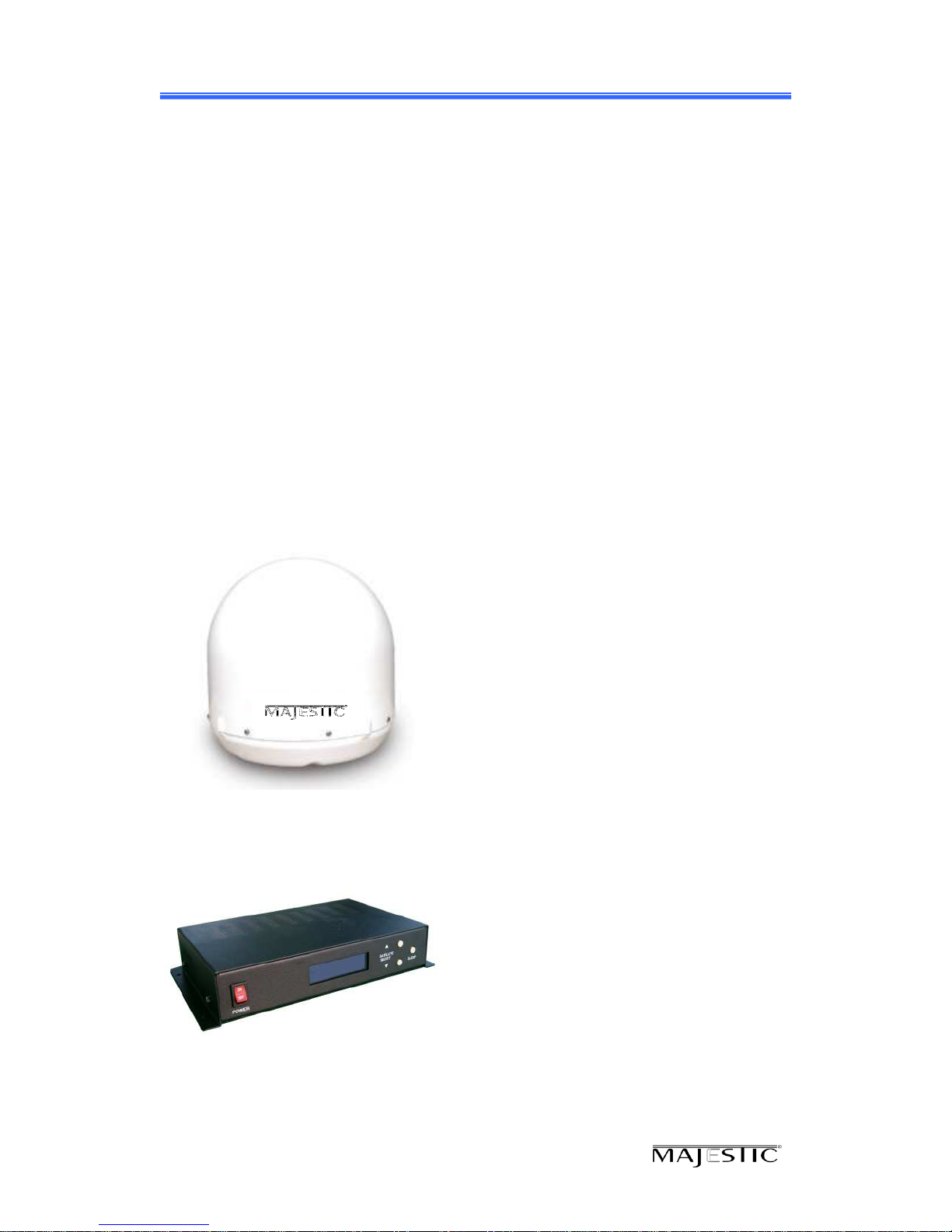
Antenna Unit
The antenna unit houses the antenna positioning
mechanism, LNB (low noise block), and control
elements within a radome. Weather tight
connectors join the power, signal, and control
cabling from the below decks units.
I U(In oor Unit)
The IDU is the system’s user interface, providing
access to the system and its functions through an
LCD and three buttons. The IDU also serves as
the vessel’s junction box, allowing the system to
use vessel power, and supply and receive data
to/from the antenna unit.
Figure 1-3 System Components

SATMAR60 User Manual
www.majestic-global.co.nz
Page
9
This section offers a general explanation of how properly to install the SATMAR60
antenna. Installation of the SATMAR60 antenna must be accomplished by or under the
supervision of an authorized dealer for the Limited Warranty to be valid and in force.
The steps in the installation and setup process are as follows:
Unpac ing the unit……………….…………………………………………….10
Preparing for the installation……………………………………………….11
Selecting the location………….……………………………………….……...12
Equipment and cable installation…………..…………………………….14
SATMAR60 User Manual
www.majestic-global.co.nz
Page
10
Unpacking the unit
Unpacking the unitUnpacking the unit
Unpacking the unit
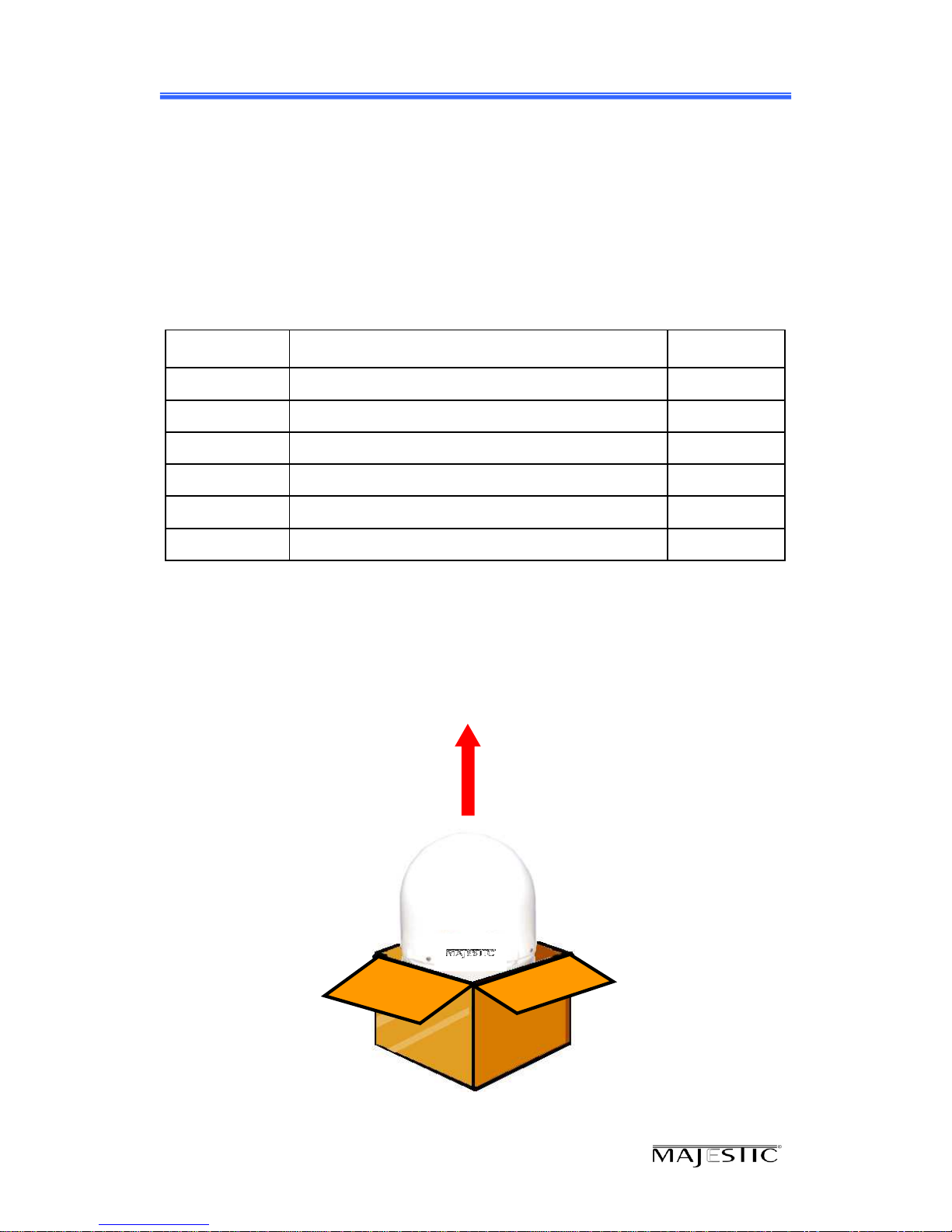
1. Open box and remove packing material.
The following items are included in the packaging of the WSTA-SM400PM antenna.
Item Description Quantity
1SATMAR60 Antenna Unit 1 each
2IDU (In Door Unit) 1 each
3Power Cable 1 each
4Coaxial Cable (10m) 1 each
5Coaxial Cable (1m) 1 each
6Installation & User Manual 1 set
Table 2-1 Parts included
2. Lift dome out of box vertically. Then lift unit out of box vertically. Do not turn
box and “roll” out, or turn upside down to remove.
Lift Unit straight up
out of the carton!
Indice
Altri manuali Majestic Antenna


Manuali Antenna popolari di altre marche

Alfa Network
Alfa Network APA-L01 Manuale utente

Naval
Naval PR-422CA Manuale utente

Feig Electronic
Feig Electronic ID ISC.ANTH200/200 Series Manuale utente

TERK Technologies
TERK Technologies TV44 Manuale utente

Directive Systems & Engineering
Directive Systems & Engineering DSE2324LYRMK Manuale utente

HP
HP J8999A Manuale utente


