
MAJORITY Castle Manuale utente

Majority Castle
Music System
CB3A-CDAB-BLK
User Guide

Contents
Controls and Functions.............................. 1
Remote Controller .................................. 3
What’s in the box? .................................. 4
Instruction Guide . . . . . . . . . . . . . . . . . . . . . . . . . . . . . . . . . . . 5
Basic Operation...........................................5
DAB Radio and Set up Preset for DAB Radio................6
FM Radio and Set up Preset for FM Radio ..................8
CD Player ................................................10
Bluetooth & Phone Connection ..........................11
Clock and Date Setting...................................13
Sleep Setting ............................................14
System Reset and Software Version Display ...............15
Brightness and Alarm Setting ............................16
Other Functions .........................................18
Technical Specification .............................19
Warranty ..........................................19
Troubleshooting Guide ............................20
Important Safety Information ......................21
Watch video tutorials and register
your product for a FREE 3-year
warranty at
3
Y
E
A
R
F
R
E
E
E
X
T
E
N
D
E
D
W
A
R
R
A
N
T
Y
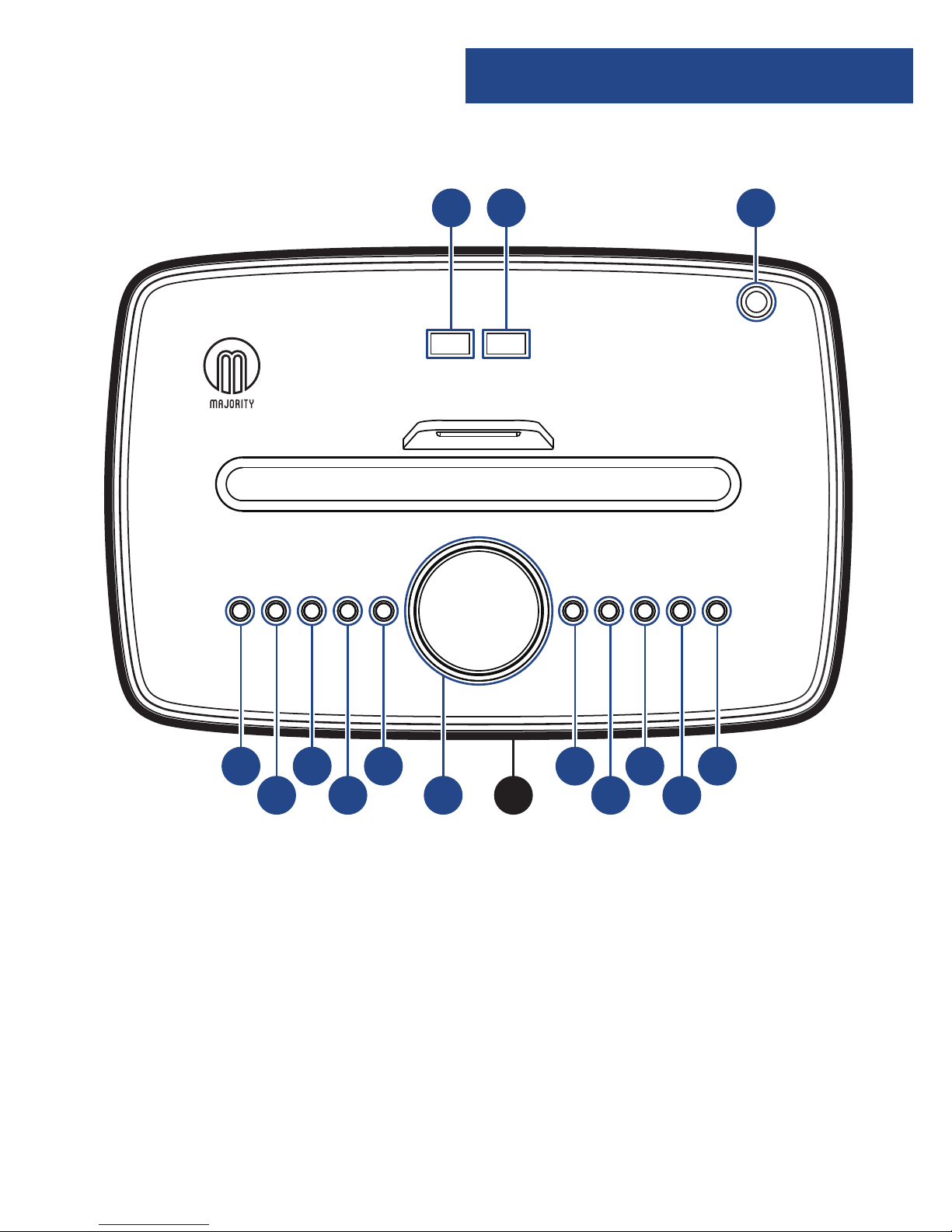
Instructions GuideControls and Functions
1
1. USB Out 1
2. USB Out 2
3. Antenna
4. Power/Mode
5. Menu
6. Scan
7. Preset
8. Effect
9. Volume/Select
Snooze
10. Display
(on front of
music system)
11. Skip Back
12. Play/Pause
13. Skip Forward
14. Stop
15. Eject CD
1. Volume Control
2. Reduce Treble Effect
3. Mute
4. Increase Treble Effect
5. Previous Track
6. Play/Pause
7. Next Track
8. Reduce Bass Effect
9. Bass+Loudness Compensation
10. Increase Bass Effect
11. Power/Standby
12. Switch Mode
13. Reset Treble and Bass Effects
21 3
4 6
5 7 9 10
811 13
12 14 15
Top View
Rear View
20
16 17 18 19
13
4
10
7
12
9
6
3
11
8
5
2
11
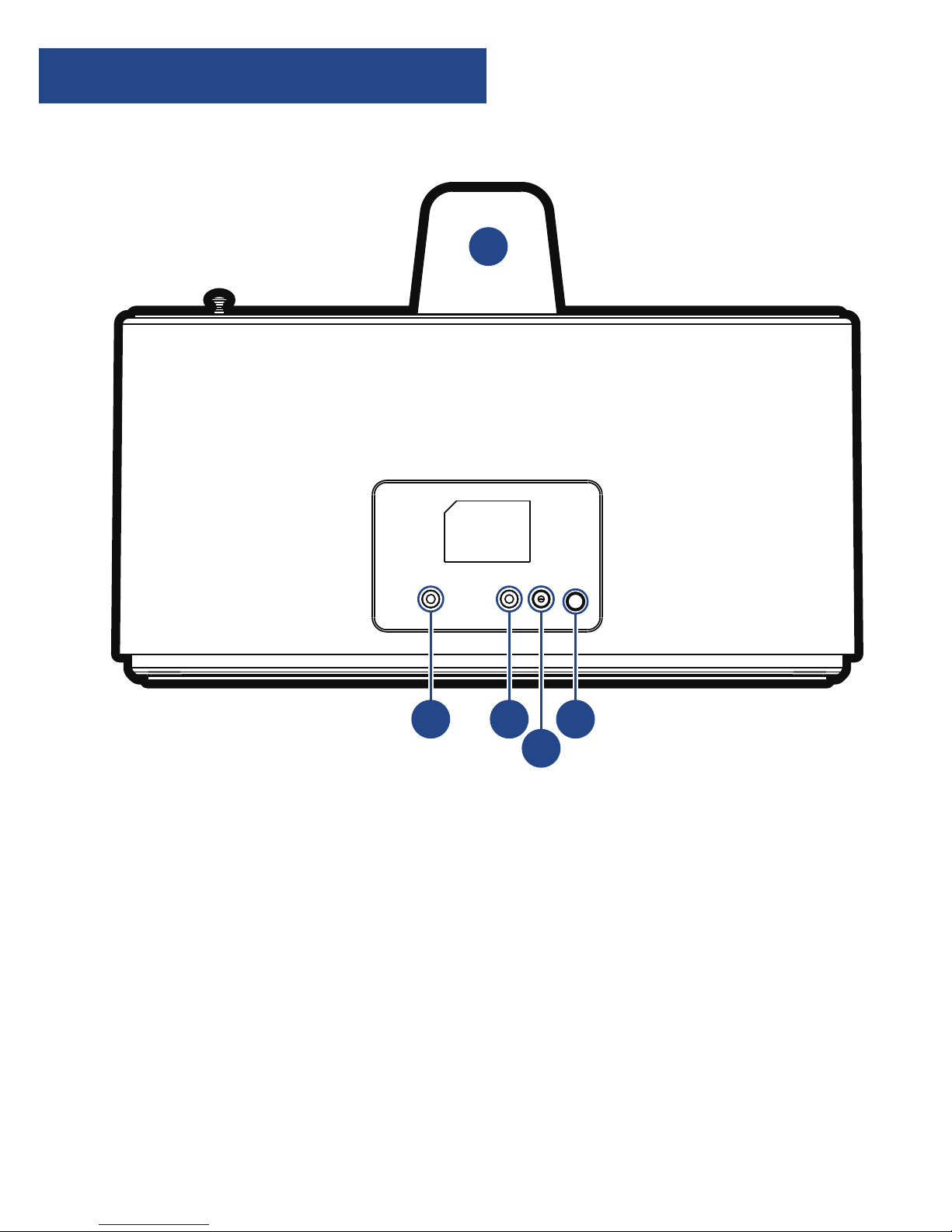
Instructions Guide
Controls and Functions
2
1. Volume Control
2. Reduce Treble Effect
3. Mute
4. Increase Treble Effect
5. Previous Track
6. Play/Pause
7. Next Track
8. Reduce Bass Effect
9. Bass+Loudness Compensation
10. Increase Bass Effect
11. Power/Standby
12. Switch Mode
13. Reset Treble and Bass Effects
21 3
4 6
5 7 9 10
811 13
12 14 15
Top View
Rear View
20
16 17 18 19
13
4
10
7
12
9
6
3
11
8
5
2
11
16. Aux-In jack
17. Headphone jack
18. DC 9v In jack – wall plug
19. On/Off switch
20. Phone stand
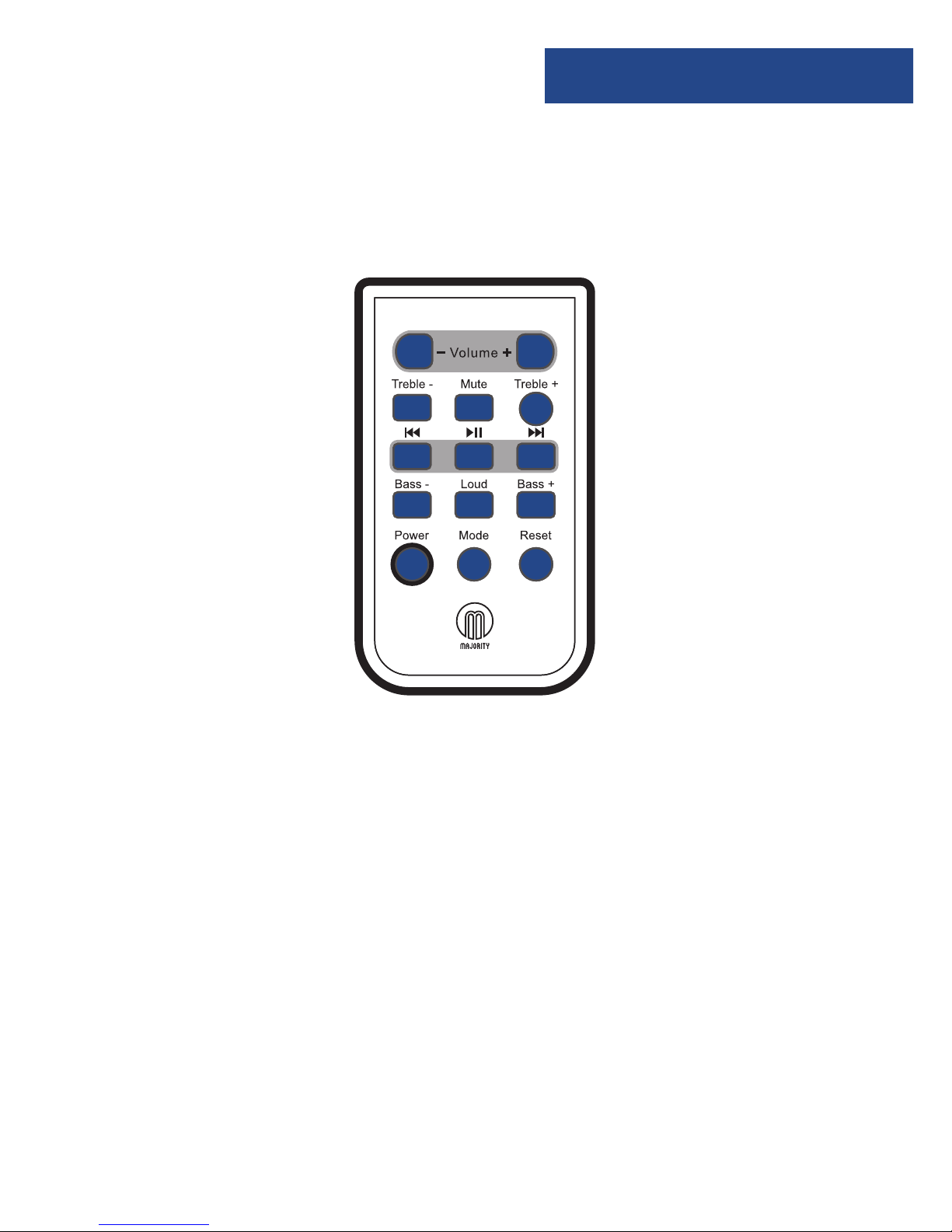
Instructions Guide
Remote Controller
3
1. Volume Control
2. Reduce Treble Effect
3. Mute
4. Increase Treble Effect
5. Previous Track
6. Play/Pause
7. Next Track
8. Reduce Bass Effect
9. Bass+Loudness Compensation
10. Increase Bass Effect
11. Power/Standby
12. Switch Mode
13. Reset Treble and Bass Effects
21 3
4 6
5 7 9 10
811 13
12 14 15
Top View
Rear View
20
16 17 18 19
13
4
10
7
12
9
6
3
11
8
5
2
11
1. Volume Control
2. Reduce Treble
3. Mute
4. Increase Treble
5. Previous Track
6. Play/Pause
7. Next Track
8. Reduce Bass
9. Bass+ Loudness
Compensation*
10. Increase Bass
11. Power/
Standby
12. Switch Mode
13. Reset Treble
and Bass
Levels
*Bass Loud Compensation increases the level of low
frequencies. Audio at low frequencies can lose bass and treble.
The Loud button helps to rectify this.
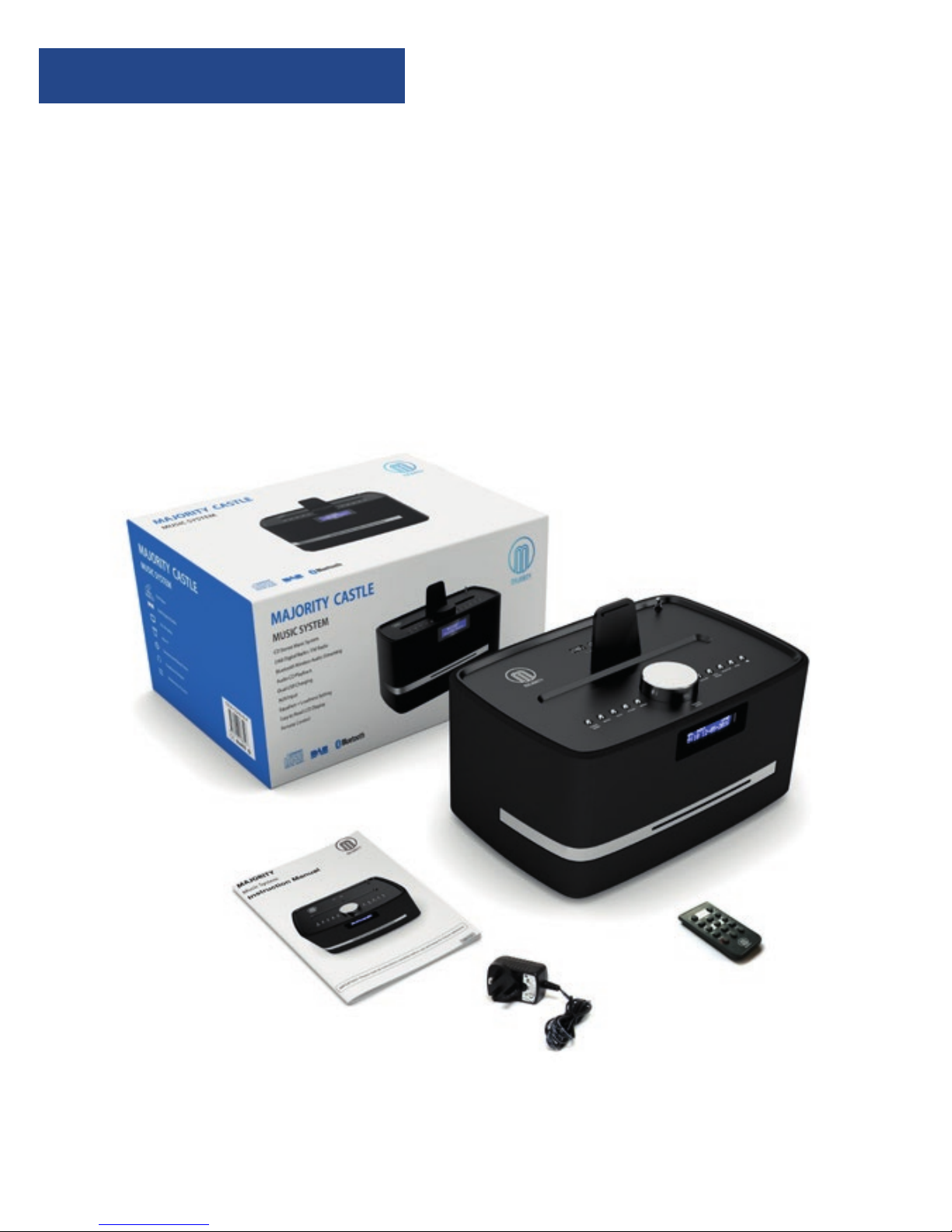
Instructions Guide
What’s in the box?
4
●Majority Castle Music System
●Remote Control
●UK Standard Plug DC 9v Power Supply
●Phone Stand
●User Guide

Instructions Guide
Instructions Guide
5
Please note all (Ref.) refer to the Controls and Functions
mapping guide on Pages 1-2.
Basic Operation
Plug the 9v adapter connector into the back of the system
labelled DC 9v (Ref.18) and the power supply into the mains.
Power Supply ON/OFF at the back of the system (Ref.19).
Press the ‘Power/Mode’button to turn the unit on (Ref.4).
The unit will automatically start up in DAB radio mode or the
previous mode you were using.
To select a mode press the ‘Power/Mode’button (Ref.4) until
your required option is selected. The currently selected mode
will be displayed on the front screen (Ref.10).
There are four options:
●DAB - DAB Radio
●FM - FM Radio
●CD - CD Player
●BT-AUX – Phone connection
Watch video tutorials and register
your product for a FREE 3-year
warranty atwww.majorityradios.co.uk
3
Y
E
A
R
F
R
E
E
E
X
T
E
N
D
E
D
W
A
R
R
A
N
T
Y

6
Instructions Guide
Standby
To place the music system back on standby, press and hold the
‘Power’ Button (Ref.4). The front display will show “Goodbye”
and then go into standby, showing the time and date. To turn
off fully press the button on rear of the unit (Ref.19) and switch
off at the mains. The cord must be kept out of reach of children.
DAB Radio
Press ‘Power/Mode’ button (Ref.4) and the unit will display
“Welcome to DAB” on the front display (Ref.10).
Pull up the antenna (Ref.3).
The music system will display “Searching” on the display or
“Tuning”if you have tuned previously (scanning may take a
few minutes).
Press ‘Scan’ (Ref.6) to search for stations and use the ‘Skip Bk’
(Ref.11) or ‘Skip Fwd’ (Ref.13) button to fine tune the station.
IMPORTANT: Please make sure you have
extended the antenna to its full length
(Ref.3). This will then enable you to rotate it
to get the best signal.

7
Instructions Guide
How to store a preset radio station
You can store a station using the preset button (Ref.7) and save
up to 10 stations.
First, tune to the station you want to store. Then press and hold
the ‘Preset’ button. The number “1” will flash on the front
display screen.
Use the ‘Skip Bk’ or‘Skip Fwd’ button to select which preset
number you want to assign to that station.
Then press the large ‘Volume/Select/Snooze’ button on top of
the system button (No.9) once to select and store this.
The display screen will show “Preset [1] stored”. [1] will be the
preset number to which the station has been saved.
How to play a preset radio station
Once you have stored all your selected stations you can then
just press (do not hold) the preset button (Ref.7) and scroll
through your choices using the ‘Skip Bk’ or ‘Skip Fwd’ button to
select the preset number you want.
Then press the large ‘Volume/Select/Snooze’ button on top of
the system (Ref.9) once to select.
To view information about the station such as ‘what’s now
playing’ press the menu button (Ref.5) once and it will show
any data on the front display.

8
Instructions Guide
FM Radio
To select FM Radio mode press the ‘Power Mode’ button (Ref.4)
until “FM Mode”is displayed on the front screen (Ref.10).
Pull up the antenna (Ref.3).
Press and hold ‘Scan’ (Ref.6) and the music system will
automatically preset the first 10 stations that have a good signal.
To fine tune or search for stations use the ‘Skip Bk’ (Ref.11) or
‘Skip Fwd’ (Ref.13) button. Press the ‘Skip Bk’ or ‘Skip Fwd’
button multiple times to search slowly or press and hold to
search quickly.
IMPORTANT: Please make sure you have
extended the antenna to its full length
(Ref.3). This will then enable you to rotate it
to get the best signal.
Altri manuali per Castle
1
Questo manuale è adatto per i seguenti modelli
1
Indice
Altri manuali MAJORITY Convertitore multimediale


