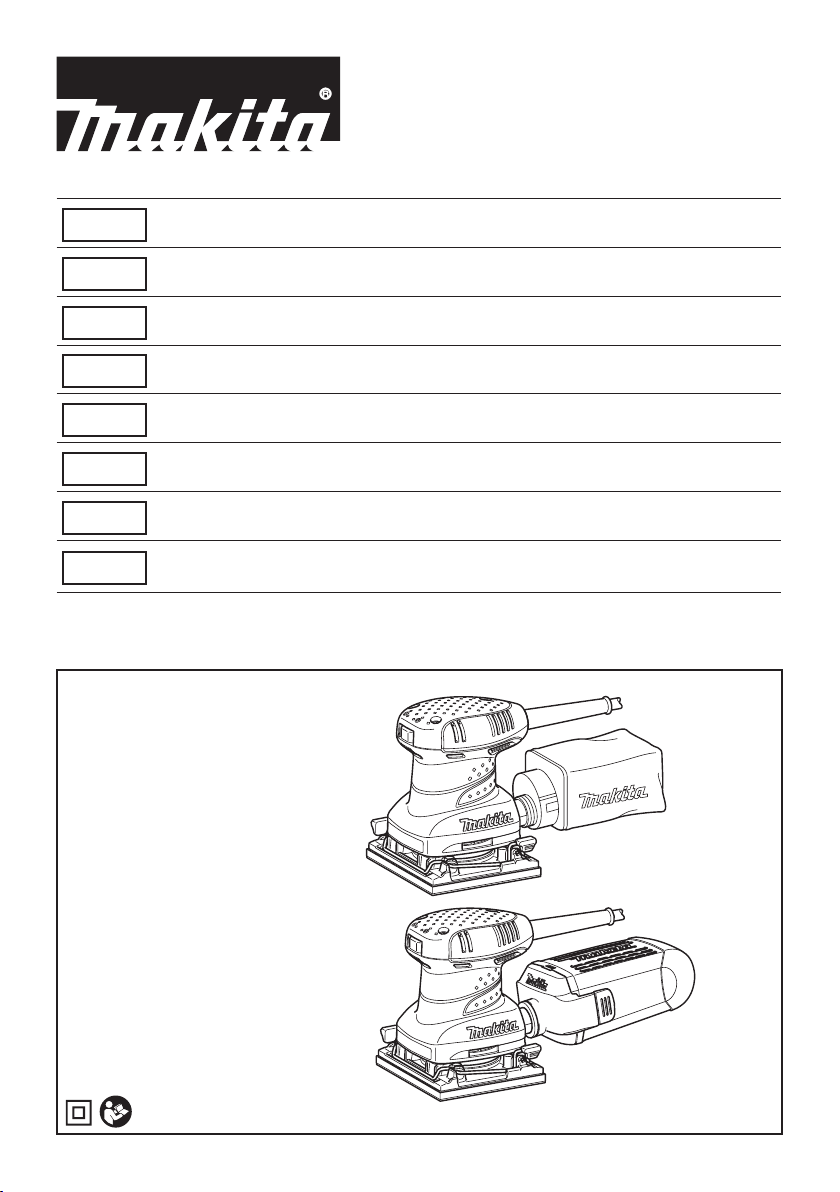
Makita BO4555 Manuale utente

BO4555
BO4556
BO4557
BO4558
EN Finishing Sander INSTRUCTION MANUAL 4
SV Osc. planslipmaskin BRUKSANVISNING 7
NO Slipemaskin for nsliping BRUKSANVISNING 10
FI Viimeistely hiomakone KÄYTTÖOHJE 13
LV Apdares slīpmašīna LIETOŠANAS INSTRUKCIJA 16
LT Šlifuotuvas NAUDOJIMO INSTRUKCIJA 19
ET Taldlihvija KASUTUSJUHEND 22
RU Вибрационная
шлифмашина
РУКОВОДСТВО ПО
ЭКСПЛУАТАЦИИ 25

1
1
2
3
1
2
1
1
2
3
1
2
Fig.1
Fig.2
Fig.3
Fig.4
Fig.5
Fig.6
Fig.7
Fig.8
2

1
2
1
1
2
12
Fig.9
Fig.10
Fig.11
Fig.12
Fig.13
Fig.14
Fig.15
3

4ENGLISH
ENGLISH (Original instructions)
SPECIFICATIONS
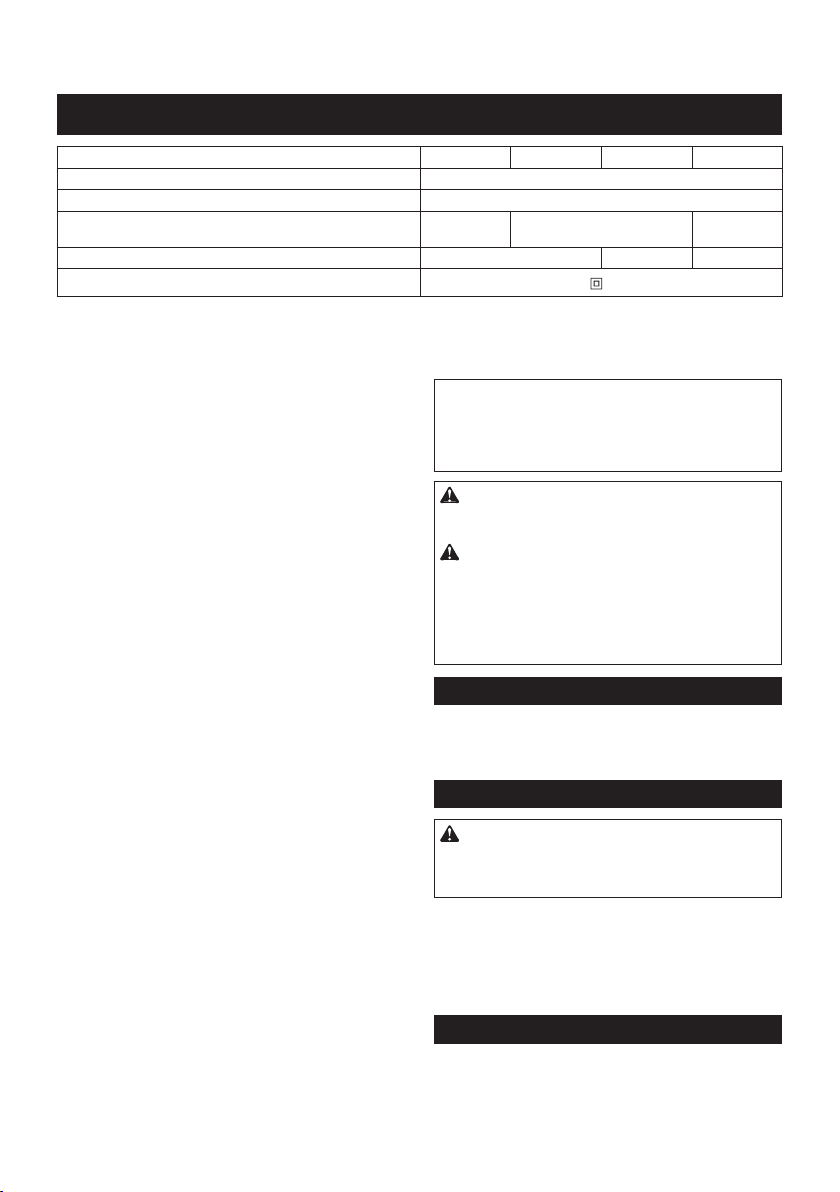
Model BO4555 BO4556 BO4558 BO4557
Pad size 112mm ×102mm
Orbits per minute (min-1)14,000
Dimensions (L x W x H)
131 mm x 112 mm
x 142 mm
131 mm x 112 mm x 141 mm
131 mm x 112 mm
x 137 mm
Net weight 1.1 kg 1.2 kg 1.0 kg
Safety class /II
• Duetoourcontinuingprogramofresearchanddevelopment,thespecicationshereinaresubjecttochange
without notice.
• Specicationsmaydifferfromcountrytocountry.
• WeightaccordingtoEPTA-Procedure01/2014
Intended use
Thetoolisintendedforthesandingoflargesurfaceofwood,
plastic and metal materials as well as painted surfaces.
Power supply
Thetoolshouldbeconnectedonlytoapowersupplyofthe
samevoltageasindicatedonthenameplate,andcanonly
beoperatedonsingle-phaseACsupply.Theyaredouble-in-
sulatedinaccordancewithEuropeanStandardandcan,
therefore, also be used from sockets without earth wire.
Noise
ThetypicalA-weightednoiseleveldeterminedaccord-
ingtoEN62841:
Model BO4555
Soundpressurelevel(LpA):80dB(A)
Uncertainty(K):3dB(A)
Thenoiselevelunderworkingmayexceed80dB(A).
Model BO4556
Soundpressurelevel(LpA):82dB(A)
Soundpowerlevel(LWA):93dB(A)
Uncertainty(K):3dB(A)
Model BO4557
Soundpressurelevel(LpA):76dB(A)
Uncertainty(K):3dB(A)
Thenoiselevelunderworkingmayexceed80dB(A).
Model BO4558
Soundpressurelevel(LpA):79dB(A)
Uncertainty(K):3dB(A)
Thenoiselevelunderworkingmayexceed80dB(A).
Wear ear protection
Vibration
Thevibrationtotalvalue(tri-axialvectorsum)deter-
minedaccordingtoEN62841:
Model BO4555
Workmode:sandingmetalplate
Vibration emission (ah):2.5m/s2or less
Uncertainty(K):1.5m/s2
Model BO4556
Workmode:sandingmetalplate
Vibration emission (ah):3.0m/s2
Uncertainty(K):1.5m/s2
Model BO4557,BO4558
Workmode:sandingmetalplate
Vibration emission (ah):3.5m/s2
Uncertainty(K):1.5m/s2
NOTE:
Thedeclaredvibrationemissionvaluehasbeen
measured in accordance with the standard test method
and may be used for comparing one tool with another.
NOTE:
Thedeclaredvibrationemissionvaluemay
also be used in a preliminary assessment of exposure.
WARNING:
Thevibrationemissionduringactual
use of the power tool can differ from the declared emission
valuedependingonthewaysinwhichthetoolisused.
WARNING: Be sure to identify safety measures
to protect the operator that are based on an estima-
tion of exposure in the actual conditions of use (taking
account of all parts of the operating cycle such as
the times when the tool is switched off and when it is
running idle in addition to the trigger time).
EC Declaration of Conformity
For European countries only
TheECdeclarationofconformityisincludedasAnnexA
to this instruction manual.
General power tool safety warnings
WARNING:
Read all safety warnings, instruc-
tions, illustrations and specications provided with this
power tool. Failure to follow all instructions listed below
mayresultinelectricshock,reand/orseriousinjury.
Save all warnings and instruc-
tions for future reference.
Theterm"powertool"inthewarningsreferstoyour
mains-operated (corded) power tool or battery-operated
(cordless) power tool.
SANDER SAFETY WARNINGS
1.
Always use safety glasses or goggles. Ordinary
eye or sun glasses are NOT safety glasses.
2. Hold the tool rmly.
3. Do not leave the tool running. Operate the tool
only when hand-held.

5ENGLISH
4. This tool has not been waterproofed, so do not
use water on the workpiece surface.
5. Ventilate your work area adequately when you
perform sanding operations.
6.
Some material contains chemicals which may be
toxic. Take caution to prevent dust inhalation and
skin contact. Follow material supplier safety data.
7.
Use of this tool to sand some products, paints and
wood could expose user to dust containing hazardous
substances. Use appropriate respiratory protection.
8. Be sure that there are no cracks or breakage
on the pad before use. Cracks or breakage
may cause a personal injury.
SAVE THESE INSTRUCTIONS.
WARNING:
DO NOT let comfort or familiar-
ity with product (gained from repeated use)
replace strict adherence to safety rules for
the subject product. MISUSE or failure to fol-
low the safety rules stated in this instruction
manual may cause serious personal injury.
FUNCTIONAL
DESCRIPTION
CAUTION:
• Alwaysbesurethatthetoolisswitchedoffand
unpluggedbeforeadjustingorcheckingfunction
on the tool.
Switch action
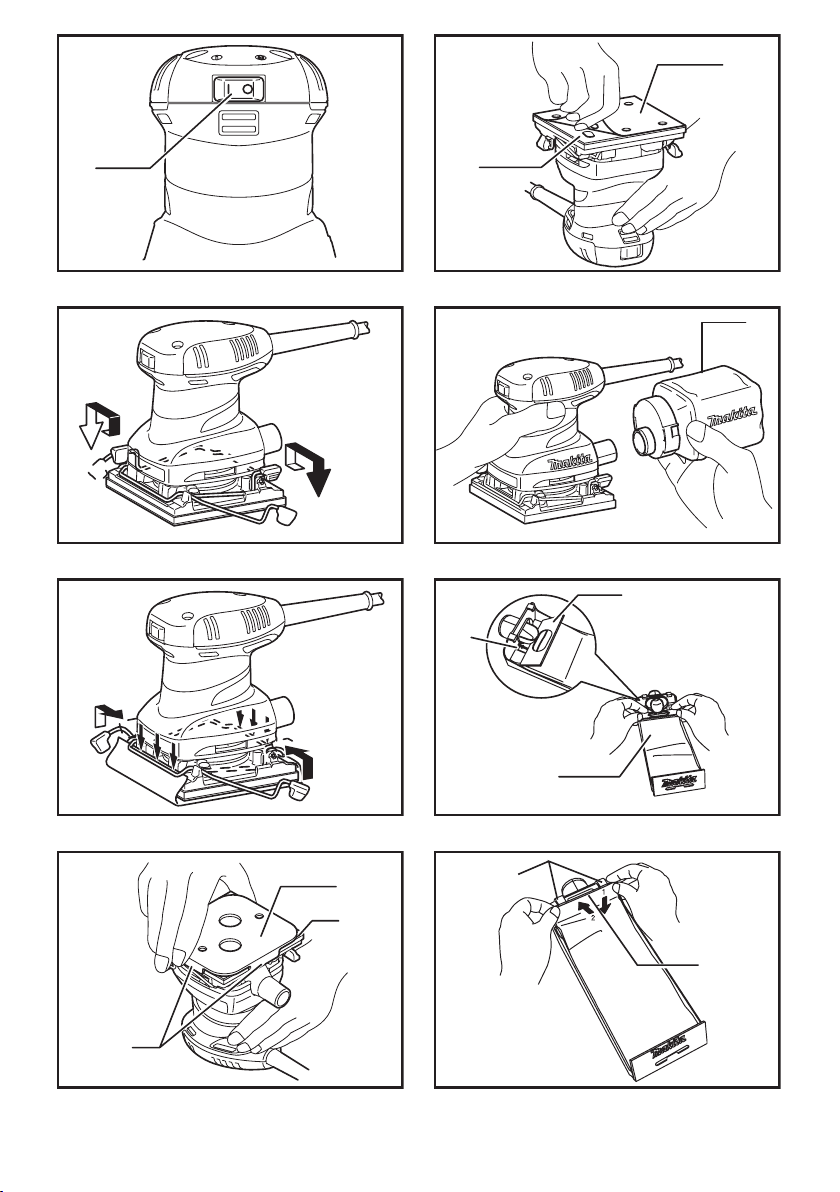
►Fig.1: 1. Switch
CAUTION:
• Beforeplugginginthetool,alwayschecktosee
that the tool is switched off.
Tostartthetool,pressthe"I"sideoftheswitch.To
stopthetool,pressthe"O"sideoftheswitch.
ASSEMBLY
CAUTION:
•
Alwaysbesurethatthetoolisswitchedoffand
unplugged before carrying out any work on the tool.
Installing or removing abrasive
paper
►Fig.2
Openthepaperclampbyraisingonthelevertorelease
from the locking port and then Insert the paper end into
theclampingpart,aligningthepaperedgesevenand
parallel with the sides of the base. (Bending the paper
beforehand makes attachment easier). Once the paper
isinplace,returnthelevertoitsoriginalposition.
►Fig.3
Repeat the same process for the other end of the base,
maintaining the proper paper tension.
Afterinsertingthepaper,makesuretheclampingpart
hold it securely. Otherwise the paper will be loose
andsubjecttoslippage,resultinginunevensanding
operation.
►Fig.4: 1. Punch plate 2. Sandpaper 3. Guide
Whenusingthedustbag,makeholesintheabrasive
paperusingthepunchplateasfollows:
1. Set the tool upside down.
2. Placethepunchplateovertheabrasivepaperso
thatthebentsidesofthepunchplateareush
with the paper edges.
3. Press the punch plate to make holes in the abra-
sivepaper.
CAUTION:
• Besuretoremovethepunchplatebeforeoper-
ating the tool.
Model BO4555 only
NOTE: Use Makita hook-and-loop sandpaper with
this sander.
►Fig.5: 1. Velcro sandpaper 2. Base
1. Set the tool upside down so that the pad is on top.
2. Positionthesandpapertottheshapeofthe
base. Be sure to align the holes on the sandpaper
with the holes on the pad (the dust will be sucked
intotheseholes;itisthereforeimportanttoleave
them open).
3. Pressthepaperrmlyoverthepad.
To remove the sandpaper:
1. Set the tool upside down so that the sandpaper is
on top.
2. Grasping one corner of the sandpaper, peel it from
the pad.
NOTE:
• Ifthesandpaperisingoodcondition,saveitfor
further use.
Dust bag (accessory)
►Fig.6: 1. Dust bag
Theuseofthedustbagmakessandingoperations
cleananddustcollectioneasy.Toattachthedustbag,
tthebag'sentryportontothedustspoutonthetool.
Makesurethattheholeinthebag'sentryportisjust
overthepimple-likeprotrusiononthedustspout.
For the best results, empty the dust bag when it
becomes approximately half full, tapping it lightly to
removeasmuchdustaspossible.

6ENGLISH
Installing paper dust bag
(accessory)
►Fig.7: 1.Groove2.Frontxingcardboard3. Front
side of paper dust bag
Place the paper dust bag on the paper dust bag holder
withitsfrontsideupward.Insertthefrontxingcard-
boardofthepaperdustbagintothegrooveofthepaper
dust bag holder.
Thenpresstheupperpartofthefrontxingcardboard
in arrow direction to hook it onto the claws.
►Fig.8: 1.Claws2. Upper part
Insert the notch of the paper dust bag into the guide of
thepaperdustbagholder.Theninstallthepaperdust
bag holder set on the tool.
►Fig.9: 1. Notch 2. Guide
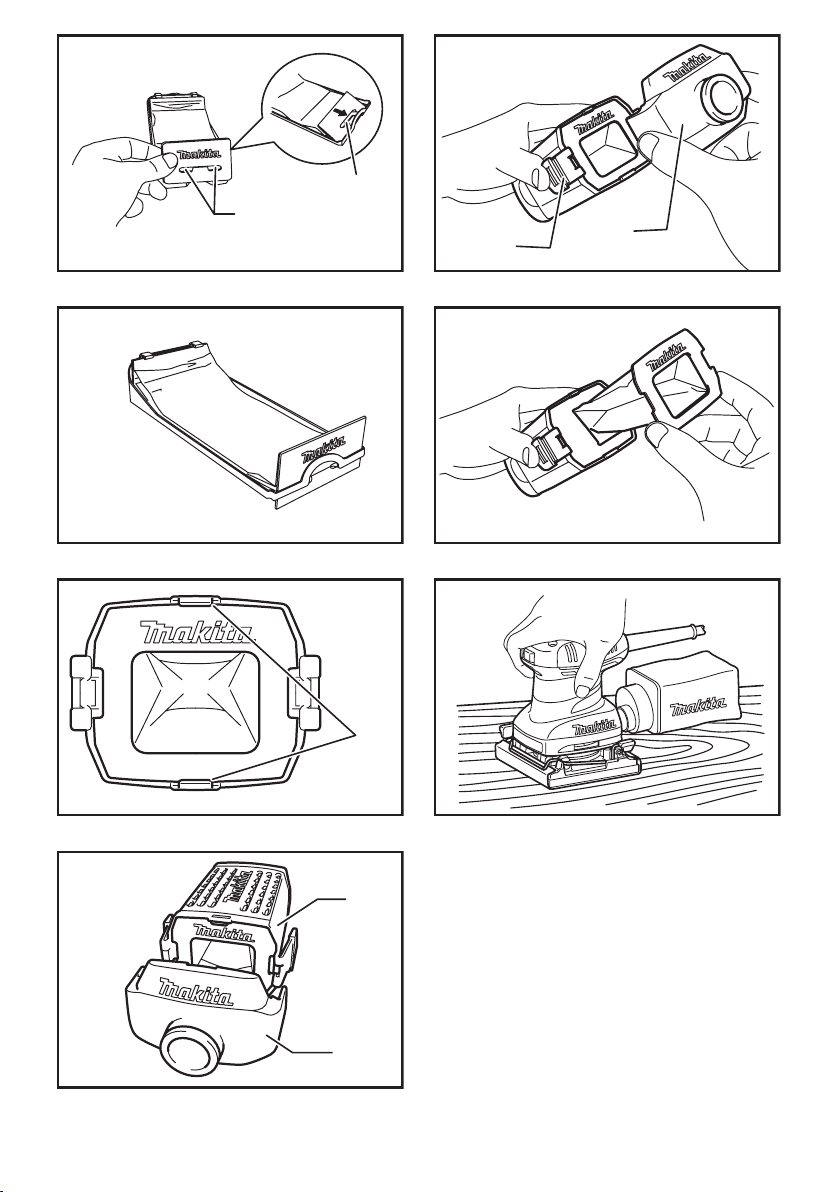
►Fig.10
Installing paper lter bag
►Fig.11: 1. Holding tab
Make sure that the logo on the cardboard lip and the
logo on the dust box are on the same side, then install
thepaperlterbagbyttingthecardbordlipinthe
grooveofeachholdingtab.
►Fig.12: 1. Dust box 2. Dust nozzle
Make sure that the logo on the cardboard lip and the
logo on the dust nozzle are on the same side, then
install the dust nozzle on the dust box.
Removingdustboxandpaperlterbag.
►Fig.13: 1. Latch 2. Dust nozzle
Removethedustnozzlebypushingthetwolatches.
►Fig.14
Removethepaperlterbagrstbypinchingthelogo
side of its cardboard lip, then by pulling the cardboard
lipdownwardstomoveitoutoftheholdingtabofthe
dust box.
OPERATION
Sanding operation
►Fig.15
CAUTION:
• Neverrunthetoolwithouttheabrasivepaper.
You may seriously damage the pad.
• Neverforcethetool.Excessivepressuremay
decreasethesandingefciency,damagethe
abrasivepaperand/orshortentoollife.
Holdthetoolrmly.Turnthetoolonandwaituntilit
attainsfullspeed.Thengentlyplacethetoolonthe
workpiecesurface.Anishingsanderisgenerallyused
toremoveonlyasmallamountofmaterialatatime.
Since the quality of the surface is more important than
theamountofstockremoved,donotbeardownonthe
tool.Keepthebaseushwiththeworkpieceatalltimes.
MAINTENANCE
CAUTION:
• Alwaysbesurethatthetoolisswitchedoffand
unplugged before attempting to perform inspec-
tion or maintenance.
• Neverusegasoline,benzine,thinner,alcohol
or the like. Discoloration, deformation or cracks
may result.
TomaintainproductSAFETYandRELIABILITY,
repairs, carbon brush inspection and replacement, any
othermaintenanceoradjustmentshouldbeperformed
byMakitaAuthorizedServiceCenters,alwaysusing
Makita replacement parts.
OPTIONAL
ACCESSORIES
CAUTION:
• Theseaccessoriesorattachmentsarerecom-
mendedforusewithyourMakitatoolspecied
inthismanual.Theuseofanyotheraccessories
orattachmentsmightpresentariskofinjuryto
persons. Only use accessory or attachment for
its stated purpose.
If you need any assistance for more details regard-
ingtheseaccessories,askyourlocalMakitaService
Center.
• Abrasivepaper(withoutpre-punchedholes)
• Paperdustbag
• Paperdustbagholder
• Punchplate
• Dustbag
• Dustbox
• Paperlterbag
NOTE: Some items in the list may be included in the
toolpackageasstandardaccessories.Theymay
differ from country to country.
Altri manuali per BO4555
21
Indice
Altri manuali Makita Levigatrice

Makita
Makita BO4510 Manuale utente

Makita
Makita 9902 Manuale utente

Makita
Makita 9902 Manuale utente

Makita
Makita BO4558 Manuale utente

Makita
Makita 9902 Manuale utente

Makita
Makita 9910 Manuale utente

Makita
Makita DBO480 Manuale utente

Makita
Makita BO4565 Manuale utente

Makita
Makita 9032 Manuale utente

Makita
Makita 9237C Manuale utente

Makita
Makita PV001G Manuale utente

Makita
Makita 9741 Manuale utente

Makita
Makita BO3710 Manuale utente

Makita
Makita DBO140 Manuale utente

Makita
Makita SA5040C Manuale utente

Makita
Makita BO3710 Manuale utente

Makita
Makita GA7911 Manuale utente

Makita
Makita M9203 Manuale utente

Makita
Makita 9910 Manuale utente

Makita
Makita BO4557 Manuale utente