
Matrix Telecom EON45 Manuale utente

EON45 for Cosine V4
User’s Guide
Version 1
August 2006
MATRIX TELECOM PVT. LTD.MATRIX TELECOM PVT. LTD.
MATRIX TELECOM PVT. LTD.MATRIX TELECOM PVT. LTD.
MATRIX TELECOM PVT. LTD.
Corporate Office: Factory:
394-GIDC, Makarpura 39-GIDC, Waghodia-391 760
Vadodara-390 010, India Dist. Vadodara, India
Tel.:+91 265 2630555 Tel.: +91 2668 263172/73
Fax: +91 265 2636598 Fax: +91 2668 262631
E-mail: Info@MatrixTeleSol.com E-mail: Support@MatrixTeleSol.com
URL: www.MatrixTeleSol.com

Documentation Information
This is a general documentation and it covers many models with
different specifications. A particular product may not support all the
featuers and facilities described in the documentation.
Matrix Telecom reserves the right to revise information in this
publication for any reason without prior notice. Information in this
documentation may change from time to time. Matrix Telecom makes
no warranties with respect to this documentation and disclaims any
implied warranties. While every precaution has been taken in
preparation of this user’s guide, Matrix Telecom assumes no
responsibility for errors or omissions. Neither is any liability assumed
for damages resulting from the use of the information contained
herein.
Matrix Telecom reserves the right without prior notice to make
changes in design or components of the equipment as engineering
and manufacturing may warrant.
Neither Matrix Telecom not its affiliates shall be liable to the purchaser
of this product or third parties for damages, losses, costs or expenses
incurred by purchaser or third parties as a result of: accident, misuse
or abuse of this product or unauthorized modifications, repairs or
alterations to this product or failure to strictly comply with Matrix
Telecom’s operating and maintenance instructions.
All rights reserved. No part of this user’s guide may be copied or
reproduced in any form or by any means without the prior written
consent of Matrix Telecom.

Matrix
3EON45 for Cosine V4
User’s Guide
Welcome
Thanks for purchasing a Matrix product.
We want you to get the maximum performance from our product. If
you run into technical difficulties, we are here to help. But please
consult this user’s guide first.
If you still can’t find the answer, gather all the information or questions
that apply to your problem and with the priduct close to you, call your
delear. Matrix delears are trained and ready to give you the support
you need to get the most from your Matrix product. In fact, most
problems reported are minor and can be easily solved over the
phone.
In addition, technical consultation is available from Matrix engineers
every business day. We are always ready to give advice on
application requirement or specific information on installation and
operation of our products.
This common user’s guide for India, European and American defaults.
The featute access codes mentioned in the user’s guide are specific
to Indian defaults. European andAmerican customers are requestred
to change the values to European/American defaults on installing the
system. Please refer topic ‘Configuring the System’ and ‘Defaul the
System’ in Cosine V4 System Manual for more details. On doing so
the feature access codes shall be changed as follows:

Matrix
4EON45 for Cosine V4
User’s Guide
Feature Indian
Defaults European
Defaults American
Defaults
Operator Dialing 9 9 0
Trunk Access Code 0,5,61 to 65 0,5,61 to 65 9,5,81 to 85
Memory Dialing 8 8 6
To grab a trunk with one
trunk on hold Flash-8 Flash-8 Flash-6
Emergency Number 1 Blank Blank 911
Emergency Number 2 Blank Blank Blank
Emergency Number 3 Blank Blank Blank

Contents
Documentation Information ....................................................... 2
Welcome ...................................................................................... 3
Introduction ................................................................................... 7
Installing the EON45..................................................................... 9
Know Your EON45.......................................................................11
Using the EON45........................................................................ 14
Personal Settings........................................................................ 39
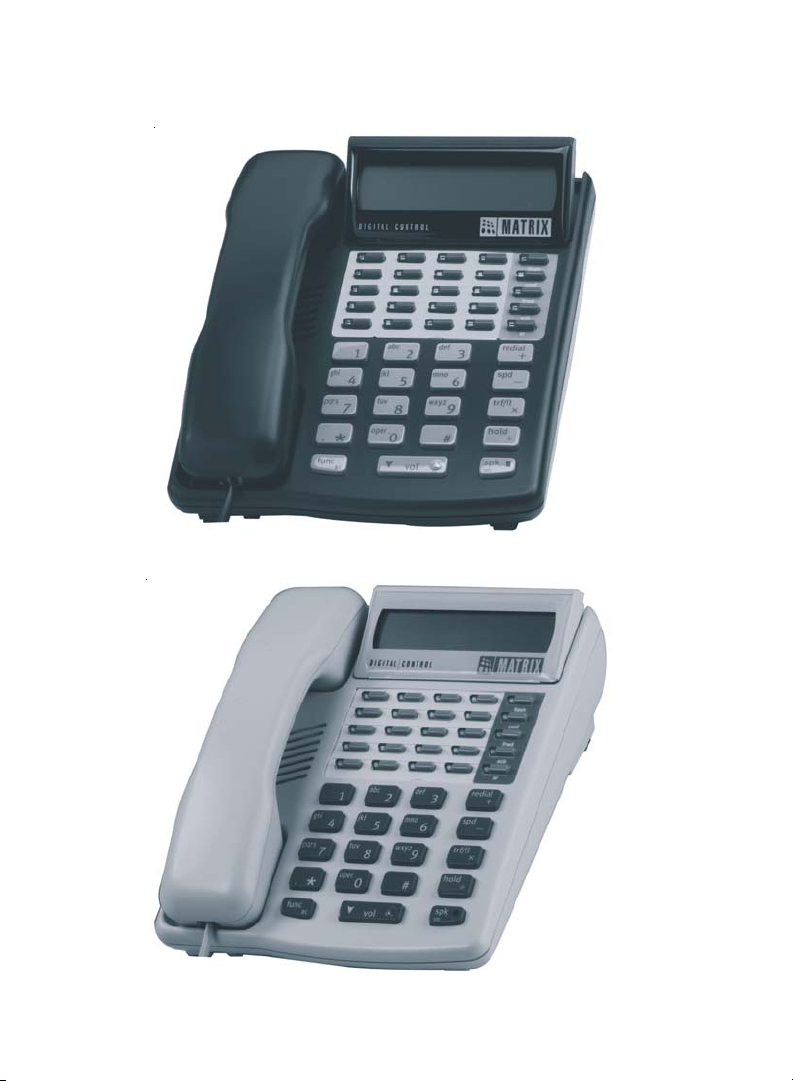
Black EON45
White EON45
Matrix
7EON45 for Cosine V4
User’s Guide
Introduction
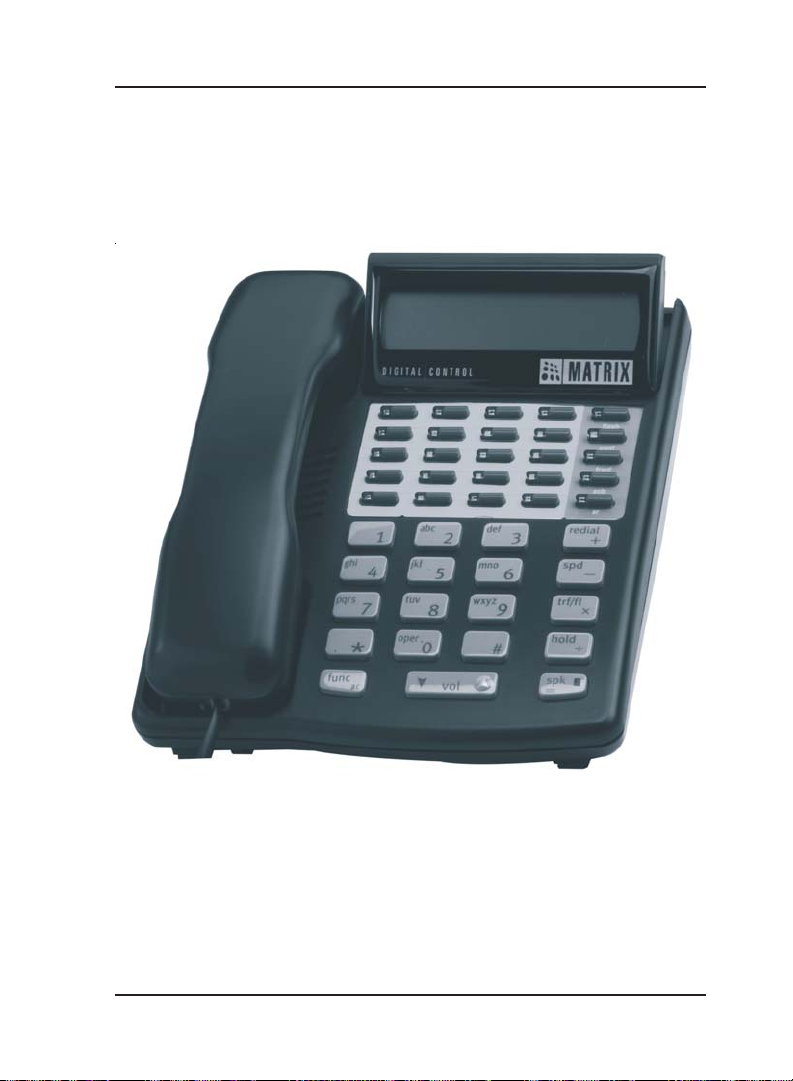
The EON45 is a versitile, user firendly, compact, feature-rich
proprietary Digital Key Phone (DKP). The EON45 is an effective toll to
manage calls efficently. The EON45 is shown in the figure below.
The EON45 offers following features:
• A 2-line x 16 characters adjustable LCD
• Twenty Five programmable keys for direct station selection/trunk
access/featuers.
• Tri-colour LEDs to show status of ports
• Hot Keypad
• Speaker Phone
• Headset connectivity

Matrix
8EON45 for Cosine V4
User’s Guide
• Adjustable ringer type and ringer volume
• Adjustable speech transmit and receive levels
• Menu driven functions
• Keypad security
The EON45 users get following benefits:
• The EON45 is simple and easy to use.
• The EON45 can be customized to the user’s requirement.
• The EON45 offers 10 different types of rings, 10 different levels for
ring volumes.
• The EON45 offers 10 speech level controls.
• The EON45 displays date and time.
• The EON45 displays the dial out the number.
• The EON45 displays the duration of the call.
• The EON45 displays the internal callers number and name. The
EON45 displays the external callers number.
• The EON45 can display missed calls.
• The EON45 offers Auto Answer facility.
• The EON45 helps the user for using a feature by the way of
offering a menu.
• The EON45 can be used to playback pleasant background music.
• The EON45 offers Live Call Screening.
=X=X=
Matrix
9EON45 for Cosine V4
User’s Guide
Installing the EON45
• Unpack the box. Get satisfied with the contents and the condition of
all the parts. In case of short supply or damaged parts, please
contact the source from where yuo made the purchase.
• The ideal sales package contains:
Sr. Item Qty.
1EON45 1
2 Handset 1
3 6P6C Line Cord 1
4 4P4C Spring Cord 1
5 EON45 User's Guide 1
6 Warranty Card Set 1
7 Support Card 1
8 Telephone Message Pad 1
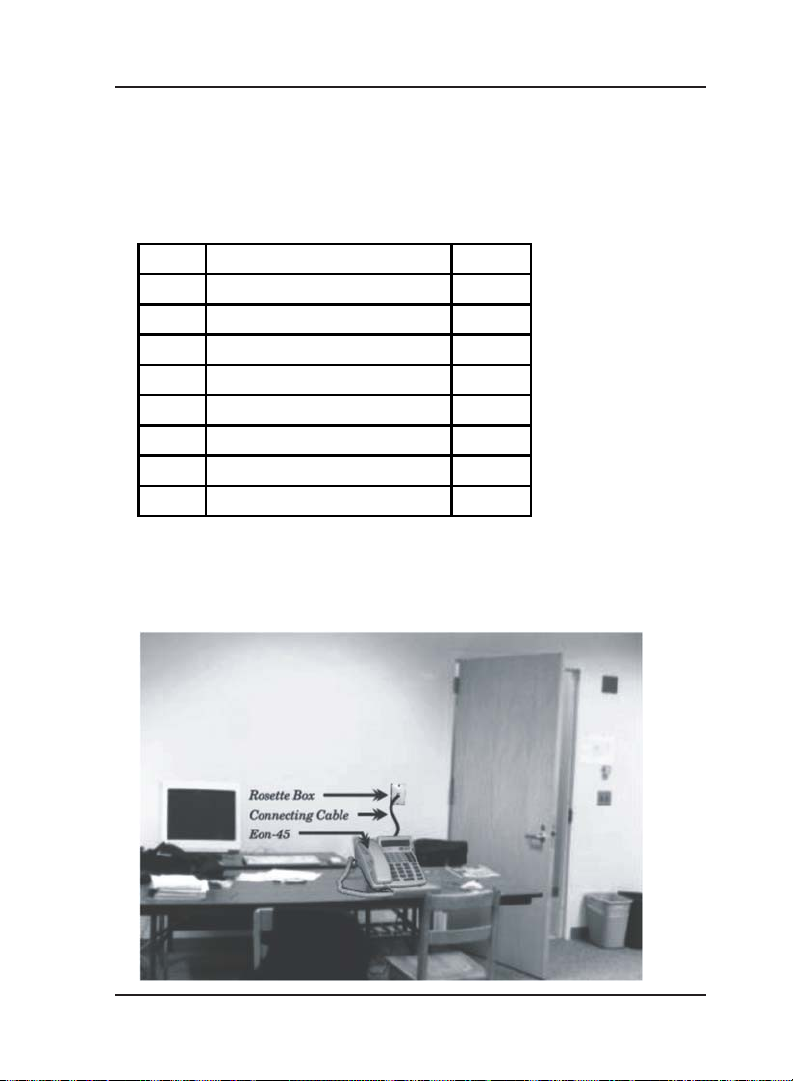
• Connect the handset to the EON45 using 4P4C spring cord.
• Connect one end of the 6P6C line cord to the EON45 and the other
end to the Rosette box made for wiring purpose in the wall. Please
refer the sketch shown below:

Matrix
10 EON45 for Cosine V4
User’s Guide
• With the system powered, on connecting the connecting cable, the
EON45 resets.All the LEDs glow in a sequence followed by green
LEDs.
• The EON45 displays a welcome message.
• The EON45 communicate with the system. The handshaking takes
around 5-6 seconds.
• On successful handsaking reset cycle, the EON45 displays station
number and station nume in the first line whereas day, date, time
and time zone in the second line. In case system is reset with
EON45 already connected to it, the EON45 displays the station
number, station anem, etc. after the system resets.
• Adjust the LCD for better view. The EON45 is ready for use.
• The user can use the EON45 with default settings. For more details
on default settings refer to topic ‘Using the EON45’.
• However, the DSS keys and LEDs canbe customized for specific
functions, as per requirements.
=X=X=
Indice
Altri manuali Matrix Telecom Sistema di conferenza


Manuali Sistema di conferenza popolari di altre marche

Kramer
Kramer VIA GO Manuale utente

AVT
AVT MAGIC AC1 Go Manuale utente

ProSoft Technology
ProSoft Technology AN-X4-AB-DHRIO Manuale utente

Sony
Sony PCS-I150 Manuale utente

Middle Atlantic Products
Middle Atlantic Products VTC Series Manuale utente

Prentke Romich Company
Prentke Romich Company Vanguard Plus Guida


