Max Pro X6-Plus Manuale utente

1
Intelligent Charger/Discharger
X
6-Plus
User's Manual
INDEX
Specifications……….........................................................................…........2
System Features………………...................................................................…2
Warnings………………...............................................................................…2
X
6-Plus charger layout…………….....................................................…….3
General Setup & Notes……………….........................................…......……4
Li-Po, Li-Ion, Li-Mn, LiFePO4 Operation & Display….…..........…..…5
A. Li-Po, Li-Ion, Li-Mn, LiFePO4 Balance Charge.........................5
B. Li-Po, Li-Ion, Li-Mn, LiFePO4 Discharge.....................................6
C. Li-Po, Li-Ion, Li-Mn Storage............................................................7
D. Li-Po, Li-Ion, Li-Mn, LiFePO4 Balance........................................8
E. Li-Po, Li-Ion, Li-Mn, LiFe Cycle.......................................................9
NiMH, NiCD, Pb CHG or DHG Operation & Display....................10
NiMH, NiCD, Pb CYCLE Operation & Display.................................11
A
CT Mode for NiMH & NiCD Operation & Display......................12
Servo Test Mode Operation & Display.............................................13
POWER Mode Operation & Display..................................................14
SETUP menu Flow..................................................................................15
Error Messages........................................................................................16
Warranty and Non-Warranty Service Conditions.........................16

2
Thanks for purchasing Maxpro products. Please read the enitre manual carefully before using your X6-Plus
Specifications
Input power: 11~15V DC /15Amp (at maximum charge rate)
Charge current: 0.1~8.0A (0.1A/step)
Discharger current: 0.1~3.0A (0.1A/step)
Max. charge power: 150Watt
Max. discharge power: 15Watt
Balance charge current: <400mA
Balance accuracy: <10mV
Voltage tolerance: 0.10%
Capacity display: 0~9999mAH
Supported batteries: 1~6 cells Li-Po, Li-Ion, Li-Mn (2~6 cells in balance charge)
1~8 cells LiFePO4 (2~6 cells in balance charge)
1~18 cells NiMH, NiCd
1~12 cells(2~24V) Pb(SLA)
Temperature control: Automatic fan speed
PC connection: USB port
Additional functions: Servo test (Linear, Speed, Deadband)
DC power supply (3.0~30V DC output)
Weight: 450g
Size(LxWxD) 145x100x40mm (5.71"x3.94"x1.57")
System Features:
Warnings:
1. High power, high current, high-performance power conversion circuit. Maxpro X6-Plus uses advanced DC/DC
converter technology with high output conversion efficiency
2. The X6-Plus can be used with four types of Lithium batteries (Li-Po, Li-lon, Li-FePO4, Li-Mn) and has a built-in balancer.
3. Optimized charge algorithm for NiMH/NiCd
4. Cooling FAN is controlled automatically by internal temperature sensor and provides intelligent protection.
5. 16*2 backlit LCD that displays the active mode, battery voltage, charge current, pack temperature, capacity (mAH
added or removed) and charge/discharge times.
6. Programmable charge settings.
Li** batteries: normal charge, fast charge, balance, storage, discharge, charge/discharge cycle, and battery monitor.
NiMH/NiCd & Pb batteries: charge, discharge, charge/discharge cycle.
7. Perfect protection. The X6-Plus has protection for reversed polarity (input or output), low input voltage, battery
temperature, charging capacity and battery voltage overrun.
8. Battery interinal resistance measurement with PC monitor software.
9. DC power supply mode can provide 3.0~30V adjustable DC to meet your requirement.
10. Built-in servo tester. Linear, Speed, Deadband of servos can be tested.
11. Firmware upgradable via USB port. The charge/discharge data can be recorded & analyzed by PC monitor software
& Battery analyzer software.
• Use a high quality power supply for input power source.
• Do not allow water, moisture, metal wires or other conductive material into the charger.
• Keep the charger away from children or pets at all times.
• Always be sure that the charger is properly configured for the correct battery type .
• Be sure that your lithium battery pack balance connector matches the multi-adapter type connected to the charger.
• Beware that the temperature of the charger shell & battery packs will increase during charge/discharge at high
power.
• Do not exceed the battery manufacturer's suggested maximum charge rates.
• Never charge batteries unattended.
• NEVER attempt to charge "non-rechargeable" cells.
• ACT charging mode should start with battery packs connected.
• Properly insulate and regularly inspect all connectors to eliminate the possibility of short circuit. Damage caused by
output short circuit is not covered by warranty.
• Do not open the case of the charger under any circumstances. Doing so will void the warranty.

3
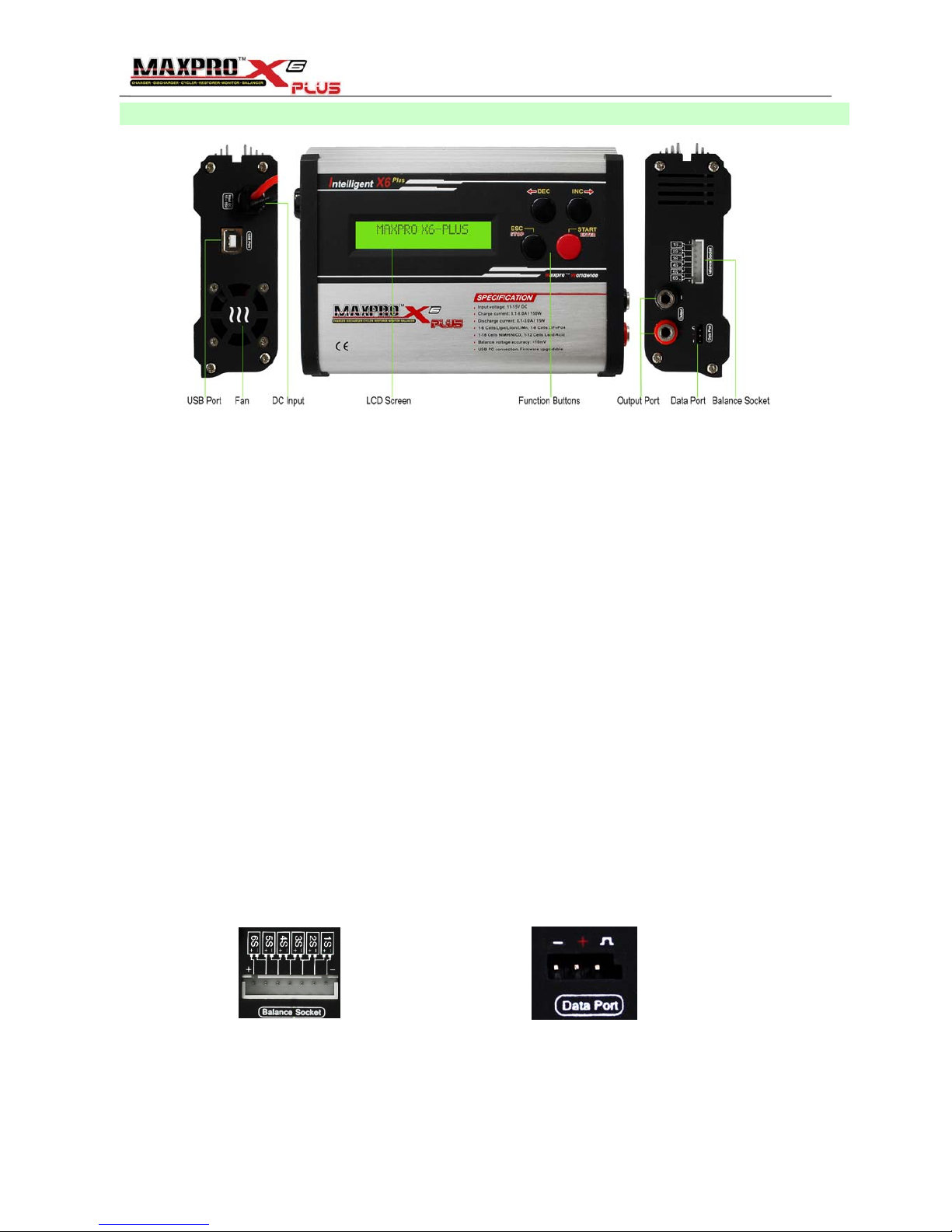
X6-Plus charger layout
Check X6-Plus charger and the standard accessories you get. The following Standard items are included in the
package. Conntact your supplier if missing part or damage is found.
Standard items:
• Maxpro X6-Plus charger with input cables & clips
• One pair of output cables & alligator clips
• One temperature sensor
• One USB data cable
• One balance multi-adapter
• One CD (User's manual, PC monitor software, Battery Analyzer software inside)
Optional parts:
• Multi-connector output cable
• Multi-Battery Charging Adapter (2S/3S)
LCD display abbreviations:
•ACT:Activation mode
•CHG/CH: Charge mode
•DHG/DH: Discharge mode
•STO: Storage mode
•BAL: Balance mode
•CYCLE: Discharge/Charge cycle mode
•ST: Initial charging of Li-xx battery
•CC: Constant current
•CV: Constant voltage
•TR: Trickle charging of NiMH/NiCd Battery
•GV: Imbalance voltage between cells
The cell order of balance socket is
123456 from negative to positive.
Data port is used for temperature
sensor or servo connection.

4
General Setup & Notes
Before Charging/Discharging is started, Pls choose an appropriate AC/DC input power source. When charging high
voltage batteries at high current (charger output 150W) the AC/DC Power Supply should be 12V minimum with rating
of 160W or more, to ensure reliable performance. The X6-Plus allow you to use lower-rated power supplies reliably, but
that total charger output wattage will be limited accordingly.
1. Attach X6-Plus to an appropriate DC power supply.
2. Connect the Input Cables (Red+ & Black-) on left side of X6-Plus to the DC power supply. Then wait for the
initialization to complete and the "No Battery" message to be displayed..
3. Connect the output cables to the Output Port on the right side of X6-Plus first!! then connect the output cables to
y
our Battery Main wire Connector (in Series charging)
To perform a balance charge do the following steps..
4. Connect the Balance Multi-Adapter to the balance socket on the right side of X6-Plus
5. Connect your Lithium battery Balance Connector to the Balance Multi-Adapter.
Suggestion: ALWAYS USE THE BALANCER(s) WHEN CHARGING LITHIUM BASED PACKS FOR SAFETY!!
NOTE:
•Please make absolutely sure that you properly identify the type of battery you are charging, the capacity in mAh,
and the number of cells wired in series and the pack voltage !!
•Please consult the documentation or labels provided with your battery to determine the correct capacity setting. It is
very important to get this right, as the charger uses the capacity setting to determine nominal charge rate (amperage),
capacity protection and safety termination. Incorrect settings could damage the battery, or result in an incomplete
charge
•CAPACITY is selected in mAh. Selection is in increment/decrement of 100mAh. CURRENT is set in Ampere (divide
mAh by 1000 to get Amperage). For 2100mAh, 2.1A for 1C, and 4.2A for 2C and so on.
•After charging is finished, always disconnect the Battery main wire connectors from Output Cables set first, then
disconnect Output Cables set from charger.
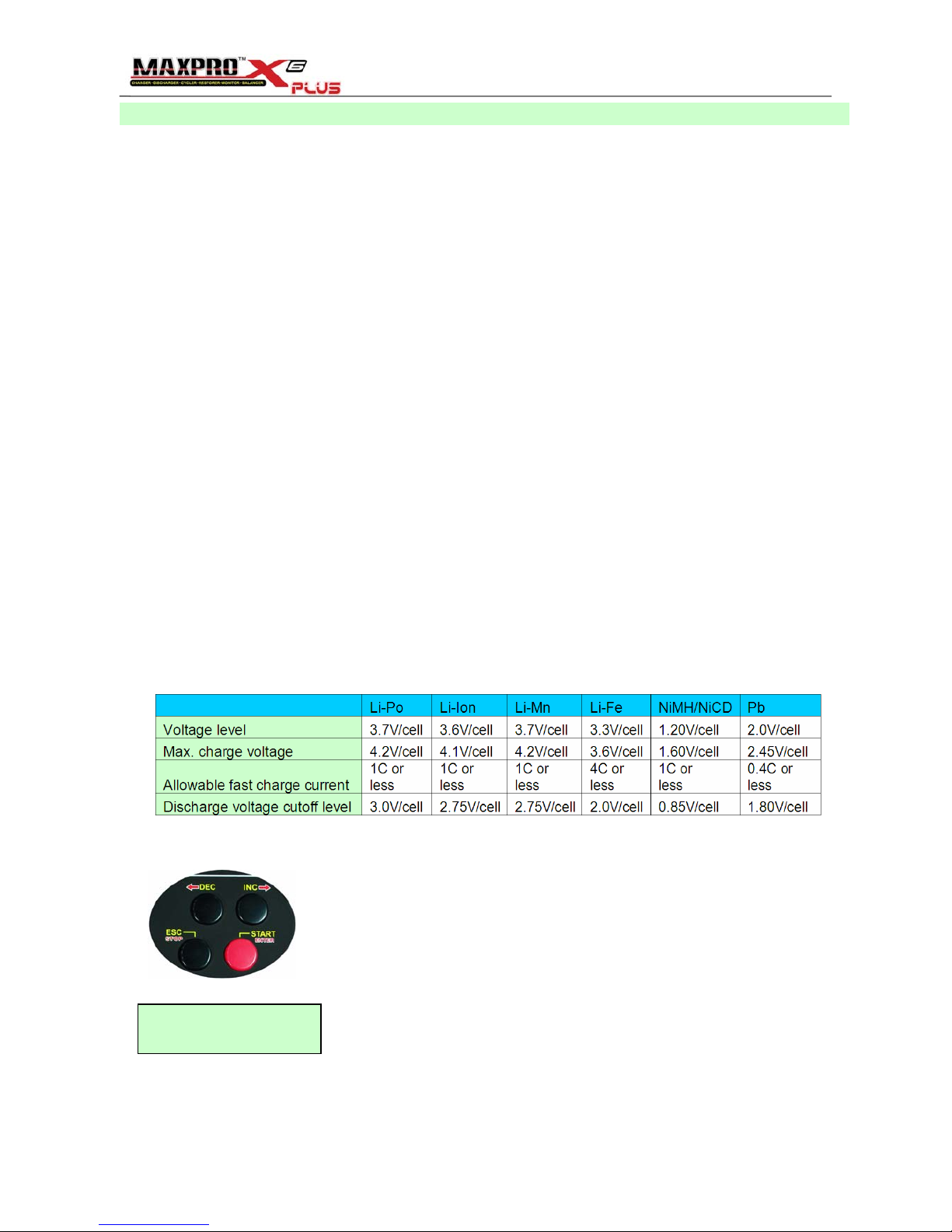
•Be very careful to choose the correct voltage for the different types of battery. The following battery parameters are
for reference.
DEC/INC, Scroll though the parameter values for Battery type, Cell numbers, Battery
capacity, Charge/Discharge current, Operation mode. And turn the LCD page between Li**
total voltage & cell voltage.
START/ENTER, Confirm the setting and skip to next parameter, Start Charge/Discharge
ESC/STOP, Cancel the setting and exit to last parameter, Stop Charge/Discharge
Cursor indication: When the cursor flashes, DEC/INC can be used to set the parameter.
e.g. "2200" flashing, Use DEC/INC to scroll though the setting of capacity.
"Gray"means the cursor is flashing in this manual.
LiPo Normal CHG
6S 2200mAH 2.2A
Timer: When you start Charging or Discharging in any mode, an internal timer starts counting at the beginning of
these cycles and is displayed on the charge and discharge screens.

5
Li-Po, Li-Ion, Li-Mn, LiFePO4 Operation & Display
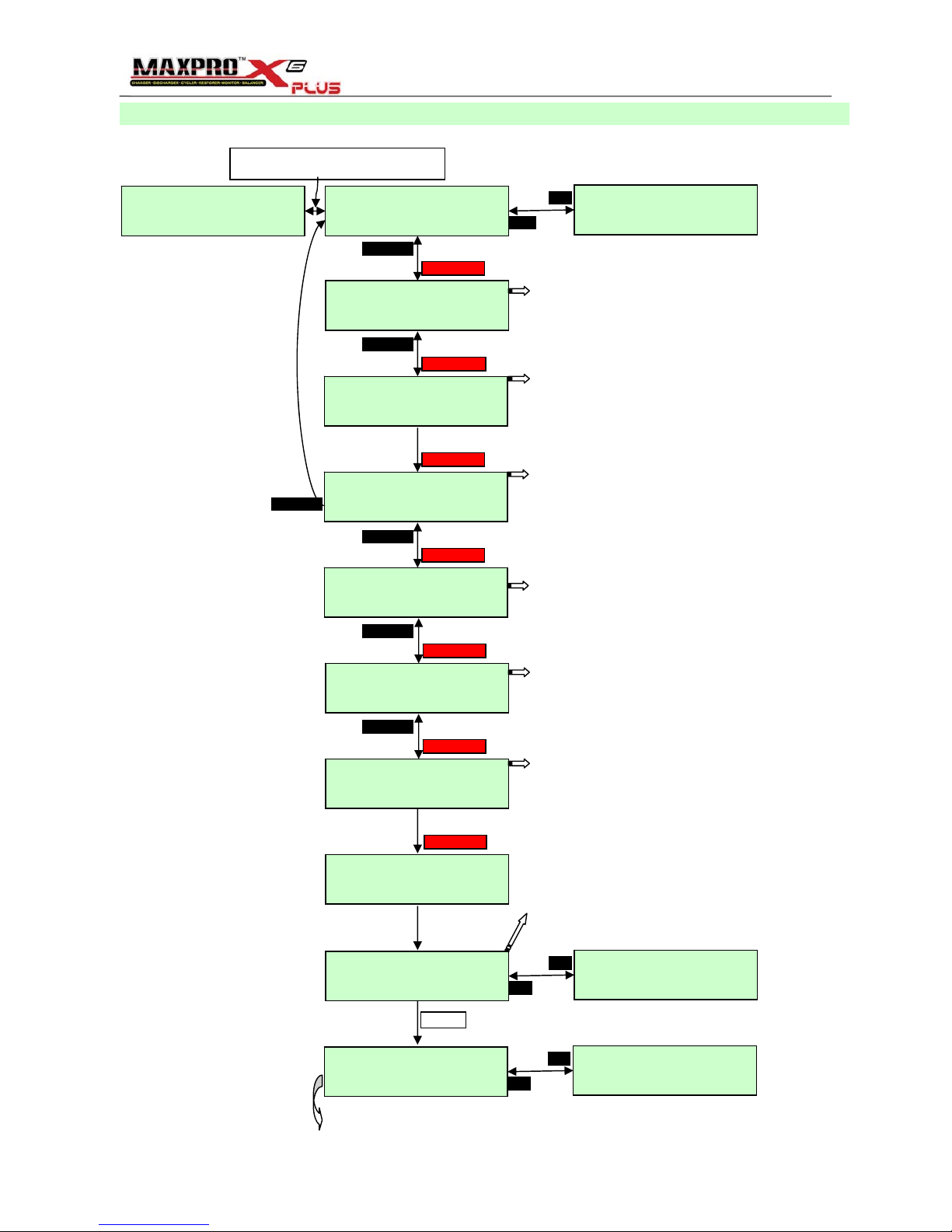
A. Li-Po, Li-Ion, Li-Mn, LiFePO4 Balance Charge
22.72V GV: 16mV>
Type:LiPo 6S
CHG DHG STO BAL
CYCLE
START/ENTER
ESC/STOP
START/ENTER
ESC/STOP
START/ENTER
ESC/STOP
LiPo Normal CHG
6S 2200mAH 2.2A
START/ENTER
ESC/STOP
LiPo Normal CHG
6S 2200mAH 2.2A
START/ENTER
CC>23.37V 2.20A>
20` 224mAH 0:05
CHG END 25.20V >
20` 2198mAH 0:58
Connect the Li** Battery Main wire Connector
& Balance Connector to X6-Plus
No Battery 22.72V GV: 16mV>
Type:LiPo 6S <3.78 3.79 3.78
3.80 3.78 3.79
INC
DEC
ESC/STOP
LiPo Normal CHG
6S 2200mAH 2.2A
START/ENTER
ESC/STOP
Starting charge
...............
START/ENTER
<3.90 3.89 3.90
3.90 3.89 3.89
INC
DEC
<4.20 4.20 4.20
4.20 4.20 4.20
INC
DEC
Be. Be. Be
22.72V GV: 16mV>
Type:LiPo 6S
Press DEC & INC, Scroll through the setting within LiFe, LiPo, LiIon, LiMn.
Be Sure the charger is properly configured for the correct battery type.
Press DEC & INC, Scroll through the setting of cell numbers.
X6-Plus will set the cell numbers automatically according to the Balance
Connector connected.
Press DEC & INC, Scroll through the setting within
CHG, DHG, STO, BAL, CYCLE
•CHG: Charge mode
•DHG: Discharge mode
•STO: Storage mode
•BAL: Balance mode
•CYCLE: Discharge/Charge cycle mode
Press DEC & INC, Scroll through the setting of charging speed within
Slow, Normal, Fast.
Slow Normal Fast.
Charge current during CC 1C 1C 1C
Cut-off current during CV 1/30C 1/20C 1/10C
CHG END Balance accuracy <10mV <10mV
Press DEC & INC, Scroll through the setting of Battery Capacity.
100mAH/Step
Be Sure the battery capacity is configured correctly according to the
battery pack.
Press DEC & INC, Scroll through the setting of Charging Current.
0.1A/Step
X6-Plus will set the charging current=1C automatically according to the
battery pack capacity.
“Charging Status”screen: the stage of the charge cycle (top left), the
pack voltage, the charging current, the pack temperature, the capacity
charged and the time of charging.
•ST: Initial charging of Li-xx battery
•CC: Constant current
•CV: Constant voltage
“Charging END”screen: the pack voltage, the pack temperature, the capacity charged and the time of charging.
The X6-Plus will stop charging when the cells voltage reach the cut-off voltage(4.20V for Lipo & LiMn, 4.10V for LiIon,
3.60V for LiFe) or reach the capacity protection(120% of set battery capacity)
You can press “STOP” to stop charging anytime.

6
B. Li-Po, Li-Ion, Li-Mn, LiFePO4 Discharge
No Battery 22.72V GV: 16mV>
Type:LiPo 6S
22.72V GV: 16mV>
Type:LiPo 6S
22.72V GV: 16mV>
Type:LiPo 6S
CHG DHG STO BAL
CYCLE
START/ENTER
ESC/STOP
START/ENTER
ESC/STOP
START/ENTER
ESC/STOP
LiPo 6S DHG
3.40V/CELL 0.7A
START/ENTER
ESC/STOP
LiPo 6S DHG
3.40V/CELL 0.7A
START/ENTER
DH>22.50V 0.66A>
20` 36mAH 0:03
DHG END 20.45V >
20` 482mAH 0:40
Connect the Li** Battery Main wire Connector
& Balance Connector to X6-Plus
<3.78 3.79 3.78
3.80 3.78 3.79
INC
DEC
ESC/STOP
START/ENTER
<3.41 3.40 3.40
3.42 3.40 3.41
INC
DEC
<3.41 3.40 3.41
3.42 3.40 3.41
INC
DEC
Be. Be. Be
Press DEC & INC, Scroll through the setting within LiFe, LiPo, LiIon,
LiMn. Be Sure the charger is properly configured for the correct battery
type.
Press DEC & INC, Scroll through the setting of number of cells.
X6-Plus will set the cell numbers automatically according to the Balance
Connector connected.
Press DEC & INC, Scroll through the setting within
CHG, DHG, STO, BAL, CYCLE
Press DEC & INC, Scroll through the setting of Discharge Cut-off
Voltage.
0.05V/Step
Be Sure the cut-off voltage is properly configured for the battery type.
Press DEC & INC, Scroll through the setting of Disharging Current.
0.1A/Step
X6-Plus will set the discharging current automatically according to the
battery pack's voltage & Max. discharge power
e.g. 6S LiPo, the start voltage is 22.72V, X6-Plus Max. discharge power is
15W. So the Max. discharge current is 15/22.72=0.66A
“Discharging Status”screen: the pack voltage, the discharging
current, the pack temperature, the capacity discharged and the time of
discharging.
“Discharging END”screen: the pack voltage, the pack temperature,
the capacity discharged and the time of discharging.
The X6-Plus will stop discharging when one of the cells voltage reach the
cut-off voltage
You can press “STOP” to stop discharging anytime.
20.47V GV: 12mV>
Type:LiPo 6S <3.41 3.41 3.42
3.42 3.40 3.41
INC
DEC
Because of the battery characteristic, after pressing“STOP", the voltage
will rise a little.
ESC/STOP

7
C. Li-Po, Li-Ion, Li-Mn Storage
No Battery 22.72V GV: 16mV>
Type:LiPo 6S
22.72V GV: 16mV>
Type:LiPo 6S
22.72V GV: 16mV>
Type:LiPo 6S
CHG DHG STO BAL
CYCLE
START/ENTER
ESC/STOP
START/ENTER
ESC/STOP
START/ENTER
ESC/STOP
Storage Chg
LiPo 3S 0.7A
START/ENTER
ESC/STOP
CC>22.79V 0.70A>
20` 36mAH 0:03
CHG END 23.10V >
20` 180mAH 0:15
Connect the Li** Battery Main wire Connector
& Balance Connector to X6-Plus
<3.78 3.79 3.78
3.80 3.78 3.79
INC
DEC
START/ENTER
<3.79 3.80 3.80
3.81 3.79 3.80
INC
DEC
<3.85 3.85 3.85
3.85 3.85 3.85
INC
DEC
Be. Be. Be
Press DEC & INC, Scroll through the setting within LiFe, LiPo, LiIon,
LiMn. Be Sure the charger is properly configured for the correct battery
type.
NO STOREGE MODE for LiFe battery
If you choose LiFe for STO mode, "Bat Type Err" will display
Press DEC & INC, Scroll through the setting of cell numbers.
X6-Plus will set the cell numbers automatically according to the Balance
Connector connected.
Press DEC & INC, Scroll through the setting within
CHG, DHG, STO, BAL, CYCLE
Press DEC & INC, Scroll through the setting of CHG/DHG Current.
0.1A/Step
X6-Plus will set the discharging current automatically according to the
battery pack's voltage & Max. discharge power.
If the battery cell voltage is lover than 3.85V, X6-Plus will charge it to
3.85V. Following FLOW is the same as CHG display
If the battery cell voltage is higher than 3.85V, X6-Plus will discharge it to
3.85V. Following FLOW is the same as DCH display
“Charging/Discharging END”screen: the pack voltage, the pack
temperature, the capacity discharged and the time of
charging/discharging.
X6-Plus will stop charging/discharging when the cells voltage reach
3.85V
ESC/STOP
23.13V GV: 4mV>
Type:LiPo 6S <3.85 3.85 3.86
3.85 3.86 3.85
INC
DEC
Because of the battery characteristic, after pressing“STOP", the voltage
will rise or drop a little according to the discharge or charge.

8
D. Li-Po, Li-Ion, Li-Mn, LiFePO4 Balance
No Battery 22.72V GV: 16mV>
Type:LiPo 6S
22.72V GV: 16mV>
Type:LiPo 6S
22.72V GV: 16mV>
Type:LiPo 6S
CHG DHG STO BAL
CYCLE
START/ENTER
ESC/STOP
START/ENTER
ESC/STOP
START/ENTER
ESC/STOP
LiPo Balance
0:01 GV: 16mV:>
START/ENTER
Balance END
0:08 GV: 2mV:>
Connect the Li** Battery Main wire Connector
& Balance Connector to X6-Plus
<3.78 3.79 3.78
3.80 3.78 3.79
INC
DEC
<3.79 3.80 3.80
3.81B3.79 3.80
INC
DEC
<3.79 3.79 3.79
3.79 3.79 3.79
INC
DEC
ESC/STOP
Be. Be. Be
Press DEC & INC, Scroll through the setting within LiFe, LiPo, LiIon,
LiMn. Be Sure the charger is properly configured for the correct battery
type.
Press DEC & INC, Scroll through the setting of cell numbers.
X6-Plus will set the cell numbers automatically according to the Balance
Connector connected.
Press DEC & INC, Scroll through the setting within
CHG, DHG, STO, BAL, CYCLE
"Balance status" Screen: Time of balance, Imbalance voltage between
cells
"B" means balancing now.
Balancing current <400mA
“Balance END”screen: Time of balance, Imbalance voltage between
cells
Note: If the imbalance voltage between cells is big. The balance program
will take long.
You can
p
ress “STOP” to sto
p
balancin
g
an
y
time.
22.74V GV: 2mV>
Type:LiPo 6S <3.79 3.79 3.79
3.79 3.79 3.79
INC
DEC

9
E. Li-Po, Li-Ion, Li-Mn, LiFe Cycle
No Battery 22.72V GV: 16mV>
Type:LiPo 6S
22.72V GV: 16mV>
Type:LiPo 6S
22.72V GV: 16mV>
Type:LiPo 6S
CHG DHG STO BAL
CYCLE
START/ENTER
ESC/STOP
START/ENTER
ESC/STOP
START/ENTER
ESC/STOP
LiPo 6S CYCLE
DHG<->CHG:1 1.5A
START/ENTER
ESC/STOP
CC>22.79V 0.70A>
20` 36mAH 0:03
Wait DHG 300S
LiPo 6S CYC:1
Connect the Li** Battery Main wire Connector
& Balance Connector to X6-Plus
<3.78 3.79 3.78
3.80 3.78 3.79
INC
DEC
<3.79 3.80 3.80
3.81 3.79 3.80
INC
DEC
Press DEC & INC, Scroll through the setting within LiFe, LiPo, LiIon,
LiMn. Be Sure the charger is properly configured for the correct battery
type.
Press DEC & INC, Scroll through the setting of cell numbers.
X6-Plus will set the cell numbers automatically according to the Balance
Connector connected.
Press DEC & INC, Scroll through the setting within
CHG, DHG, STO, BAL, CYCLE
Press DEC & INC, Scroll through the setting of Cycle order.
DHG<->CHG or CHG<->DHG
Press DEC & INC, Scroll through the setting of Cycle count.
Input number of cycles desired
Press DEC & INC, Scroll through the setting of CHG/DHG Current.
X6-Plus will set the discharging current automatically according to the
battery pack's voltage & Max. discharge power.
If the setting current is lower than the Max. discharging current, X6-Plus
will discharge the battery according to the setting current.
LiPo 6S CYCLE
DHG<->CHG:21.5A
START/ENTER
ESC/STOP
LiPo 6S CYCLE
DHG<->CHG:2 1.5A
START/ENTER
ESC/STOP
DH>22.50V 0.66A>
20` 36mAH 0:03
START/ENTER
Wait CHG 300S
LiPo 6S CYC:2
<3.41 3.40 3.40
3.42 3.40 3.41
INC
DEC
X6-Plus will cycle DHG & CHG
automatically according to the
cycle count until the cycle is
finished. You can press“STOP”
to stop CYCLE anytime.
"Wait CHG" Screen: Waiting time, Battery type, Battery cells, Cycle count
The waiting time can be setted in SETUP menu.
CHG END 25.20V >
20` 2198mAH 0:58
Cycle finished until cycle count=0
You can press “STOP” to stop Cycle anytime.

10
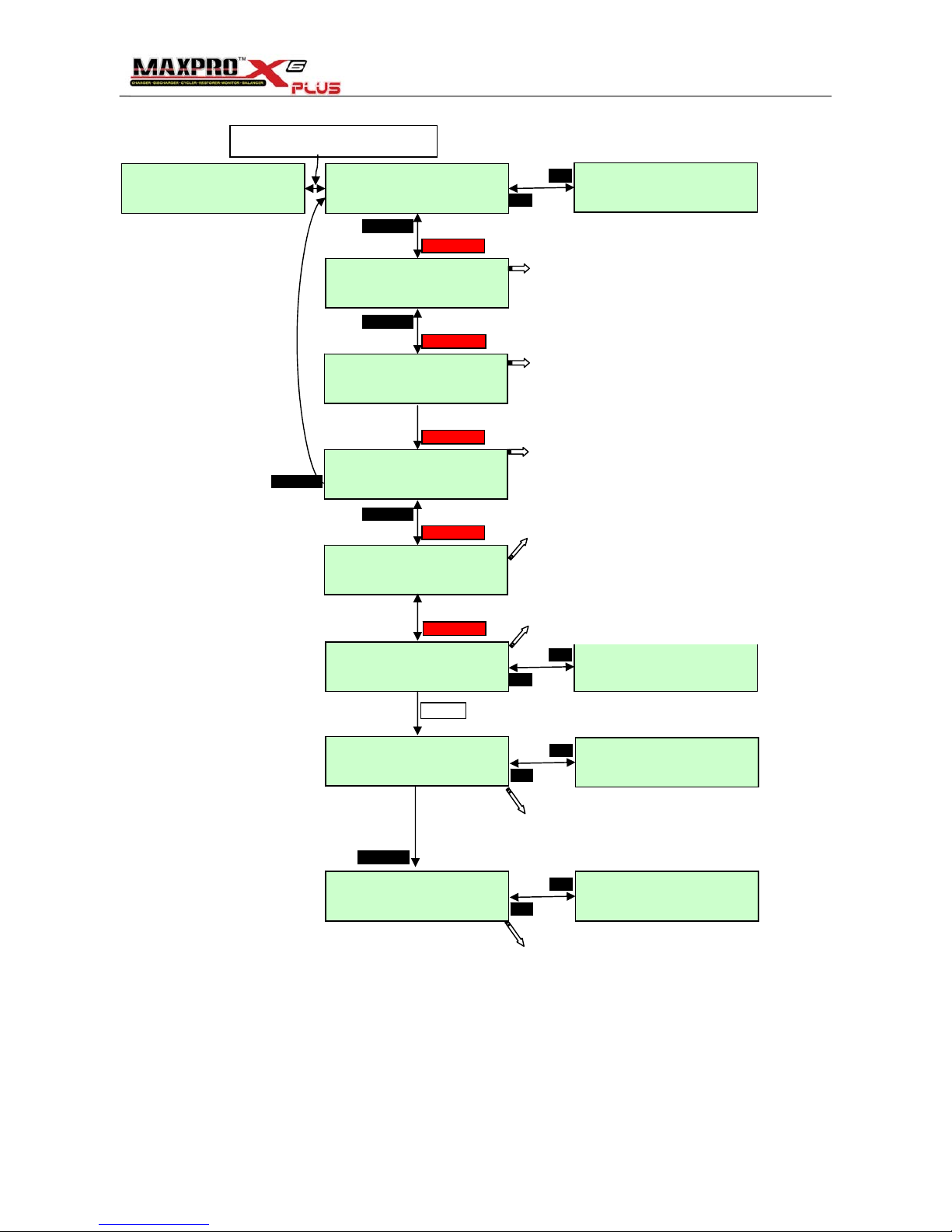
NiMH, NiCD, Pb(Lead-Acid) CHG or DHG Operation & Display
No Battery 10.71V
Type:NiMH 8S
10.71V
Type:NiMH 8S
CHG DHG STO BAL
CYCLE
START/ENTER
ESC/STOP
START/ENTER
NiMH 8S DHG
1.00V/CELL 1.5A
START/ENTER
ESC/STOP
NiMH 8S DHG
1.00V/CELL 1.5A
START/ENTER
DH> 9.80V 1.48A
20` 128mAH 0:05
DHG END 8.04V
20` 518mAH 0:21
Connect the Ni** or Pb Battery Main wire Connector to X6-Plus
Suggestion: Temperature sensor should be connected to X6-Plus and touched with the battery.
ESC/STOP
START/ENTER
Be. Be. Be
CHG DHG STO BAL
CYCLE
NiMH Fast CHG
8S 2500mAH 1.5A
START/ENTER
ESC/STOP
NiMH Fast CHG
8S 2500mAH 1.5A
START/ENTER
CC>10.90V 2.00A
20` 56mAH 0:02
CHG END 11.62V
32` 1856mAH 0:56
ESC/STOP
NiMH Fast CHG
8S 2500mAH 2.0A
START/ENTER
ESC/STOP
Starting charge
...............
START/ENTER
ESC/STOP
Be. Be. Be
START/ENTER
ESC/STOP
Choose the CHG mode
Choose the Fast or Normal
Fast: without TR
Normal: with TR
TR: Trickle charging
Set the Battery capacity
Set the charing current
Charging status
•CC: Constant current
•TR: Trickle charging
X6-Plus will stop charging
according to the Peak
sensitivity-Delta V.
The Peak sensitivity can be
setted in SETUP menu
Choose the DHG mode
Set the DHG cut-off voltage
Set the discharging current
Discharging status
X6-Plus will stop discharging
if the battery pack voltage
reach cut-off voltage X Cells
Indice