
mca MCA-DVBT-TV-01 Manuale utente
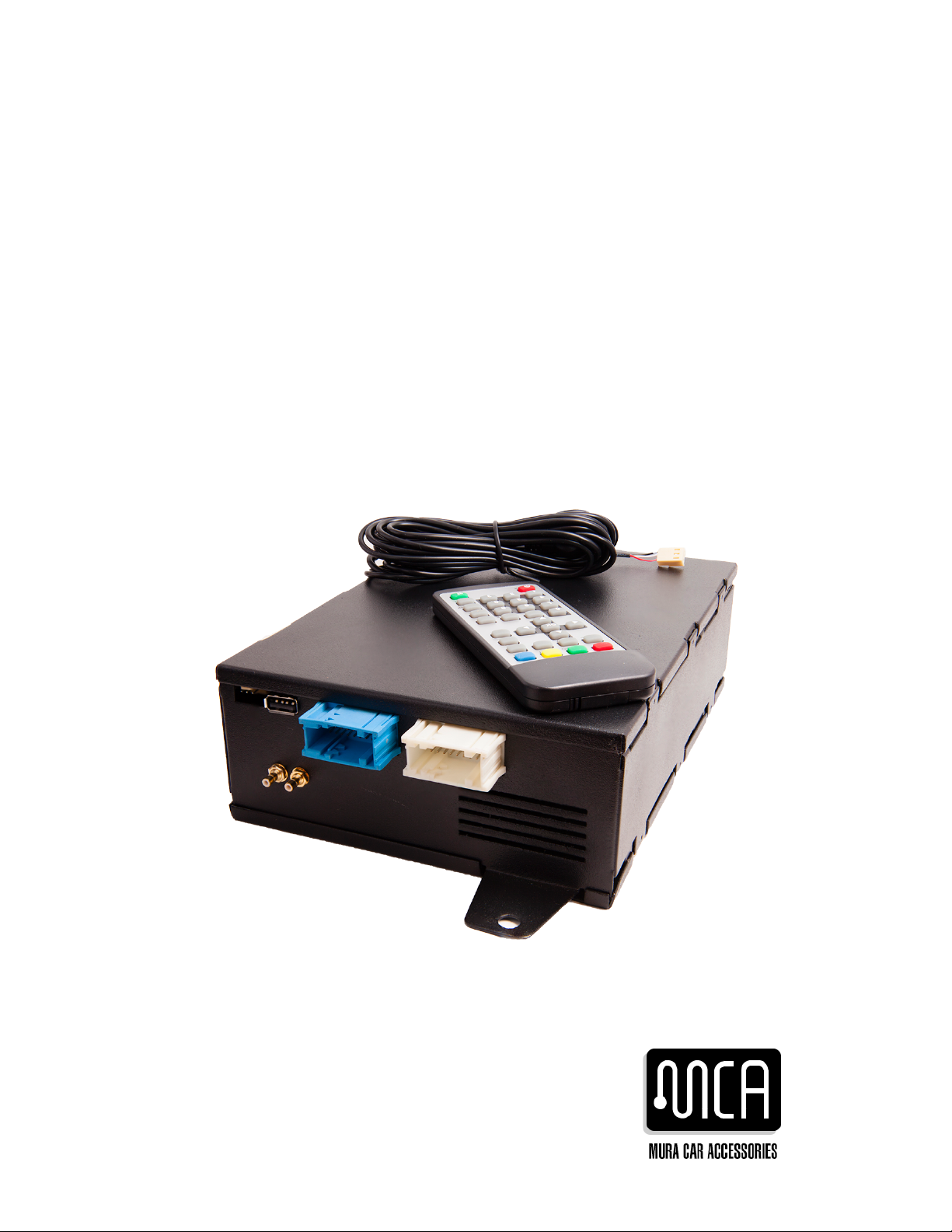
In-Car TV Tuner
Digital (DVB-T) TV Tuner for BMW IBUS
MCA-DVBT-TV-01 User Manual

Contents
Contents.................................................................................................1
Overview ................................................................................................2
Features..............................................................................................2
Package Contents................................................................................2
Hardware................................................................................................3
Panel View...........................................................................................3
Using IR Remote Control......................................................................
Using Board Monitor Display to Control TV functions...........................6
Installation..............................................................................................7
Installation overview............................................................................7
Replacing existing TV module with MCA-DVBT-TV-01........................7
Software..............................................................................................8
OSD Operation.......................................................................................9
Using OEM board monitor for menu navigation and control...............10
Using remote control for menu navigation and control......................11
Advanced Configuration Menu..............................................................11
Specifications........................................................................................13
Technical Support.................................................................................13
Warranty Information............................................................................13
1

Overview
Thank you for purchasing Mura Car Accessories TV Tuner. Our product
is designed for vehicles operating on the BMW I-BUS protocol. Providing
complete integration with OEM car head unit, MCA-DVBT-TV-01 offers
an easy to control bult-in digital (DVB-T) HD TV tuner along with a
multimedia interface, allowing you to view and record your favorite TV
shows when you are on the road.
Features
•High definition video output directly on existing car monitor screen
•Can be operated from existing car controls or by IR remote control
•Able to receive SD as well as HD broadcast
•USB host interface allows you to record streams on or view
audio/video content from a memory stick
•Support for Rear View Backup camera
Package Contents
This package contains:
•1 x MCA-DVBT-TV-01
•1 x User Manual
•1 x Remote Control
•1 x IR cable ( m) with sensor
•1 x USB cable (1. m)
2
Hardware
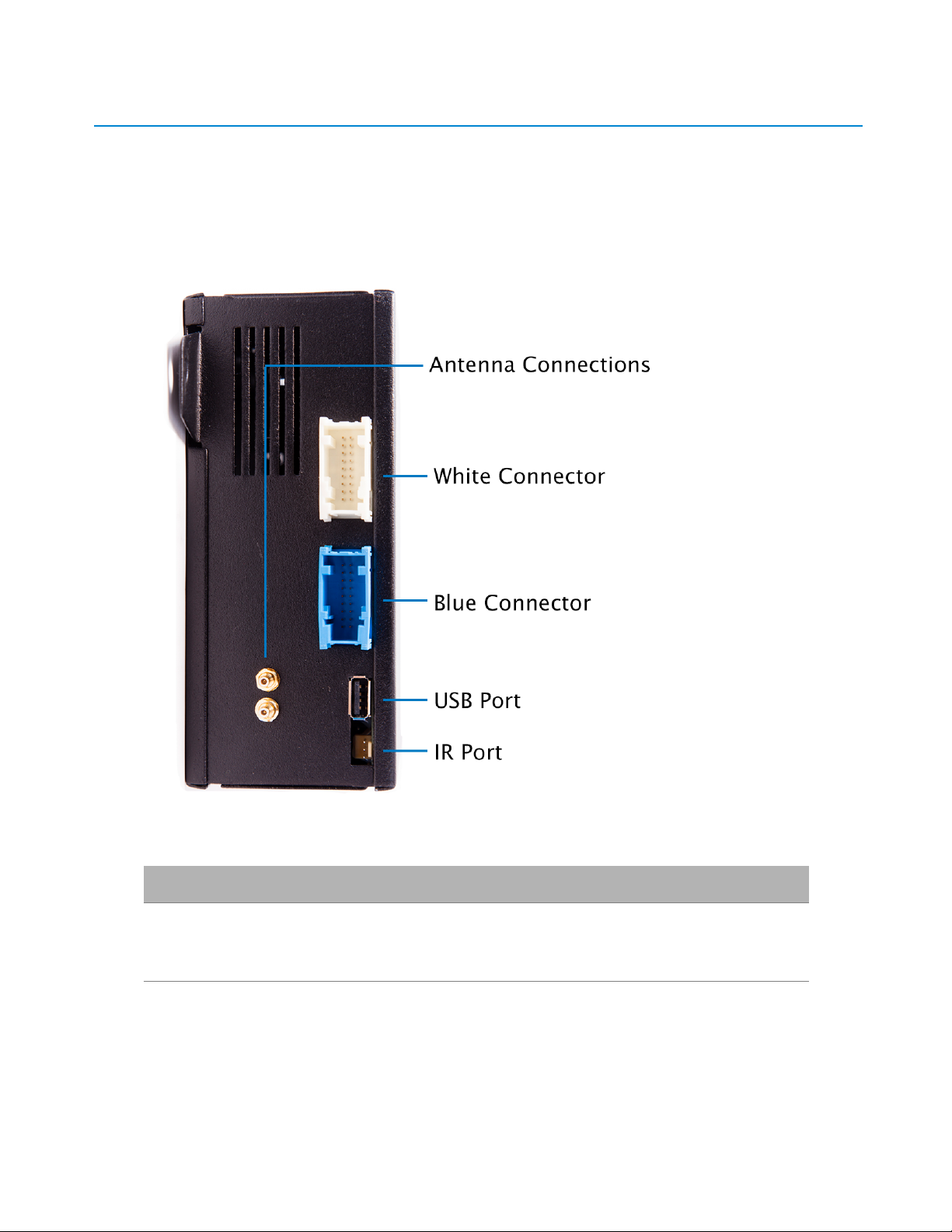
Rear Panel View
Port Connection
Blue connector Connects to car's blue
connector
White connector Connects to car's white
connector
3
USB port Connect USB data stick or
extender cable for data stick
IR port IR cable from present package
Antenna connectors Connects to OEM car antenna
connections
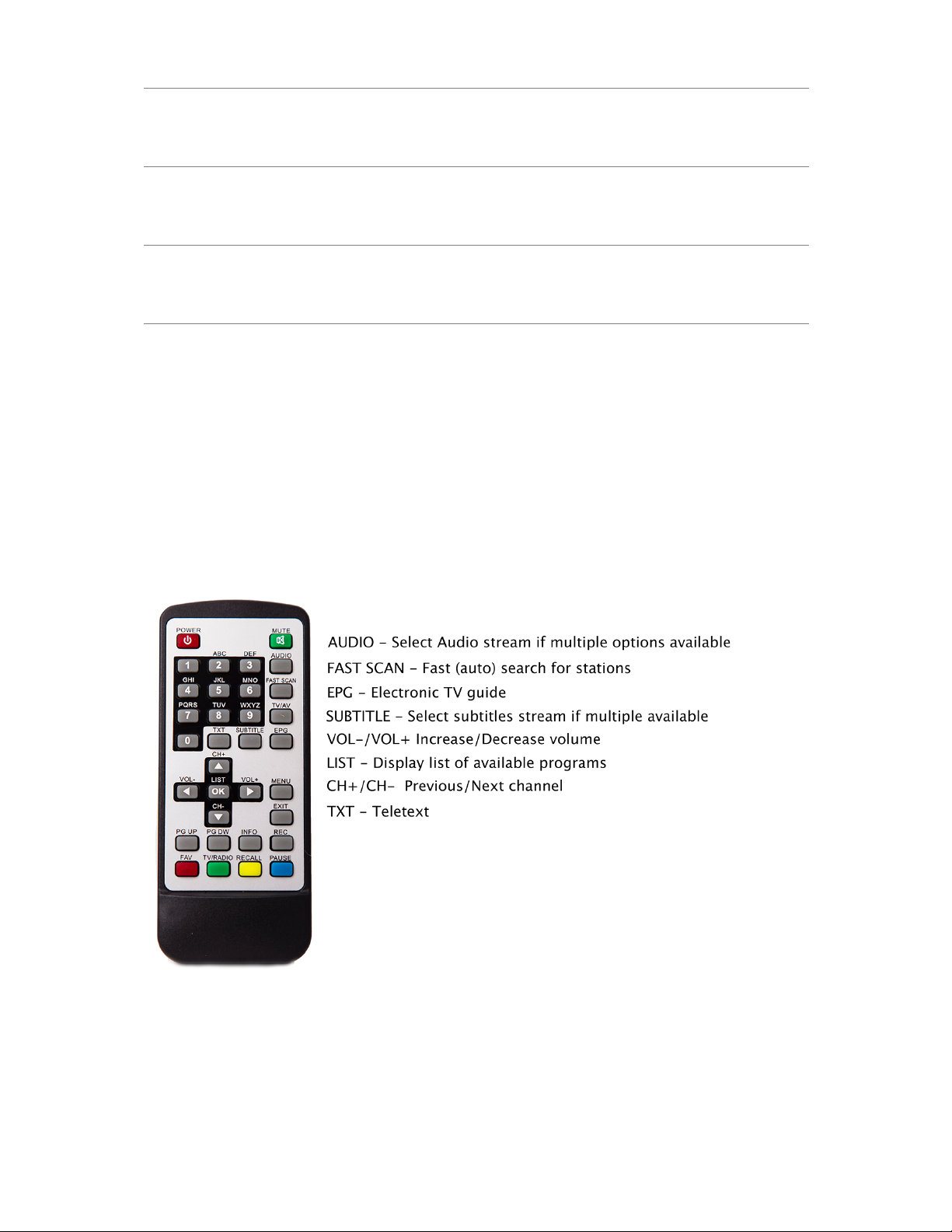
All TV module functions can be accessed using both remote control and
OEM BMW bordmonitor controls (similar to your old analogue TV
module).
Using IR Remote Control
4
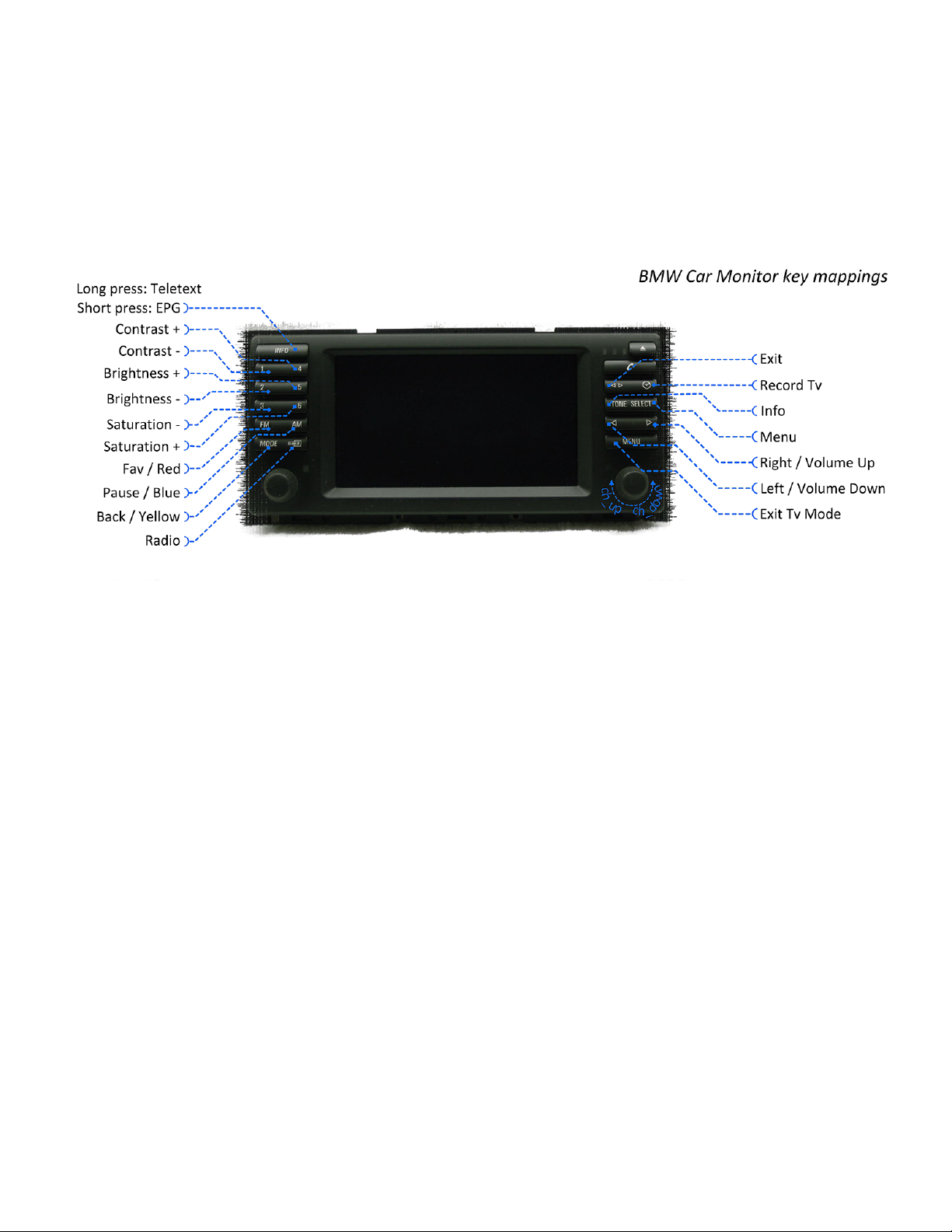
Using Board Monitor Display to Control TV unctions
5

Installation
MCA-DVBT-TV-01 is designed to replace your old, analog TV Tuner.
Therefore, it makes use of existing setup which is assumed to have
been put in place when you had your analog tuner installed. If this is
not your case and this is your first TV tuner, installation will take
additional steps for which external documentation should be available
from your car manufacturer.
Installation overview
•If you already have an installed TV tuner (an old analogue TV tuner
for example), installing MCA-DVBT-TV-01 is a simple plug and play
procedure.
•If this if the first TV module for your car, installation is similar to
retrofitting an original TV tuner. We recommend you to follow the
steps in the BMW retrofit documentation for your particular car
model.
Replacing existing TV module with MCA-DVBT-TV-01
•Wait for navigation to shut down (for led to turn off). Depending on
your car equipment, it should take around 1- min
•Disconnect the negative terminal of the car battery
•Remove the old TV module and put the MCA-DVBT-TV-01 in its
place
•Connect the white and blue car cable connectors to corresponding
connectors on MCA-DVBT-TV-01 panel
•Connect car antennae to corresponding connectors on MCA-DVBT-
TV-01 panel
•If you wish to control the TV tuner via remote control, connect
supplied IR cable to IR connector on MCA-DVBT-TV-01 and route IR
cable so that the receiver ends up in a location that is most
6

convenient to you. You will need to be able to point the remote
control towards this receiver.
•Connect USB cable to the USB port on MCA-DVBT-TV-01 and route
the other end of the cable to a convenient position for when you
want to use a USB stick
•Installation is now over. Reconnect the car battery.
The location where you can find your old TV tuner depends on your car
model.
So tware
MCA-DVBT-TV-01 announces itself to the car computer (just like the
OEM analog TV tuner). This means that you will find it in the navigation
System Menu, under the name 'Television'. The first time you access it
after installation, you will be taken to an 'Installation Guide' which
allows you to set OSD Language (menu language), Country and to
search for available channels. After you perform the channel search, you
can start enjoying digital TV in your car.
7

OSD Operation
Menu Sub Menu Description
Program Program Edit
EPG
Sort
LCN
Picture Aspect Ratio
TV Format
e.g. 16:9, 4:3
Channel
Search
Auto Search
Manual Search
Country
Antenna Power
Automatic scan for channels
Manual scan for channels
Time Time Offset
Country Region
Time Zone
If set to 'Auto' there is no need
to worry about the other
features in this sub-menu
Option OSD Language
Subtitle Language
Audio Language
Digital Audio
Sets menu language
If multiple options available,
sel. lang. for subtitle and audio
N/A (BMW audio is all analog)
System - Present version of TV tuner
does not make use of 'System'
functions.
USB Multimedia
Photo Configure
Movie Configure
PVR Configure
USB →
Multimedia
Music
Photo
Movie
PVR
Access to Music, Photo and
Movie folders on your memory
stick
Access to streams recorded
using MCA-DVBT-TV-01
8

Using OEM board monitor for menu navigation and
control
The following instructions refer to controls described in section “Using
Board Monitor Display to Control TV functions” on page 6. Mind that the
names by which we refer to them differ from what appears on your
board monitor, so please use the above mentioned picture to guide
your through the following steps.
•Press Menu to enter and Exit to exit the menu
•Navigate by using left/right arrows
•Select desired submenu by pressing rotary button
•Navigate submenu by means of rotary button
•Once you get to desired option, change value by pressing left/right
arrows
The following apply to USB Multimedia submenu only:
General controls:
•Hierarchical folder structure. Press rotary button to view folder
contents.
•Once you get to the desired file, select it by pressing rotary button
•By default, audio/video file plays in preview mode. For full-screen
mode, press Fav/Red.
•When viewing self recorded video streams, press Pause/ lue to pause
Start/Stop Recording:
•Press Record Tv and recording starts.
•While recording a channel, you can switch to watching programs,
provided they are from the same transponder
•If you try to navigate outside current transponder, you will not be
allowed to continue navigation (Screen goes black and the text
'Recording' is displayed). Navigate back to previous channels.
•End recording by first navigating back to the program you are
recording and then pressing Exit. The recording will then be saved to
on your USB stick.
Delete recording:
9
Altri manuali per MCA-DVBT-TV-01
1
Indice


