
Mea Junior Manuale utente

MEA
Get a
Green
Brain
soil moisture
and
climate monitoring
with
certainty
41 Vine Street
Magill
South Australia 5072
p08 8332 9044
f08 8332 9577
wwww.mea.com.au
Junior
Weather
Station
User Manual
Version 2.0
November 2013

Page 2www.mea.com.au
Junior Weather Station User Manual
Notices
Copyright
Copyright © Measurement Engineering Australia Pty. Ltd. 2012
All rights reserved. Under the copyright laws, this manual may not be copied, in whole or in part
by any means without the written consent of Measurement Engineering Australia Pty. Ltd.
Design Changes
Measurement Engineering Australia Pty. Ltd. reserves the right to change the designs and
specications of its products at any time and without prior notice.
Contact
Measurement Engineering Australia Pty. Ltd.
41 Vine Street
MAGILL SA 5072
Telephone 08 8332 9044
Fax: 08 8332 9577
Web: www.mea.com.au
Warranty
MEA oers a 12 month, return-to-factory warranty on all new logging systems and hardware.
The warranty applies to hardware, software and system defects only. The warranty does not
cover acts of misuse by the user or third parties, including misuse arising from failure to install
or operate a system or its components in accordance with relevant system documentation, or
failure to seek advice from MEA regarding correct installation or operation of a system or its
components.
Support
If you have questions or problems that cannot be resolved using the information in this manual,
contact MEA technical support using the details above. If phoning, ask for the Operations
Manager and explain the issue. The Operations Manager will assign a Technician to help resolve
the issue. Quoting your MEA Job Reference Number will enable us to quickly locate your details.
Phone support is generally available Monday to Friday between 9am and 5pm Central (ie South
Australian) Standard or Summer Time.
Site visits can be arranged but will incur charges for labour, travel time and where applicable,
accommodation and meals.
MEA technicians can only oer support for issues relating directly to the operation of Magpie
software or MEA logging systems or hardware. For general computer issues please consult a
computer technician.

Page 3www.mea.com.au
Junior Weather Station User Manual
Contents
Introduction ............................................................................................6
Contents of the Shipping Crate .............................................................7
The Assembled Weather Station ...........................................................8
Virtual Instruments .......................................................................................................10
Delta T ...................................................................................................................10
Degree Days ..............................................................................................................10
Dew Point ...................................................................................................................10
Chill Units ...................................................................................................................10
Frost Hours ................................................................................................................11
Daylight Hours .........................................................................................................11
EvapoTranspiration .................................................................................................11
Site Preparation ....................................................................................12
Hardware Installation ..........................................................................14
Required Tools and Equipment................................................................................14
Mounting Post ...............................................................................................................15
Bolt the Weather Station to the Post ......................................................................16
Adjust the Solar Panel .................................................................................................17
Level the Solar Radiation Sensor .............................................................................18
Solar Radiation Sensor Maintenance ...............................................................19
Air Temperature & Relative Humidity Sensor......................................................20
Air Temperature & Humidity Sensor Maintenance .....................................20
Install the Rain Gauge .................................................................................................21
Rain Gauge Maintenance .....................................................................................23
Soil Temperature Sensor ............................................................................................26
Soil Temperature Sensor Maintenance ...........................................................27
Leaf Wetness Sensor ....................................................................................................28

Page 4www.mea.com.au
Junior Weather Station User Manual
Leaf Wetness Sensor Maintenance ...................................................................29
Software Installation and Operation ..................................................30
A Brief Introduction to Magpie ................................................................................30
Install Magpie 3 Software and the Logging Scheme .......................................30
How to Find Magpie Files on Your Computer .....................................................31
Loading the Logging Scheme ..................................................................................32
Install the System Battery ..........................................................................................32
Connect the Laptop to the Weather station .......................................................33
Open the Logging Scheme .................................................................................34
Set the Connection Method and COM Port...................................................35
Program the Data Logger .....................................................................................36
Real Time Information .................................................................................................36
Logger Information ................................................................................................37
Channel Inputs .........................................................................................................38
Channel Selection Grid .........................................................................................38
Retrieving Measurements ..........................................................................................39
Set the Connection Method ................................................................................39
Unload Data ..............................................................................................................41
View Data .........................................................................................................................42
The Navigator ...........................................................................................................42
Open a New Graph .................................................................................................44
Open a New Table ...................................................................................................45
Favourite Graphs and Tables ...............................................................................46
Test the Packet Data Terminal ..................................................................................47
Force a PDT Transfer ...............................................................................................47
Observe the result ..................................................................................................48
What the Lights Mean ...........................................................................................48

Page 5www.mea.com.au
Junior Weather Station User Manual
Testing FTP Unloading in Magpie 3 ..................................................................50
How to Change Parameters for Virtual Instruments ........................................52
Entering Your Altitude for the Delta T Instrument ......................................52
Changing the Threshold Temperature for Frost Hours ..............................53
Entering Latitude and Altitude for the ETo Instrument.............................54
System Maintenance ............................................................................55
Power Supply Maintenance ......................................................................................55
Solar Panel .................................................................................................................55
Battery Validation Errors .......................................................................................55
System Battery .........................................................................................................56
How to Replace the System Battery .................................................................56
How to Replace the System Fuse ......................................................................57

Page 6www.mea.com.au
Junior Weather Station User Manual
Introduction
Thank you for purchasing an MEA Junior Weather Station. This manual explains how to
install and operate your weather station. Please read it thoroughly before attempting
to install or operate your weather station.
Please note that your weather station has been ‘built to order’ and the manual
may make reference to climate sensors or other features which are not part of your
particular system.
If you have a question about the installation or operation of your Junior Weather
Station which is not answered in this manual, or if you see something you think is
wrong, please contact MEA using the details inside the front cover of this manual.

Page 7www.mea.com.au
Junior Weather Station User Manual
Contents of the Shipping Crate
Your Junior Weather Station has been shipped to you in a large plywood box so that
the weather station is well protected in transit.
The combined weight of the weather station and the shipping crate is
approximately 60 kg. Use mechanical lifting aids or team lifting when moving the
shipping crate.
The crate contains:
●A data recorder and data transfer devices in a square plastic enclosure, bolted to
an upright.
●A cross arm with a solar panel and solar radiation sensor attached.
●An LP02 global solar radiation sensor.
●A PA2 wind speed sensor and a PRV wind direction sensor.
●A HC2-S3 air temperature and relative humidity sensor.
●An MEA2040 leaf wetness sensor.
●A 6507A soil temperature sensor.
●A universal mounting bracket and U-bolt assemblies.
●A disk or USB drive containing software and documentation.
●A USB cable.
Page 8www.mea.com.au
Junior Weather Station User Manual
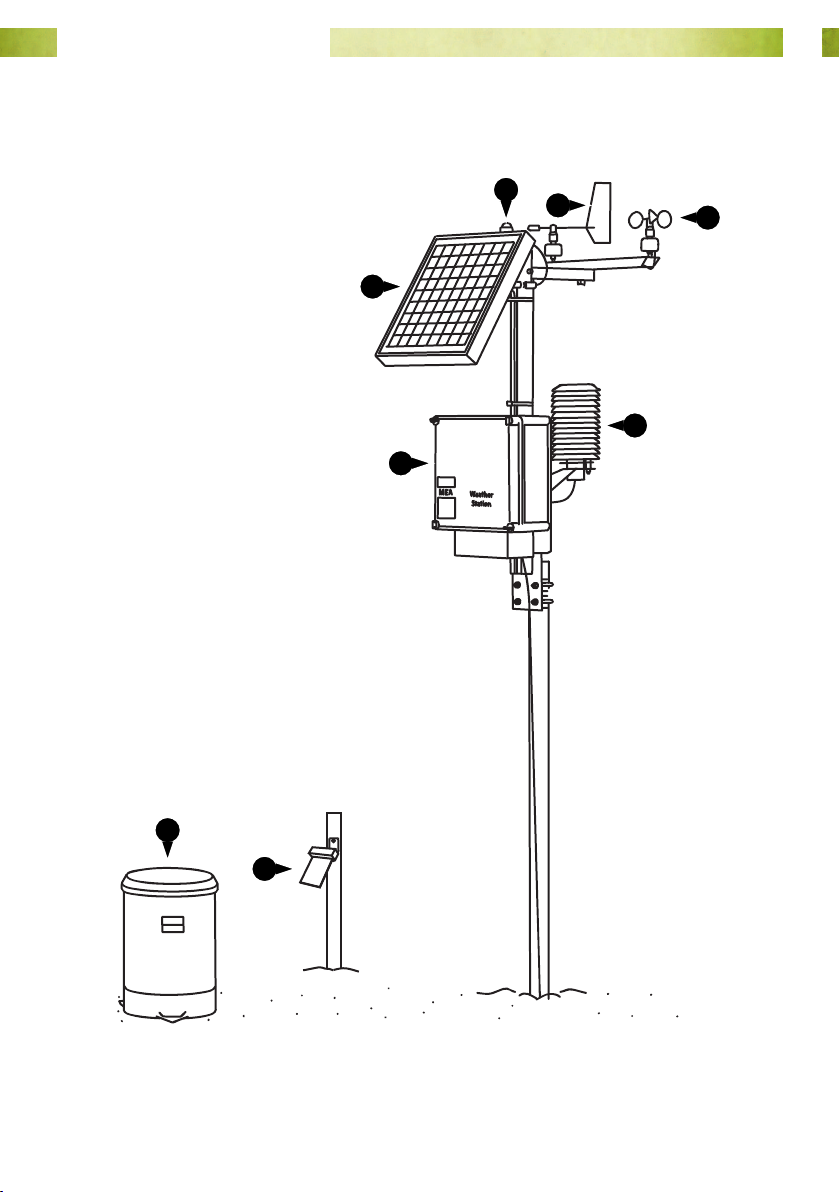
The Assembled Weather Station
Following assembly your weather station will look like this.
8
1
2
34
5
6
Fig. 1. Junior Weather Station.
7

Page 9www.mea.com.au
Junior Weather Station User Manual
1 Solar panel. The solar panel keeps the system battery charged and powers the data
logger and all of the instruments on your weather station.
2 Solar radiation sensor. This sensor measures direct and diuse (global) solar
radiation in a 180° eld of view. Solar radiation measurements can be used in the
calculation of Daylight Hours and potential Evapotranspiration.
3 Wind direction sensor. Wind direction can be an important thing to know for spray
applications.
4 Wind speed sensor. Wind speed is also an important thing to know for spray
applications. Wind speed measurements can also be used in the calculation of potential
Evapotranspiration.
5 Air temperature and relative humidity sensor shelter. Air temperature and relative
humidity can be used in the calculation of potential Evapotranspiration, Delta-T,
Apparent Temperature, and Dew Point. Air temperature can also be used in the
calculation of Frost Hours, Degree Days and Chill Days.
6 The logger enclosure. This contains the data logger, system battery and, if ordered,
the devices that will transfer your weather recordings to the Internet.
7 The rain gauge. A two-compartment bucket inside the gauge collects rainfall as it
passes through the gauge. As each compartment becomes full, the bucket ‘tips’ around
a pivot, then the other compartment begins to ll. Each ‘tip’ corresponds to 0.2 mm of
rainfall.
8 Leaf wetness sensor. The sensor acts like an articial leaf and detects the presence
of moisture on its surface. Rather than simply ‘wet’ or ‘dry’, the sensor can measure
surface moisture over the entire range from 0 to 100%.
9 Soil temperature sensor (not shown).

Page 10www.mea.com.au
Junior Weather Station User Manual
Virtual Instruments
The inputs from the climate sensors on your Junior Weather Station are combined in
Magpie software to calculate additional values, called ‘virtual’ instruments.
Delta T
Delta T is one of the standard indicators for acceptable spray conditions. It is indicative
of evaporation rate and droplet lifetime. Delta T is calculated by subtracting the wet
bulb temperature from the dry bulb temperature. The result is expressed as °C.
When applying pesticides, Delta T should ideally be between 2 and 8°C (Source: http://
reg.bom.gov.au/info/leaets/Pesticide-Spraying.pdf).
Your Junior Weather Station calculates Delta T from air temperature, relative humidity
and the altitude of the site where the station is located.
You will need to enter the altitude into the logging scheme so that Delta T can be
correctly calculated. Please see “Entering Your Altitude for the Delta T Instrument” on
page 52 for further details.
Degree Days
Degree days are a measure of heat accumulation used to predict plant maturation
rates. It is calculated from air temperature. By default, the calculation assumes that
no growth will occur below 10°C or above 35°C. The result is expressed in °C, and is
updated at 9 am each day.
Dew Point
Dew point is the temperature to which the air would have to be cooled to in order
for condensation of water vapour to occur. It is calculated from air temperature and
relative humidity. The result is expressed in °C.
Chill Units
Vegetative and fruiting buds for some types of crop remain dormant until they have
accumulated sucient ‘chill units’. The ‘Utah Method’ is used to assign chill units with a
positive value between 1.4 and 12.4°C, zero units from 12.5 to 15.9°C and negative units
above 16°C.
Chill units are updated at 9 am each day.
Indice
Manuali Stazione meteorologica popolari di altre marche


National Geographic
National Geographic VA Colour RC Manuale utente

Renkforce
Renkforce 1208067 Manuale utente

Levenhuk
Levenhuk Discovery Report WA40 Manuale utente

Instant Transmission
Instant Transmission MA 10410 Manuale utente

Lutron Electronics
Lutron Electronics PHB-318 Manuale utente

WAREMA
WAREMA EWFS Weather station eco Manuale utente