Mect TPAC1008 03 Series Manuale utente

ME7068_05
11/19
USER’S MANUAL for
TPAC1008 03 series
HMI PLC all in one

HMI PLC all in one: TPAC1008 03 Mect srl
ME7068_05 11/19

HMI PLC all in one: TPAC1008 03 Mect srl
ME7068_05 11/19
INDEX
1. Introduction................................................................................................................ 1
1.2. Symbols ............................................................................................................... 1
1.3. Terms................................................................................................................... 1
1.4. Security................................................................................................................ 2
1.5. Reference manual................................................................................................ 2
2. System description ................................................................................................... 3
2.1. Specifications....................................................................................................... 4
3. Hardware installation ............................................................................................... 6
3.1. Mechanical dimensions ..................................................................................... 6
3.2. Panel mounting.................................................................................................. 8
3.2.1. Distance .................................................................................................... 8
4. TPAC1008 03 wiring ..............................................................................................10
4.1. Connections......................................................................................................10
4.2 Power supply .....................................................................................................12
4.2.1. Isolation .....................................................................................................12
4.2.2. System power supply.................................................................................12
4.2.3. Digital output power supply......................................................................12
4.2.4. Fuse............................................................................................................ 12
4.3 Digital input/output wiring................................................................................ 13
4.4. Analogue input wiring...................................................................................... 14
4.4.1. Thermocouples inputs................................................................................. 14
4.4.2. PT100 inputs...............................................................................................15
4.4.3. Voltage/Current inputs ............................................................................... 15
4.4.4. Load cell inputs .......................................................................................... 16
4.4.5. Encoder inputs............................................................................................ 16
4.5. Analogue outputs wiring ..................................................................................18
4.5.1. Output current.............................................................................................18
4.5.2. Voltage output ............................................................................................18
4.6. ModBus wiring (available in all modules)....................................................... 19
5. Peripherals..............................................................................................................20
5.1. USB...................................................................................................................20
5.2. Ethernet.............................................................................................................20
6. PLC and HMI.........................................................................................................20
6.1. System variables............................................................................................... 21
7. How to order...........................................................................................................27

HMI PLC all in one: TPAC1008 03 Mect srl
ME7068_05 11/191
1. Introduction
To grant a fast setup of the device please follow carefully the information in this
manual.
1.1. Staff skill
Products described in this manual are devoted to PLC programmers or automation
experts only. MECT S.r.l. declines any responsibility about malfunctioning or damage
caused by incorrect use of MECT devices, due to noncompliance to this manual
information. MECT S.r.l provides an help desk service.
1.2. Symbols
Danger
Follow this advice to avoid people injury.
Warning
Follow this advice to protect the device.
Caution
Follow this advice to have a more effective performance.
ESD (Electrostatic discharge)
Danger: possibly damage due to Electrostatic discharge.
Note
Step to follow for a correct installation.
Additional information.
1.3. Terms
PLC: TPAC1008 03
Terminals: MPNC020, MPNC030, MPNC035
Systems: PLC (TPAC1008 03) with terminals
PTO: Train pulse output

HMI PLC all in one: TPAC1008 03 Mect srl
ME7068_05 11/192
1.4. Security Attention
Switch off devices before connecting them.
ESD (Electrostatic discharge)
Modules have electronic components that can be damaged by
electrostatic discharge. Be sure to be connected to ground when
handle the devices.
The instrument has not power switch and internal fuse, but it powers on immediately
after connecting a correct power supply input (check the power supply value on the
instrument label). Keep the power supply line as short as possible and keep it separate
from other power lines.
For security reasons it is necessary to have a 2 section power switch with a fuse near
the instrument and easily approachable.
Avoid the presence of other power actuators in the same control panel, high humidity,
excessive heat and corrosive gas.
Instruments must have a power supply from security transformers or SELV
transformers.
1.5. Reference manual
The Quick Start (downloadable from the web
site) and MectSuite Tutorial are the reference
manuals for MectSuite to develop HMI and
PLC applications.

HMI PLC all in one: TPAC1008 03 Mect srl
ME7068_05 11/193
2. System description
TPAC1008 03 is a device composed by a PLC and a HMI with touch-screen monitor
7” width and 800 x 480 pixel resolution with 262.000 colors. TPAC1008 03 has digital
and analog inputs and outputs, CanOpen and Modbus fieldbus, and a 100Mbit/s
Ethernet interface.
The networks are managed simultaneously by TPAC1008 03 and data from a network
can be sent to another thus creating a bridge between the two networks.
On TPAC1008 03 there is an USB host port , that allows, with an adapter, the use of
an USB pen drive for software updates and data log. Through a GPRS/UMTS or Wi-Fi
key (optionally sold by Mect) is possible to connect the operator panel to a Wi-Fi or
Mobile network. Settings under MENU OPTIONS NETWORK_CFG tab
“Wi-Fi” or tab “Mobile”
On TPAC1008 03 there are up to 1 Kbyte of retentive variables stored on flash.
Instrument can be ordered with landscape or vertical (V option) orientation (see
following pictures).
Figure 1: front view TPAC1008 03 (landscape version)
Figure 2: front view TPAC1008 03 (vertical version)

HMI PLC all in one: TPAC1008 03 Mect srl
ME7068_05 11/194
2.1 Specifications
Il TPAC1008 03 is based on a multiprocessor system. PLC and HMI are based on a
454MHz ARM9, I/O interface and acquisition is managed by a Cortex M3 processor.
Two systems are on different boards and communicate via a CAN interface.
Table 1
PLC Hardware characteristics
PLC Processor
ARM926JE 454MHz
RAM
128MB
FLASH
128MB
Non volatile variables
On FLASH memory
Real Time Clock
Yes with rechargeable battery
Screen 7”
TFT 800 x 480 pixel 262k colors
Touch screen
Resistive 4 wires
Ethernet
10Mbit/s - 100Mbit/s self recognition
USB
Host 2.0
CANOpen
1 channel
Max Bit rate : 1Mbit/sec
Cycle time : 10msec
Serial output
RS485 full duplex (hardware configuration)
hardware)
Hardware I/O characteristics
Processor 1 and 2
Cortex-M3 72MHz
PLC software characteristics
OS
LINUX 2.35
PLC
IEC61131-3
Graphics
Based on QT library
CAN Bus
Not available
ModBus
Modbus RTU master
Mass Storage
Possibility of history storage
TPAC1008_03_AD
Digital inputs PNP
24+4 fast
Input Range 0 - 24Vdc +/- 15%
2 of them can be for mono/bidirectional encoder
or counter and 2 capture (ms) *
Digital outputs
PNP
16+4 fast
Max output current: 200mAdc@24Vdc

HMI PLC all in one: TPAC1008 03 Mect srl
ME7068_05 11/195
Analog outputs
4
PT100, TCJ, TCK, TCT, TCS, TCB, TCR,
010Vdc,
020mA
Cell inputs
3
2.5mV Max Sensibility
/V
Encoder inputs
4 + 1*
Max Frequency 40kHz
PTO ( Pulse Train
Output)
4
Max Frequency 65kHz
Configurable
analogue outputs
2
010Vdc, 020mA
Not configurable
analogue outputs
2
010Vdc
Power supply
1236VDC
Absorbed Power
3.5W Digital output excluded
Electromagnetic compatibility
The electromagnetic compatibility tests have been carried out at accredited
laboratories, according to EN 61326-1, EN 61131-2 and EN 61000-6-2standards.

HMI PLC all in one: TPAC1008 03 Mect srl
ME7068_05 11/196
3. Hardware installation
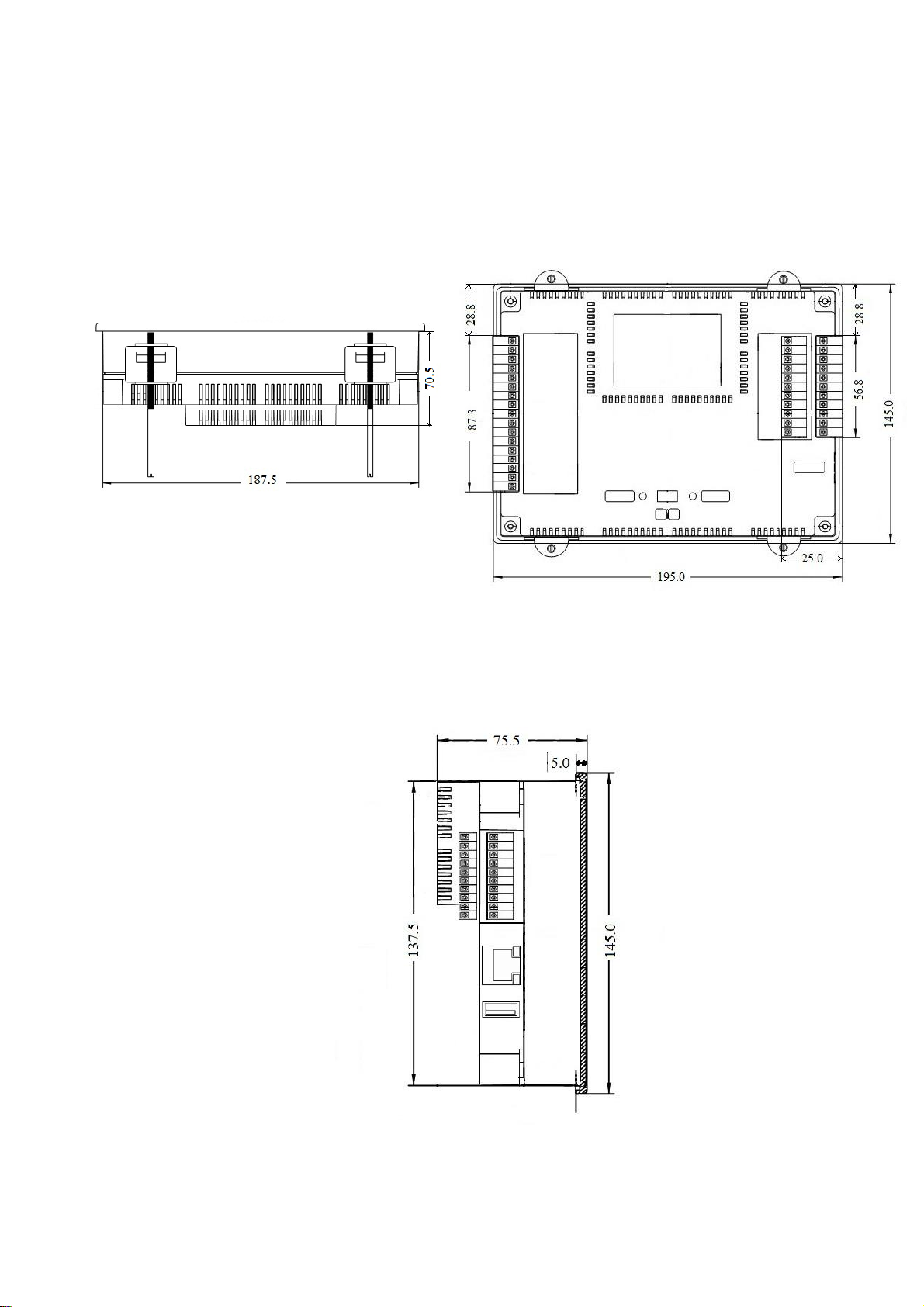
In the following figures the mechanical dimensions of TPAC1008 03 are shown.
3.1. Mechanical dimensions
Side view
Figure 3
Rear view
Figure 4
Side view
Figure 5

HMI PLC all in one: TPAC1008 03 Mect srl
ME7068_05 11/197
Technical specifications
Table 2
MECHANICAL
Material
Polycarbonate, Polyamide 6.6
Dimensions W x L x H
195 mm x 145 mm x 75.5 mm
Mounting plate
138mm x 188mm
Installation
Panel installation
Environmental conditions
Operating Temperature
0 °C ... 55 °C
Storage Temperature
-20 °C ... +85 °C
Relative Humidity
5 % a 95 % without condensation
Electric isolation
Air clearance
According to IEC 60664-1
Pollution according to
IEC 61131-2
2
Protection
Rear protection
IP 20
Front protection
IP65
Attention
Install the devices in an electrical cabinets with no more than 55°C.
Indice
Altri manuali Mect Controllori