MediaFORM CD-5916 Manuale

CD-5916 Operator’s Guide

CD-5916 Operator’s Guide
Document Revision: 060102
Page 1
Copyright Notice
Copyright ©1996-2002 by MediaFORM, Inc. All rights reserved.
This manual and the accompanying illustrations may not be copied, reproduced,
electronically transmitted, or translated into another language, in whole, or in part,
without the written consent of MediaFORM, Inc.
CD2CD, CD2CD PRO, CD-5400L, CD-5908, CD-5916, CD 3701, CD-
3703, CD-3706P, cdDIRECTOR, AP-1301i/t, Easi-DAT and Easi-AUDIO
are trademarks of MediaFORM, Inc.
Other trademarks referred to are the property of their respective trademark or
registered trademark holders.
Warranty
MediaFORM, Inc. warrants to the original purchaser that the equipment that you have purchased is free from
defects in materials and workmanship, for a period of time as follows:
Duplicator Electronics & Mechanical Parts 1 year
CD-R/RW Recorders 1 year
This warranty is applicable when the warranty registration has been completed and returned to MediaFORM, Inc.
within a reasonable period of time following the purchase and the warranty is NOT transferable. This warranty
does not apply to malfunctions caused by misuse, negligence, accident, or alteration, nor is MediaFORM, Inc.
responsible for consequential damages related to the use of this equipment.
This warranty is made in lieu of any other warranty expressed or implied.
CD-R/RW Recorder Warranty Policy
Individual CD-R/RW recorder manufacturers are responsible for the products they provide. As a convenience,
MediaFORM, Inc. will honor any service issue related to a defective recorder while under its respective
manufacturer’s warranty providing that the recorder has been purchased from MediaFORM, Inc. either directly
or indirectly. MediaFORM, Inc. assumes no responsibility for products NOT purchased through MediaFORM,
Inc.
Piracy
The copying of audio, video, or software without the permission of the copyright holder is illegal. MediaFORM,
Inc. accepts no responsibility for the copyright use or misuse of this equipment. It is the sole responsibility of the
user to ensure that the legal rights of copyright in duplicating are respected.
MediaFORM, Inc.
400 Eagleview Blvd.
Exton, PA. 19341
Tel.: (610) 458-9200
Fax.: (610) 458-9554
Email: [email protected]
www: http://www.mediaform.com

CD-5916 Operator’s Guide
Document Revision: 060102
Page 2
Table of Contents
MEDIAFORM, INC....................................................................................................................................................1
ABOUT MEDIAFORM, INC.....................................................................................................................................4
WHAT TO EXPECT FROM YOUR MEDIAFORM CD DUPLICATOR...............................................................................4
ABOUT THIS MANUAL............................................................................................................................................4
GETTING STARTED.................................................................................................................................................5
WHAT’S IN THE BOX..................................................................................................................................................5
PACKING MATERIALS .................................................................................................................................................5
THE BEST PLACE TO PUT THE CD-5916....................................................................................................................6
SAFETY PRECAUTIONS................................................................................................................................................6
LOCATION OF CD-5916 COMPONENTS.......................................................................................................................7
Front View............................................................................................................................................................7
Rear View.............................................................................................................................................................7
LOCATION OF CD-R/RW RECORDER PARTS AND CONTROLS....................................................................................8
LCD Display Screen And Keypad.....................................................................................................................8
MediaFORM SmartDRIVE 16X.........................................................................................................................8
SYSTEM STARTUP ...................................................................................................................................................9
LOADING A DISC ......................................................................................................................................................11
REMOVING A DISC ...................................................................................................................................................11
OPERATION -QUICK START..............................................................................................................................12
MAKING COPIES (CD-TO-CD) ..................................................................................................................................12
COMPARING DISCS (CD-TO-CD)..............................................................................................................................14
GENERAL OPERATION.........................................................................................................................................16
FUNCTION KEYS.......................................................................................................................................................16
STOPPING THE COPY OR COMPARE PROCESS...........................................................................................................23
CREATING A HARD DISK IMAGE...............................................................................................................................24
Creating A Single Hard Disk Image................................................................................................................24
Creating Multiple Hard Disk Images...............................................................................................................27
COPYING FROM A HARD DISK IMAGE ......................................................................................................................32
Multiple Images Disabled.................................................................................................................................32
Multiple Images Enabled..................................................................................................................................33
COMPARING FROM A HARD DISK IMAGE .................................................................................................................35
Multiple Images Disabled.................................................................................................................................35
Multiple Images Enabled..................................................................................................................................36
COMPARING DISCS (CD-TO-CD TOC) .....................................................................................................................38
SMARTRID AND SMARTSTAMP CODES .................................................................................................................40
Writing SmartRID And SmartSTAMP Codes.................................................................................................40
Reading SmartRID And SmartSTAMP Codes..............................................................................................41
ATIP CODES ............................................................................................................................................................43
Reading ATIP Codes........................................................................................................................................43
VIEWING SCSI DEVICE INFORMATION......................................................................................................................44
COPY PROTECTION ...................................................................................................................................................46
Enabling Copy Protection.................................................................................................................................46
CREATING AUDIO COMPILATION DISCS ....................................................................................................................48

CD-5916 Operator’s Guide
Document Revision: 060102
Page 3
WORKING WITH CD-REWRITABLE (CD-RW) DISCS ...............................................................................................50
CD-RW Supported Formats ............................................................................................................................50
CD-RW Copying Speed...................................................................................................................................50
Copying From CD-RW Master Discs..............................................................................................................50
CONVERTING FROM TRACK-AT-ONCE TO DISC-AT-ONCE........................................................................................51
SETTING THE INTERNAL CLOCK.....................................................................................................................53
PASSWORD PROTECTION...................................................................................................................................54
SETTING A PASSWORD .............................................................................................................................................54
STARTING UP USING A PASSWORD...........................................................................................................................54
CHANGING OR REMOVING A PASSWORD..................................................................................................................55
SETTING THE MACHINE ID ................................................................................................................................56
FIRMWARE UPDATES...........................................................................................................................................57
CONNECTING THE CD-5916 TO A PC................................................................................................................59
MINIMUM SYSTEM REQUIREMENTS..........................................................................................................................59
SCSI DEVICE SETUP.................................................................................................................................................59
SYSTEM STARTUP.....................................................................................................................................................60
APPENDIX A: SUPPORTED FORMATS..............................................................................................................61
APPENDIX B: ERROR CODES DISPLAYED ON SCREEN..............................................................................62

CD-5916 Operator’s Guide
Document Revision: 060102
Page 4
About MediaFORM, Inc.
Thank you for purchasing MediaFORM’s CD-5916 standalone CD
duplicator. MediaFORM manufactures a wide variety of CD duplication
equipment. This includes manual and fully automatic CD duplicators, and
CD printers. We hope you will consider us for all of your duplication needs.
What To Expect From Your MediaFORM CD Duplicator
Your MediaFORM CD-5916 CD duplicator is professionally designed and
manufactured to give you years of trouble free operation. To avoid
accidental damage to your new CD duplicator, please read and understand
this manual thoroughly before operating the unit.
About This Manual
This manual is written for both novice and experienced users. Please read
through this Operator’s Guide from beginning to end before using the unit.
Once having read the manual, follow along chapter by chapter. This will
provide the necessary understanding of your new CD-5916 CD duplicator.

CD-5916 Operator’s Guide
Document Revision: 060102
Page 5
Getting Started
Carefully remove the CD-5916 CD duplicator from the shipping container.
Inspect the contents and verify them against the packing slip. Report any
errors in shipping as soon as possible.
What’s In The Box
Your new CD-5916 CD duplicator includes:
•CD-5916 CD duplicator
•Power cord
•Firmware CD
•Operator’s Guide
•MediaFORM Product & Warranty Registration card
Packing Materials
Please retain the original box and packaging in the event that the unit
requires future servicing. This will help to reduce the possibility of damage
occurring in transit.

CD-5916 Operator’s Guide
Document Revision: 060102
Page 6
The Best Place To Put The CD-5916
The best operating location for the CD-5916 CD duplicator is in a climate
controlled area, free of dirt, dust, humidity, excessive heat, and electronic or
electromagnetic interference. Room temperature should be between 65 and
75 degrees Fahrenheit, or between 18 and 23 degrees Celsius. Place the CD-
5916 on a solid, steady work surface, and allow sufficient room for all
incidental work materials. Provide at least six inches of clearance on all
sides of the unit for ventilation.
Safety Precautions
The system is shipped with a three-prong power connector, and must be
used with a properly grounded AC receptacle. DO NOT try to defeat the
third “ground” prong. All computer peripherals must be properly grounded,
and the CD-5916 is no exception. The use of a power conditioner, such as
an Uninterruptible Power Supply (UPS) or a surge protector, is highly
recommended. The minimum required size is 400VA.
Repairs or alterations should only be attempted by authorized factory-
trained technicians. MediaFORM reserves the right to void the warranty if
unauthorized service is performed.

CD-5916 Operator’s Guide
Document Revision: 060102
Page 7
Location Of CD-5916 Components
Front View
Rear View

CD-5916 Operator’s Guide
Document Revision: 060102
Page 8
Location Of CD-R/RW Recorder Parts And Controls
LCD Display Screen And Keypad
MediaFORM SmartDRIVE 16X
Legend
1) Disc tray -Discs are loaded and removed from this tray. Pressing the eject button will open the
tray when the power is switched on to the CD-5916.
2) Read and write status LEDs -These indicators light up when the recorder is reading or writing.
3) Eject button -This button is used to open or close the disc tray.
4) Emergency eject pinhole -In the event that the disc tray will not open by pressing the eject button
insert the tip of a large paper clip into this hole and push.

CD-5916 Operator’s Guide
Document Revision: 060102
Page 9
System Startup
Before duplicating can begin, it is necessary to review a few details.
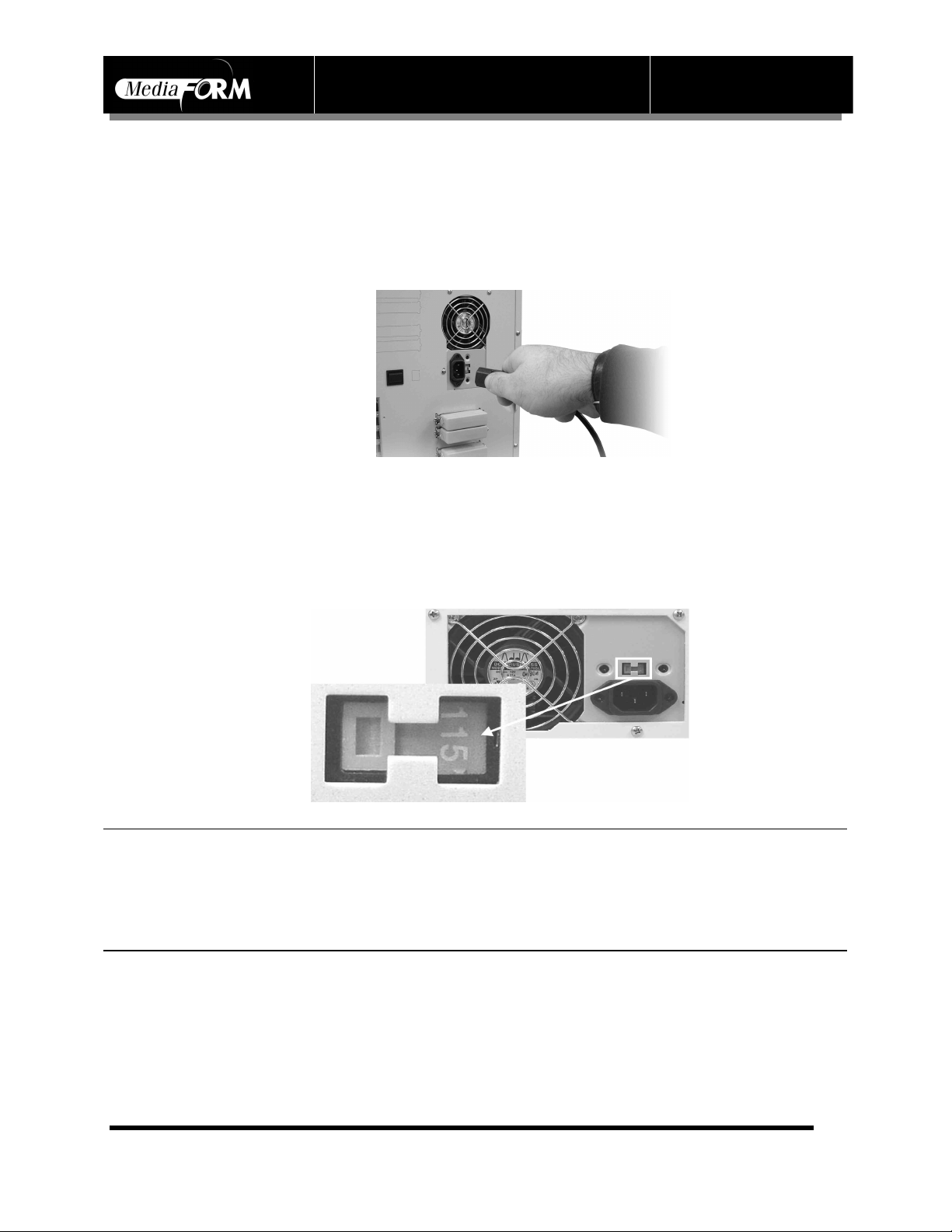
•Plug one end of the supplied power cord into the upper receptacle at the
rear of the unit.
•Next, verify that the voltage selector switch is set correctly. It is located
between the two power receptacles. The CD-5916 supports both 115
VAC and 230 VAC at 50 ~ 60 Hz. Please confirm that the appropriate
voltage (115 VAC for North America) has been selected.
M
CAUTION
Always use properly grounded receptacles, or severe damage to
your system may result. The use of a surge protector or
Uninterruptible Power Supply (UPS) is highly recommended.
Indice
Altri manuali MediaFORM Duplicatore di dischi
Manuali Duplicatore di dischi popolari di altre marche

Kanguru
Kanguru U2-DVDDUPE-S Manuale utente

StarTech.com
StarTech.com 8STSATDUP11 Manuale utente

DUPLO SEIKO CORPORATION
DUPLO SEIKO CORPORATION Duprinter DP-460 Manuale utente

Addonics Technologies
Addonics Technologies UDFH7 Manuale utente

Vinpower Digital
Vinpower Digital MiniLoader VDX-1 Manuale utente

Addonics Technologies
Addonics Technologies CFASTD5 Manuale utente