
Medion Camcorder Manuale utente

1
Overview of the equipment
Front
1 Mode selector switch
2 Lens
3 LC display
4 Self-timer LED
5 LED
6 HDMI/USB connector casing
1
2
3
4
5
6
2
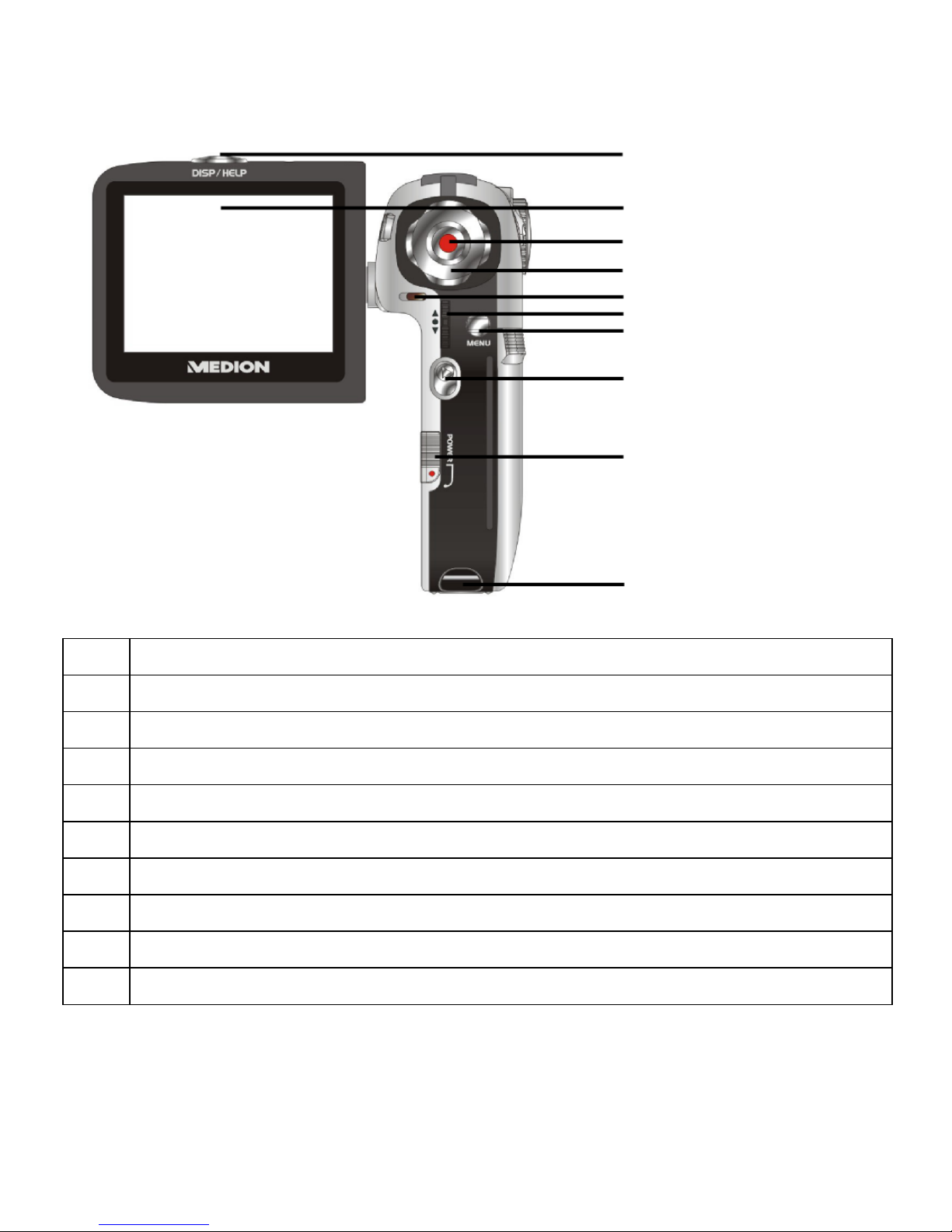
Rear
7 Display/Help button
8 LC display
9 Shutter release
10 Navigation pad/Up/Down/Right/Left
11 Mode/Recording LED
12 Zoom/OK button
13 Menu button
14 Playback button
15 On/Off switch
16 Strap holder
7
8
9
10
11
12
13
14
15
16
3
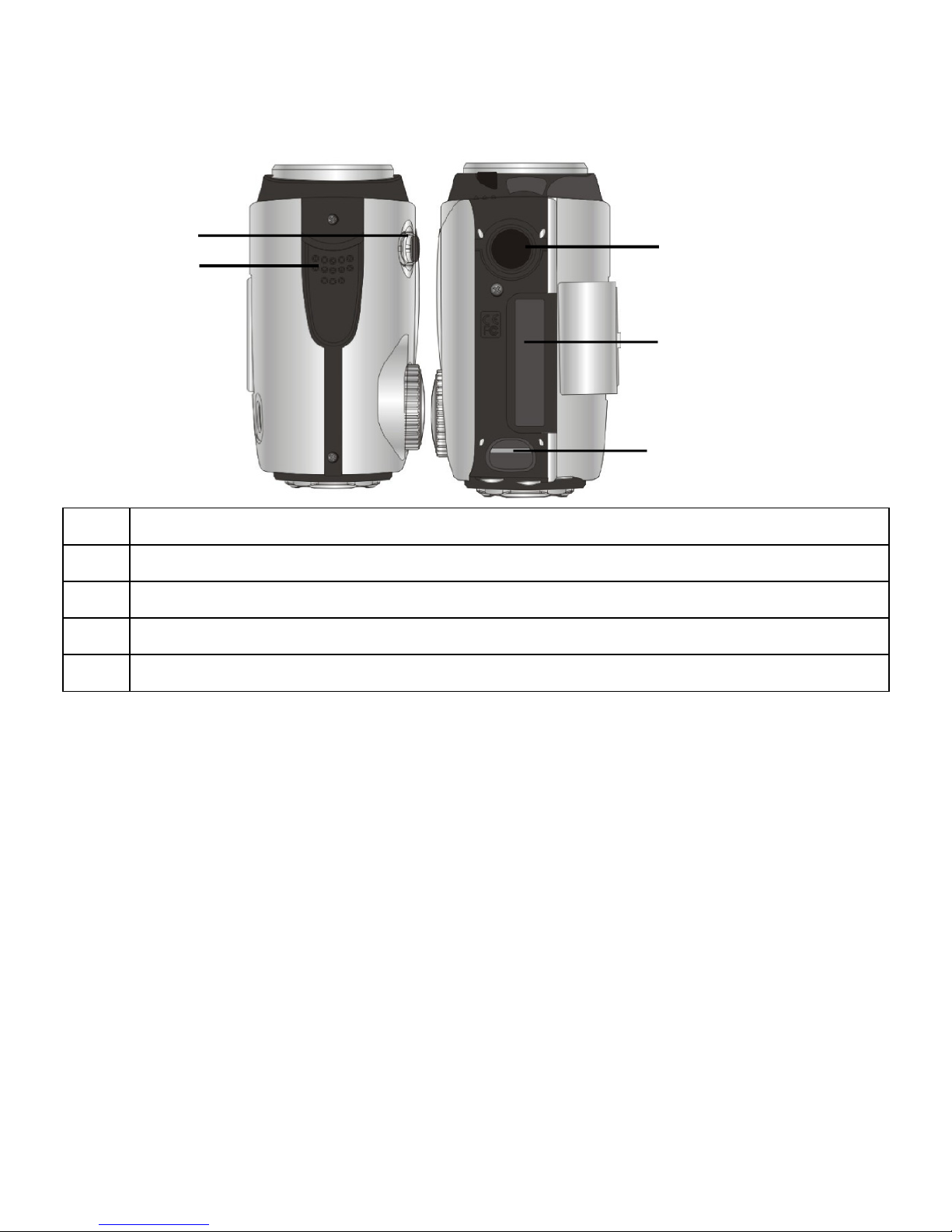
Upper side/underside
17 Macro switch
18 Speaker
19 Tripod socket
20 SD card compartment cover
21 Strap holder
18 19
20
21
17

4
Contents
Overview of the equipment ...........................................................................1
Contents........................................................................................................4
Safety instructions..........................................................................................6
About these instructions.............................................................................6
Proper use ..................................................................................................6
Warnings....................................................................................................6
The Camcorder.........................................................................................10
Package contents .....................................................................................11
First steps .................................................................................................15
Adjusting the system settings ...................................................................19
Film mode ................................................................................................27
Film menu................................................................................................30
Film playback mode .................................................................................36
Film playback menu .................................................................................39
Photo mode .............................................................................................42
Photo menu .............................................................................................45
Photo playback mode...............................................................................52
Photo playback menu...............................................................................57
Audio mode .............................................................................................62
Audio playback mode...............................................................................63
Audio playback menu...............................................................................65
Underwater functions ..................................................................................68
Insert camcorder in underwater casing.....................................................68
Appliance overview in underwater casing ................................................69

5
Installing drivers and software .....................................................................72
Technical Data .............................................................................................73
Disposal.......................................................................................................74

6
Safety instructions
About these instructions
Read the safety instructions carefully before use. Note the
warnings on the device and in the operating instructions
Always keep the operating instructions close to hand. If you
sell the equipment or give it away, make sure you also hand
over these instructions and the guarantee card.
Proper use
The camera is intended for taking pictures in digital format. If the camera
is in the closed underwater casing, you can also take underwater
pictures.
Do not operate the camera either in extreme heat or extreme cold.
The camera is not suited to operation in extreme conditions.
The camera is for private use only and not for use in a heavy industrial
business.
Warnings
In order to avoid injury, please heed the following warnings while using
the product:
Do not trigger the flash too close to the eyes. In this case, damage can be
caused to the eyes of the person being photographed.
Keep at least 1m away from children when you are working with the
flash.
Do not place the camera strap round the neck. If the strap is placed
inadvertently around the neck there is a risk of choking.
Do not open or dismantle the camera.
Dismantling the camera constitutes a risk of high-voltage electric shock.

7
Only expert personnel should undertake internal component tests,
modifications and repairs. Take the product to an authorised Service
Centre for testing.
If you are not going to use the camera for a period of time, remove the
batteries to prevent leakage
The camera must not be exposed to either drips or spray, unless it is in
the underwater casing. Do not place any objects filled with liquids (e.g.,
vases) on the camera.
Handling batteries
Batteries may contain combustible materials. If not properly handled,
batteries may leak, heat up intensely, ignite or even explode, which
could result in damage to your camera and your health.
Please follow the following instructions at all costs:
Keep children away from batteries.
If batteries are swallowed, consult your doctor immediately.
Never charge batteries (unless it is expressly specified).
Never empty the batteries by means of high power output.
Never short-circuit the batteries.
Never expose the batteries to excessive heat, such as from sunshine, fire
or similar.
Do not dismantle or warp the batteries.
Your hands or fingers could be injured or battery fluid could come into
contact with your eyes or skin. If this should happen, rinse the affected
parts with a large quantity of clean water and inform your doctor
immediately.
Avoid hard knocks and vibrations.
Always observe the correct polarity.
Take care to ensure that the plus (+) and minus (-) poles are correctly
inserted.

8
Do not mix up new and old batteries or different types of battery.
This could cause your camera to malfunction. In addition, the weaker
batteries would discharge too much.
Remove used batteries from the camera immediately.
Remove the batteries from the appliance if you do not intend to use it for
a long period of time.
Immediately replace all used batteries in a camera with new batteries of
the same type.
Insulate the battery contacts with an adhesive strip, if you wish to store
or dispose of the batteries.
Safety precautions
Take the following safety precautions, in order to avoid damage to your
camera and to always keep it in perfect condition.
Store in dry conditions
The camera itself is not watertight. It may only be immersed in water if it
is inside the underwater casing supplied.
Before immersing the camera in water, ensure that the underwater
casing is tightly closed and that there is nothing jammed between the
casing cover and the rubber seal.
Keep away from damp, salt and dust.
Wipe off salt and dust with a light, damp cloth if you have been using
the camera on the beach or by the seaside. Carefully dry the camera
afterwards.
Keep away from strong magnetic fields.
Never place the camera too close to appliances which generate strong
electromagnetic fields, such as, for example, electric motors. Strong
electromagnetic fields may result in camera malfunctions or disturb the
data recording.
Avoid excessive heat
Do not use or store the camera in sunlight or at high temperatures.

9
Stress of this kind can result in the batteries leakage or in the casing
warping.
Avoid high variations in temperature
If you take the camera from a cold environment into a warm one, or vice
versa, drops of water can form outside and inside the camera. To
prevent condensation, put the camera into the carrying case or into a
plastic bag before you subject it to a quick change of temperature.
Do not drop camera
Hard shaking caused from falling or vibrations can cause malfunctions.
Loop the carrying strap round your wrist when you carry the camera.
Do not remove batteries when data are being processed.
When image data is being recorded to memory cards or deleted,
switching off the power supply can result in data loss or damage the
internal circuit or the memory.
Treat lens and all moving parts carefully
Do not touch the lens. Be careful when handling the memory card.
These parts are not designed for high stresses.
Memory cards
Switch the power supply off, before you insert or remove the memory
card. Otherwise the memory card may become unstable. Memory cards
may become hot during use. Always remove the memory cards carefully
from the camera.
This symbol on the camera certifies that the device complies with
EU guidelines on electromagnetic interference. CE stands for
Conformité Européene (European Conformity).

10
The Camcorder
Equipment description
The camcorder provides the following:
the functions of a digital camcorder,
of a digital camera
and of a digital device -
in one handy piece of equipment. With the enclosed underwater casing, you
can also perform the specified functions underwater, to a maximum depth of
5m.
Instead of a viewfinder, the camcorder has a high-resolution LC display,
enabling you to monitor your pictures. In addition, the LC-display is used to
show the screen menus in which you make your settings.
The Camcorder has four-times digital zoom and can take films to a maximum
resolution of HD 1280x720 and photos in 12M pixels (interpolated).
The internal memory has a usable capacity of approx. 8MB. Thus you can
also record photos or short films even if you do not have an SD card in the
camera.
The camcorder can be easily connected to a computer by USB or to a TV set
by HDMI connection.
Using an HDMI cable, connect your camcorder to a TV with a digital
connection, to watch your films recorded in HD format.
Altri manuali per Camcorder
1
Indice
Altri manuali Medion Videocamera

Medion
Medion MD 85733 Manuale utente

Medion
Medion MD 86066 Manuale utente

Medion
Medion Life P47010 Manuale utente

Medion
Medion DIGITAL VIDEO CAMERA Manuale utente

Medion
Medion LIFE S47100 Manuale utente

Medion
Medion S89038 Manuale utente

Medion
Medion LIFE P47350 MD 86288 Manuale utente

Medion
Medion LIFE Manuale utente

Medion
Medion Life X47006 Manuale utente

Medion
Medion DIGITAL VIDEO CAMERA Manuale utente


