
Mesa I-Video PRO XVR1648 Manuale utente

1
USER MANUAL
XVR1648
Stand Alone Type
DVR SYSTEM

2
HDD , CD/DVD-RW Connect -------------------------------------------------- 12
System -------------------------------------------------------- 23
User ---------------------------------------------------------- 22
Network --------------------------------------------------------- 20
Disk Management -------------------------------------------------- 32
Event ------------------------------------------------------- 26
Setup-System ------------------------------------------------------ 15
Display --------------------------------------------------------- 15
Camera ------------------------------------------------------ 17
Audio ------------------------------------------------------- 19
Configuring the live display ---------------------------------------------- 14
Power On ---------------------------------------------------------------- 13
Live Display --------------------------------------------------------------- 14
Remote Controller description --------------------------------------------- 11
Rear panel description --------------------------------------------------- 10
Front panel description --------------------------------------------------- 9
Product Description -------------------------------------------------------- 9
System Organization ---------------------------------------------------- 8
Product Contents List --------------------------------------------------- 7
Specifications --------------------------------------------------------- 5
Specification & Organization -------------------------------------------------- 5
Setup-Record ------------------------------------------------------ 33
Pre/Post Recording --------------------------------------------- 33
Normal Record---------------------------------------------------- 34
Intensive Record -------------------------------------------------- 36
Panic ------------------------------------------------------- 38
IMPORTANT SAFETY INSTRUCTIONS -------------------------------------------- 4
Panorama 1 search --------------------------------------------------- 40
Normal Search ------------------------------------------------------ 39
Search -------------------------------------------------- 39
Panorama 2 search --------------------------------------------------- 45
Smart search --------------------------------------------------- 46

3
Ch Selection -------------------------------------------------- 49
SEQ Start / Stop ---------------------- ------------------------------------ 50
Reserved Data Management ---------------------------------------------- 48
Archiving --------------------------------------------------- 47
Digital Zoom ------------------------------------------------------ 52
Archiving -------------------------------------------------------- 47
PTZ --------------------------------------------------------------- 51
Key Lock ------------------------------------------------------ 53
Panic Rec ------------------------------------------------------ 54
Shutdown ------------------------------------------------------ 55
System Requirement ---------------------------------------------------- 56
Introduction ----------------------------------------------------------- 57
Remote SW Local Setup ----------------------------------------------------- 58
local setup ---------------------------------------------------- 58
Remote SW installation ------------------------------------------------------ 56
Search Method -------------------------------------------------------- 63
Search Option -------------------------------------------------------- 64
Remote SW DVR System Setup ------------------------------------------------ 69
Camera ------------------------------------------------------------ 70
Alarm/Event -------------------------------------------------------- 71
Display ---------------------------------------------------------- 74
Audio ----------------------------------------------------------- 76
User ----------------------------------------------------------- 76
Remote SW DVR Record Setup ------------------------------------------------ 77
Record Mode ---------------------------------------------------------- 77
Normal record --------------------------------------------------------- 79
Intensive record -------------------------------------------------------- 81
Panic record ---------------------------------------------------------- 82
Search Function Introduce ------------------------------------------------ 62
Remote SW Search --------------------------------------------------------- 62
WEB CONNECTION SETUP ----------------------------------------------------
83

4
IMPORTANT SAFETY INSTRUCTIONS
1) Read these instructions.
2) Keep these instructions.
3) Heed all warnings.
4) Follow all instructions.
5) Do not use this apparatus near water.
6) Clean only with a dry cloth.
7) Do not block any of the ventilation openings. Install in accordance with the manufacturer's instructions.
8) Do not install near any heat sources such as radiators, heat registers, stoves, or other apparatus
that produce heat.
9) Do not defeat the safety purpose of the polarized or grounding type plug. A polarized plug has
two blades with one wider than the other.
A grounding type plug has two blades and a third grounding prong.
The wide blade or the third prong is provided for your safety.
When the provided plug does not fit into your outlet, consult an electrician for replacement
of the obsolete outlet.
10) Protect the power cord from being walked on or pinched particularly at plugs, convenience
receptacles, and the point where they exit from the apparatus.
11) Only use the attachments/accessories specified by the manufacturer.
12) Use only with a cart, stand, tripod, bracket, or table specified by the manufacturer, or sold
with the apparatus.
When a cart is used, use caution when moving the cart/apparatus combination to avoid injury
from tip-over.
13) Unplug this apparatus during lightning storms or when unused for long periods of time.
14) Refer all servicing to qualified service personnel. Servicing is required when the apparatus
has been damaged in any way, such as power supply cord or plug is damaged, liquid has
been spilled or objects have fallen into the apparatus, the apparatus has been exposed to
rain or moisture, does not operate normally, or has been dropped.
15) This equipment is indoor use and all the communication wirings are limited to inside of the
building.
16) The socket-outlet shall be installed near the equipment and shall be easily accessible.
17) CAUTION
RISK OF EXPLOSION IF BATTERY IS REPLACED BY AN INCORRECT TYPE.
DISPOSE OF USED BATTERIES ACCORDING TO THE INSTRUCTIONS.
# Operation Max temperature : 40℃
# USB Load condition: USB Ports( 5 Vdc, Max. 500 mA)

5
Specifications
MODEL
XVR1648
Operation
PENTAPLEX
PENTAPLEX performance
(Doing Simultaneous Live Display/Recording/Playback/Archiving/
Networking effectively without interfering each other operations)
Video in
Channels
16
Connection
BNC, 1.0Vpp composite 75ohm balanced
Loop through
BNC,1.0Vpp composite 75ohm unbalanced, auto termination
Audio in
Channels
4
Connection
line level unbalanced
Main Displays
BNC
1.0Vpp composite 75ohm unbalanced
VGA
15 pin D-SUB 1024 x 768 @ 60Hz
Screen display modes
1 , 4 , 9, 8 , 16
User assignable each camera’s position on screen template
Sequence
Adjustable dwell time, user defined sequences
Spot displays
Channels
4 fully programmable
Connection
BNC, 1.0Vpp composite 75ohm unbalanced
Display mode
Full screen sequence, adjustable dwell time
Audio out
Channels
1
Connection
RCA, line level unbalanced
External alarm
Inputs
16(16 Open collector TR), NO or NC common ground
Outputs
16, high(+5V) or low(0V) selectable, common ground
User interface
On screen display
GUI, alpha blending
Control
Front panel/IR Remote/USB Mouse
Recording
Video CODEC
MPEG-4
Resolution options for each
channel
CIF (352 x 240, 352 x 288), 2 CIF (704 x 240, 704 x 288)), D1 (704 x 480, 704 x 576)
Maximum total frame rate
480 FPS (NTSC) / 400 FPS (PAL)
Image quality
Highest, High, Standard, Low
Pre-event recording
5 seconds max
Recording modes
Continuous / Motion detection / Alarm / User event / Panic
Frame rate options for each
channel
30 – 15 – 7.5 – 4 – 2 – 1
Schedule
Configurable recording time
limits
Weekly / Daily per Camera
Audio
Audio inputs independently assigned to each channel
Motion detection
16 x 16 selectable grid with 10 levels of sensitivity
Covert recording
Yes, selectable by channel
Camera title
English and Numeral
SPECIFICATION&ORIGANIZATION

6
Model
XVR1648
Playback
Speed
Forward / reverse. 1x, 2x, 3x, 4x, 8x, 16x, 32x, 64x, 128x
Control
Front panel buttons and Jog / Shuttle ring/USB Mouse
Search method
Calendar / timeline, event log, Panorama Search 1,2, Smart Search
Split screen display modes
1,4,16
Audio synchronization
Yes, any frame rate
Archiving
Storage
CD-RW (DVD±RW option), USB Memory stick, Network
Format
Watermarked AVI
Archive data
Independent channels selection (video / audio), backup log, event log
Time
Time zone
Worldwide, Selectable
DST
Yes
PTZ
RS-485
Multi protocol, baud rate and speed control for each channel
System
Watchdog
Yes
Abnormal shutdown detection
Yes, with system auto recovery
HDD error detection
Yes, SMART monitoring
Network
Connection
RJ45, 10 / 100 Ethernet
DHCP
Yes
DDNS
Yes
Two way network audio
Yes
Bandwidth management
Yes
Remote client
Client software
Yes, Included
Remote configuration
Yes
Remote PTZ control
Yes
Email event notification
Yes
Storage
Maximum Capacity
Not limited
Storage
4 x HDD maximum
Recording options
Write once / Overwrite
Event handling
Source
Alarm in, motion detection, video loss, HDD error, User event
Action
Record, alarm out, email notification, log, remote client popup, buzzer, full screen popup
Security
User levels
ADMIN, MANAGER, USER
Key Lock
Yes, password protected
Physical
Dimensions
428mm(w) x 475mm(d) x 93mm(h)
Weight
12Kgs
SPECIFICATION&ORIGANIZATION
7
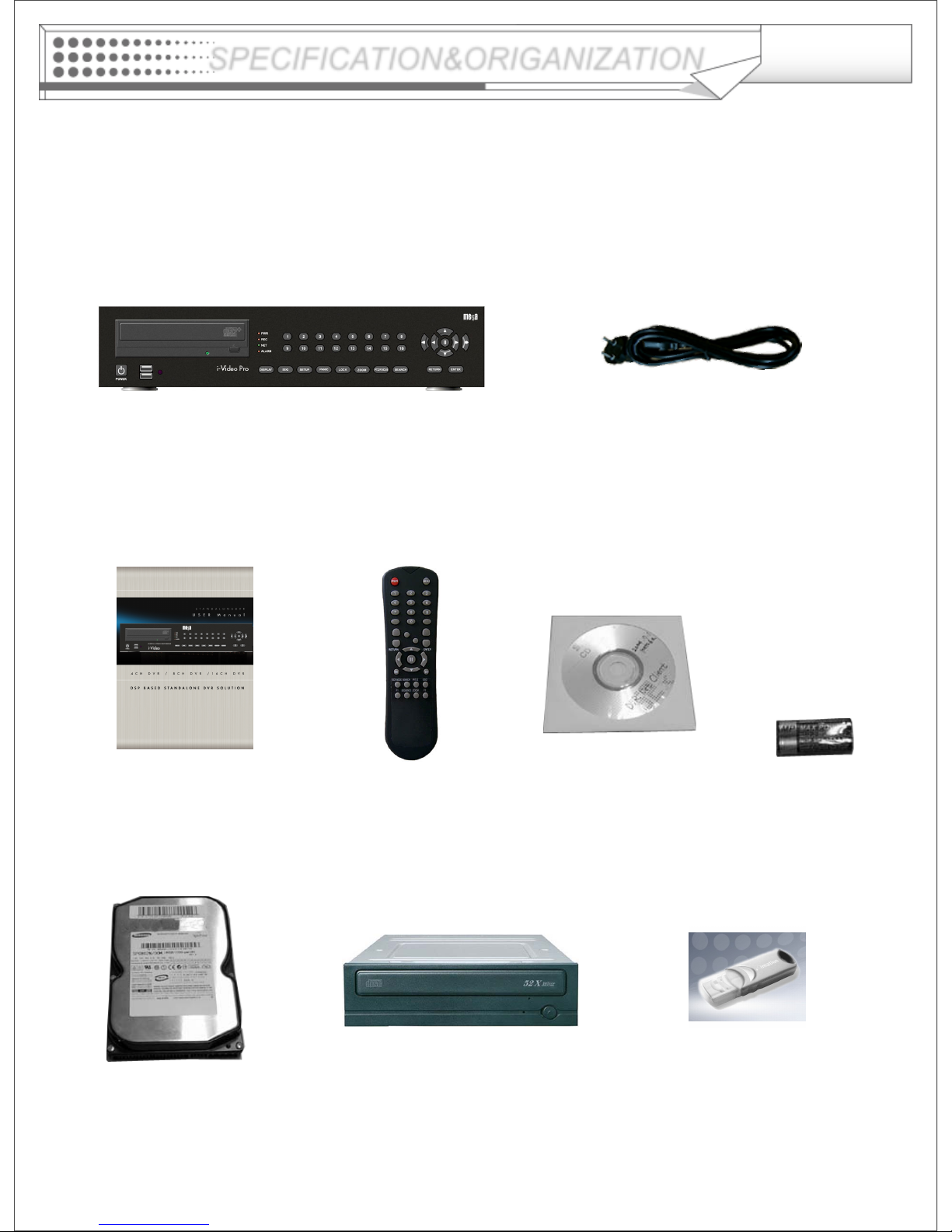
Product Contents List
Please confirm that all product contents are present when open the package.
①Basic Contents
Remote ControllerInstruction Manual Remote Agent
Installation CD AAA Battery x 2
AC Power Cable
②Optional Contents
Internal Hard Disk Drive Internal CD-RW/DVD-RW Drive USB Thumb Drive
SPECIFICATION&ORIGANIZATION

8
SPECIFICATION&ORIGANIZATION
System Organization
NETWORK
Camera #1-16
Alarm Sensor #1-16 Alarm Out #1-16
VCR VGA
Monitor A/V Monitor
Remote Client
PC(RA & CMS) Image Printer
Video In
Video Out
TCP/IP
Alarm Input/Out
Remote
Controller
CD/
DVD-
RW
Backup
AVI Backup
WEB Client
USB USB Mouse

9
DISPLAY
Selects the various display
modes in live display and
playback
SEQ
Calls the currently defined
sequence mode
SETUP
Displays the setup menus
PANIC
Selects the panic recording
mode
LOCK
Locks the front panel buttons
ZOOM
Selects digital zoom mode in
live display
PTZ/FOCUS
Selects PTZ mode in live
display
SEARCH
Displays the search menu
USB ports
Supports a wide
variety of USB
memory stick for
archiving, system
setting backup and
firmware upgrade.
An additional USB
port is also
provided on the
rear panel
Mouse move,
Mouse right Click
and Left Click
It works same as
Mouse control
CHANNEL SELECTION
BUTTONS
Used to display individual
channels in live display and
playback ,And also used to
enter numeric
passwords for login screens
Increases the speed for
reverse playback
Reverses playback
Pauses / resumes playback
Selects forward playback
Increases the speed for
forward playback
Front Panel
PRODUCT DESCRIPTION
POWER BUTTON
Turn the power on/off
10
• When System Install, Please do under System Power Off Status.
• VGA monitor is main monitor. If you connect the CRT monitor through
monitor out, you can not see the menu.
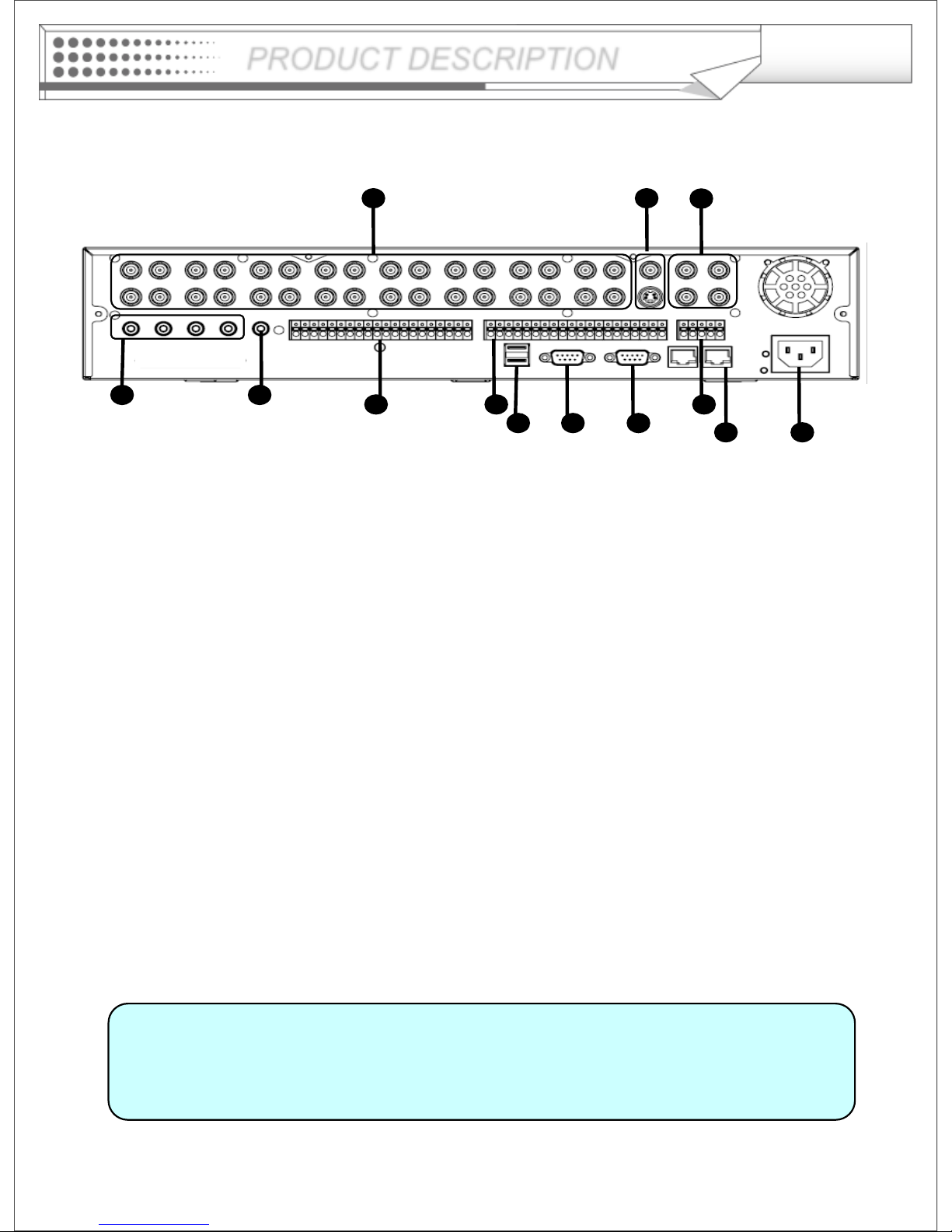
Rear Panel
Tip
12
98 10 13
1 2 3
476
511
①Video IN / Loop : BNC Video Input Port, BNC Video Loop Output
②Monitor out : BNC Main Monitor Output
SVHS : Output Video by Connected SVHS.
③Spot #1 ~ #4 : 4 x BNC Output to Individually-Sequenced Spot Monitors
④Audio In : 4 x RCA Audio Line Input Terminal
⑤Audio Out : RCA Audio Line Out Terminal
⑥Alarm : 16 x Input TTL Alarm/Sensor Input Terminal
⑦Alarm out : 16 x Digital Output Terminal
⑧USB PORT: USB Port for backup by USB Memory Stick or USB HDD
⑨VGA OUT : VGA Main Monitor Output
⑩RS-232C : Serial Configuration Port for Program Debugging
⑪RS-485 : PTZ device connection and control
⑫RJ-45 jack : 10/100 Ethernet LAN/WAN connection (for Remote Access and Configuration)
⑬AC Power Input
PRODUCT DESCRIPTION
Indice


