
MGE UPS Systems Comet EXtreme Series Guida utente

Comet EXtreme
4.5/6/9/12 kVA
Start-Up Guide
286-153721-01
Comet EXtreme Transformer Distribution Cabinet
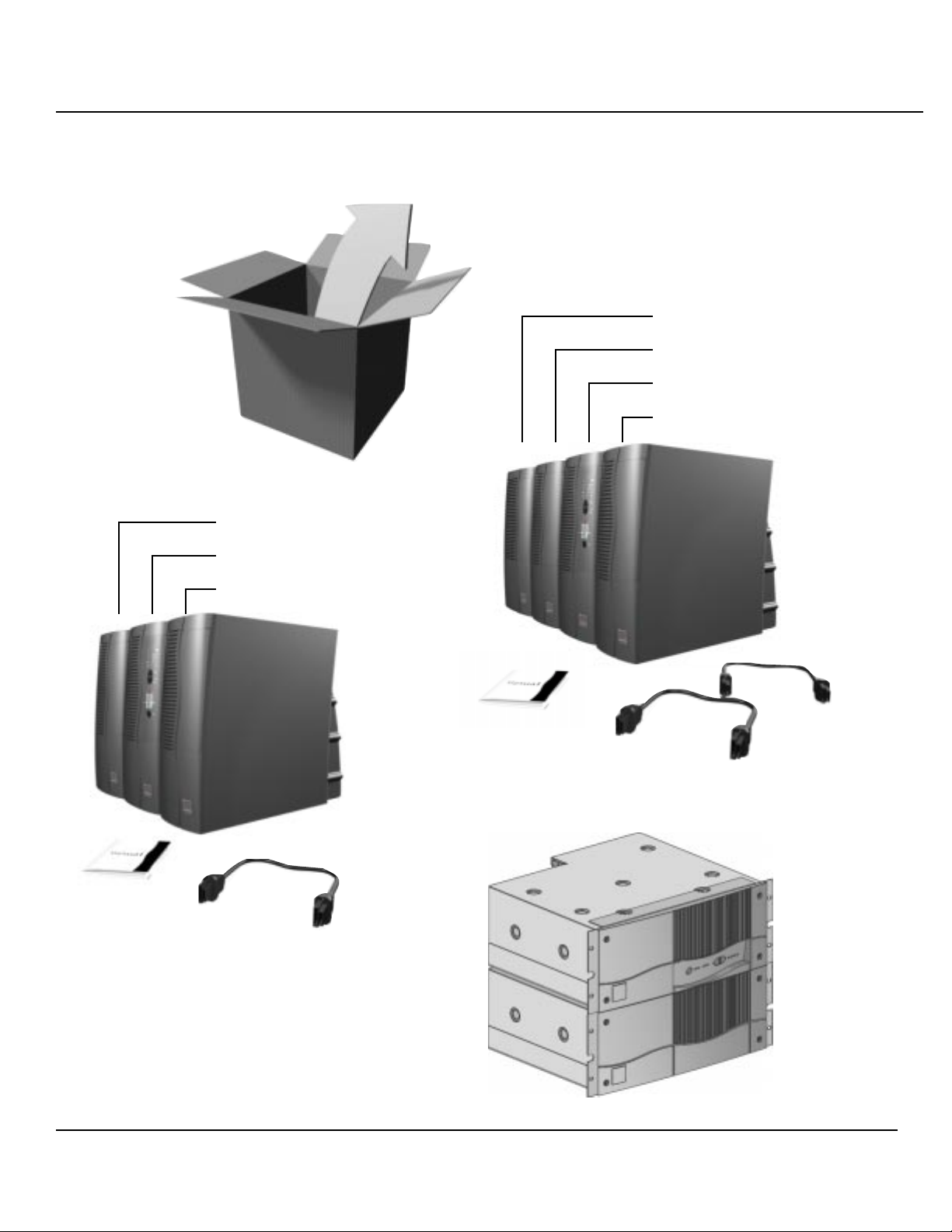
Items included in 9/12 kVA tower configuration:
Items included in 4.5/6 kVA tower configuration:
battery module
electronics module
transformer (optional)
battery module
electronics module
transformer (optional)
battery module
NOTE:
Connection and operation for rack models
and tower models are the same.
1.0 Unpacking
4.5/6 kVA rack model configuration:
86-1537121-01 3
4
3
2.0 Installation of I/O Box
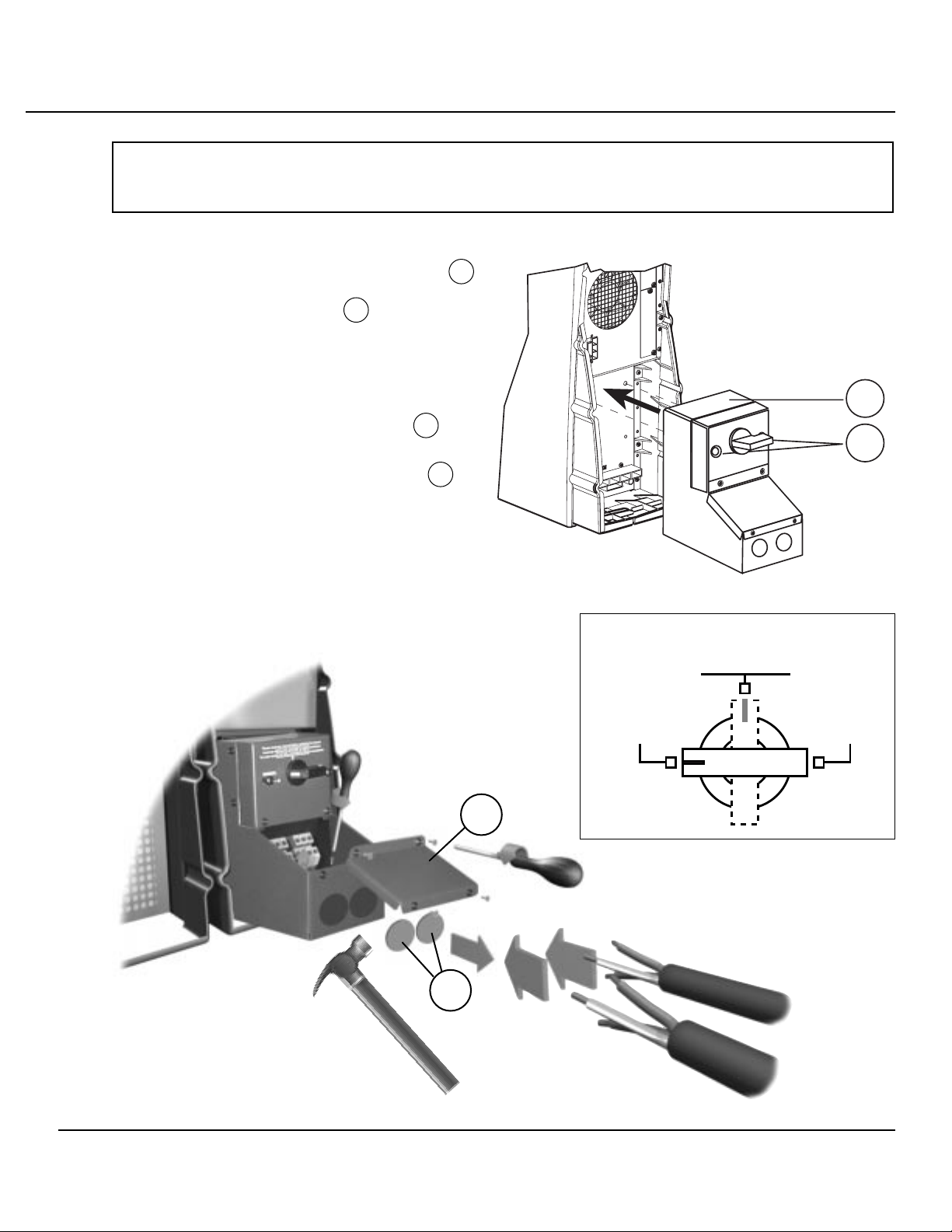
2.1 Install I/O Box. Verify the I/O box 1
is mounted properly to the UPS and
the mounting screws 2 are properly
torqued to 20.7 in. LB.
2.2 Verify the Bypass Rotary Switch, on
the I/O Box, is in the “NORMAL”
position. See Figure 1.
2.3 Remove terminal block cover 3 on
I/O Box.
2.4 Remove cable entry knockouts 4 at
rear of I/O Box.
2.5 Insert cables for input power (left)
and output power (right) thru
knockouts.
*Be sure cables are secured to I/O
box with a strain relief.
Before turning the switch,
see the manual
NORMAL BY-PASS
2
1
Figure 1
(output)
(input)
WARNING! Wiring to be done by qualified electrical personnel. Insure that all
external AC input line circuit breakers are open (off).

486-153721-01
3.0 Input/Output Connections
Always connect the earth ground wire first!
3.1 Connect the three wires of the equipment cable to the “OUTPUT” terminal block.
3.2 Connect the three wires of the power cable to the “INPUT” terminal block.
L1L2 L1L2
INPUT OUTPUT
L1L2 L3
INPUT OUTPUT
120
104
N
104
120
208VAC
FROM UTILITY
TO LOAD
208VAC
I/O BOX
TO LOAD
120VAC/208VAC/240VAC
OR
TO OPTIONAL POWER DISTRIBUTION MODULE (PDM)
- OR -
TO OPTIONAL
6 kVA ISO
TRANSFORMER
4.5/6 KVA CONFIGURATION
TERMINAL BLOCK LAYOUT
NOTE: UPS AND ISOLATION TRANSFORMER
ARE FACTORY CONFIGURED AT 208 VAC
Comet EXtreme Transformer Distribution Cabinet

4.5/6 kVA Schematic
OPTIONAL 240 VAC INPUT CONFIGURATION
4.5/6 kVA Schematic
L1
INPUT OUTPUT
4.5 /6 KVA UPS
L2
L1
L2
240 VAC INPUT
FROM UTILITY
4.5/6 KVA ISO TRANSFORMER
(240 VAC INPUT)
L1
L2
L3 NEUT OUTPUT
104A
104B
120A
120B
GND
208 240 208 VAC 240 VAC
L1
INPUT OUTPUT
4.5 /6 KVA UPS
L2
L1
L2
208 VAC INPUT
FROM UTILITY
4.5/6 KVA ISO TRANSFORMER
(208 VAC INPUT)
L1
L2
L3 NEUT OUTPUT
104A
104B
120A
120B
GND
208 240 208 VAC 240 VAC
86-1537121-01 5
Quick Start Guide

L1L2 L1L2
INPUT OUTPUT
L1 L2
INPUT OUTPUT
X3
N
X5 X6 X7X2X1
9/12 KVA CONFIGURATION
TERMINAL BLOCK LAYOUT
NOTE: UPS AND ISOLATION TRANSFORMER
ARE FACTORY CONFIGURED AT 208VAC
208VAC
FROM UTILITY
I/O BOX
TO LOAD
208VAC
TO LOAD
120VAC/208VAC/240VAC
OR
TO OPTIONAL POWER DISTRIBUTION MODULE (PDM)
- OR -
TO OPTIONAL
12 kVA ISO
TRANSFORMER
686-153721-01
Comet EXtreme Transformer Distribution Cabinet

Optional Transformer for 9/12 Floor mount:
9/12 kVA Schematic
L1
INPUT OUTPUT
9/12 KVA UPS
L2
L1
L2
208 VAC INPUT
FROM UTILITY
(or optional
240 VAC input,
configured with software)
9/12 KVA XFMR SCHEMATIC
(208 VAC) INPUT
H1
H2
OUTPUT AT
208 VAC TRANSFORMER INPUT
(L1)
(X7)
(X6)
(X1)
(X5)
(L2)
104
120
GND
N
104
120
104
120
GND
N
104
120
(X4)
(X3)
(X2)
NOT USED IN 208 VAC APPLICATION
a
a
a
b
b
b
NOT USED IN 240 VAC APPLICATION
OPTIONAL CONFIGURATION:
OUTPUT AT
240 VAC TRANSFORMER INPUT
86-1537121-01 7
Quick Start Guide
input output

L1L2L1L2
INPUT OUTPUT 9/12 KVA DUALTRANSFORMER CONFIGURATION
TERMINAL BLOCK LAYOUT
NOTE: UPS AND ISOLATIONTRANSFORMER
ARE FACTORY CONFIGURED AT208 VAC
L1L2L3
INPUT OUTPUT
120
104
N
104
120
TO LOAD
120VAC/208VAC/240VAC
OR
TO OPTIONAL
POWER DISTRIBUTION MODULE (PMM)
L1L2L3
INPUT OUTPUT
120
104
N
104
120
TO LOAD
120VAC/208VAC/240VAC
OR
TO OPTIONAL
POWER DISTRIBUTION MODULE (PMM
6KVA ISOTRANSFORMER 6KVA ISOTRANSFORMER
208VAC
FROM UTILITY
886-153721-01
Comet EXtreme Transformer Distribution Cabinet

9/12 kVA Dual Transformer Schematic
OPTIONAL 240 VAC INPUT CONFIGURATION
9/12 kVA Dual Transformer Schematic
L1
INPUT OUTPUT
9/12 KVA UPS
L2
L1
L2
240 VAC INPUT
FROM UTILITY
4.5/6 KVA ISO TRANSFORMER
(240 VAC INPUT)
L1
L2
L3 NEUT
104A
104B
120A
120B
GND
208 240
4.5/6 KVA ISO TRANSFORMER
(240 VAC INPUT)
L1
L2
L3 NEUT
104A
104B
120A
120B
GND
208 240
(240 VAC
INPUT)
OUTPUT
OUTPUT
L1
INPUT OUTPUT
9/12 KVA UPS
L2
L1
L2
208 VAC INPUT
FROM UTILITY
4.5/6 KVA ISO TRANSFORMER
(208 VAC INPUT)
L1
L2
L3 NEUT
104A
104B
120A
120B
GND
208 240
4.5/6 KVA ISO TRANSFORMER
(208 VAC INPUT)
L1
L2
L3 NEUT
104A
104B
120A
120B
GND
208 240
(208 VAC
INPUT)
OUTPUT
OUTPUT
86-1537121-01 9
Quick Start Guide
3.3 Make sure wires are secured properly.
3.4 Refit and secure the terminal block cover.
3.5 Battery-module connections
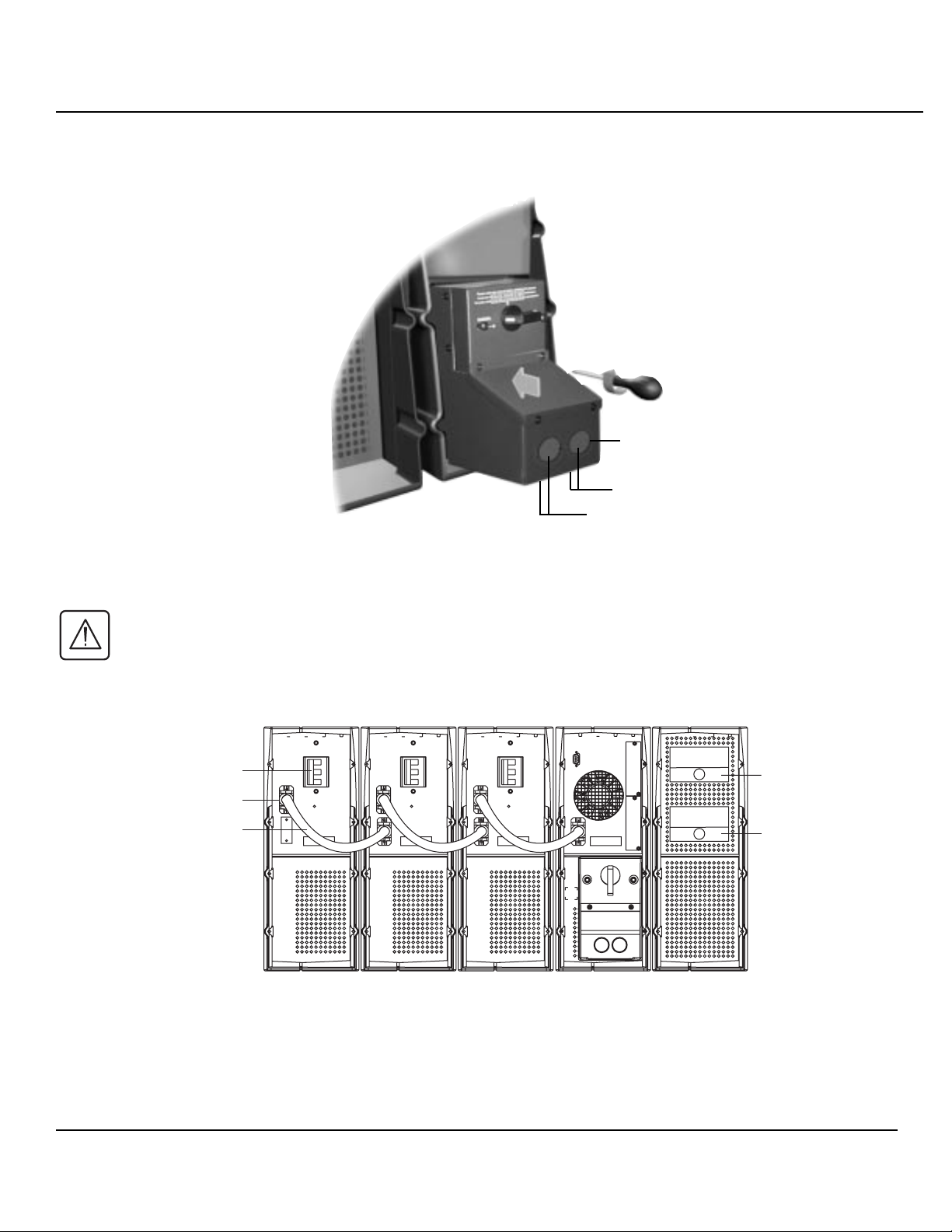
3.5.1 Comet EXtreme 4,5 and 6 kVA
3.5.1.1 Check that the battery circuit breaker is OFF.
3.5.1.2 Connect cable to the connectors of the electronic and battery modules.
Input
Battery CB
Battery Cable Connector
Battery Cable
BATTERY #3 BATTERY #2 BATTERY #1
UPS TRANSFORMER
Output
10 86-153721-01
Comet EXtreme Transformer Distribution Cabinet
output (front feed or bottom feed)
power connection knock-outs
input (front feed or bottom feed)
Altri manuali per Comet EXtreme Series
1
Questo manuale è adatto per i seguenti modelli
4
Indice
Altri manuali MGE UPS Systems Unità di distribuzione dell'energia


