
Mi MCCGQ02HL Manuale utente

Mi Door and Window Sensor 2 User Manual
Manual de usuario de Mi Door and Window Sensor 2
Mi Tür- und Fenstersensor 2 Benutzerhandbuch
Manuel d'utilisation de Mi Door and Window Sensor 2
Manuale utente Mi Door and Window Sensor 2
Manual do utilizador do Sensor de movimento portas e janelas Mi 2
Руководство пользователя Датчика открытия окон и дверей
Mi Door and Window Sensor 2
Mi 방범 센서 2사용 설명서
Czujnik do drzwi i okien Mi 2 Instrukcja obsługi
Mi 防犯センサー2取扱説明書
คู่มือผู้ใช้ Mi เซ็นเซอร์หน้าต่างและประตู 2
小米門窗感應器 2 使用說明書
01
13
24
35
46
57
68
79
88
98
109
118
126
Miﻦﻣ2ﺬﻓاﻮﻨﻟاو باﻮﺑﻷا ﺮﻌﺸﺘﺴﻣ مﺪﺨﺘﺴﻤﻟاﻞﻴﻟد
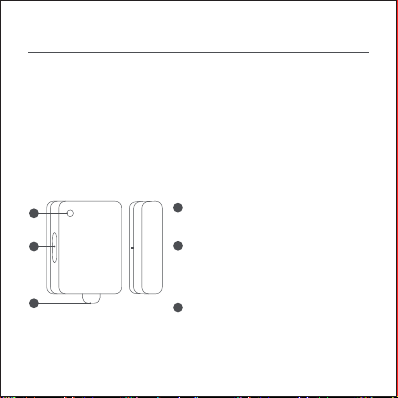
Induction Lens
(built-in status indicator and light sensor)
Insulating sheet (Tear off before use)
Reset Buon
Press: Wake up the Bluetooth connection
Press and hold for 3 seconds: Reset/confirm
adding
The Mi Door and Window Sensor 2 can be installed on doors, windows,
drawers, etc. Through the proximity and separation of the sensor and the
magnet, the opening and closing status of doors or windows is detected in
real-time, and the light sensor detects the light intensity of the surrounding
environment. Low power consumption, tool-free installation, and ready to
be aached and used.
Note: When performing an OTA update to the Mi Door and Window Sensor
2, briefly press the reset buon to wake up the Bluetooth connection. For
detailed steps, please follow the instructions in the Mi Home app.
Product Overview
Sensor Magnet
1
2
3
1
2
3
Note: This product is for indoor use only and needs to be connected to a
Bluetooth gateway for smart control.
1
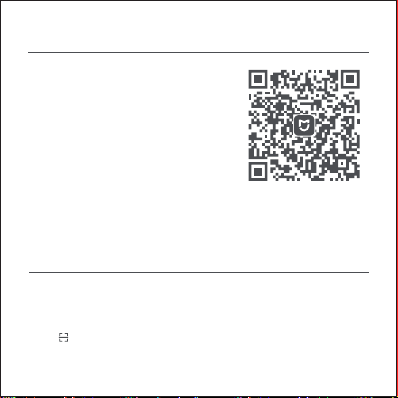
1. Open the Mi Home/Xiaomi Home app, and sign in to your account.
2. Tap + in the top right corner of the homepage in the app to enter the Add
device page.
3. Tap in the top right corner of the Add device page, scan the product's
QR code and follow the instructions to complete adding the device and start
using it.
Adding a device
This product works with the Mi Home/Xiaomi
Home app*. Use the Mi Home/Xiaomi Home
app to control your device, and to interact
with other smart home devices.
Scan the QR code to download and install the
app. You will be directed to the connection
setup page if the app is installed already. Or
search "Mi Home/Xiaomi Home" in the app
store to download and install it.
* The app is referred to as Xiaomi Home app in Europe (except for Russia). The
name of the app displayed on your device should be taken as the default.
Connecting with Mi Home/Xiaomi Home App
2
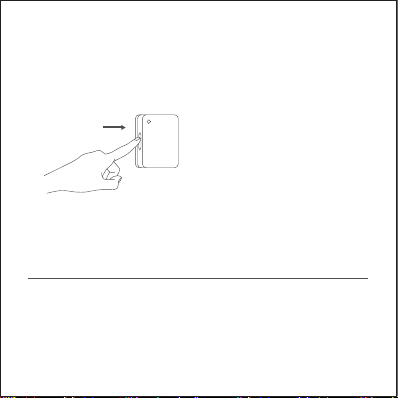
Press and hold the reset buon for 3
seconds until the indicator
continuously blinks 3 times and then
release it.
Note: If the product's QR code cannot be scanned, you can search for the
product name "Mi Door and Window Sensor 2" to complete adding it.
If it cannot be added, please try again aer holding the phone as close to
the sensor as possible.
Please install and secure the device once it has been added successfully.
This product can create smart scenes via the Mi Home/Xiaomi Home app to
realize a connection with other smart devices.
Example of a smart scene:
When the door is opened at night, it triggers the door and window sensor,
and the living room light turns on automatically.
Smart Scenes
Note: The version of the app might have been updated, please follow the
instructions based on the current app version.
3
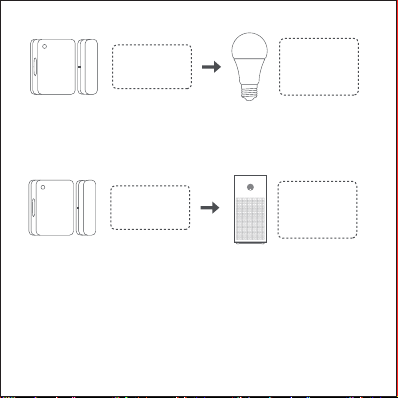
Door opening
sensor trigger
The living room
light turns on
automatically
026
Window opening
sensor trigger
The air purifier
turns off
automatically
When the window is opened to air the room, it triggers the door and window
sensor, and the air purifier turns off automatically.
For more connection functions, tap + in the top right corner of the
homepage in the Mi Home/Xiaomi Home app, and select the device as the
trigger condition to create smart connection scenes according to the
actual scenario.
4
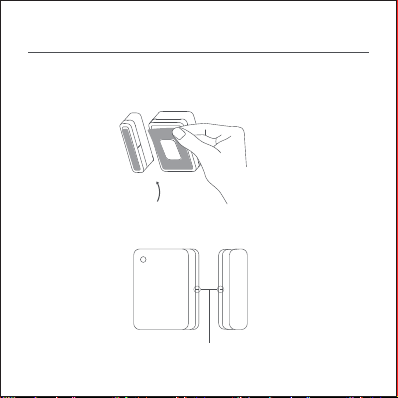
1. Apply the adhesive stickers inside the boom grooves of the sensor and
the magnet respectively. Tear off the protective film from the adhesive
stickers when installing.
2. Align the marks on the side of the sensor unit and the side of the magnet
as much as possible during installation.
Try to align the installation marks.
Installation
5
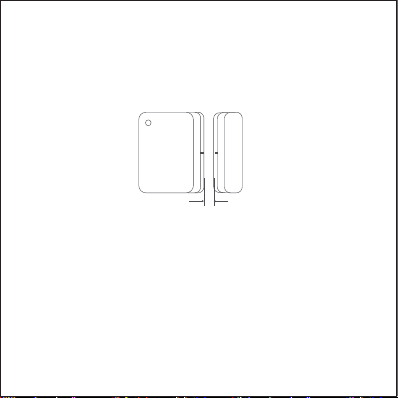
Ensure the clearance is less than 18 mm.
3. Aach the sensor and the magnet to the fixed side and the movable side
of the area that can be opened and closed. It is recommended to install the
sensor on the fixed surface and the magnet on the movable surface, and
ensure the clearance between the two is less than 18 mm when the door or
window is closed.
Note: The surface the adhesive sticker is applied to must be clean and dry.
Please avoid dropping the sensor during installation, as it may easily
damage the body of the sensor.
The installation clearance can be measured with the help of the scale on
the back of the user manual.
6
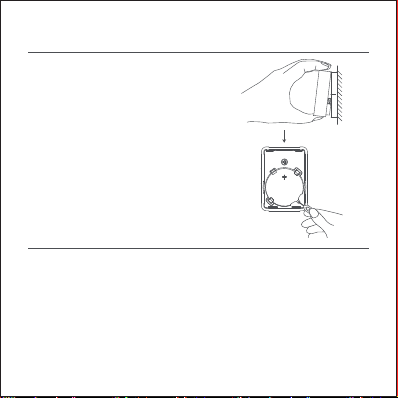
1. Place your thumb in the groove of the body
of the sensor and li the body upward to
separate it from the back cover.
2. Insert a pin or a similar tool into the hole
and li the baery upward to remove it.
3. Place the CR2032 baery in the baery slot
with the positive terminal facing upwards.
4. Align the body of the sensor with the back
cover and firmly press it to snap it into place.
Baery Replacement
Name: Mi Door and Window Sensor 2 Model: MCCGQ02HL
Wireless Connectivity: Bluetooth 5.1 BLE Operating Temperature: -10°C to 50°C
Baery Type: CR2032 (Installed) Operation Frequency: 2402-2480 MHz
Maximum Output Power: 10 dBm FCC ID: 2ANJHMCCGQ02HL
Item Dimensions: 34.0 × 32.7 × 14.5 mm
Operating Humidity: 0–95% RH, non-condensing
Specifications
7

WARRANTY NOTICE
As a Xiaomi consumer, you benefit under certain conditions from additional
warranties. Xiaomi offers specific consumer warranty benefits which are in
addition to, and not instead of, any legal warranties provided by your
national consumer law. The duration and conditions related to the legal
warranties are provided by respective local laws. For more information
about the consumer warranty benefits, please refer to Xiaomi's official
website hps://www.mi.com/en/service/warranty/. Except as prohibited by
laws or otherwise promised by Xiaomi, the aer-sales services shall be
limited to the country or region of the original purchase. Under the
consumer warranty, to the fullest extent permied by law, Xiaomi will, at its
discretion, repair, replace or refund your product. Normal wear and tear,
force majeure, abuse or damage caused by the user's negligence or fault
are not warranted. The contact person for the aer-sale service may be any
person in Xiaomi's authorized service network, Xiaomi's authorized
distributors or the final vendor who sold the products to you. If in doubt
please contact the relevant person as Xiaomi may identify.
The present warranties do not apply in Hong Kong and Taiwan.
Products which were not duly imported and/or were not duly manufactured
by Xiaomi and/or were not duly acquired from Xiaomi or a Xiaomi’s official
seller are not covered by the present warranties. As per applicable law you
8

WEEE Information
Regulatory Compliance Information
may benefit from warranties from the non-official retailer who sold the
product. Therefore, Xiaomi invites you to contact the retailer from whom
you purchased the product.
All products bearing this symbol are waste electrical and
electronic equipment (WEEE as in directive 2012/19/EU) which
should not be mixed with unsorted household waste. Instead, you
should protect human health and the environment by handing
over your waste equipment to a designated collection point for
the recycling of waste electrical and electronic equipment,
appointed by the government or local authorities. Correct
disposal and recycling will help prevent potential negative
consequences to the environment and human health. Please
contact the installer or local authorities for more information
about the location as well as terms and conditions of such
collection points.
9
Indice
Lingue:
Altri manuali Mi Accessori


