
MICILE Sidewinder Manuale utente

MICILE Sidewinder Tablet
User Guide
For Software Version E8

2
MICILE User Guide E08.V01.140814
Table of Contents
4 Chapter 1: MICILE Sidewinder Tablet at a glance
5 MICILE Sidewinder Tablet
5 Overview
6 Chapter 2: Getting Started
6 Inserting the micro SD card:
7 Powering on MICILE Tablet
8 Conguring WIFI
12 Tethering the MICILE tablet to your PC:
13 Bringing up the ide browser
14 Chapter 3: Understanding Projects
14 Uploading a sample project
16 The Code Editing Screen
17 Running a project
18 Stopping a project
19 Chapter 4: Writing Simple Programs
19 Creating a New Project
21 Writing a simple print statement in the Debug window
24 Printing Hello World to the MICILE Tablet
27 Chapter 5: Understanding the Core MICILE EZ
27 Libraries
29 Setting screen Color
31 Set Text size
32 draw text

3
MICILE User Guide E08.V01.140814
33 Drawing Simple shapes
35 More Shapes
36 Chapter 6: Using Other Libraries
36 Using EZ_Camera Library
39 Chapter 7: Running other applications
41 Apps for exercises:
41 Apps for SD card:
4
MICILE User Guide E08.V01.140814
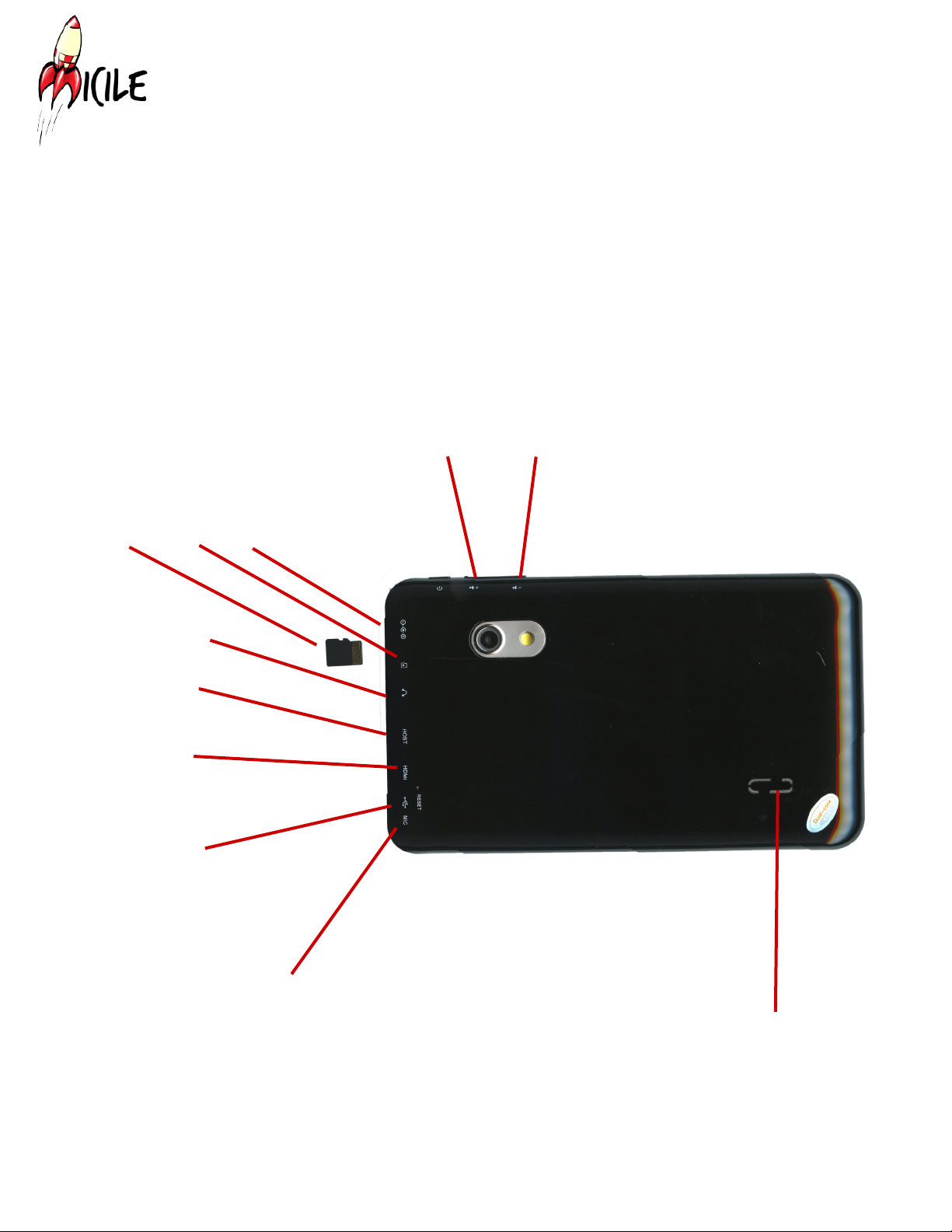
Category: Tablet PC
Model: Sidewinder
Function: Front and rear facing cameras, 802.11 n WIFI, speaker, microphone
Display: 7 inch, 800 x 480, capacitive multi-touch
Bundled Items: AC charger, 4 GB micro SD card preloaded with MICILE Operating System
Processor Brand: AllWinner A20 dual core
Chapter 1: MICILE Sidewinder Tablet at a glance
5
MICILE User Guide E08.V01.140814
MICILE Sidewinder Tablet
OVERVIEW
The MICILE OS contains a built-in Integrated Development Environment (IDE)
which allows you to write applications for the MICILE Tablet using a Chrome web
browser.
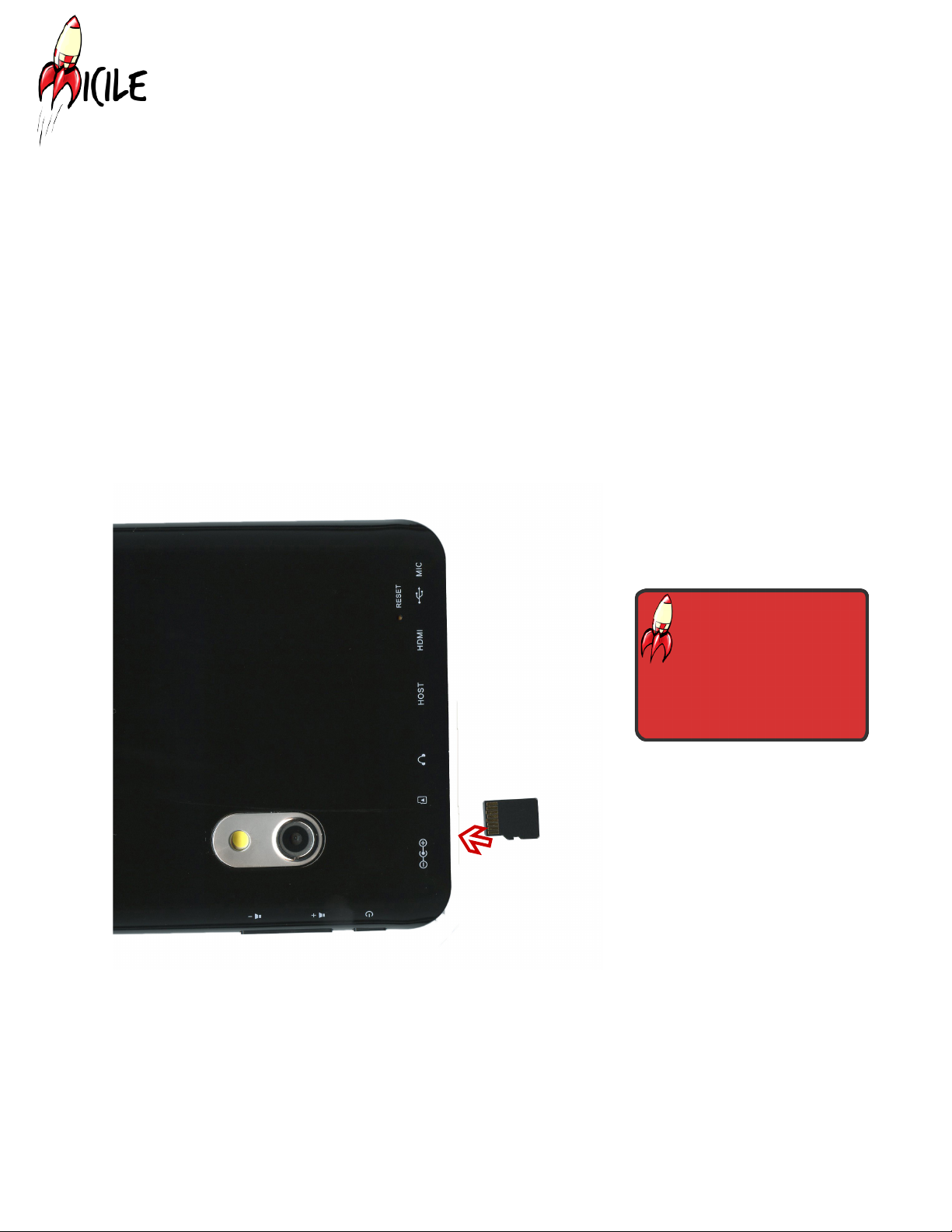
Volume down
Volume up
Host USB port
Speaker
Microphone
Mini USB port
Mini HDMI port
Headphone Jack
Micro SD
card with
MICILE OS
Charging
port
Micro SD
card slot
6
MICILE User Guide E08.V01.140814
INSERTING THE MICRO SD CARD:
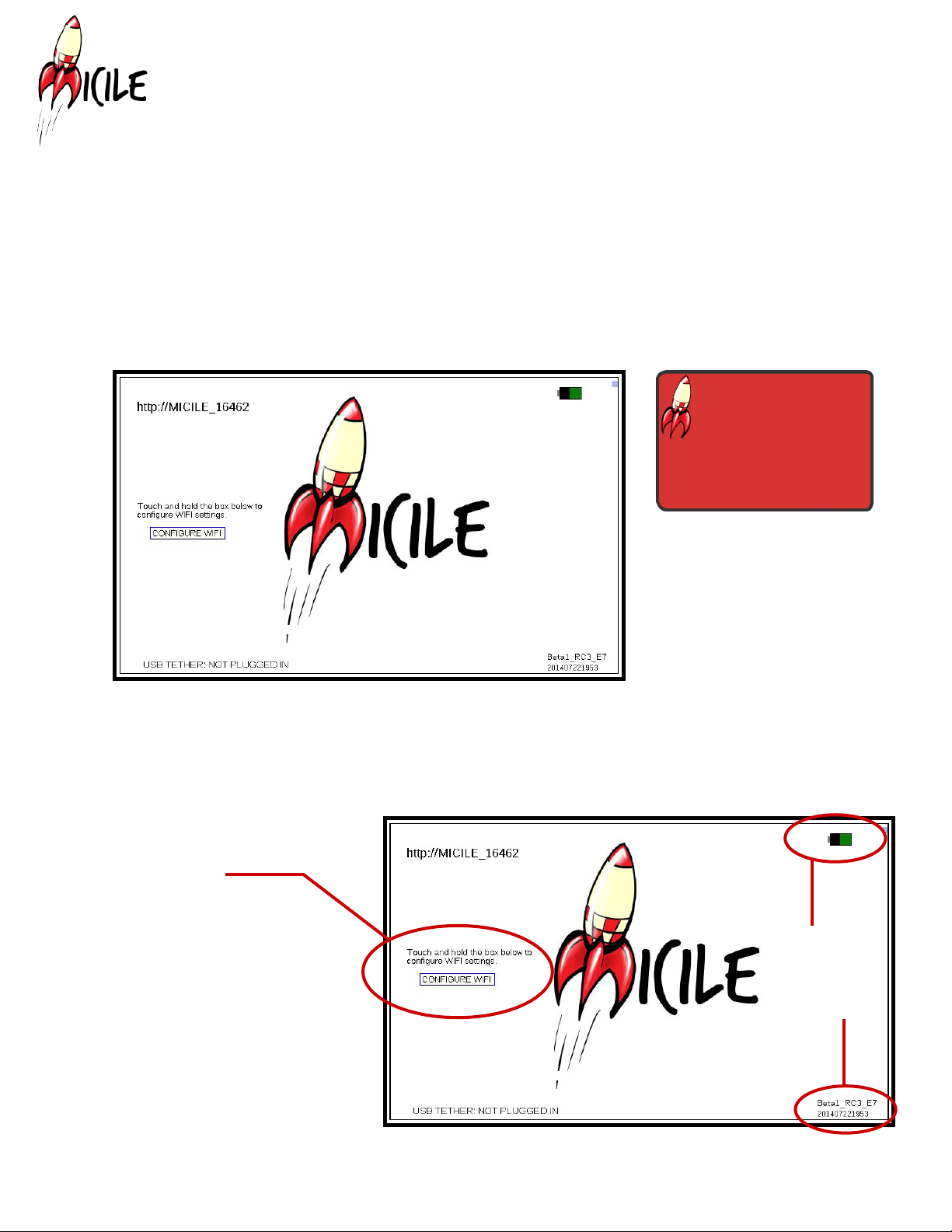
Before powering on your MICILE Tablet, insert provided micro SD card as shown
with the writing face up. You will hear the card click into place. The provided micro
SD card contains the MICILE OS. The MICILE Tablet will not work properly unless
the micro SD card is securely in place before the tablet is turned on.
Chapter 2: Getting Started
Insert micro SD
card with the gold
ngers facing
down before starting the
MICILE Tablet.
7
MICILE User Guide E08.V01.140814
POWERING ON MICILE TABLET
Once the micro SD card is inserted in the MICILE Tablet, you are ready to power
the tablet on. Hold the power button down for ve seconds and then release the
button. It may be helpful to use a watch or clock with a second hand to
help determine the correct amount of time to depress the power button until you
are more familiar with the system. A couple seconds after releasing the power
button, you will notice the LCD screen starting to glow as the back-light turns on
followed shortly by the MICILE start screen.
Hold the power
button down for 5
seconds and release
the button.
If the tablet does not turn on, hold down the power button for ten seconds to force
it to turn off. Wait a few seconds. Hold down the power button for ve seconds and
release
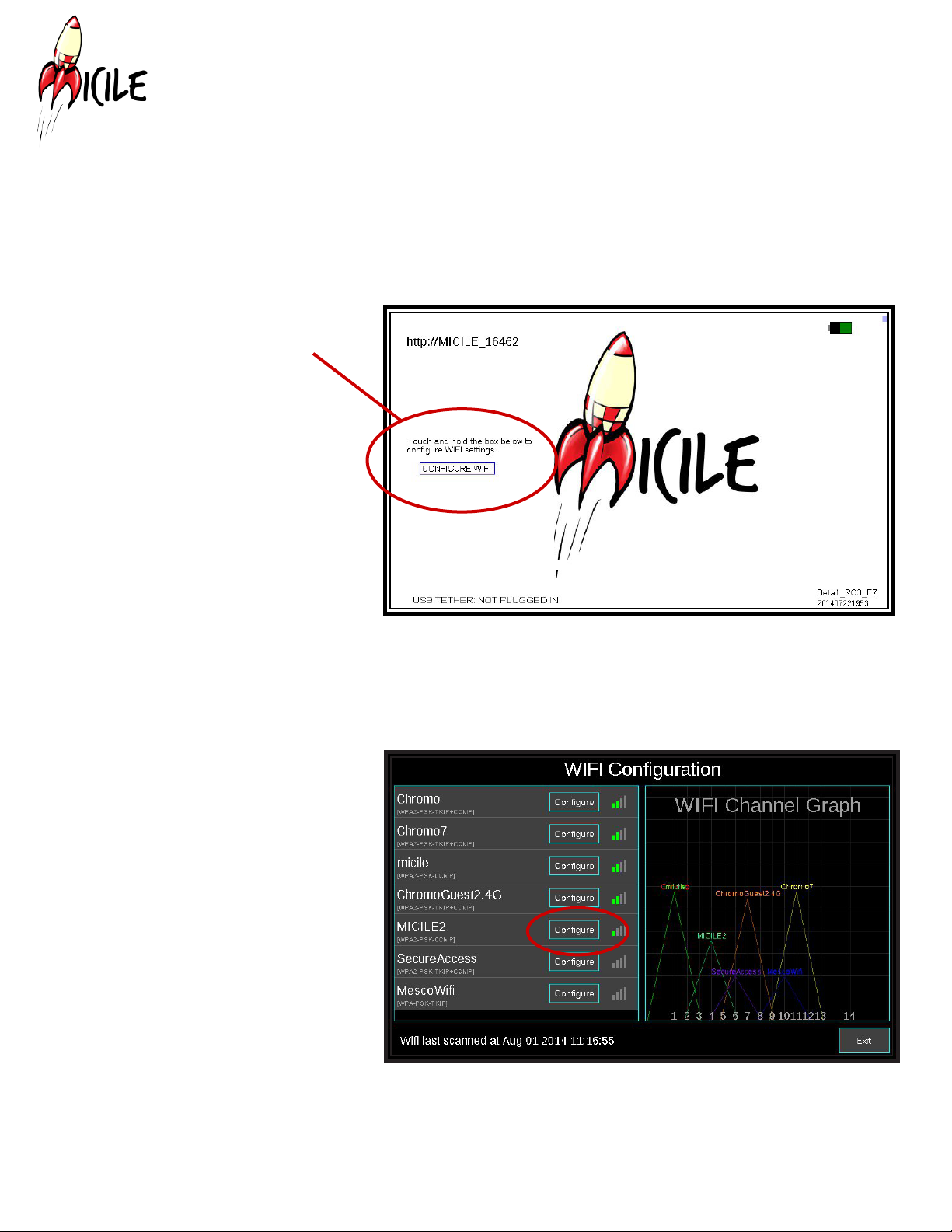
WIFI Conguration button
Battery Meter
MICILE OS
Version
8
MICILE User Guide E08.V01.140814
CONFIGURING WIFI
Once you see the above screen you are ready to congure the WIFI. Be sure your
laptop or desktop computer is connected to the same WIFI connection that you will
be connecting the MICILE Tablet to.
1. Click on the button that
says “CONFIGURE WIFI”
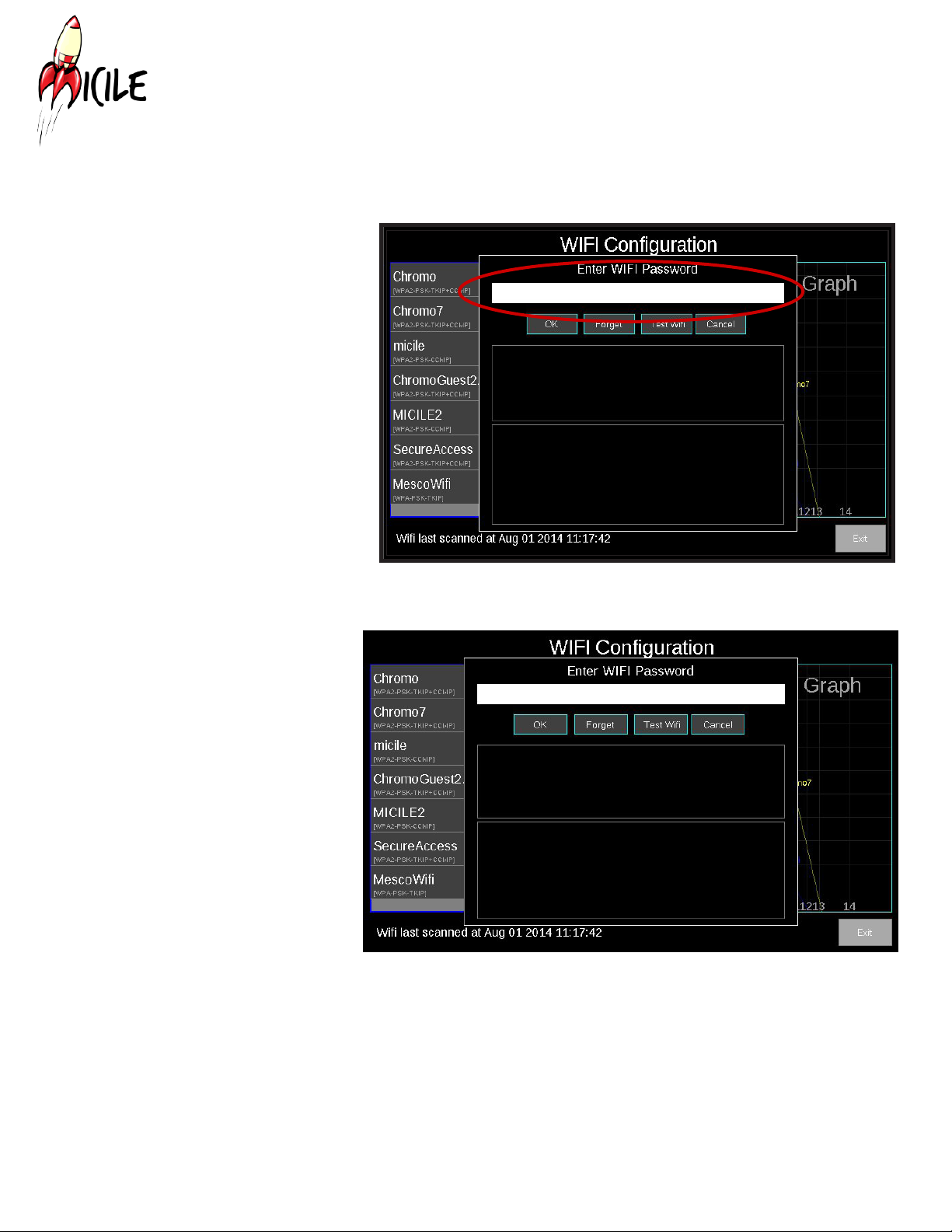
2. A list of detected
networks will show up on
the left side of the WIFI
Conguration screen as in.
Click the “Congure” button
that corresponds to the
name of the WIFI network
you’re using.
9
MICILE User Guide E08.V01.140814
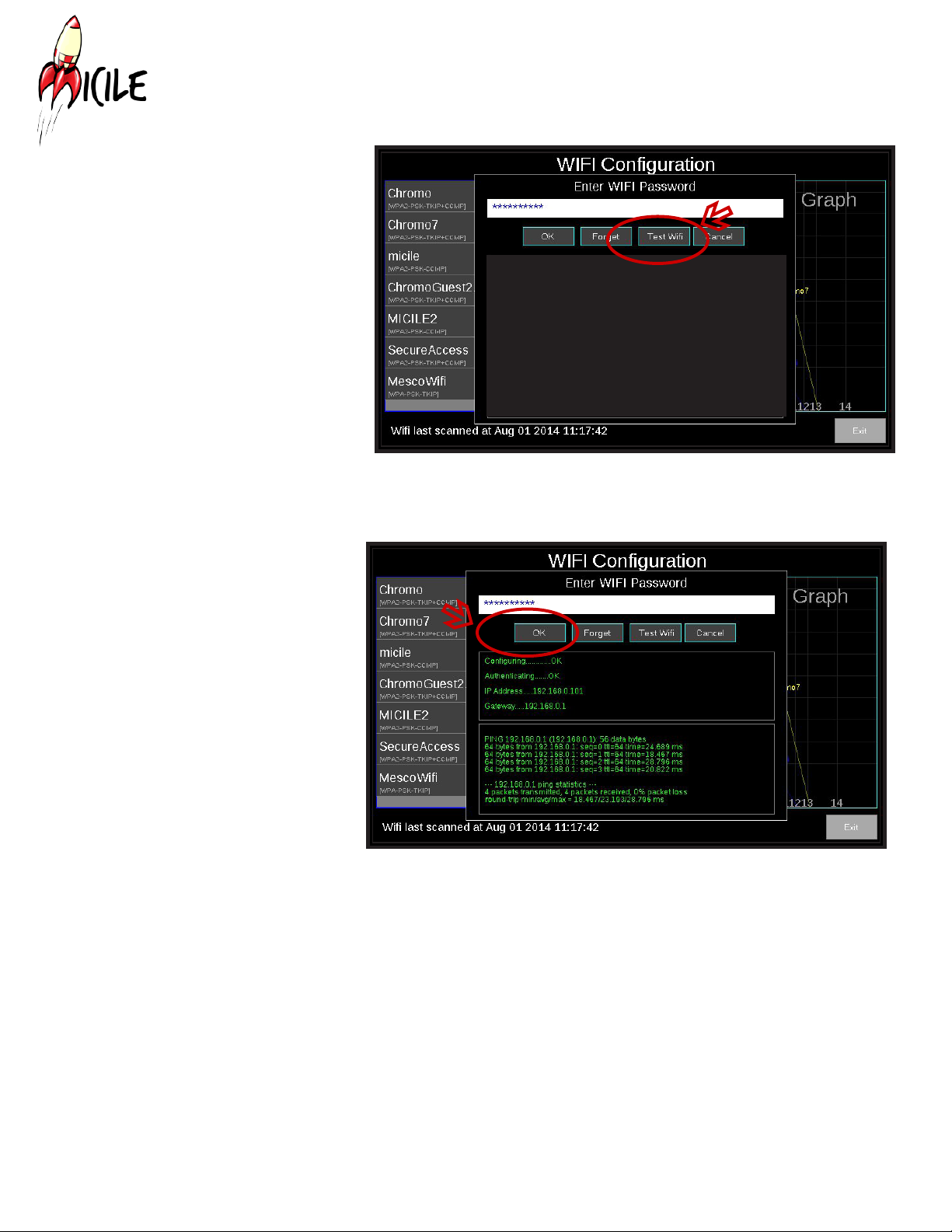
3. The WIFI Conguration
screen will show up. A
white text box will appear.
Touch in this text box to
bring up the keyboard.
4. Using the keyboard,
enter the correct passkey
for the WIFI network (there
is no cursor, just tap the
box and a keypad will
appear).
10
MICILE User Guide E08.V01.140814
5. Once you have
entered the correct
password, click the
“Test WIFI” button. If the
screen says “probably
bad password”, check
that you are on the
correct router and that
you have the correct
password.
6. You should see
a screen with green
text that looks like this
image. Click the “OK”
button.
Indice


