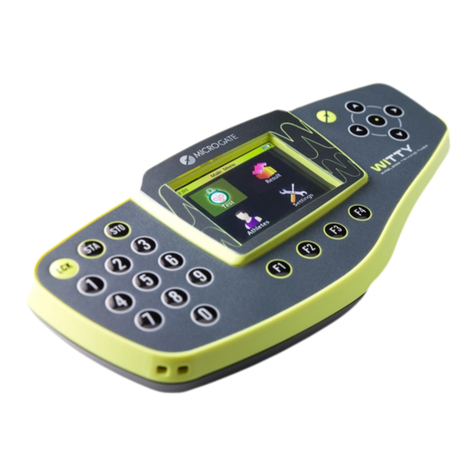
Microgate WITTY Manuale utente

User Manual
Manual version 1.5
Firmware Versions:
Witty·TIMER: 2.36.36 –Witty·SEM: 2.1.1 –Witty·GATE: 2.0.8 –Witty·RFID: 2.0.3 - Witty·MANAGER: 1.5.0

Witty User Manual - EN - v1.5 P. 2 / 171
Contents
1Device Functions and Major Features.........................................................................................................................6
1.1 Contents of the Kit................................................................................................................................ 7
2Main Functions .....................................................................................................................................................................8
2.1 Witty Timer........................................................................................................................................... 8
2.1.1 Switching On.............................................................................................................................. 9
2.1.2 Switching Off.............................................................................................................................. 9
2.1.3 Reset.......................................................................................................................................... 9
2.2 Photocells ........................................................................................................................................... 10
2.2.1 Mounting Photocells and Reflectors on Tripods ..................................................................... 11
2.2.2 LED Statuses and Colors .......................................................................................................... 12
2.2.3 Paired Photocells..................................................................................................................... 13
2.3 Radio Transmission............................................................................................................................. 15
2.3.1 Transmission Impulse Duration (Radio Power) ....................................................................... 16
2.4 Elements of the Graphical User Interface .......................................................................................... 19
2.4.1 Virtual Keyboard...................................................................................................................... 23
2.4.2 The Start (STA) and Stop (STO) Keys........................................................................................ 24
2.4.3 The Lock Key (LCK)................................................................................................................... 24
2.4.4 Icons on the Header Bar .......................................................................................................... 25
2.5 Power Supply and Charging................................................................................................................ 26
2.6 Witty·RFID........................................................................................................................................... 27
2.6.1 Basic operation........................................................................................................................ 28
2.6.2 LED statuses and colours......................................................................................................... 29
2.7 Witty·SEM........................................................................................................................................... 30
3Quick Setup: how to quickly carry out your first test........................................................................................ 32
4Test Types:...........................................................................................................................................................................37
4.1 Basic.................................................................................................................................................... 37
4.1.1 In Line ...................................................................................................................................... 39
4.1.1.1 Enabling·Witty·SEM as the starting traffic light............................................................... 42
4.1.2 Go & Back ................................................................................................................................ 48
4.1.3 Shuttle with Recovery.............................................................................................................. 49
4.1.3.1 Enabling Witty·SEM ......................................................................................................... 50
4.2 Multistart............................................................................................................................................ 52
4.2.1 Configuring the Photocells ...................................................................................................... 52
4.3 Counter............................................................................................................................................... 55

Witty User Manual - EN - v1.5 P. 3 / 171
4.4 Witty·SEM........................................................................................................................................... 58
4.4.1 Change Direction ..................................................................................................................... 58
4.4.2 Agility....................................................................................................................................... 63
4.4.2.1 Custom............................................................................................................................. 64
4.4.2.2 Random............................................................................................................................ 67
4.4.2.3 Random multicolour........................................................................................................ 68
4.4.2.4 Random multisymbol....................................................................................................... 68
4.4.2.5 Random multisymbol and multicolour............................................................................ 68
4.4.3 Standalone Change Direction.................................................................................................. 69
4.4.4 Autonomous Sequence ........................................................................................................... 71
4.4.5 Tennis Shuttle.......................................................................................................................... 72
4.4.6 Cognitive Tests......................................................................................................................... 74
4.4.6.1 Divided Attention ............................................................................................................ 81
4.4.6.2 Double Decision............................................................................................................... 86
4.4.6.3 Mixed Signals................................................................................................................... 93
4.4.6.4 Hawk Eye ....................................................................................................................... 100
4.4.6.5 Eye for Detail ................................................................................................................. 105
4.4.6.6 Juggle ............................................................................................................................. 109
4.5 Dual Test........................................................................................................................................... 114
5Functions of the Witty Timer.....................................................................................................................................116
5.1 Test ................................................................................................................................................... 117
5.1.1 Simple Test ............................................................................................................................ 118
5.1.1.1 New................................................................................................................................ 121
5.1.1.2 Delete Event .................................................................................................................. 121
5.1.1.3 Ranking .......................................................................................................................... 122
5.1.1.4 Options .......................................................................................................................... 123
5.1.2 Preconfigured Test ................................................................................................................ 129
5.1.2.1 Load ............................................................................................................................... 130
5.1.2.2 Sprint Start-Stop: timing of a BASIC In-Line Test........................................................... 130
5.1.2.3 Go & Back: timing of a BASIC Go & Back Test ............................................................... 130
5.1.2.4 Shuttle 5x + 30": timing of a BASIC Shuttle Test............................................................ 130
5.1.2.5 MultiStart Start-Stop: timing of a MULTISTART Test..................................................... 132
5.1.2.6 Counter 10x: timing of a COUNTER Test ....................................................................... 137
5.1.3 My Tests................................................................................................................................. 138
5.1.3.1 Load ............................................................................................................................... 138

Witty User Manual - EN - v1.5 P. 4 / 171
5.1.3.2 Edit................................................................................................................................. 138
5.1.3.3 Delete ............................................................................................................................ 138
5.1.3.4 Cancel ............................................................................................................................ 138
5.1.4 Define New Test .................................................................................................................... 139
5.2 Results .............................................................................................................................................. 142
5.2.1 Show ...................................................................................................................................... 142
5.2.2 Continue ................................................................................................................................ 142
5.2.3 Sort/Filter............................................................................................................................... 142
5.2.3.1 Sort ................................................................................................................................ 142
5.2.3.2 Filter............................................................................................................................... 143
5.2.3.3 Reset Filter..................................................................................................................... 144
5.2.4 Delete .................................................................................................................................... 145
5.3 Athletes ............................................................................................................................................ 146
5.3.1 Show ...................................................................................................................................... 146
5.3.2 Sort ........................................................................................................................................ 147
5.3.3 Delete .................................................................................................................................... 147
5.3.4 Cancel .................................................................................................................................... 147
5.4 Settings............................................................................................................................................. 148
5.4.1 Radio...................................................................................................................................... 149
5.4.1.1 Verify Signal................................................................................................................... 149
5.4.1.2 Frequency ...................................................................................................................... 150
5.4.1.3 Photocell Mode ............................................................................................................. 151
5.4.2 Units....................................................................................................................................... 153
5.4.2.1 Measurement Unit: ....................................................................................................... 153
5.4.2.2 Precision ........................................................................................................................ 154
5.4.2.3 Speed ............................................................................................................................. 154
5.4.3 Display ................................................................................................................................... 155
5.4.3.1 Brightness ...................................................................................................................... 155
5.4.3.2 Screen Time-Out............................................................................................................ 156
5.4.4 Date & Time........................................................................................................................... 157
5.4.4.1 Set Date ......................................................................................................................... 157
5.4.4.2 Set Time......................................................................................................................... 158
5.4.4.3 Date/Time Format ......................................................................................................... 158
5.4.5 Language................................................................................................................................ 159
5.4.6 Peripherals............................................................................................................................. 160

Witty User Manual - EN - v1.5 P. 5 / 171
5.4.7 Witty·SEM.............................................................................................................................. 161
5.4.8 Sound..................................................................................................................................... 162
5.4.9 Miscellaneous........................................................................................................................ 163
6Connecting to a PC via Witty Manager...................................................................................................................164
7Technical Data..................................................................................................................................................................165
7.1 Witty Timer....................................................................................................................................... 165
7.2 Witty GATE Photocell ....................................................................................................................... 166
7.3 Witty·SEM......................................................................................................................................... 167
7.4 Witty·RFID......................................................................................................................................... 168
8Declaration of Conformity...........................................................................................................................................169
8.1 FCC Conformity................................................................................................................................. 170
8.2 Japan/EU MRA: Certification by Type of the Ordinance Concerning Technical Regulations
Conformity of specified Radio Equipment (MPT Ordinance No. 37 of 1981) ........................................... 170

Witty User Manual - EN - v1.5 P. 6 / 171
1DEVICE FUNCTIONS AND MAJOR FEATURES
WITTY is a training timing system ideal for all sports where assessing athletic performance through sprint,
speed, endurance, reaction, shuttle tests, etc. is essential.
Thanks to the timer and photocell-integrated radio system (which do not require special official
authorization), the large color display, the modern user interface featuring icons, and the practical padded
backpack, setup and use is extremely easy and fast.
The system is largely expandable with the possibility to add (single or double) photocells for intermediate
times, accessories such as starting pads, time displaying LED boards, direction indicators, etc.
The kit comes with a free Windows software (which can be downloaded from our website) called Witty
Manager for importing data of performed tests and viewing it in numerical tables and graphs, managing a
complete athlete personal data base (transferring the athlete's picture to the timer for fast identification),
creating customized test types and updating the timer and photocell firmware.

Witty User Manual - EN - v1.5 P. 7 / 171
1.1 CONTENTS OF THE KIT
Basic kit (art. £WIT001):
•1 Witty timer
•2 photocells
•2 reflectors
•4 tripods
•1 backpack
•1 wall power supply (with 4 different plugs for all world standards ) + 3 USB cables for charging the
timer and 2 photocells simultaneously
•1 USB-PC cable
•1 USB memory stick containing Witty manuals and Witty manager software
•1 cord
The kit can be expanded purchasing more photocell and reflector pairs with tripod ('Lap Time Kit', art.
£WIT002) for managing more lap times.
Both kits (Basic and Lap Time) are available with a 'Double Photocell' option (see chapter 2.4; the relevant
article codes are £WIT003 and £WIT004)

Witty User Manual - EN - v1.5 P. 8 / 171
2MAIN FUNCTIONS
2.1 WITTY TIMER
The figure below shows the main parts of the Witty timer, which will be explained hereafter.
Confirmation key
(OK)
MICROGATE key
LOCK, START and STOP
keys
Numeric keypad
Function keys F1 to F4
Keypad navigator
USB connector for charging and connecting to a PC
3.5mm jack for external inputs

Witty User Manual - EN - v1.5 P. 9 / 171
2.1.1 SWITCHING ON
To switch on the Witty timer press the <Microgate> key. After a few seconds required by the boot loader,
a screen is displayed showing the installed firmware version. Press any key to go to the Main Menu.
2.1.2 SWITCHING OFF
From any screen press the <Microgate> key and hold it for 5 seconds.
Another screen prompts to confirm switching off the timer. Press <F1> to confirm or <F4> to cancel.
2.1.3 RESET
If the timer does not respond to any command, press the <Microgate> key and hold it for at least 10 seconds.
When the key is released, the device will be reset and switched off. Press the key again to switch on.

Witty User Manual - EN - v1.5 P. 10 / 171
2.2 PHOTOCELLS
To switch on the photocell press the ON button for one second; the status LED blinks with a green light (if
the battery status is sufficient) or with an orange light (if the battery status is low). A continuous beeping
sound is produced until the correct alignment with the reflector (or a similar reflecting surface) is found.
To switch off the photocell press the button until the LED turns red, then release it.
ON/OFF button
USB connector for charging
and updating the firmware
3.5mm jack for photocell
pair and external inputs
Status Led
Altri manuali per WITTY
2
Indice
Altri manuali Microgate Timer