
Miele PG 8133 SCVi Manuale utente
Operating instructions
PG 8133 SCVi
To avoid the risk of accidents or damage to
the machine, it is essential to read these
instructions before it is installed and used for
the first time.
en - GB, IE, AE
M.-Nr. 11 600 290

Contents
2
Notes about these instructions........................................................................ 5
Operating steps................................................................................................... 5
Guide to the machine........................................................................................ 6
Machine overview................................................................................................ 6
Control panel....................................................................................................... 7
Display................................................................................................................. 8
Correct use ........................................................................................................ 9
Warning and Safety instructions...................................................................... 11
Caring for the environment .............................................................................. 17
Economical dishwashing..................................................................................... 18
Before using for the first time .......................................................................... 19
Opening the door ................................................................................................ 19
Closing the door.................................................................................................. 19
Basic settings...................................................................................................... 20
Before using the machine for the first time, you will need: ................................. 22
Dishwasher salt ................................................................................................... 22
Filling the salt reservoir................................................................................... 23
Salt refill indicator........................................................................................... 23
Rinsing agent....................................................................................................... 24
Adding rinsing agent ...................................................................................... 25
Rinsing agent refill reminder........................................................................... 25
Preparing the load items................................................................................... 26
Economical dishwashing..................................................................................... 26
Notes ................................................................................................................... 26
FlexAssist ............................................................................................................ 29
Upper basket....................................................................................................... 29
Adjusting the upper basket ............................................................................ 32
Lower basket....................................................................................................... 33
Cutlery ................................................................................................................. 36
3D+ cutlery tray ............................................................................................. 36
Loading examples ............................................................................................... 38
Dishwashers with cutlery tray......................................................................... 38
Operation............................................................................................................ 40
Detergent............................................................................................................. 40
Powder detergents ......................................................................................... 40
Liquid detergent ............................................................................................. 41
Switching on........................................................................................................ 44
Selecting a programme ....................................................................................... 44

Contents
3
Starting a programme ......................................................................................... 45
Time display ........................................................................................................ 45
Energy management ........................................................................................... 46
End of programme............................................................................................... 46
Switching off........................................................................................................ 47
Removing load items........................................................................................... 47
Interrupting a programme.................................................................................... 47
Changing a programme....................................................................................... 47
Programme options........................................................................................... 48
Options................................................................................................................ 48
FlexiTimer with EcoStart ..................................................................................... 49
Programme chart .............................................................................................. 52
Cleaning and care ............................................................................................. 56
Periodic checks ................................................................................................... 56
Cleaning the wash cabinet.................................................................................. 56
Cleaning the door and the door seal................................................................... 57
Cleaning the door front ....................................................................................... 57
Checking the filters in the wash cabinet ............................................................. 58
Cleaning the filters............................................................................................... 58
Cleaning the spray arms...................................................................................... 60
Problem solving guide ...................................................................................... 61
Technical problems ............................................................................................. 61
Faults with water intake or drainage.................................................................... 63
General problems ................................................................................................ 64
Noises.................................................................................................................. 65
Unsatisfactory washing result ............................................................................. 66
Maintenance ...................................................................................................... 69
Cleaning the water inlet filter............................................................................... 69
Cleaning the drain pump and non-return valve................................................... 70
Customer service .............................................................................................. 71
Contact in the event of a fault ............................................................................. 71
Programme updates............................................................................................ 71
EPREL database ................................................................................................. 71
Warranty .............................................................................................................. 72
Optional accessories ........................................................................................ 73
Installation.......................................................................................................... 74
Electrical connection........................................................................................... 74

Contents
4
Plumbing ............................................................................................................. 75
The Miele Waterproof system......................................................................... 75
Water intake ................................................................................................... 75
Connecting the drainage system.................................................................... 77
Technical data.................................................................................................... 78
Settings menu.................................................................................................... 79
Open the Settings menu ..................................................................................... 79
Language......................................................................................................... 79
Time of day.......................................................................................................... 80
Water hardness ................................................................................................... 81
Rinse aid.............................................................................................................. 82
External dispensing............................................................................................. 82
Temperature unit.................................................................................................. 83
Final rinse temperature........................................................................................ 83
EcoStart............................................................................................................... 84
Networking .......................................................................................................... 86
Miele@home........................................................................................................ 86
2nd interim rinse.................................................................................................. 89
Brightness ........................................................................................................... 89
Volume................................................................................................................. 89
Refill indicators.................................................................................................... 90
Check filters ........................................................................................................ 90
AutoOpen ............................................................................................................ 90
Optimise standby ................................................................................................ 91
BrilliantLight......................................................................................................... 91
Software version.................................................................................................. 91
Showroom programme........................................................................................ 91
Factory default settings....................................................................................... 92
Closing the Settings menu .................................................................................. 92

Notes about these instructions
5
Warnings
Information which is important for safety is highlighted in a thick framed box
with a warning symbol. This alerts you to the potential danger of injury to people
or damage to property.
Read these warning notes carefully and observe the procedural instructions and
codes of practice they describe.
Notes
Notes provide information of particular importance that must be observed.
They are highlighted in a thick framed box.
Additional information and comments
Additional information and comments are highlighted in a box framed with a
single black line.
Operating steps
Instructions on how to operate the commercial dishwasher are identified by
marked operating steps. They explain the procedure step by step.
Operating steps are indicated by a black square bullet point.
Example:
Select the desired setting and press OK to confirm.
Display
Information given via the commercial dishwasher display appears in a special
display font to match the font on the machine.
Example:
When the messageFinished or AutoOpenappears in the display...
Guide to the machine
6
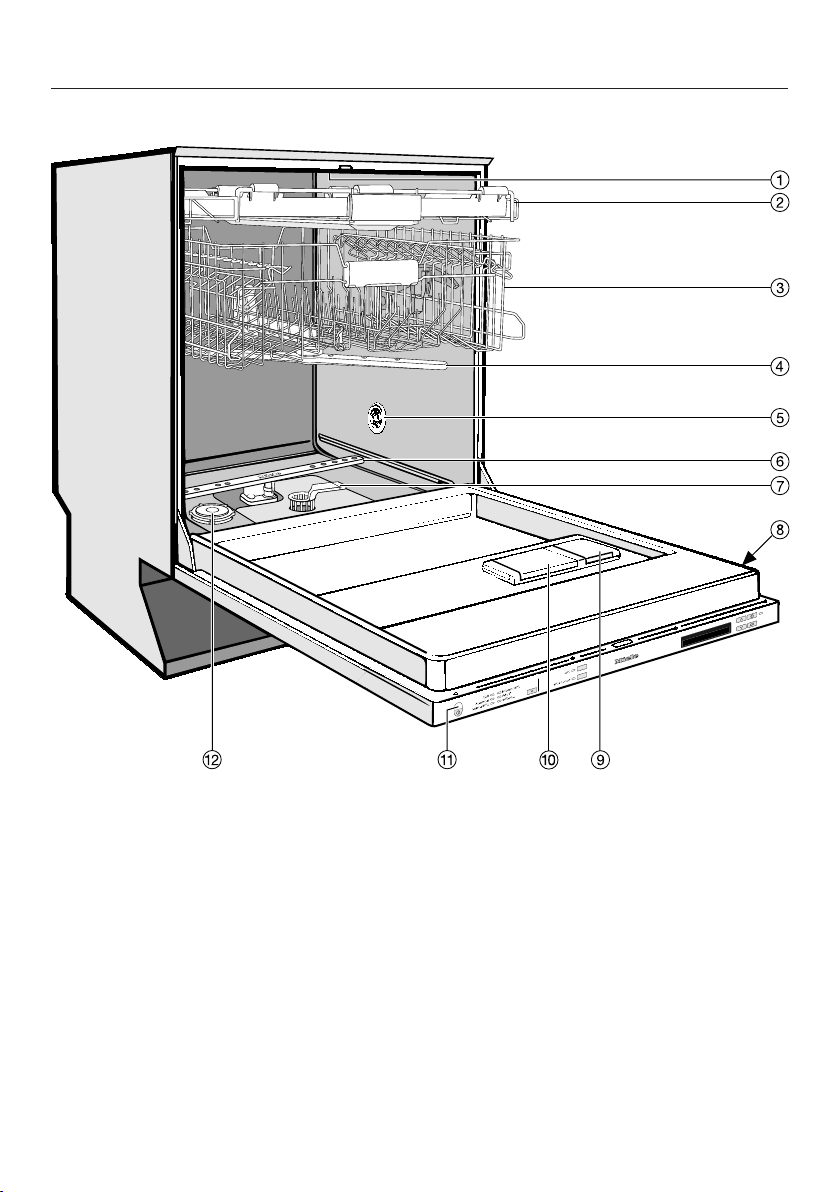
Machine overview
aUpper spray arm (not visible)
bCutlery tray
cUpper basket
dMiddle spray arm
eAir inlet for drying
fLower spray arm
gFilter combination
hData plate
iRinse aid reservoir
jDual compartment detergent
dispenser
kIn-operation indicator light
lSalt reservoir
Guide to the machine
7
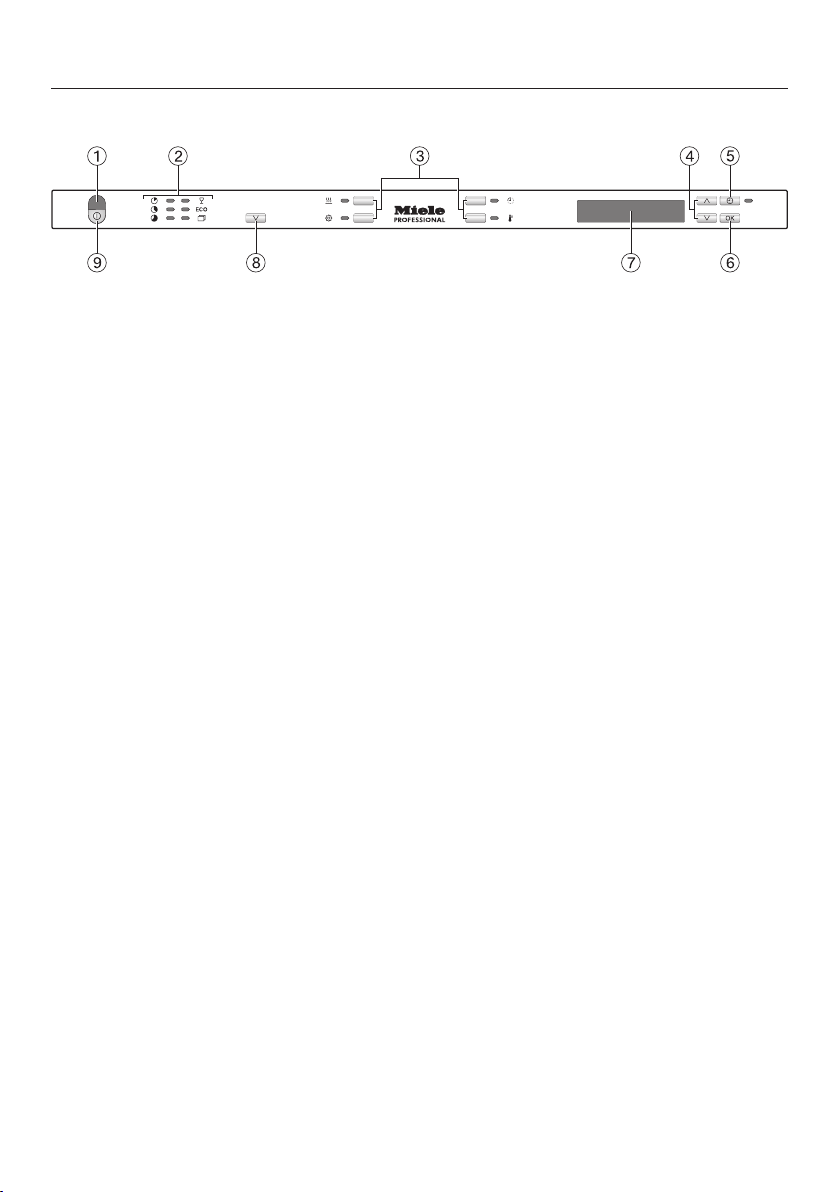
Control panel
aIn-operation indicator light
bProgramme selection
cOption buttons with indicator lights
dArrow buttons
ebutton (FlexiTimer) with indicator
light
fOK button (confirmation)
gDisplay
hProgramme selection button
iOn/off button

Guide to the machine
8
Display
General
The display is used to select or set the
following:
- Programme
- FlexiTimer (delay start)
- Settings menu
The display can show the following:
- The programme stage
- The estimated time left for the
programme to run
- Any relevant fault messages and
information
To save energy, the dishwasher
switches off after a few minutes if you
do not press any buttons during this
time.
Press the button to switch the
dishwasher back on.
Settings menu
The Settings menu is used to alter the
dishwasher's electronics to suit
different requirements. The Settings
menu is accessed by pressing the
button.
The arrows on the display indicate that
further options are available. You can
use the arrow buttons next to the
display, as appropriate, to select these
further options.
The OK button is used to confirm a
message or setting and also to move to
the next menu or another level.
The option that is selected will have a
tick next to it.
To exit a sub-menu, use the arrow
buttons to select the Back option and
confirm with OK.
If you do not press any buttons for
several seconds, the display will revert
to the previous menu. You may then
have to enter your settings again.

Correct use
9
This commercial dishwasher complies with all current local and
national safety requirements. Inappropriate use can, however, lead
to personal injury and material damage.
Read the operating instructions carefully before using the
commercial dishwasher for the first time. They contain important
information on the safety, use and maintenance of the machine.
This way you will prevent the risk of accidents and damage to the
commercial dishwasher. Keep these operating instructions in a
safe place and pass them on to any future owner.
This dishwasher with its short programme running times and
powerful cleaning performance is intended for commercial use in
offices, lunch rooms, clubhouses, workshops, large kitchens and
similar professional environments.
It is also suitable for use in domestic households and in similar
residential environments; for example, by customers in hotels,
motels, bed and breakfasts and other related establishments.
The dishwasher is subsequently referred to as a dishwasher in
these operating instructions.
Glasses, cutlery and crockery are referred to generally as crockery
when not more specifically defined.
The term “process chemicals” refers to all chemical agents
required for reprocessing the load items.
This dishwasher is not intended for continuous use.
This dishwasher may not be used to clean medical products or
devices.
This machine is designed exclusively for use as a “dishwasher” for
cleaning loads as described in these instructions. Conversions,
modifications and any other use are not permitted.
This dishwasher is intended for stationary, indoor use only.

Correct use
10
The special inserts should only be used for their specific
application.
This dishwasher can only be used by people with reduced
physical, sensory or mental capabilities, or lack of experience or
knowledge, if they are supervised whilst using it or have been shown
how to use it in a safe way and understand and recognise the
consequences of incorrect operation.
This dishwasher is supplied with a special lamp (depending on the
model) to cope with particular conditions (e.g. in terms of
temperature, moisture, chemical resistance, abrasion resistance and
vibration). This lamp must only be used for the purpose for which it
is intended. The lamp is not suitable for room lighting. Replacement
lamps may only be fitted by a Miele authorised technician or by the
Miele Customer Service Department.
This dishwasher contains several light sources in energy efficiency
class D.
The lighting control element is integrated into the appliance control
and cannot be removed separately. As a result, electricity
consumption cannot be measured separately.
Altri manuali per PG 8133 SCVi
1
Indice
Altri manuali Miele Lavastoviglie

Miele
Miele G 684 Manuale utente

Miele
Miele PFD 101 Manuale utente

Miele
Miele DA 6590 W Manuale utente

Miele
Miele G 690 Manuale utente

Miele
Miele G 2630 SCi Manuale utente

Miele
Miele G5740 SC Manuale utente

Miele
Miele G 7166 Manuale utente

Miele
Miele G 349 Plus Manuale utente

Miele
Miele PTD 701 Manuale utente

Miele
Miele G 601 Manuale utente

Miele
Miele G 4700 Manuale utente

Miele
Miele DGC 6300 Manuale utente

Miele
Miele G 5481 Manuale utente

Miele
Miele G 1 Series Manuale

Miele
Miele G 6990 Manuale utente

Miele
Miele PTD 901 Manuale utente

Miele
Miele G 2142 Manuale utente

Miele
Miele GDU 45/60-1 Manuale utente

Miele
Miele G 641 SCi Manuale utente

Miele
Miele G 4205 Manuale elenco delle parti


