
Mindsets BCE 003A Manuale utente

Programmable Robot Kit
Code: BCE 003A
2 3
CONTENTS
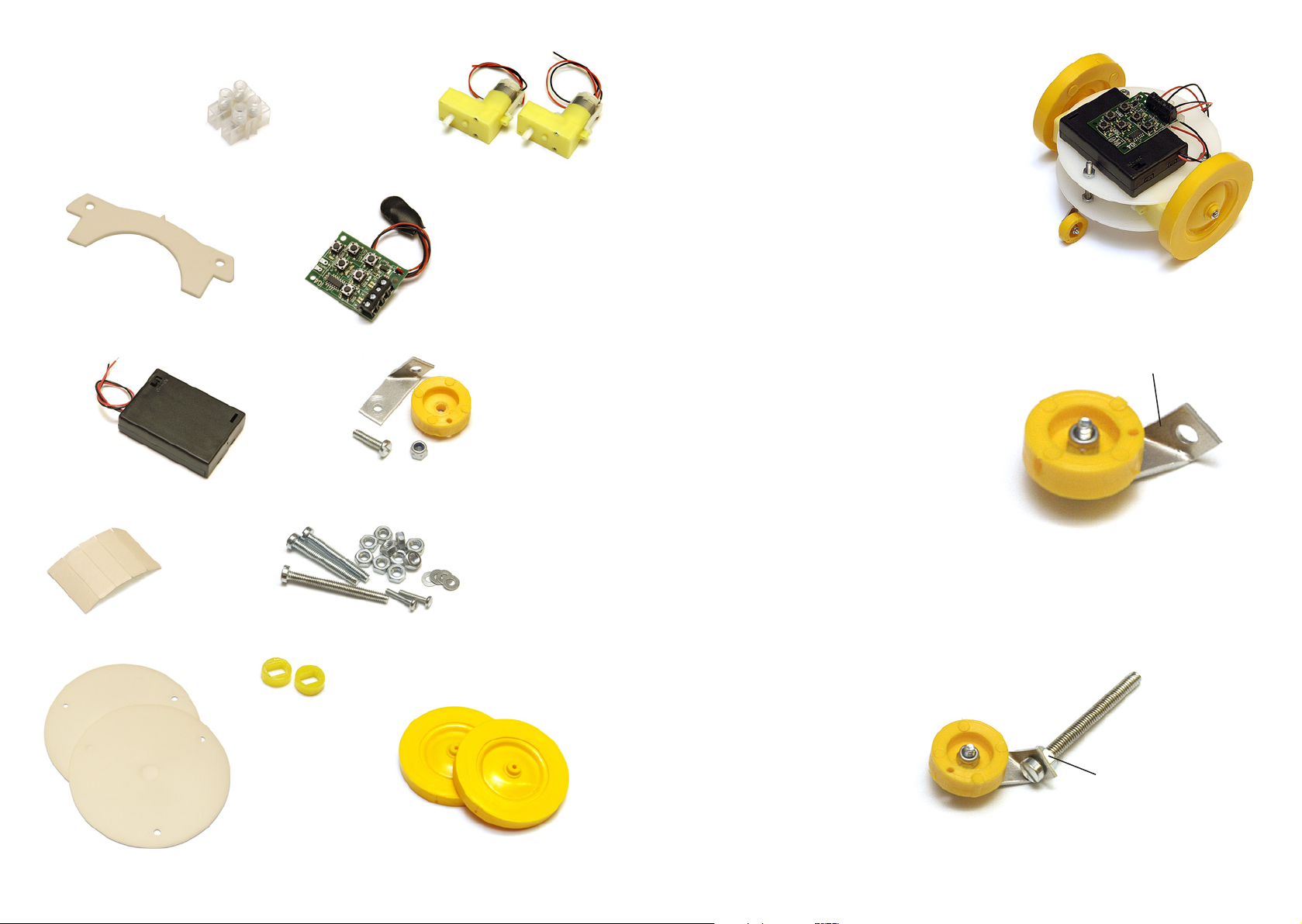
Connecting block 2 motorised gearboxes
Guideplate IQ4 programmable controller
Battery box
Castor wheel
assembly
5 sticky pads
Screws, nuts and washers
1 x M4 x 40 screw
2 x M4 x 30 screw
2 x M2.5 x 12 screw
10 x M4 nuts
4 x washers
2 x chassis plates
2 x wheels
2 x wheel inserts
INTRODUCTION
The Programmable Robot has a control system (called
the IQ4 controller) which is easily programmed to
control a left and a right motor. When both motors are
on the robot moves forward (or backward). When just
one of the motors is on the robot turns left or right. If
the two motors run in opposing directions the robot will
spin on the spot.
BUILDING YOUR ROBOT
1. Using a screwdriver and a pair of pliers, fit the
castor wheel onto the metal bracket. Use the pliers
to hold the nut while carefully tightening the screw.
Don’t over-tighten the screw - the wheel should be
free to turn.
2. Insert the long screw (M4 x 40) through the metal
bracket and thread a nut onto the screw as shown.
Do not tighten the nut - the bracket should be free
to turn on the screw.
metal bracket
nut
4 5
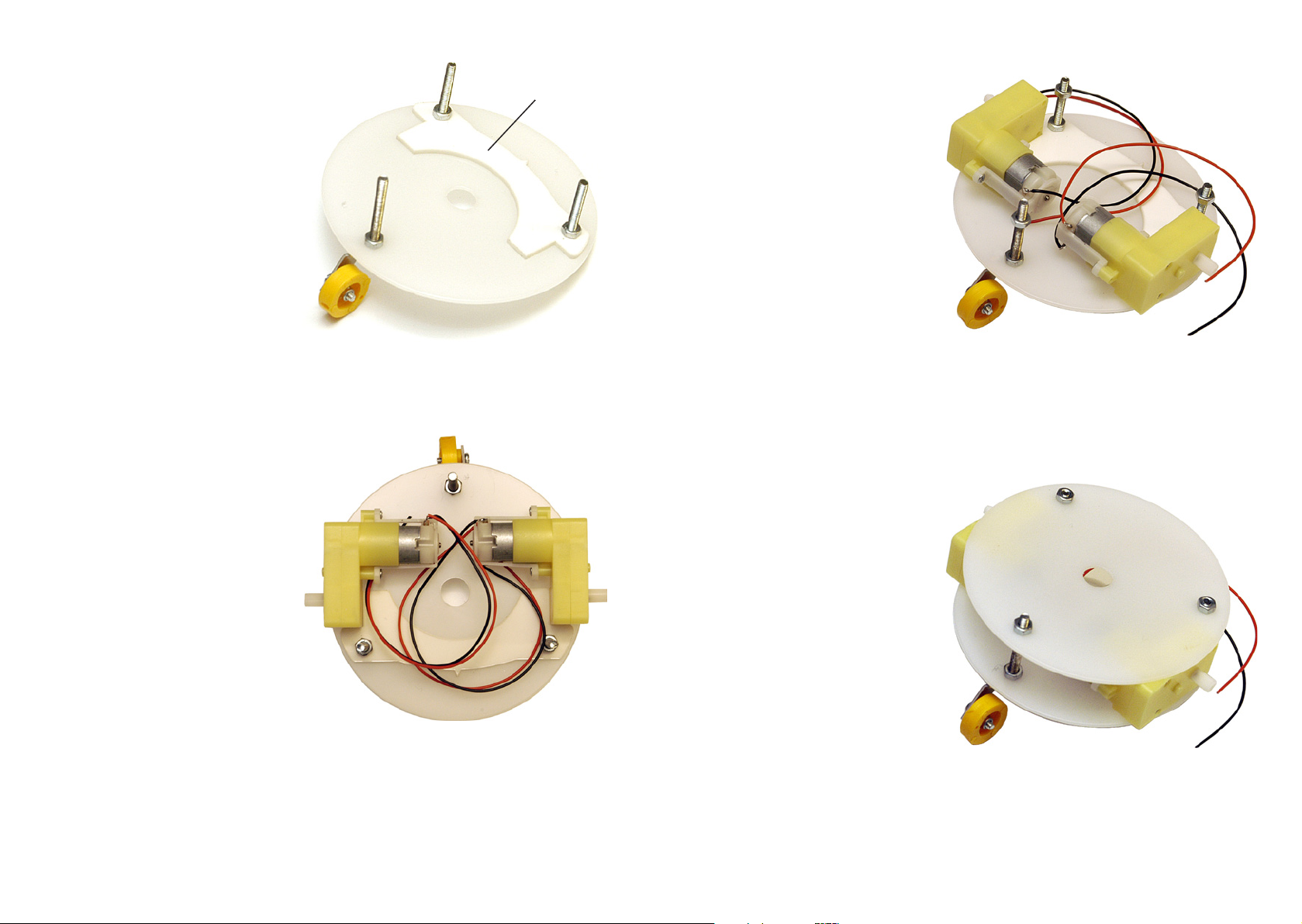
3. Insert the castor wheel screw through
a hole in one of the chassis plates.
Thread a nut onto the screw and
tighten it.
Insert the two M4 x 30 screws through
the other two holes in the chassis
plate. Slide the guideplate over the
screws then tighten a nut onto each
screw.
4. Attach a sticky pad to each of the
motors. Stick the motors onto
the chassis plate as shown using
the guideplate to ensure correct
positioning.
5. Twist another nut on to the end of
each screw so that approximately 7mm
of thread is exposed on the shorter
screws and 12mm of thread is exposed
on the longer screw.
6. Fit the second plate over the screws
and secure it using three nuts.
guideplate
6 7
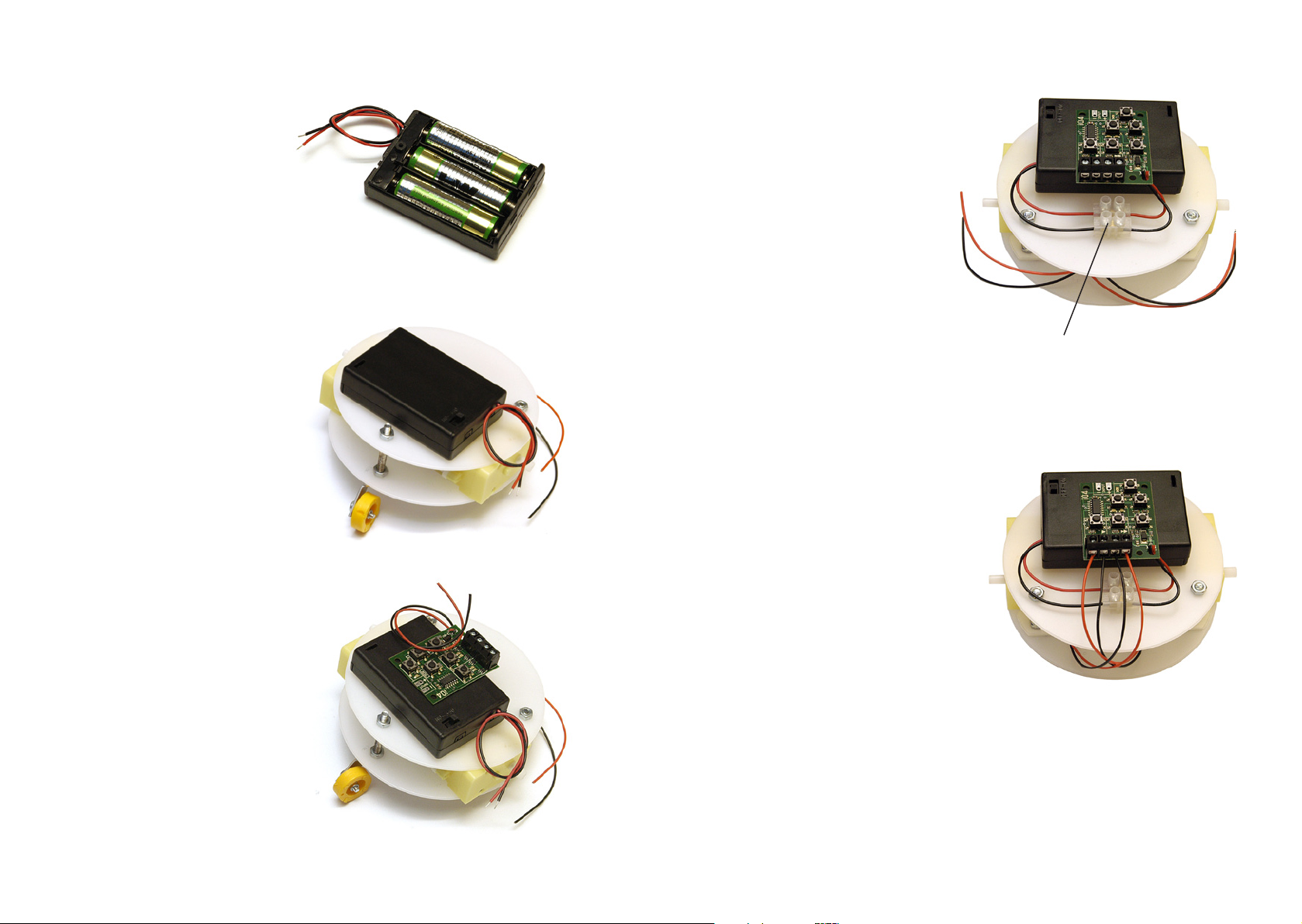
7. Make sure the switch on the battery
box is ‘OFF’, then insert 3 x AA
batteries into the battery box. Take
care to ensure the batteries are
inserted the correct way round.
8. Using one of the sticky pads, stick the
battery box to the top plate in the
position shown.
9. Use another sticky pad to stick the IQ4
controller on top of the battery box.
Cut the connector off the end of the
wires from the IQ4 controller.
10. Use the final sticky pad to fix the
connecting block to the top plate as
shown. Carefully strip the ends of the
wires from the IQ4 to expose the metal
wire strands.
Join the wires from the battery box
to the wires from the IQ4 using the
connecting block. (Loosen the screws in
the connecting block before inserting
the wires, then tighten the screws to
hold the wires in place).
11. Carefully strip the ends of the wires
from the motors to expose the metal
wire strands.
Insert these wires into the connecting
block on the IQ4 controller. The red
and black wires from the left motor
should connect into the left side of the
connecting block. Ensure the wires
are connected in this order: red, black,
black red.
connecting block

8 9
12. Place one of the small washers into the
centre of one of the wheels, then press
in one of the plastic wheel inserts.
Repeat with the second wheel.
13. Carefully press the wheels onto the
motorised gearboxes then fix them in
place using the remaining screws and
washers. A gentle force will be needed
to ensure the screws bite into the
plastic.
Your robot is now ready to use.
wheel insert
PROGRAMMING YOUR ROBOT
The IQ4 controller can be programmed to switch the two motors forward, reverse or off in a desired sequence.
Programming is achieved using the two ‘output’ switches, the ‘reverse’ switch and the ‘save’ switch. The ‘run’
switch is used to start or stop a program.
The IQ4 board will ‘remember’ a sequence of up to 60 switching steps. At each step either of the outputs can
be switched forward, reverse or off. The overall time delay between each step can be adjusted by pressing the
‘reduce run speed’ or ‘increase run speed’ switches while a program is running.
Switch the power ‘ON’, then try this example program:
1. Press the output [1] switch and the output [2] switch so that the green lights appear above the switches.
(The motors will start turning forward.)
2. Press the ‘save’ switch once. (The red light under the ‘run’ switch will flash twice to show the save
switch has been pressed.)
3. Press the output [2] switch so that the green light above it turns off. (The right hand motor will stop
turning).
4. Press the ‘save’ switch once.
5. Press output [1] switch so that the green light above it turns off. Press the output [2] switch so that the
green light above it turns on. (The left hand motor will stop turning and the right hand motor will start
turning).
6. Press the ‘run’ switch once and put the robot down on a flat surface.
Run switch and
Red/Green LEDs
+
_
OUTPUT 1
+
_
OUTPUT 2
Green LEDs Red LEDs
INPUT
Input LED
Battery
connection
3V to 6V
Output 1 switch (also
reduce run speed)
Output 2 switch (also
increase run speed)
Input switch
Save
switch
Reverse
switch

10 11
The robot will repeat the following movements: forward, turn left, turn right.
The program may be summarised in the following table:
Note: while the program is running the time between each step of the program can be increased or decreased
by pressing the ‘increase run speed’ or ‘reduce run speed’ switches.
ADDING STEPS TO A PROGRAM
1. Press the ‘run’ switch so that the light under it turns red and the motors stop turning.
2. While both of the outputs are off press the ‘save’ switch once. This will cause the robot to stop for a
moment when the program is running.
3. While holding down the ‘reverse’ switch, press the output [1] switch and the output [2] switch so that
the red lights appear above the switches. Both motors will start turning backward.
4. Press the ‘save’ switch twice. This means the robot will reverse for two steps of the program.
5. Press the two output switches once so that both outputs are off, then press the ‘save’ switch once.
6. Press the ‘run’ switch once and put the robot down on a flat surface.
The robot will repeat the original program but after turning right it will then stop for a moment, reverse and
then stop again.
ERASING A PROGRAM
The IQ4 controller will ‘remember’ a program even when the power is switched off. To erase a program hold
the ‘run’ switch down for 3 seconds until the light flashes.
FURTHER INFORMATION ABOUT THE IQ4 CONTROLLER
For more detailed information about the IQ4 controller please see www.mindsetsonline.co.uk and search
for IQ4. A pdf file is available to download from the link.
Output 1
1
2
3
4
Output 2
forward
forward
off
forward
off
forward
Lines
IDEAS FOR APPLICATIONS
• Mazecompetition-designamazeforyourrobotforuseinaprogrammingcompetition.(Stringorpaper
stripscouldbeusedtomapoutthemaze.)
• Ballcollector-designadevicethatwillenableyourrobottocollectpingpongballsasitmoves.
• Remotelming-designabracketthatwillallowavideocameratobettedtoyourrobot.
• Roboticpet-designanendearingbodysuitforyourrobot.
• Drawingmachine-designapenholdersothatyourrobotdrawsasitmoves.(Largesheetsofpaperwill
be needed!)
• Bumpandreverse-addamicroswitch‘bumper’toyourrobotsothatitcanreverseandmoveoffina
different direction when it bumps into an object. For information regarding adding an input to the IQ4
controller please see the IQ4 information booklet available from www.mindsetsonline.co.uk.

BATTERY SAFETY
• Batteriescanbehazardous-especiallyrechargeablebatteriesandalkalinebatteries
• Neveruserechargeablebatteriesinyourkit
• Alwaystakecarethatthebatteryleadsdonottouchtogetherandshort-circuitthe
battery. This can result in the battery getting hot and even melting the battery box
• Alwaysremovethebatteryfromyourkitwhenyouhavenishedusingit
• Alwaysstorebatteriessafelywheretheycannottouchanymetalobjects
• Neverdisposeofbatteriesinare.Puttheminaspecialbatterycollectionunitorin
the normal household waste
WARNING
This is not a toy. It is an educational kit and must be used under adult supervision. This
product is not suitable for children under 3 years. It contains sharp or small parts that
could be dangerous for young children.
Designed and supplied by Mindsets Ltd.
Web: www.mindsetsonline.co.uk
Mindsets Ltd., Unit 10, The IO Centre, Lea Road, Waltham Cross, Herts. EN9 1AS
Indice
Altri manuali Mindsets Robotica


