
miniClima EBCeasy1 Manuale utente
miniClima Schönbauer GmbH
Brunner Str. 21b, 2700 WIENER NEUSTADT, AUSTRIA, EU
Tel. | Phone: + 3 2622 2 96 , + 3 6991 2 96 01, Voicemail: + 3 6993 2 96 01, Fax: + 3 2622 2 96 15, E-Mail: office@miniclima.com
www.miniclima.com, twitter.com/miniClima
UID | VAT-ID: ATU6199 35, EORI: ATEOS1000001229, EORI (UK): GB077366578000
Firmenbuchnummer | Trade Register Number: 267137z (Landesgericht | Regional Court of Wiener Neustadt)
miniClima Manual EBCeasy1-2
Topic: Complete instructions for the application, installation, usage, maintenance & care, de-installation,
storage and packing-up of the respective devices.
Valid for: miniClima Constant Humidity Devices, Series EBC10/11/12 (Rev.3)/easy, Type EBCeasy1-2.
Optional accessories or extras are described in their respective supplement manuals.
THIS MANUAL CONTAINS IM ORTANT INFORMATION - LEASE READ IT CAREFULLY BEFORE
USING OR INSTALLING YOUR DEVICE!
The devices covered by this manual are not destined for being used by persons (including children) with
limited physical, sensory or intellectual abilities and/or by persons lacking the required experiences/skills,
except such persons are going to be supervised by a person that is responsible for their safety or such
persons have been thoroughly briefed beforehand about the usage of the device and it can be expected that
the persons will have comprehended the explanations and that they will also follow them. Children have to
be kept well away from the devices, ensuring that they will not play with them.
Applies analogously to the individual products of type EBCeasy. As of 25.03.2021. Subject to
modification.
miniClima - Manual_EBCeasy1-2_en
1 / 0

miniClima Schönbauer GmbH
Brunner Str. 21b, 2700 WIENER NEUSTADT, AUSTRIA, EU
Tel. | Phone: + 3 2622 2 96 , + 3 6991 2 96 01, Voicemail: + 3 6993 2 96 01, Fax: + 3 2622 2 96 15, E-Mail: office@miniclima.com
www.miniclima.com, twitter.com/miniClima
UID | VAT-ID: ATU6199 35, EORI: ATEOS1000001229, EORI (UK): GB077366578000
Firmenbuchnummer | Trade Register Number: 267137z (Landesgericht | Regional Court of Wiener Neustadt)
TABLE OF CONTENTS
1 GENERAL INFORMATION.......................................................................................................................... 4
1.1 What can be expected from the work of an EBCeasy, what can't..................................................4
1.1.1 Primary purpose...........................................................................................................................
1.1.2 Characteristic features..................................................................................................................
1.2 Risk of use, recommendations.......................................................................................................... 6
1.3 ermissible ambient conditions........................................................................................................ 7
1.4 Further requirements for using EBCs...............................................................................................8
1.5 Available types.................................................................................................................................... 8
2 IDENTIFYING YOUR UNIT AND ITS ACCESSORIES/O TIONS...............................................................8
2.1 Delivered items (per EBC).................................................................................................................. 8
2.2 ossibly delivered other (optional) accessories (excerpt)..............................................................9
2.3 Verifying the series............................................................................................................................. 9
2.4 Identifying the serial number (S/N)..................................................................................................10
3 INSTALLATION......................................................................................................................................... 10
3.1 Setting up the EBC, establishing the hosepipe connections.......................................................10
3.1.1 Handling the hosepipe fittings.....................................................................................................12
3.1.2 Connecting the hosepipes to the EBC........................................................................................13
3.2 Electrical connections...................................................................................................................... 14
3.2.1 Plugging and securing the 12V Connection................................................................................1
3.2.2 Handling the ferrite core.............................................................................................................. 1
3.2.3 RH/T sensor................................................................................................................................ 1
3.2. Control lines................................................................................................................................ 15
3.2.5 Wirings for the external signals (Composite error alarm and on-off status)................................16
4 INITIAL AND CONTINUED O ERATION..................................................................................................17
4.1 mains connection............................................................................................................................. 18
4.2 Stand-by mode.................................................................................................................................. 18
4.3 Switching on and off.........................................................................................................................18
4.4 Settings and read-outs - working with the menu...........................................................................20
. .1 Menu entry Setpoint.................................................................................................................... 21
. .2 Menu entry AlarmMax................................................................................................................. 21
. .3 Menu entry AlarmMin..................................................................................................................23
. . Menu entry AlarmBeep...............................................................................................................2
. .5 Menu entry 1. Alarm................................................................................................................... 25
. .6 Menu entry for the display and menu language..........................................................................26
. .7 Menu entry t@Sensor................................................................................................................. 26
. .8 Menu entry t@Eom..................................................................................................................... 27
. .9 Menu entry t@EBC..................................................................................................................... 28
. .10 Menu entry OpHours................................................................................................................ 28
. .11 Menu entry rH Corr...................................................................................................................29
. .12 Menu entry Hyst........................................................................................................................30
4.5 rocedures during operation........................................................................................................... 31
5 ALARMS - WHAT THEY MEAN AND HOW TO REACT...........................................................................32
5.1 Humidity alarm.................................................................................................................................. 32
5.1.1 Description of the alarm.............................................................................................................. 32
5.1.2 Remaining EBC functions during this alarm................................................................................32
5.1.3 Possible reasons and solutions..................................................................................................33
5.2 Flaps alarm........................................................................................................................................ 33
5.2.1 Description of the alarm.............................................................................................................. 33
5.2.2 Remaining EBC functions during this alarm................................................................................3
5.2.3 Possible reasons and solutions..................................................................................................3
Applies analogously to the individual products of type EBCeasy. As of 25.03.2021. Subject to
modification.
miniClima - Manual_EBCeasy1-2_en
2 / 0

miniClima Schönbauer GmbH
Brunner Str. 21b, 2700 WIENER NEUSTADT, AUSTRIA, EU
Tel. | Phone: + 3 2622 2 96 , + 3 6991 2 96 01, Voicemail: + 3 6993 2 96 01, Fax: + 3 2622 2 96 15, E-Mail: office@miniclima.com
www.miniclima.com, twitter.com/miniClima
UID | VAT-ID: ATU6199 35, EORI: ATEOS1000001229, EORI (UK): GB077366578000
Firmenbuchnummer | Trade Register Number: 267137z (Landesgericht | Regional Court of Wiener Neustadt)
5.3 EomTemp alarm................................................................................................................................ 34
5.3.1 Description of the alarm.............................................................................................................. 3
5.3.2 Remaining EBC functions during this alarm................................................................................3
5.3.3 Possible reasons and solutions..................................................................................................35
5.4 Signal error alarm............................................................................................................................. 35
5. .1 Description of the alarm..............................................................................................................35
5. .2 Remaining EBC functions during this alarm................................................................................35
5. .3 Possible reasons and solutions..................................................................................................35
6 TROUBLESHOOTING............................................................................................................................... 37
6.1 The desired humidity level is not reached......................................................................................37
6.2 The humidity level displayed on the EBC is different to the one of a third party instrument that
has been put inside the case.................................................................................................................. 37
6.3 A red LED lights up on the front panel...........................................................................................37
6.4 When pulling or plugging in the sensor cable or the control line the EBC reacts in an
unexpected way....................................................................................................................................... 37
6.5 The device won't react in any sort of way anymore, neither the LED nor the display are on,
despite of the device being plugged on correctly................................................................................38
7 MAINTENANCE AND CARE..................................................................................................................... 38
7.1 Filter-pads for air in-/outlets........................................................................................................... 38
7.2 Long-term drift of the RH/T sensor.................................................................................................39
7.3 General service................................................................................................................................. 39
8 DEINSTALLING / ACKING U / STORING / SHI ING.........................................................................39
9 TECHNICAL DATA.................................................................................................................................... 41
9.1 Figures............................................................................................................................................... 41
9.2 Dimensions....................................................................................................................................... 41
Applies analogously to the individual products of type EBCeasy. As of 25.03.2021. Subject to
modification.
miniClima - Manual_EBCeasy1-2_en
3 / 0

miniClima Schönbauer GmbH
Brunner Str. 21b, 2700 WIENER NEUSTADT, AUSTRIA, EU
Tel. | Phone: + 3 2622 2 96 , + 3 6991 2 96 01, Voicemail: + 3 6993 2 96 01, Fax: + 3 2622 2 96 15, E-Mail: office@miniclima.com
www.miniclima.com, twitter.com/miniClima
UID | VAT-ID: ATU6199 35, EORI: ATEOS1000001229, EORI (UK): GB077366578000
Firmenbuchnummer | Trade Register Number: 267137z (Landesgericht | Regional Court of Wiener Neustadt)
1 GENERAL INFORMATION
1.1 What can be expected from the work of an EBCeasy, what can't
1.1.1 Primary purpose
The miniClima Constant Humidity Devices EBC are built for the regulation of the relative air-humidity in both
air- and steam-tight enclosed museum showcases, switchboards, deposit cupboards, containers and similar
applications (hereinafter only referred to as "cases"). The devices help in reaching and keeping a desired
level of relative air-humidity inside the cases. They are not built for the purpose of influencing or changing
any other state or condition of the air being processed (e.g. temperature, pollution, etc.), but further
equipment1 can be added to an EBC for filtering dust and particles out of the system air.
1.1.2 Characteristic features
Once set up correctly, the EBC, the case and the interconnections between EBC and case (hosepipes)
together form a tight air circulation system. As long as the EBCeasy is turned on and has adjusted its internal
air-leading parts, the air circles almost continuously through it. More in detail: The air is exhausted from the
case, led to the EBC, where it is going to be either humidified, dehumidified or left unchanged - depending on
the set and actual RH values. The conditioned air is then led back into the case. Conditioning is achieved by
means of a solid state polymer ionic membrane. On one side of the membrane it splits hydrogen ions (H+)
from the air, migrates it through the membrane and discharges it on the other side. The membrane can only
be used in one direction. Therefore the EBCeasy is equipped with a mechanism to switch the air-stream
between both sides of the membrane depending on the necessity to humidify or dehumidify. The respective
other side of the membrane is opened to the surrounding air to equalize the generated humidity level.
When the EBCeasy has to change its operation-state between humidifying, dehumidifying or just circulating,
it first stops its circulation fan, then closes flaps being open to the outside and then opens flaps according the
new operating state and starts the circulation fan again. The outside air is therefore never opened to the
internal air-stream directly. Moreover to avoid the transport of external particles into the internal air-stream,
the outside air is filtered by filter-pads of filter-class F6 on the incoming side and of filter-class F3 on the
outgoing side.
During all these times a digital sensor measures the values for relative air humidity and temperature within
the case. The EBC receives these values and compares the measured RH value with the setpoint, the
1See www.miniclima.com for our current products and available optional accessories.
Applies analogously to the individual products of type EBCeasy. As of 25.03.2021. Subject to
modification.
miniClima - Manual_EBCeasy1-2_en
/ 0
miniClima Schönbauer GmbH
Brunner Str. 21b, 2700 WIENER NEUSTADT, AUSTRIA, EU
Tel. | Phone: + 3 2622 2 96 , + 3 6991 2 96 01, Voicemail: + 3 6993 2 96 01, Fax: + 3 2622 2 96 15, E-Mail: office@miniclima.com
www.miniclima.com, twitter.com/miniClima
UID | VAT-ID: ATU6199 35, EORI: ATEOS1000001229, EORI (UK): GB077366578000
Firmenbuchnummer | Trade Register Number: 267137z (Landesgericht | Regional Court of Wiener Neustadt)
hysteresis and the threshold values, which can all be set via the menu prompts on the front panel of the
EBC.
Through the work of the EBC, the desired level of the air humidity in the case is constantly approached -
duration and speed depending on the initial values, on the conditions (temperature, humidity) the case is
exposed to, and on a number of further variables (like the temperature at the EBC's place of installation, the
size and shape of the case, the air/steam tightness of the case, the kind of materials stored inside the case,
the length of the hosepipes, whether or not the hosepipes are laid in many bends and turns etc). After the
setpoint range (=setpoint +/- hysteresis) has been reached, the RH is going to be kept on a constant level. A
negligible movement around the setpoint might be observed. This behaviour is technically induced and does
not constitute an error.
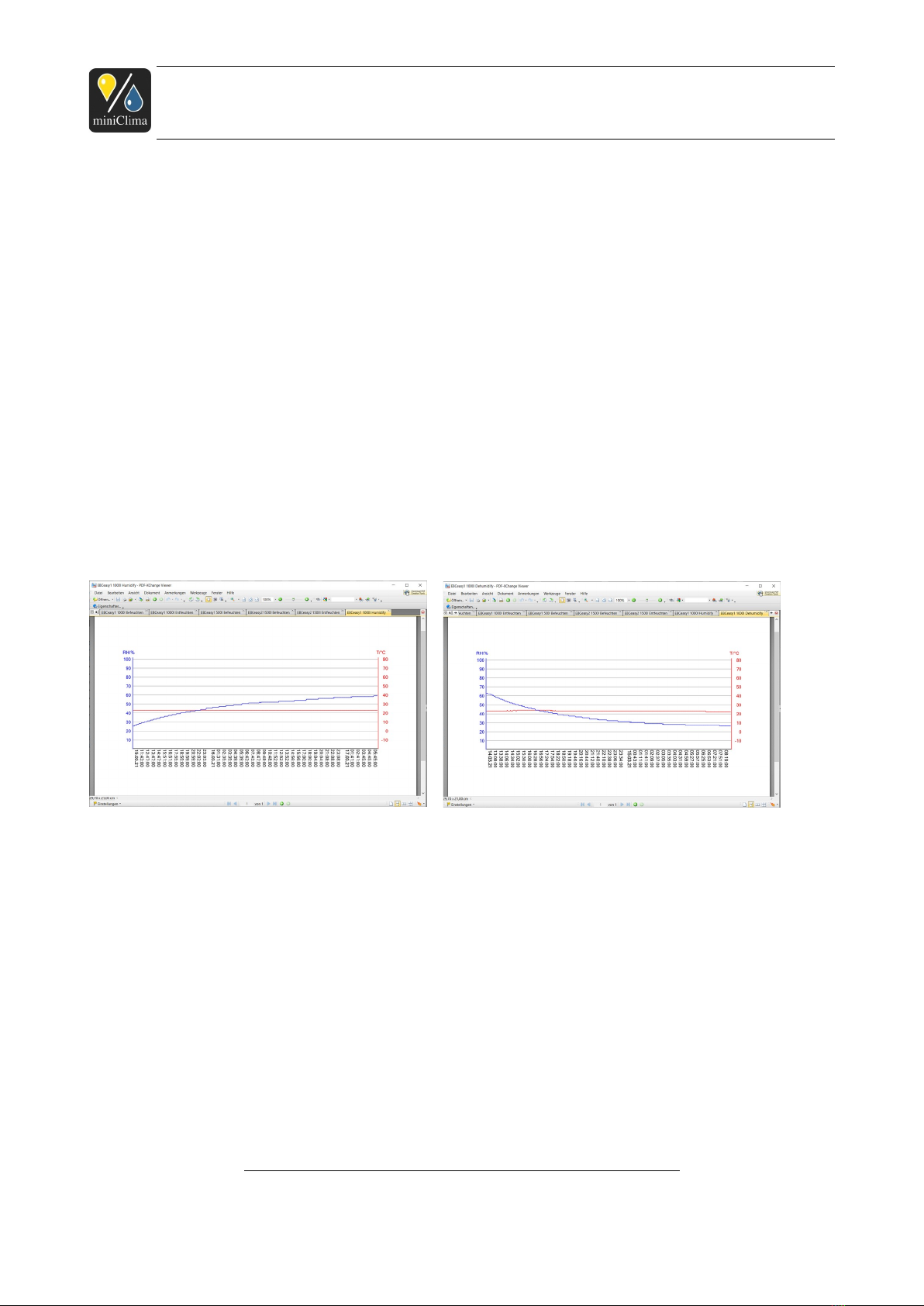
A typical reaction process can be seen in the following picture, showing the humidification and
dehumidification by an EBCeasy1 for a showcase of 1,0m³ (RH: blue, T: red) at 30%RH, 22°C surrounding
conditions.
Applies analogously to the individual products of type EBCeasy. As of 25.03.2021. Subject to
modification.
miniClima - Manual_EBCeasy1-2_en
5 / 0
Fig. 1: Humidification Process EBCeasy1 Fig. 2: Dehumidification Process EBCeasy1
miniClima Schönbauer GmbH
Brunner Str. 21b, 2700 WIENER NEUSTADT, AUSTRIA, EU
Tel. | Phone: + 3 2622 2 96 , + 3 6991 2 96 01, Voicemail: + 3 6993 2 96 01, Fax: + 3 2622 2 96 15, E-Mail: office@miniclima.com
www.miniclima.com, twitter.com/miniClima
UID | VAT-ID: ATU6199 35, EORI: ATEOS1000001229, EORI (UK): GB077366578000
Firmenbuchnummer | Trade Register Number: 267137z (Landesgericht | Regional Court of Wiener Neustadt)
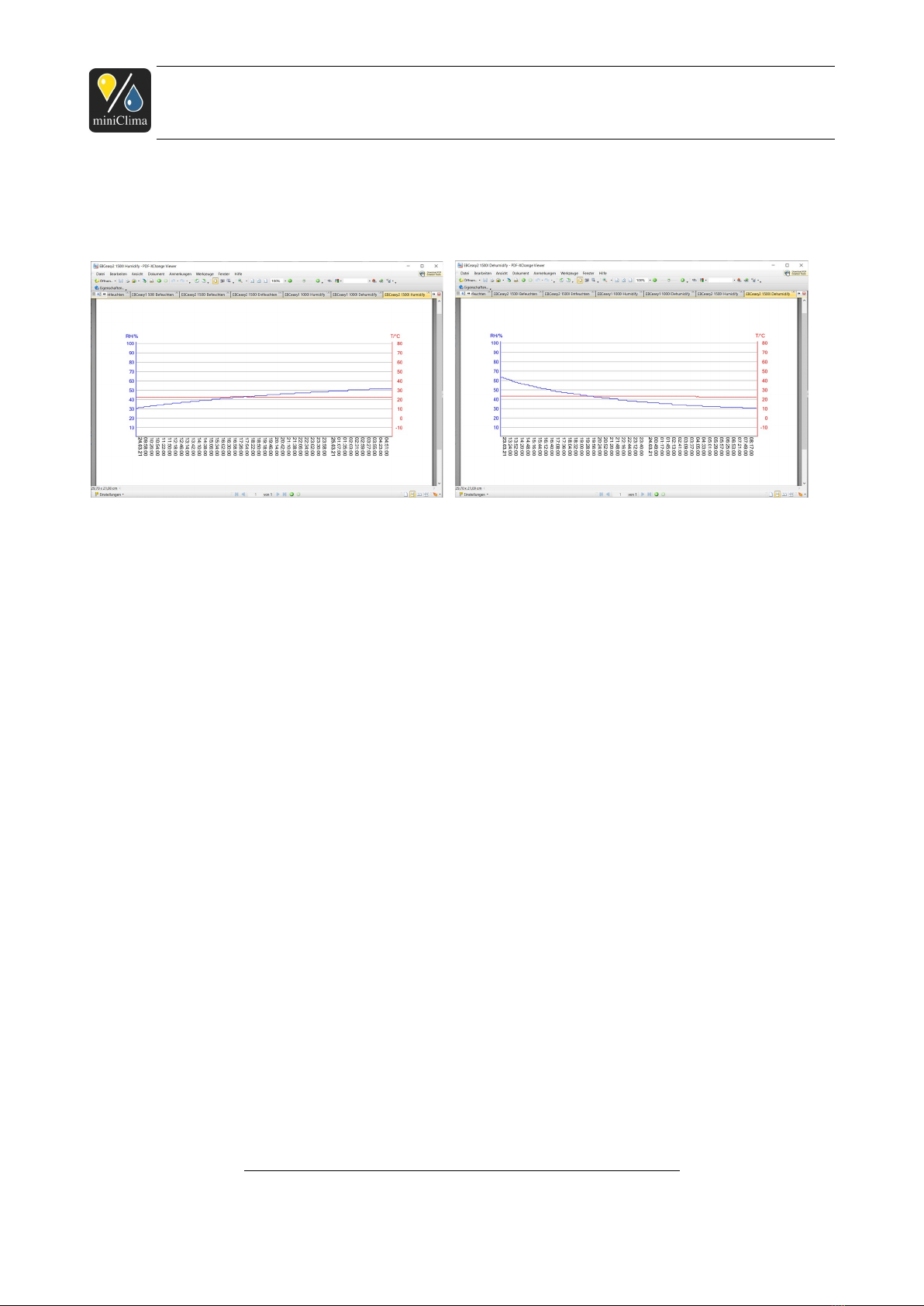
A typical reaction process can be seen in the following picture, showing the humidification and
dehumidification by an EBCeasy2 for a showcase of 2,0m³ (RH: blue, T: red) at 30%RH, 22°C surrounding
conditions.
1.2 Risk of use, recommendations
Our devices are first and foremost used for the regulation of the relative humidity of the air surrounding
precious and/or irreplaceable works of art or artefacts. It is therefore necessary to cover all possible
imponderables, when installing and using the EBCs. For this purpose, please do bear in mind the following
recommendations and risks of use.
A clean installation, carried out according to the instructions found in this manual, is the basis for a working
system. In particular essential are:
The use of a climate-ready case (air-tight, steam-tight).
The positioning of the miniClima RH/T sensor on a spot that features the same environmental conditions
as the one where the exhibit is placed (see section 3.2.3 "RH/T sensor", p. 1 ).
The design and positions of the air inlets and outlets on the case (see section 3.1 "Setting up the EBC,
establishing the hosepipe connections", p. 10).
That the air resistance within the air circuit is kept low (short hosepipe connections, avoidance of too
many bends and turns when laying the hosepipes etc. - see section 3.1 "Setting up the EBC, establishing
the hosepipe connections", p. 10).
Preventing different temperatures inside the case (light installations, solar radiation,...). The miniClima
RH/T sensor and the exhibit in particular need to be exposed to the very same temperature.
The temperature surrounding the EBC and the hosepipes (see section 3.1 "Setting up the EBC,
Applies analogously to the individual products of type EBCeasy. As of 25.03.2021. Subject to
modification.
miniClima - Manual_EBCeasy1-2_en
6 / 0
Fig. : Humidification Process EBCeasy2 Fig. 3: Dehumidification Process EBCeasy2

miniClima Schönbauer GmbH
Brunner Str. 21b, 2700 WIENER NEUSTADT, AUSTRIA, EU
Tel. | Phone: + 3 2622 2 96 , + 3 6991 2 96 01, Voicemail: + 3 6993 2 96 01, Fax: + 3 2622 2 96 15, E-Mail: office@miniclima.com
www.miniclima.com, twitter.com/miniClima
UID | VAT-ID: ATU6199 35, EORI: ATEOS1000001229, EORI (UK): GB077366578000
Firmenbuchnummer | Trade Register Number: 267137z (Landesgericht | Regional Court of Wiener Neustadt)
establishing the hosepipe connections", p. 10).
Regular visual inspection of the EBCs, regular maintenance and care of the EBCs (see section 7
"Maintenance and care", p. 38).
We recommend a beforehand verification by the user/customer that our product is going to be able to fulfil
the individual expectations and needs required for the specific case. Please don't hesitate to get in touch for
any questions.
It is further recommended to test the function of a completely installed system (consisting of the case, the
interconnections and the EBC(s)) before using it to control the relative air-humidity of sensitive exhibits or
components. In doing so, possible errors (i.e. wrong installations) can be discovered early enough to have
them corrected.
Please bear in mind that every technical device can break. So, to be on the safe side with respect to the
lasting integrity of your sensitive and valuable exhibits or components, further actions should be considered:
Regular inspections of the case and the EBC through skilled personnel probably provide for the highest
possible safety against technical failures or breakdowns.
Installation of external signal devices for every EBC, to be alarmed in time when one of our devices
needs attention (see section 3.2.5 "Wirings for the external signals (Composite error alarm and on-off
status)" on p. 16).
Having a spare unit at hand if need be or when the regular inspection at our workshop becomes due. You
can save time and avoid delays during which your case might remain without humidity control. Those who
decide for this option should actually best have their EBCs rotate in regular intervals.
Please mind to install, use, maintain, deinstall, pack up, store and ship your EBC and all accessories
correctly and in accordance to the instructions.
1.3 ermissible ambient conditions
-5 - 30°C, 15-80%RH, non-condensing (applies to the storage of the EBC as well as to the operation of
the completely installed system as a whole).
Note: The performance ot the EBCeasy also depends on the humidity of its environment, as a high
difference of the humidity inside and outside of the showcase can cause diffusion of humidity through the
Applies analogously to the individual products of type EBCeasy. As of 25.03.2021. Subject to
modification.
miniClima - Manual_EBCeasy1-2_en
7 / 0

miniClima Schönbauer GmbH
Brunner Str. 21b, 2700 WIENER NEUSTADT, AUSTRIA, EU
Tel. | Phone: + 3 2622 2 96 , + 3 6991 2 96 01, Voicemail: + 3 6993 2 96 01, Fax: + 3 2622 2 96 15, E-Mail: office@miniclima.com
www.miniclima.com, twitter.com/miniClima
UID | VAT-ID: ATU6199 35, EORI: ATEOS1000001229, EORI (UK): GB077366578000
Firmenbuchnummer | Trade Register Number: 267137z (Landesgericht | Regional Court of Wiener Neustadt)
membrane.
NOTE: The values -5 - 30°C and 15-80%RH refer to the air-conditions surrounding the EBC and the case
which are generally obligatory for operation (or damage-free storage) of the EBC. They do not refer to the
surrounding air-conditions were the full capacity with respect to the achievable setpoint range (inside the
case) will be given (see also section 9 "Technical data", p. 0).
1.4 Further requirements for using EBCs
The EBCeasy has to be operated with 12V DC, 2 W. An according wall power supply is usually part of
delivery.
1.5 Available types
EBCeasy-1 device for air volumes of up to approx. 1,0m3.
EBCeasy-2 device for air volumes of up to approx. 2,0m3.
NOTE: The capacity of an EBC will differ depending on the ambient conditions, the tightness and
constitution of the case, the tightness and constitution of the connections between case and device, the kind
and consistency of the materials stored/presented inside the case, and the like.
Every EBC of the current series can be used as both a master unit and a slave. The decision for one of the
two hierarchic states is selected automatically dependant upon the type of cable connected to the EBC. If it
is the cable of a miniClima RH/T sensor then the EBC becomes a master controller; if it is the control line
coming from another EBC then the unit becomes a slave and will duplicate the function of the EBC that is the
first in the line (chain of EBCs).
With this it is possible to increase the max. volume of the air that can be conditioned: Every added
EBCeasy1/2 increases the capacity by approx. 1,0/2,0m3.
2 IDENTIFYING YOUR UNIT AND ITS ACCESSORIES/O TIONS
2.1 Delivered items (per EBC)
1 EBC. (packed extra in order to avoid transport damages: 1 6pin plug-in connector).
1 Flexible hosepipe (length as ordered or by default 3m for each EBCeasy).
Applies analogously to the individual products of type EBCeasy. As of 25.03.2021. Subject to
modification.
miniClima - Manual_EBCeasy1-2_en
8 / 0

miniClima Schönbauer GmbH
Brunner Str. 21b, 2700 WIENER NEUSTADT, AUSTRIA, EU
Tel. | Phone: + 3 2622 2 96 , + 3 6991 2 96 01, Voicemail: + 3 6993 2 96 01, Fax: + 3 2622 2 96 15, E-Mail: office@miniclima.com
www.miniclima.com, twitter.com/miniClima
UID | VAT-ID: ATU6199 35, EORI: ATEOS1000001229, EORI (UK): GB077366578000
Firmenbuchnummer | Trade Register Number: 267137z (Landesgericht | Regional Court of Wiener Neustadt)
2 Hosepipe fittings for affixing the hosepipes to the case. Each hosepipe fitting consists of 1 connector, 1
counter nut, 1 gasket ("GD..").
1 external power supply for 12VDC/2 W.
Either (for EBCs sold as master units): 1 RH/T sensor with housing, cable (2.5m resp. 5.0m), RJ 5 plug
and a ferrite core ( IM ORTANT: Please see the printed note that has been added your delivery before
handling the sensor).
Or (for EBCs sold as slave units): 1 control line (2.0m resp. 5.0m; category-5e patch cable, twisted
pair/non-crossed, with RJ 5 plugs and ferrite cores on either end).
CD-ROMs (1 set per order) with the relevant user manuals, information and the miniClima software
(further copies of the CDs on request).
2.2 ossibly delivered other (optional) accessories (excerpt)
Aluminium flanges for fixing the hosepipe fittings on a case wall of more than 6mm thickness.
Air circulation filters.
Air distribution boxes LVB20 (see the additionally delivered manual).
Detached operating unit (cable-bound remote control; see the additionally delivered manual).
Serial data cable RS232 for plugging the EBC to a PC.
"Serial2USB" adapter with cable and driver2 for plugging the EBC to a PC without RS232 interface.
I2C Expander for enhancing the signal of the RH/T sensor if the latter is installed more than 7.5m away
from the EBC3 (see the additionally delivered manual).
Serial2IP converter for hooking the EBC to your local LAN or WiFi (see the additionally delivered manual).
Extern LED unit for displaying the alarm/on-off status of the EBC (see the additionally delivered manual).
Add. control lines and/or RH/T sensors.
2.3 Verifying the series
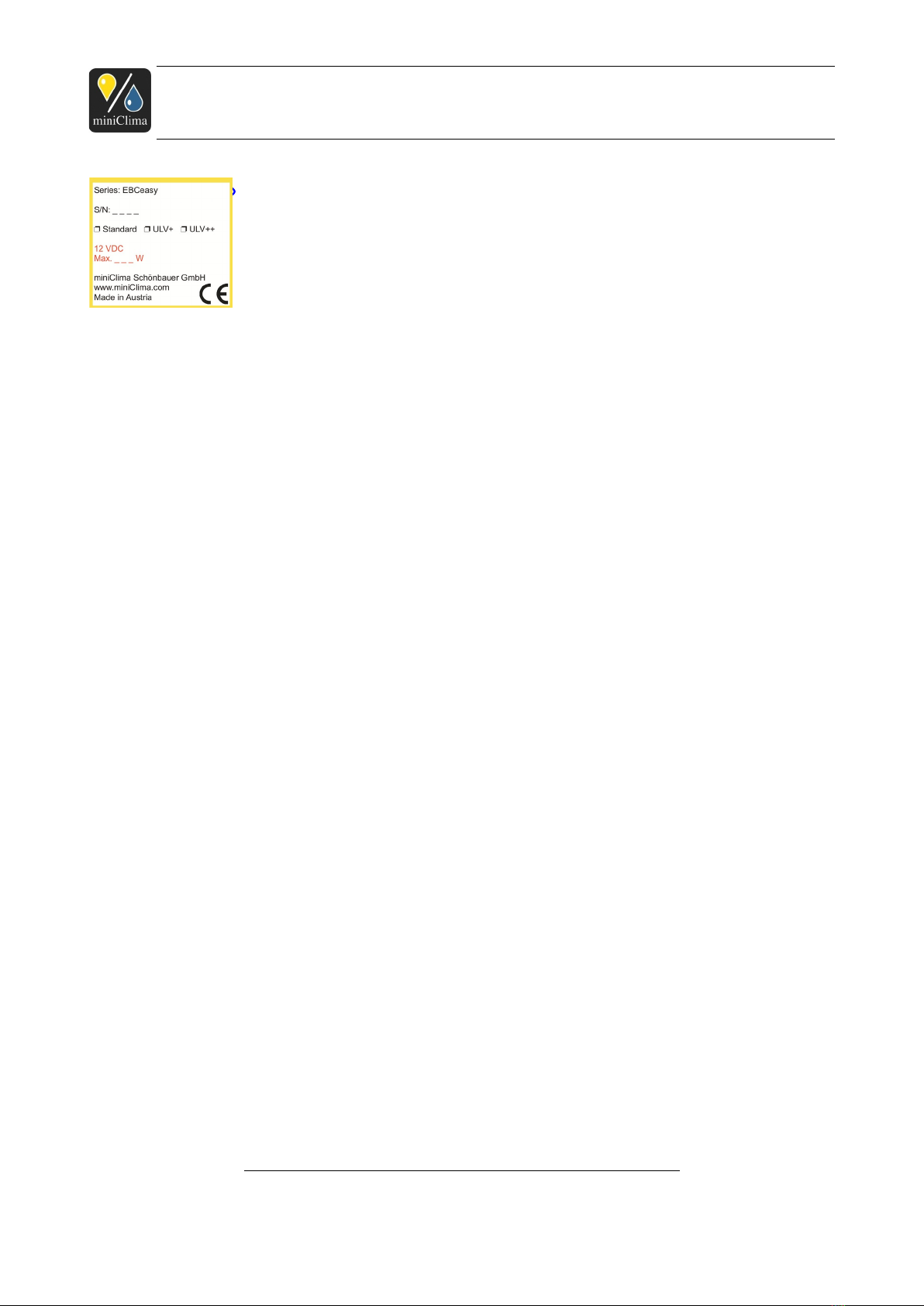
The series is indicated on the rating plate on the backside of the unit (see Fig. 5). It should read "EBCeasy".
2 CAUTION: The driver CD might have a diameter of <12 cm. Such Mini-CDs are not applicable for slot-loading disc drives. Do check with your hardware documentation if
uncertain!
3Admissible max. length of the sensor cable (as of processor version V121107.02): 5+2.5=7.5m (earlier versions: 5m). The mentioned expanders are required for greater
distances.
Applies analogously to the individual products of type EBCeasy. As of 25.03.2021. Subject to
modification.
miniClima - Manual_EBCeasy1-2_en
9 / 0
miniClima Schönbauer GmbH
Brunner Str. 21b, 2700 WIENER NEUSTADT, AUSTRIA, EU
Tel. | Phone: + 3 2622 2 96 , + 3 6991 2 96 01, Voicemail: + 3 6993 2 96 01, Fax: + 3 2622 2 96 15, E-Mail: office@miniclima.com
www.miniclima.com, twitter.com/miniClima
UID | VAT-ID: ATU6199 35, EORI: ATEOS1000001229, EORI (UK): GB077366578000
Firmenbuchnummer | Trade Register Number: 267137z (Landesgericht | Regional Court of Wiener Neustadt)
Fig. 5 - Rating plate with series ID,
S/N and indication of the built-in air
circulation fan (Standard-ULV,
ULV+ or ULV++).
2.4 Identifying the serial number (S/N)
The serial number (four digits labelled S/N) is indicated on the rating plate on the backside of the EBC (see
Fig. 5).
3 INSTALLATION
3.1 Setting up the EBC, establishing the hosepipe connections
NOTE: If you have ordered air-distribution-boxes (LVB20), filter boxes, or other accessories relevant for
the hosepipe connections, do also regard their additional installation manuals at this point.
The EBC should be positioned as close as possible to the case, to keep the air resistance, which increases
with the length of the used hosepipes, low. The EBC should not be located in the air-conditioned part of the
case itself. The device has to be installed horizontally and firm. The device has to be given the possibility to
emit its self-produced heat during the operation. It is therefore necessary to ensure, that…
1) ...the device's place of installation (mostly the plinth of the case) is aired (e.g. by means of ventilation
holes in the plinth , or by ventilation fans, if necessary);
2) ...the EBC is placed on a plain surface
3) ... the filter grills on the sides are not blocked and that edge distances of min. 10mm (right side, left side)
are kept for an adequate ventilation;
) ...the air slits are vacuum cleaned regularly, if necessary, and the filter(s) behind the air grill(s) on the right
Recommended sizes and positions for the ventilation holes: 2x50cm2 per EBCeasy: top & bottom panel of the plinth and/or both side panels of it.
Applies analogously to the individual products of type EBCeasy. As of 25.03.2021. Subject to
modification.
miniClima - Manual_EBCeasy1-2_en
10 / 0
Questo manuale è adatto per i seguenti modelli
4
Indice
Altri manuali miniClima Umidificatore


