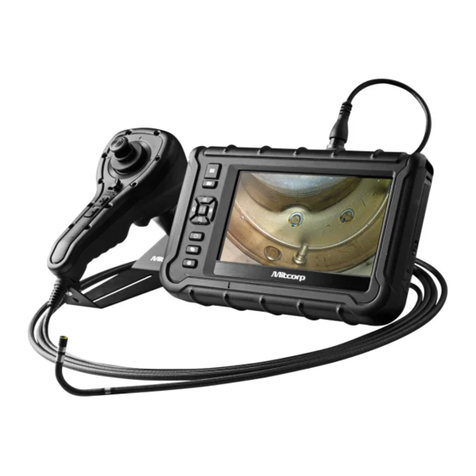
Mitcorp X1000 Manuale utente

VIDEOSCOPE SYSTEM
User Manual
X1000
©Medical Intubation Technology Corporation (Mitcorp).
All rights reserved. Design and specications are subject to change without prior notice. Actual product and accessories
may differ from illustrations. Errors and omissions excepted. Reproduction in any manner without written permission of
Mitcorp is strictly forbidden.
ESC
OK


TABLE OF CONTENTS
Introduction
System Overview.................................................................................................................5
Legal and Other Notices.......................................................................................................9
WEEE Noteice....................................................................................................................................9
CE Notice.......................................................................................................................................9
FCC Notice...........................................................................................................................10
RoHS Notice................................................................................................10
Contact information......................................................................................................10
Chemical Compatibility.................................................................................................................11
Safety Guide..........................................................................................................................11
Inspection and Capturing Functions
Steering the Probe..............................................................................................................12
Adjusting the Brightness..................................................................................................12
Zooming .................................................................................................................................12
Rotating and Inverting......................................................................................................12
Enhancing Image Edge (Clarity+).................................................................................13
Boost Image Brightness (Boost+)................................................................................13
Enhancing Image Contrast (Negative+)..................................................................14
Anti Reflection...............................................................................................14
Particle free...............................................................................................14
Capturing an Image / Freezing Live Image..............................................................15
Dual View Inspection......................................................................................15
Recording a Video............................................................................................16
Playback Functions
Browse / Album modes................................................................................................................16
Delete File..........................................................................................................................16
Add Note.................................................................................................................................17
Compare Stored Image with Live View.......................................................................17
Video Playback....................................................................................................................18
Menu and Settings
General Menu operation.........................................................................................................19
Image Functions........................................................................................................................19
Language Selection.....................................................................................................................20
Adjust Date and Time.........................................................................................................20
Adjust Auto Power Off Timer...................................................................................................21
SD Card Operation.........................................................................................................................21
USB Functions and AV Output
USB Functions.............................................................................................................................23
Maintenance
Changing Tube and Calibration............................................................................24
Upgrading Firmware................................................................................................25

Accessories
Insertion Tube Accessories...........................................................................................26
System Unit Accessories..............................................................................................................28
Specications
System Unit................................................................................................................................29
2way Articulation Tube...............................................................................................29

INTRODUCTION
SYSTEM OVERVIEW
System Unit
SNAP
RIGHT/BRIGHTER
LEFT / DIMMER
UP / ZOOM IN
SUN VISOR
STAND
RECORD
OK / MENU
DOWN / ZOOM OUT
POWER / ESC
ROTATE / MIRROR
LIGHT DIRECTION
POWER INDICATION
ESC
OK
5

SD CARD SLOT
AV OUT
USB
DC IN
RESET
INSERT TUBE CONNECTOR
THREADED HOLE FOR
TRIPOD MOUNT
6

ARTICULATION
CONTROL WHEEL
PROBE HEAD
WHEEL LOCK
SEALING NUT
CONNECTOR
DATE
TIME
LIGHT
DIRECTION
SD CARD
STATUS
BRIGHTNESS
INDICATOR
BATTERY
INDICATOR
REPEAT
RECORDING
INDICATOR
SNAP
INCREASE /DECREASE
BRIGHTNESS
BUTTON
LOCK PROTECTION CAP
PROTECTIVE RING
FITTING RING
PROBE NECK
Insert Tube
Screen Display
7

Setting Up the System
1. Remove the Insert Tube and the system unit from the case.
2. Attach the to the system unit
• Connect the tail cord connector of the Insert Tube to the input
connector of the system unit, screw tight the sealing nut.
3. Power on the system by press and hold the for 3 seconds.
4. Insert the SD card
• Open the peripheral cover on the side of the system unit and insert the
SD card.
Capturing Images
1. Guide the probe to the inspection area.
2. Aim the camera
• Deflect the probe tip by rotating the control wheel.
3. Capture the image.
• Press to capture desired image.
• Hold to keep freezing the frame.
Recording Video
• Press to start recording video.
• Press again to stop recording.
Review Images or Videos
• Press to enter browse mode.
• Press to start playing recorded video.
Turn Off the System
• Press and hold for 3 seconds to turn off the system.
About the battery
Frequent operations
The system is powered by a non-interchangeable Li-Polymer battery, which provides
approximately 6 hours capacity while fully charged. It takes about 3 hours for the
battery to be fully charged from empty. The system must be charging at room
temperature for best charging capacity.
8

SD card
Capacity
Totol Images 31130 62259 124518 249037
Video Length 135 mins 270 mins 539 mins 1079 mins
LEGAL AND OTHER NOTICES
This Mitcorp product is warranted to be free from defects in material and workman
shop for 1 year from the date of purchase. Mitcorp agrees to repair or replace the
product, at its own option and at no charge. This warranty shall not apply to any
product, which has been subject to connect to a faulty accessories, alteration,
negligence, accident or to any product which has been installed other than in
accordance with these instructions.
Warranty is subject to void under unauthorized attempt to disassemble the system
unit, insert tubes or modification of any kinds, even attempted only, of the system.
Mitcorp will not be responsible for damages caused by following situations:
• Defaced, modied or removed serial number label or warranty seal
• Modications of components without Mitcorp’s authorization
• Damages caused by natural phenomena or uncontrollable forces, such as
lightning, ooding, re, earthquake…etc.
WEEE NOTICE
About the SD card usage
• The cross-out wheeled bin symbol indicates that according to the European
Directive 2002/96/EC on Waste Electrical and Electronic Equipment, this
product must be collected in a separated way instead of being disposed of
as unsorted municipal waste.
• Contact your local dealer for procedures of recycling this equipment.
The X1000 videoscope system uses SD card to storage captured images and videos.
The estimated total images and video length on a par with SD card capacity is shown
below:
4 GB 8 GB 16 GB 32 GB
9
CE NOTICE
The X1000 Videoscope System is in conformance with the following standards:
• 1999/5/EC Radio and Telecommunications Terminal Equipment Directive.
• 2004/108/EC Electromagnetic Compatibility Directive

RoHS NOTICE
The X1000 Videoscope System is in conformance with the requirements of the
European law on the Restriction of Hazardous Substances (RoHS) directive. This means
that our product is both lead-free and without the hazardous substances either in the
manufacturing process or in the nal product
CONTACT INFORMATION
Please contact the store you purchased for assistance if you have any question about
this product.
FCC NOTICE
This device complies with Part 15 of the FCC Rules. Operation is subject to the
following two conditions:
• This device may not cause harmful interference.
• This device must accept any interference received, including interference
that may cause undesired operation
Federal Communications Commission Statement
This equipment has been tested and found to comply with the limits for a Class A
digital device, pursuant to Part 15 of the FCC Rules. These limits are designed to
provide reasonable protection against harmful interference when the equipment is
operated in a commercial environment. This equipment generates, uses and can radiate
radio frequency energy and, if not installed and used in accordance with the instruction
manual, may cause harmful interference to radio communications. Operation of this
equipment in a residential area is likely to cause harmful interference in which case the
user will be required to correct the interference at his own expense.
FCC Caution: Any changes or modifications not expressly approved by the party
responsible for compliance could void the user's authority to operate this equipment.
This device complies with Industry Canada licence-exempt RSS standard(s). Operation
is subject to the following two conditions: (1) this device may not cause interference,
and (2) this device must accept any interference, including interference that may
cause undesired operation of the device.
Le présent appareil est conforme aux CNR d'Industrie Canada applicables aux appareils
radio exempts de licence. L'exploitation est autorisée aux deux conditions suivantes
: (1) l'appareil ne doit pas produire de brouillage, et (2) l'utilisateur de l'appareil doit
accepter tout brouillage radioélectrique subi, même si le brouillage est susceptible d'en
compromettre le fonctionnement.
10
Indice
Altri manuali Mitcorp Strumento analitico