MOBA MCE Lasers DUO 2 v2 Manuale utente

OPERATOR’S
MANUAL
DUAL MACHINE CONTROL PANEL
WITH AUXILIARY OUTPUT
HYDRAULIC/AUX
JOYSTICK(S)SENSOR(S)
ZERO
UP
DOWNDOWN
UP
DUO² v2
MAST
AUX 2AUX 1
12-24 V DC
A
M
A
M
REF
+
-
ver 5.16
DUO 2 v2

This manual is an important part of your purchase. Please read it thoroughly
before using your DUO System.2
We recommend that you record details of your purchase here so that the
information is readily available if you ever need to contact your supplier.
Serial Number ___________________________________
Date of Purchase _________________________________
Purchased from __________________________________
Telephone ______________________________________
Facsimile _______________________________________
Email __________________________________________
P ublished By:P
MOBA Mobile Automation Australia Pty Ltd
90 Willandra Drive
Epping 76 30
Victoria, Australia
Copyright © 2019 MOBA Australia
MCE Lasers ® is a registered trademark of MOBA Australia.
All rights reserved. No part of this manual may be reproduced in any form or by
any means without prior written permission from the publishers.
July 2019
Stock number: OM.DUO2
Document number: 01 - -000-17-00 -00 15 0 2

WARRANTY
STATEMENT OF LIMITED WARRANTY
MOBA Australia warrants all equipment of its manufacture to be free of defects in
material and workmanship for a period of months. his warranty period is twelve T
twelve months from the date of invoice. tems covered by this warranty are: I
sensors, transmitters, electronic levels, receivers, masts, control boxes, displays
and accessories. ll other components not manufactured by but A MOBA Australia
sold as a part of the installation package, such as hydraulic or electrical
components, hoses, fittings and clamps, will carry the original manufacturer’s
warranty.
MOBA Australia or its authorised service centre will repair or replace, at its
option, any defective part or component of which notice has been given during
the warranty period. warranty registration card must be filled out properly and A
be on file with the service department before warranty repair or MOBA Australia
replacement can be approved. f service in the field is necessary to repair I
machine-mounted equipment under warranty, may authorize on-MOBA Australia
site repairs at no charge for parts and labour. ravel time, accommodation and T
other expenses incurred to and from the place where repairs are made will be
charged to the purchaser at the prevailing rates. f warranty service can be done I
at a factory authorised service centre, the customer will pay only one way freight
charges.
Any evidence of negligen or abnormal use, accident or an attempt to repair ce
equipment by other than factory authorised personnel even when using MOBA
Australia’s certified or recommended parts, automatically voids the warranty.
T Mhe foregoing states the entire liability of regarding the purchase OBA Australia
and use of its equipment. will not be held responsible for any MOBA Australia
consequential loss or damage of any kind.
This warranty is in lieu of all other warranties, except as set forth above,
including any implied warranty of merchantability or fitness for a particular
purpose, are hereby disclaimed. his warranty is in lieu of all other warranties, T
expressed or implied.

TABLE OF CONTENTS
1. Product Overview ............................................................................................7
2. User Interface ..................................................................................................8
2.1. Graphic Display .......................................................................................8
2.2. Key Functions ..........................................................................................8
2.3. Key Legend .............................................................................................9
2.4. LED Indication .......................................................................................10
2.5. Sensor Lights ........................................................................................10
2.6. Configuration Menu ...............................................................................11
3. First Steps .....................................................................................................12
3.1. Basic Setup ...........................................................................................12
3.2. Cable Connections ................................................................................13
3.3. Connecting DUO² ..................................................................................13
V C ...............................................................143.4. Hydraulic alve onfiguration
U ..........................................................................................183.5. Powering p
S .....................................................................................183.6. Working creen
U H ............................................................................193.7. Setting p ydraulics
. T H ......................................................203.7.1 Selecting ype of ydraulics
. S H Response ................................213.7.2 Adjusting ettings for ydraulic
.1 General Settings for VO Hydraulics .................................223.7.2
.2 General Settings for IO Hydraulics ...................................233.7.2
.3 General Settings for ON/OFF Hydraulics .........................243.7.2
. H ..............................................................253.7.3 Calibration - ydraulics
.1 Min Pulse (H ) ...................................263.7.3 Calibration ydraulics
.2 Max Pulse (H ) ..................................273.7.3 Calibration ydraulics
. S (H ) .................................................283.7.4 Advanced ettings ydraulics
P .........................................................................................294. Working with anel
. M B ...................................................................294.1 Manually oving the lade
4 . V C M .............................................................30.2 Setting the alve ontrol ode
. ........................................................................314.3 Grade to zero operation

TABLE OF CONTENTS (continued)
4.4 Reference, ffset & et arget. O S T .............................................................32
. S R e ...................................................................334.4.1 To elect ef rence
. A R e O .........................................................334.4.2 To djust ef rence/ ffset
. T C S v i R e O ...........334.4.3 To ransfer urrent ensor alue nto ef rence/ ffset
. Z R e O ..................................................344.4.4 To ero ef rence/ ffset value
5. Hydraulics L/R for slope sensor ............................................................344.
4.6. Auxiliary Control ....................................................................................35
4.6.1 Auxiliary Keys Settings ..............................................................35
5. Sensor Settings .............................................................................................36
. Sensor .......................................................................375.1 General Settings
Adjustment ................................................................375.1.1. Response
Adjustments .............................................................385.1.2. Dead Band
A ..................................................395.1.3. Proportional Range djustment
.........................................................395.1.4. Control Range Adjustment
...................................................................405.1.5. Measurement Mode
..........................................................................................405.1.6. Offset
...........................................................................................405.1.7. Units
ng T r5.2. Calibrati Slope & race Sensors ......................................................41
.................................................415.2.1 Before Calibrating Slope Sensor
................................................415.2.2 Before Calibrating Tracer Sensor
3 Slope Sensor - Side Selection ...............................................................435. .
4 LCD/LED Settings .................................................................................435. .
4 LCD Backlight Settings ...............................................................435. .1.
4 Backlight OFF/ON/AUTO Settings .............................................445. .2.
4 LCD Brightnes ............................................................................445. .3.
4 4 LCD Contrast ..............................................................................445. . .
4 5 Reverse LCD ..............................................................................455. . .
4 6. LED Brightness ..........................................................................455. .

TABLE OF CONTENTS (continued)
5.5 Mast Mode of Operation ........................................................................46
5 5 . Mast Working Screen .................................................................46. .1
5 5 . Mast Function Keys ....................................................................46. .2
5 5. . Adjusting Mast Position ..............................................................47. 3
5 5.4 Relative Offset .............................................................................48.
5.5.4.1 Using the Panel Keys ......................................................48
5.5.4.2 Using Optional Joystick ...................................................49
6 GNSS ................................................................................................51. Sensor
6 . NSS Working Screen ..........................................................................51.1 G
6.2 GNSS Function Keys .............................................................................51
6.3 GNSS Job Type Selection and Setup .....................................................52
6.4 GNSS Auto Mode ...................................................................................53
7 et to System Default.................................................................................54. Res
8 Joystick Type .................................................................................................55.
9 actical Example...........................................................................................58. Pr

1. PRODUCT OVERVIEW
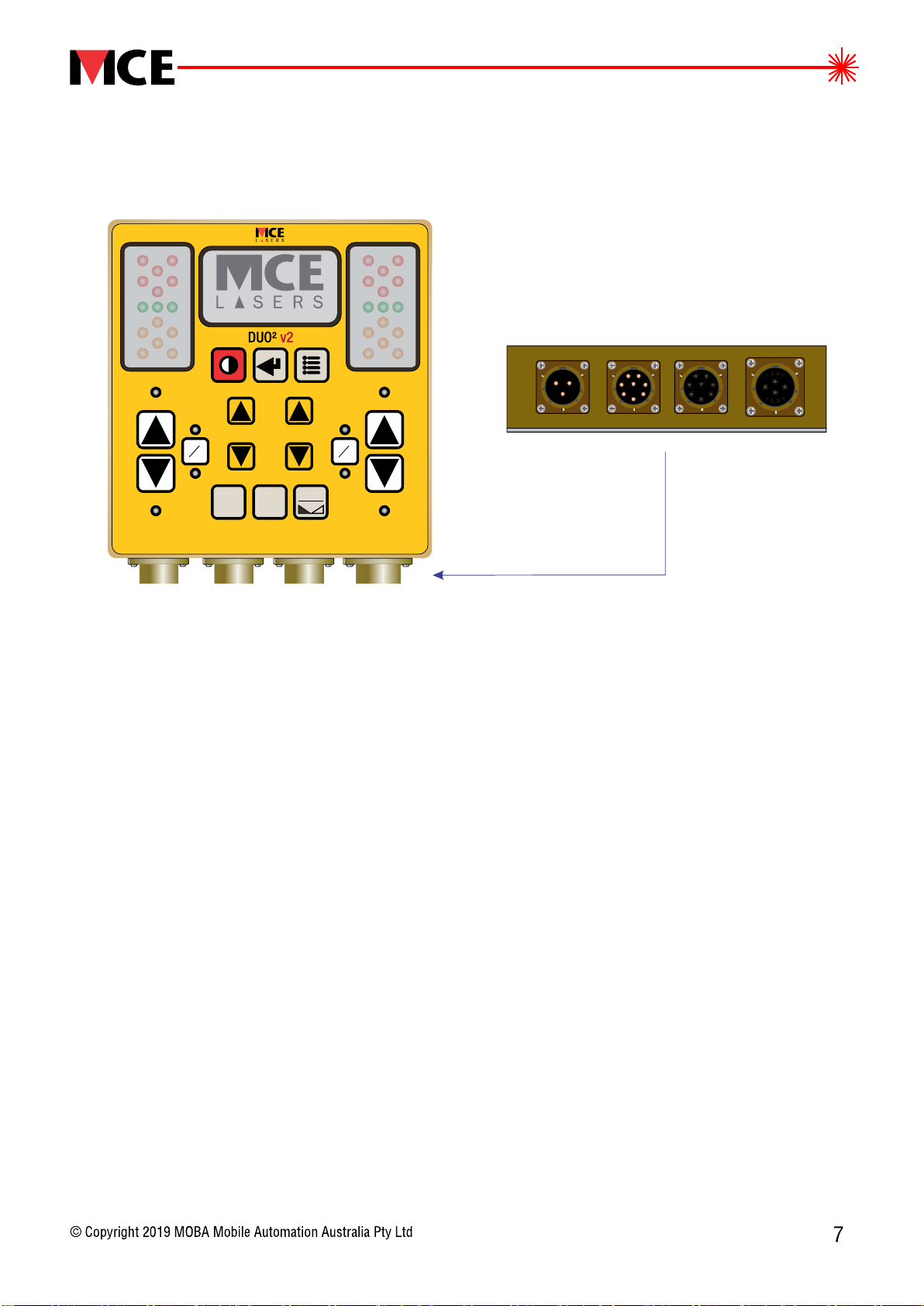
The DUO is a control panel for dual machine control application. The DUO has 2 2
a dual control for valve actuation and dual control for auxiliary valves. The
system provides the user with the flexibility to independently use single or
multiple valve control.
Information provided by the sensor is intelligently processed and applied to the
valve control. System control status and sensor readings are shown in bigger
fonts for easy viewing.
A clearly structured configuration menu enables the operator to set all necessary
settings, from accuracy selection for control to the selection of different valve
types to be used .
In addition a three-colour 5 channel LED clusters on each side of the unit ed
provide an easily visible indication of the direction the hydraulics valves should
be actuated to bring the blade to the set position.
The hydraulics valves can be actuated either automatically or manually, from the
panel using keys or a joystick. The DUO can drive ON/OFF hydraulic valves 2
along with PV and PI without need of any external accessory.
HYDRAULIC/AUX
JOYSTICK(S)SENSOR(S)
ZERO
UP
DOWNDOWN
UP
MAST
AUX 2AUX 1
12-24 V DC
A
M
A
M
REF
+
-
ver 5.16
figure 1

2. USER INTERFACE
2.1 GRAPHIC DISPLAY
2.2 KEY FUNCTIONS
The graphic display indicates the panel
status, sensor reading and sensor dead band
accuracy setting. Menus, parameters,
important information and various settings are
displayed when menus are accessed.
ZERO
UP
DOWNDOWN
UP
MAST
AUX 2AUX 1
A
M
A
M
REF
+
-
Power Key - turns the unit ON/OFF
Enter Key - use to accept settings or change settings while in the menu
Menu Key - use to access the configuration menu
A/M Key - changes the
hydraulics valve control
between two operating
modes: ormanual mode
automatic mode
Aux Hyd Up and Down Keys -
to scroll through menu options,
t ,oro increase or decrease the value of a setting
to move AUX1 and AUX2 when connected
Hyd Up and Down Keys-
use to manually move
hydraulics in up or
down direction
Grade to Zero Key - set the value of the connected sensor or mast
to zero (not available for all sensor types)
Mast Key - to flip between mast screen
and sensor screen
Hydraulics left/right Key - reverses the sign of offset
Laser Sensor
+015
MAN AUTO
Laser
ON
Ref = 012
Laser Sensor [mm]
figure 2
figure 3

2.3 KEY LEGEND:
This manual uses key designator for each graphical key representation.
Please refer to this section for graphical key equivalent of each key designator.
= [POWER] key
CONTROL PANEL MINI JOYSTICK
= [MENU] key
= [ENTER] key
= [ZERO] key
= [MAST] key
= [REF] key
= [AUX1] key
= [UP/DOWN] key
= [A/M] key = [L/R] button
= [RIGHT A/M] button
= [LEFT A/M] button
= [AUX2] key
ZERO
DOWN
UP
MAST
AUX 2
AUX 1
A
M
REF
+
-
L
L
R
R
L/R
L/R
MODE
LEFT A/M
RIGHT A/M

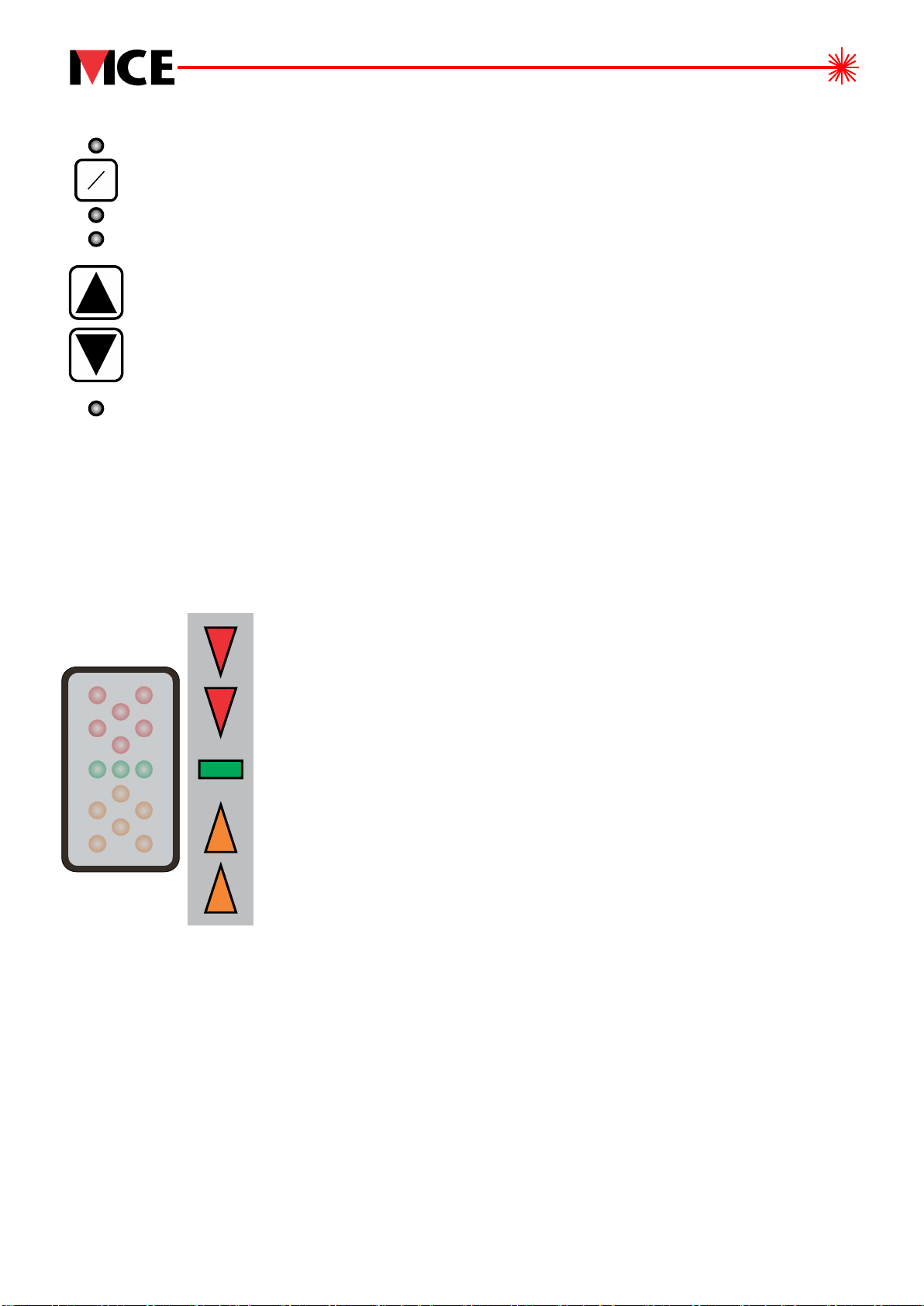
2. LIGHTS5 SENSOR
Memory mode: If only top red or bottom orange arrows are blinking at slow rate it
indicates the last direction of required correction before the laser beam went off
the sensor receiving area.
No communication: If both top red and bottom orange arrows blink together it
indicates that the panel has lost communication with the sensor. Please check
the cable connection at this point.
Top red arrows blinking = very large upward deviation.
Need to lower the bucket/blade by a lot.
Both red arrows blinking = large upward deviation.
Need to lower the bucket/blade.
Only inner red arrow blinking = small upward deviation.
Need to lower the bucket/blade by a little.
Inner red arrow and green bar blinking = very small upward
deviation. Need to lower the bucket/blade by very little.
Green bar blinking = no deviation (centre or ).‘ON TARGET’
Inner orange arrow and green bar blinking = very small
downward deviation. Need to raise the bucket/blade
by very little.
Inner orange arrow blinking = small downward deviation.
Need to raise the bucket/blade by a little.
Both orange arrows blinking = large downward deviation.
Need to raise the bucket/blade.
Bottom orange arrows blinking = very large downward
deviation. Need to raise the bucket/blade by a lot.
The sensor lights indicate the magnitude of the deviations from the centre or ‘ON
TARGET’ ‘ONand the required direction of the valve actuation to return to centre or
TARGET’ . Meaning of the different sensor light indications:
figure 4
2. LED INDICATION4
AUTO LEDS: ON when hydraulics control for the side is in
automatic mode.
MANUAL LEDS: ON when hydraulics control for the side is in
manual mode.
UP/DOWN LEDS: ON when hydraulic valve for the side is
activated up or down.
M
A
DOWN
UP
Indice