MobileVision MV-BC1 Manuale utente

For Technical Assistance, please call (310) 735-2000,
or visit www.magnadyne.com
Model: MV-BC1
Digital Wireless Safety
Camera Monitor System
Owner’s/InstallationManual

2
W
Table of Contents
Introduction
What’s in the Box
Introduction ....................................................................................................................... 2
What’s in the Box............................................................................................................... 2
Monitor Installation............................................................................................................ 3
MobileVision Factory Pre Wired Installation ...................................................................... 4
Non-MobileVision Pre Wired Installation ........................................................................... 6
New Installation - No Factory Pre Wires Present............................................................. 10
Button Operations............................................................................................................ 12
Monitor Menu Operations................................................................................................ 13
Camera Pairing ................................................................................................................ 14
Maintenance..................................................................................................................... 15
Troubleshooting............................................................................................................... 15
Specifications................................................................................................................... 16
Cable Interface Definition................................................................................................. 16
Warning / Cautions .......................................................................................................... 17
Warranty .......................................................................................................................... 18
Camera Mounting Template............................................................................................. 19
Congratulations on the purchase of the Mobilevision 5” Monitor Camera System.
This system has been designed to provide years of trouble-free operation.
The information in this manual provides detailed instruction on how to properly install,
operate and maintain your new MV-BC1 camera system.
This product must be installed and used in accordance with this manual. Any alterations
to this product that enables it to be used in any way other than intended or designed could
distract the driver and result in an accident causing injury or death. Magnadyne Corporation
disclaims any and all liability that may result from failure to install and operate in any other
manner in which this was intended.
Monitor with Vehicle Adapter
Suction Cup Mounting Base
Rearview Camera and Mounting Hardware
6 Foot Camera Power Cord
Camera Power Cord Adapter
Antennas
Instructions

3
Monitor Installation
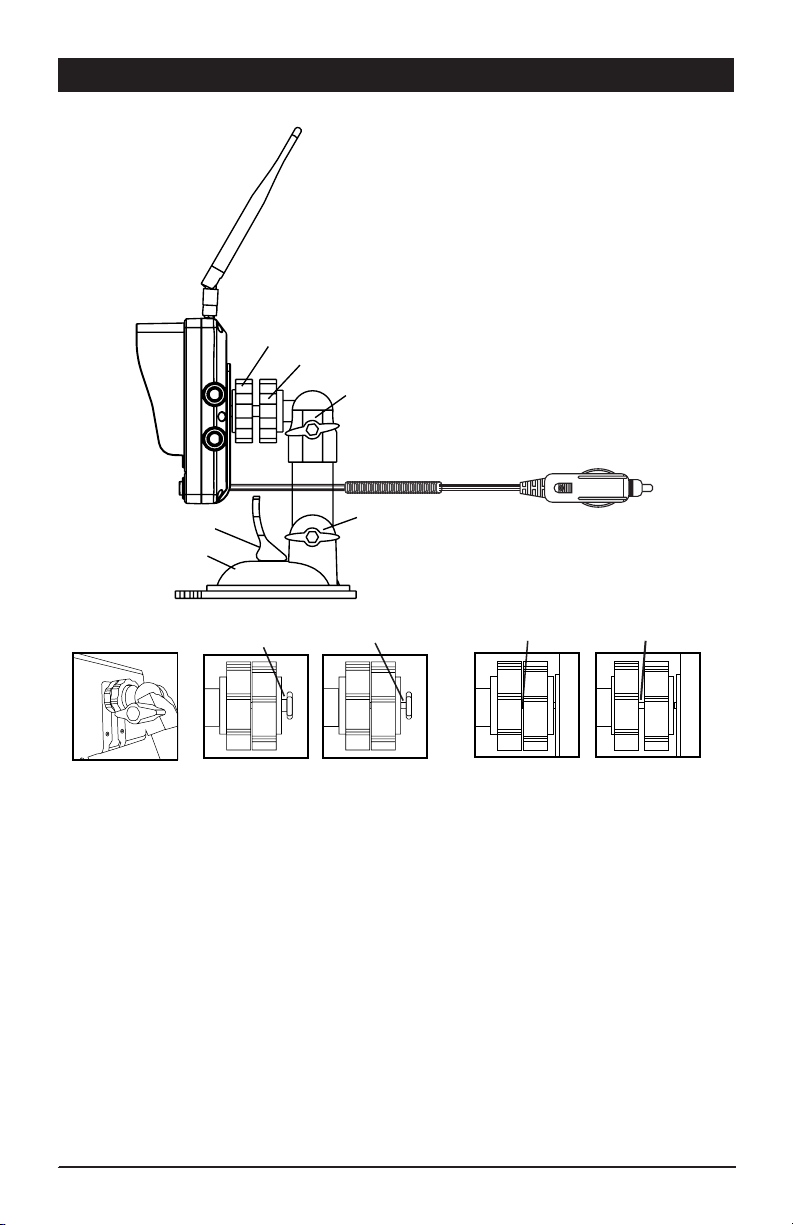
1. Loosen the mounting thumb wheel on the suction cup mounting base, so the
mounting nut attached to the monitor mounting thumb wheel can slide completely into
the monitor’s base mounting slot (Figure A).
Note: Make sure the nut is aligned correctly to allow the narrow side of the nut to slide
all the way into the small channel of the monitor’s base mounting slot. (Figure B)
2. Tighten the mounting thumb wheel against the monitor. Lock the mounting thumb
wheel in place by tightening the locking thumb wheel.
(Figure C)
3 Position the suction cup mount onto desired flat smooth surface location and secure
into place using the pull lever. Make sure to remove protective packing plastic sheet
from bottom of suction cup.
4. Adjust the monitor to desired viewing position by loosening the upper tilt / swivel and
lower tilt adjustments. Tighten to hold in desired viewing position.
5. Install the antenna onto the monitor.
Figure A Figure B Figure C
Correct Correct
Incorrect Incorrect
Mounting Thumb Wheel
Antenna
Locking Thumb Wheel
Lower Tilt
Upper Tilt / Swivel
Pull Lever
Suction Cup
Mounting Base
Vehicle Power Adapter

4
MobileVision Factory Pre Wired Installation
If your vehicle is Pre Wired and ready for the MV-BC1 Camera / Monitor System the
back of your vehicle will have a MobileVision Pre Wired plate in this general location
and the plate will look like the below illustration.
1) Pre Wired Camera Power
Lead:
• Remove 4 screws from plate.
Store the screws as you will
use these to attach the camera
in step 2 .
• Wire tied to the back of the
plate is the camera power cord.
Carefully cut the wire tie to release
the power lead. Use caution not to
damage power lead. Plastic cover
may be discarded.
2) Mounting the Camera to the Vehicle:
• Make sure vehicles power lead passes through the gasket’s large center hole.
Use precaution to prevent lead from falling into vehicle.
• Connect the camera and vehicle power leads. Make sure the connectors are
securely twist-locked together.
• Push the connected power leads back through the 3/4” hole in the middle of
the gasket and into vehicle.
• Without removing camera adjustment screws from bracket, align the camera
and bracket with the gasket and pre-drilled holes in the vehicle. Using the
4 screws removed in Step 1, attach and secure the camera, bracket and gasket
into position using a screw driver inserted between the camera and the bracket
wall. Make sure antenna mounting screw is facing up. (Figure A)
• Adjust viewing angle of camera by loosening camera adjustment screws
and then tighten.
• Mount the antenna on camera.
carefully cut wire tie
to release power cord
DISCONNECT VEHICLE POWER BEFORE STARTING INSTALLATION
!
Test System Operation before adding any additional sealant to permanently mount camera.
!

5
MobileVision Factory Pre Wired Installation (continued)
System Operation:
• Power up vehicle.
• Turn on monitor.
• Check for camera operation.
- Camera and monitor are paired.
- If camera is not paired, proceed to section
on camera pairing in this manual.
Camera &
Bracket Assembly
Screws from Bracket
Screws from Bracket
Connect the camera power lead to
the power lead in vehicle.
Screw Driver
Gasket
Vehicle Surface
Figure A
Camera Adjustment Screws
(loosen only, do not remove)

6
Non-MobileVision Factory Pre Wired Installation
If your vehicle is equipped with another manufacturers camera pre wired kit other than
MobileVision, install the MV-BC1 Camera / Monitor System using the following steps.
A. B.
How to Identify if your vehicle has a camera pre wired kit and ready for MV-BC1 installation.
Option A - Installation
If your vehicle has a pre wired install cover plate with the above illustrated shape
follow these steps to install the camera.
• Unscrew the plate from the back of the vehicle and remove the plate and gasket.
Store the screws as you will use these to attach the camera and gasket.
• Unattach power lead from pre wired plate or locate in the area.
• Make sure vehicles power lead passes through the gasket’s large center hole.
Use precaution to prevent lead from falling into vehicle.
• Use supplied adapter power harness to connect camera and vehicle power
leads. (Figure A) Make sure the connectors are securely twist-locked together.
• Push the connected power leads back through the 3/4” hole in the middle of
the gasket and into the vehicle.
• Without removing camera adjustment screws from bracket, align the camera and
bracket with the gasket and pre-drilled holes in the vehicle. Using the 4 screws
removed in Step 1, attach and secure the camera, bracket and gasket into
position using a screw driver inserted between the camera and the bracket wall.
Make sure antenna mounting screw is facing up. (Figure A)
• Adjust viewing angle of camera by loosening camera adjustment screws
and then tighten.
• Mount the antenna on camera.
Test System Operation before adding any additional sealant to permanently mount camera.
!
DISCONNECT VEHICLE POWER BEFORE STARTING INSTALLATION
!

7
Non-MobileVision Factory Pre Wired Installation (continued)
System Operation:
• Power up vehicle.
• Turn on monitor.
• Check for camera operation.
- Camera and monitor are paired.
- If camera is not paired, proceed to section
on camera pairing in this manual.
Connect the camera power lead
to the power adapter harness
Power adapter harness
Figure A
Screw Driver
Connect the power adapter harness lead to
the vehicles pre wired power lead
Gasket
Camera &
Bracket Assembly
Screws from Bracket
Screws from Bracket
Camera Adjustment Screws
(loosen only, do not remove)

8
Non-MobileVision Factory Pre Wired Installation (continued)
B.
Option B - Installation
If your vehicle has a pre wired install cover plate with the above illustrated
shape follow these steps to install the camera.
• Unscrew the plate from the back of the vehicle.
• Unattach power lead from pre wired plate.
• Align supplied MobileVision PVC gasket with predrilled holes pulling vehicles
power lead through center 3/4” hole.
• Use supplied adapter power cable to connect camera and
vehicle power leads. (Figure A)
• If vehicle power leads are not terminated or the adapter does not match the
connector on the vehicle power harness, follow these steps: (Figure B)
- If connector present, cut connector off and strip the
vehicle wire approximately 1/4”.
- Cut the supplied 6’ power cord unterminated end to the
desired shorter length and strip wire to approximately 1/4”.
- Test the vehicle power leads to identify 12V+ and 12V-.
- Connect the red power harness lead to the vehicle 12V+ lead.
- Connect the black power harness lead to the vehicle 12V- lead.
- Make sure connections are secure and protected to
prevent electrical shorts.
• Push the connected power leads back through the 3/4” hole in the middle of
the gasket and into the vehicle.
• Without removing camera adjustment screws from bracket, align the camera
and bracket with the gasket and pre-drilled holes in the vehicle. Using the
4 screws removed in Step 1, attach and secure the camera, bracket and
gasket into position using a screw driver inserted between the camera and
the bracket wall. Make sure antenna mounting screw is facing up. (Figure A)
• Adjust viewing angle of camera by loosening camera adjustment screws
and then tighten.
• Mount the antenna on camera.
DISCONNECT VEHICLE POWER BEFORE STARTING INSTALLATION
!
Test System Operation before adding any additional sealant to permanently mount camera.
!

9
Non-MobileVision Factory Pre Wired Installation (continued)
System Operation:
• Power up vehicle.
• Turn on monitor.
• Check for camera operation.
- Camera and monitor are paired.
- If camera is not paired, proceed to section
on camera pairing in this manual.
Figure A
Figure B
Connect the camera power lead to
the supplied adapter harness
Supplied adapter harness
Supplied 6’ power harness -
cut to approximately 6” Black 12V +
12V + 12V -
Rec 12V -
Screw Driver
Screw Driver
Connect the adapter harness lead to
the vehicles pre wired power lead
Gasket
Gasket
Camera &
Bracket Assembly
Camera &
Bracket Assembly
Screws from Bracket
Screws from Bracket
Screws from Bracket
Screws from Bracket
Camera Adjustment Screws
(loosen only, do not remove)
Camera Adjustment Screws
(loosen only, do not remove)

10
New Installation - No Factory Pre Wires Present
1) Mounting Location:
• Identify a suitable mounting location near the roof line centered on the rear of the
vehicle 2 or more inches above or below running lights to prevent degrading image and
reducing night vision.
• Make sure there are no wires, glass or other items that will prevent the installation.
Be sure the mounting location will allow for the drilling of a 3/4” hole to run the power
cable to the camera.
• Once a proper mounting location has been identified, use the supplied template on
page 19 of this manual to mark and drill the 3/4” hole. The supplied screws for
attaching the camera to the vehicle are self tapping but it may be necessary to use
the template to mark and drill pilot holes.
2) Power Source Connection:
Option 1 - Ignition Power
• Locate a 12V+ source that is controlled by the vehicle ignition switch. This power source
will provide power to the camera whenever the vehicle is running.
Option 2 - Back Up Only
• Connect the power lead to the right or left back-up light usually located in the
tail light assembly.
3) Wiring to Camera:
• Once a power source has been identified, route the power harness from the power
source to the 3/4” hole drilled for the camera.
Note: If additional wire length is needed, be sure to use 18 gauge wire and connect
the extension length to the end of the power harness - do not cut off the connector.
Be sure to keep 12V+ and 12V- in proper order. Make sure connections are secure
and protected to prevent electrical shorts.
Mounting Location
DISCONNECT VEHICLE POWER BEFORE STARTING INSTALLATION
!
Indice
Manuali Sistema di sicurezza popolari di altre marche

EDM
EDM Solution 6+6 Wireless-AE Manuale utente

Highway Safety Group
Highway Safety Group EA401 Manuale utente

Siren
Siren LED GSM Manuale utente

Detection Systems
Detection Systems 7090i Istruzioni per il montaggio

Se-Kure Controls
Se-Kure Controls MicroMini SK-4841 Manuale utente

Siemens
Siemens FDM273 Manuale utente