
Monument 217 Series Istruzioni originali
OWNER’S MANUAL
& INSTALLATION INSTRUCTIONS
MODEL 217 (217A / 217B / 217C / 217D / 217E)
PHOTO STORAGE & MANAGEMENT DEVICE
217-ENG-FR-DE-REV01
www.getmonument.com

WARRANTY
FULL 1-YEAR WARRANTY
If this product fails due to a defect in material or workmanship within one year
from the date of purchase, Monument Labs will at its option repair or replace it
free of charge. Shipping costs are not covered.
WARRANTY RESTRICTIONS
There are no customer-serviceable parts inside this device. Do not attempt to
repair this unit yourself. Doing so may void the warranty and can cause damage
to the device or personal injury to yourself.
This warranty gives you specific legal rights, and you may also have other rights
depending on your state of residence. For additional Monument Labs warranty
information, please visit our web site at www.getmonument.com/warranty.
Keep these instructions and your sales receipt for future reference.
Copyright © 2018 Monument Labs, Inc.
www.getmonument.com
321 N Clark St, Suite 2550
Chicago, IL 60654, USA

ELECTRICAL REQUIREMENTS
The included power supply can operate between 100-240 V AC, and provides 5 V DC
power to the device with sufficient power to simultaneously operate two USB-based
external portable drives (not included). The power provided for each drive is limited to
500 mA. If your external portable drive requires more power, you will need to
externally power it per its manufacturer’s instructions and recommendations.
Changes or modifications not expressly approved by the party responsible for compliance could void the user’s authority to operate the
equipment.
This equipment has been tested and found to comply with the limits for a Class B digital device, pursuant to Part 15 of the FCC Rules. These
limits are designed to provide reasonable protection against harmful interference in a residential installation. This equipment generates, uses
and can radiate radio frequency energy and, if not installed and used in accordance with the instructions, may cause harmful interference to
radio communications. However, there is no guarantee that interference will not occur in a particular installation.
If this equipment does cause harmful interference to radio or television reception, which can be determined by turning the equipment off and
on, the user is encouraged to try to correct the interference by one or more of the following measures:
- Reorient or relocate the receiving antenna.
- Increase the separation between the equipment and receiver.
- Connect the equipment into an outlet on a circuit different from that to which the receiver is connected.
- Consult the dealer or an experienced radio/TV technician for help.
This equipment must be installed and operated in accordance with provided instructions and the antenna(s) used for this transmitter must
be installed to provide a separation distance of at least 20 cm from all persons and must not be co-located or operating in conjunction with
any other antenna or transmitter. End-users and installers must be provided with antenna installation instructions and transmitter operating
conditions for satisfying RF exposure compliance.
This device complies with Industry Canada license-exempt RSS standard(s). Operation is subject to the following two conditions: (1) this device
may not cause interference, and (2) this device must accept any interference, including interference that may cause undesired operation of the
device.
Le présent appareil est conforme aux CNR d’Industrie Canada applicables aux appareils radio exempts de licence. L’exploitation est autorisée
aux deux conditions suivantes : (1) l’appareil ne doit pas produire de brouillage, et (2) l’utilisateur de l’appareil doit accepter tout brouillage
radioélectrique subi, même si le brouillage est susceptible d’en compromettre le fonctionnement.
To maintain compliance with the RF exposure guidelines, place the unit at least 20cm from nearby persons.
Mise en garde: Pour assurer la conformité aux directives relatives à l’exposition aux fréquences radio, le jouet doit êtreplacé à au moins 20cm
des personnes à proximité.
FCC NOTICE (USA)
IC NOTICE (CANADA)

SAFETY REQUIREMENTS
IMPORTANT SAFETY INSTRUCTIONS
1. Do not immerse the device in water or other liquids.
2. Do not use the device near water or in damp locations such as near bathtubs or
a wet basement.
3. Do not use the device if the power supply has been damaged.
4. Do not use a power supply other than the one provided by Monument Labs.
5. Do not insert foreign objects into the device.
6. Do not use the device if it malfunctions or has been damaged. Return the device
to the manufacturer for examination, electrical, or mechanical repairs. See
WARRANTY section.
7. Do not block air vents, or place the device on a soft surface such as a bed or a
sofa as this can block vent openings. Do not place objects on top of the device
as this can also block vent openings.
8. Do not store external portable drives in the drive storage bay if any of the drives
are externally-powered or damaged.
WARNING:

SAFETY REQUIREMENTS
9. Do not store anything other than a maximum of two external portable drives in the
drive storage bay.
10. Do not move or relocate the device unless all external portable drives in the drive
bay are disconnected and removed first per instructions in the OPERATION
section.
Place the device on a flat, level surface at least 24 inches (61 cm) away from heat
sources such as ranges or space heaters.
This product is intended for indoor use only. Save these instructions.

OPERATION
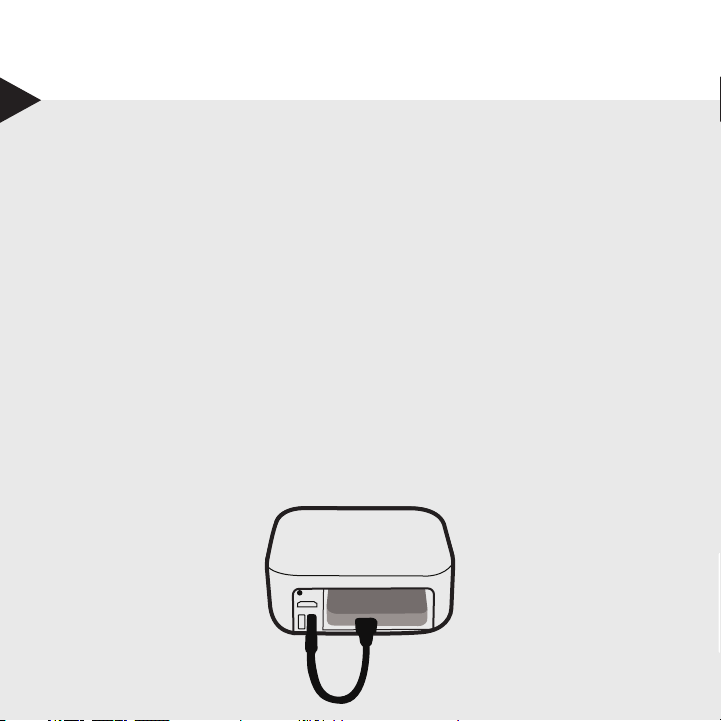
1. Make sure the device is unplugged from power.
2. If you’d like to use a gigabit Ethernet connection (only for models with an
Ethernet port), connect the device to an Ethernet switch using a CAT6
Ethernet cable. Ethernet cables of a lower standard than CAT6 may result
in a lower speed connection.
3. If desired, connect the device to a TV using the HDMI port.
4. Attach one or two USB 2.0 external 2.5” portable drives to the device.
(Note: USB 3.0 drives can also be used. However, they will operate at
USB 2.0 speeds.)
5. Turn the device on by plugging in the power. The device will power on in less
than a minute and the light in front will start blinking blue.
6. Install the Monument app on your smartphone or tablet. Go to
www.getmonument.com/apps to find the right app for your mobile device.
Install and launch the app, and follow the instructions.
INITIAL SETUP

OPERATION
STORING YOUR PHOTOS ON MONUMENT
1. Photos from your smartphone or tablet can be automatically transferred
when you start using Monument apps.
2. Insert the SD card from your digital camera to automatically import all of
your content.
3. All of the new content will be analyzed and organized by the device.
LED INDICATOR
Your Monument device has an indicator light in front. It allows you to
check its status at a quick glance.
Solid White: Idle, functioning normally.
Blinking White: Processing content.
Blinking Blue: User action required, please check your mobile app.
Blinking Green: Importing content from SD card.
NORMAL OPERATION
1. SD cards can be plugged in and removed while the light in the front is white.
2. The device can be powered down by disconnecting the power when the light
is solid white.
3. New external portable drives can be added either when the device is powered
on, or when off. As soon as a new drive is plugged in, an alert will be shown
on the mobile app. You can choose to make the second drive as the backup
drive.
4. To remove USB drives, please open the mobile app and go to the Settings
screen. Select the drive you want to remove and follow the instructions.
Removing a drive without following these steps may cause data loss or
damage to your drives.
OPERATION

PRODUCT INFORMATION
Operating temperature: 5°C to 35°C (41°F to 95°F)
Operating humidity: 25% to 80% relative humidity, non-condensing
Power consumption: 12 Watts
Maximum USB current: 500 mA per each attached device
Maximum external portable drive capacity: 2
Dimensions for the drive bay:
40mm (3/2”) Height x 83mm (3-1/4”) Width x 120mm (4-3/4”) Depth
By using your Monument device, you agree to our Terms of Use and Privacy
Policy, use limitations, and liability limitations. Please visit
www.getmonument.com/terms to review our terms. Additional information
about product safety, regulations, and legal notices can be found at
www.getmonument.com/legal.
SPECIFICATIONS
LEGAL

TROUBLESHOOTING
If the device is not functioning as expected, please check the front light:
Red: Firmware or hardware error. Visit www.getmonument.com/trouble-
shooting.
Blinking Blue: The device requires user attention. Follow the instructions on
the mobile app.
No Light: Check if the power supply is connected to a wall outlet and to the
device.
For additional support visit www.getmonument.com/support
Questo manuale è adatto per i seguenti modelli
5
Indice
Lingue:
Altri manuali Monument Magazzinaggio


