
MOVE38 BLINKS GAME SYSTEM Manuale utente


A NOTE FROM THE CREATORS
Blinks is a new kind of game system. Our goal is to bring what we love about digital
games to the social, hands-on experiences of tabletop gaming. This is a new space, barely
explored, and we’re excited that you’ve got your hands in the game.
We’ve imbued Blinks with the ability to learn from each other and learn new games.
We believe that play shapes the way we think and that each of us could learn something
from each other. Blinks wouldn’t have been possible without the help of more than a
thousand Kickstarter backers, a team of talented open-minded thinkers, and the support
of friends and family from the very beginning. We hope that Blinks are an excuse to put
away your devices and connect with family, friends and strangers – have fun, and discover
new ways of thinking.
Sincerely,
Jonathan + the Move38 team

1
WELCOME
Congrats! You have in your hands Blinks, the world’s rst smart tabletop game system.
Here’s what’s included in the box:
INSTRUCTION BOOKLET
You are here! This book will teach how to use your Blinks, and how to play the games they come with!
9 x BLINKS
The smartest game pieces you’ve ever held. Each Blink has its game labeled on the back and will teach all other
Blinks to play together.
2 x SUSHI ROLLS
These magnetic cases allow you to take Blinks with you wherever you go. It’s a snap!
STICKERS
Show o your love of Blinks in the world. Want more stickers? Send us a message on your favorite social media
channel.


TABLE OF CONTENTS
Quick Start Guide .......................................................................................................................................................
Blinks Basics ..............................................................................................................................................................
Game Instructions
Astro ...........................................................................................................................................................................
Darkball ......................................................................................................................................................................
Group Therapy ...........................................................................................................................................................
Heist ...........................................................................................................................................................................
Paintbrush ..................................................................................................................................................................
Puzzle101 ...................................................................................................................................................................
WHAM! .......................................................................................................................................................................
Widgets (Takeaway Dice, Flip Bet, Topple Stones, Spinomino) ...........................................................................
Zen Flow ....................................................................................................................................................................
Developer Info ...........................................................................................................................................................
Notes/Records/Ideas/Score ......................................................................................................................................
Credits .......................................................................................................................................................................
Safety Information .....................................................................................................................................................
4
6
8
10
12
14
18
20
22
24-31
32
35
36
39
40

4
QUICK START GUIDE
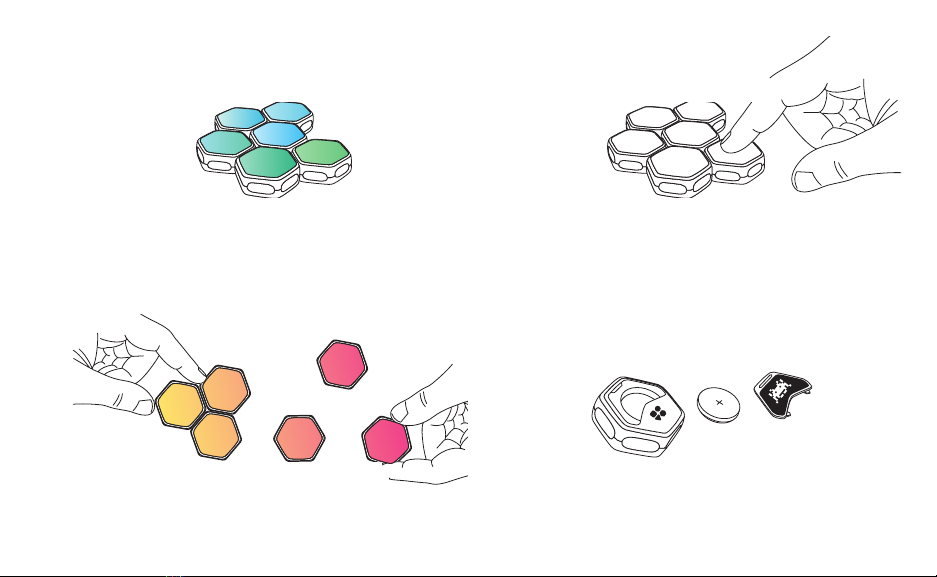
1 -WAKE
Press the Blink to turn it on
Waking one Blink will wake an entire cluster,
if the cluster of Blinks recently went to sleep.
2 - FIND A GAME
Select a game you want to play
Game labels are located on the back of each Blink.
Each Blink can teach its game to all others.
3 - LOAD GAME
Hold the Blink for 3 seconds
Making sure the Blink is alone, press and hold the Blink
until a dancing blue pattern animates on the surface,
then let go. It’s ready to teach.
4 - TEACH GAME
Attach the single Blink to the cluster
You have 3 seconds to introduce this Blink.
It begins teaching its neighbors. The dancing blue
pattern will cover the cluster as it shares the game.
5
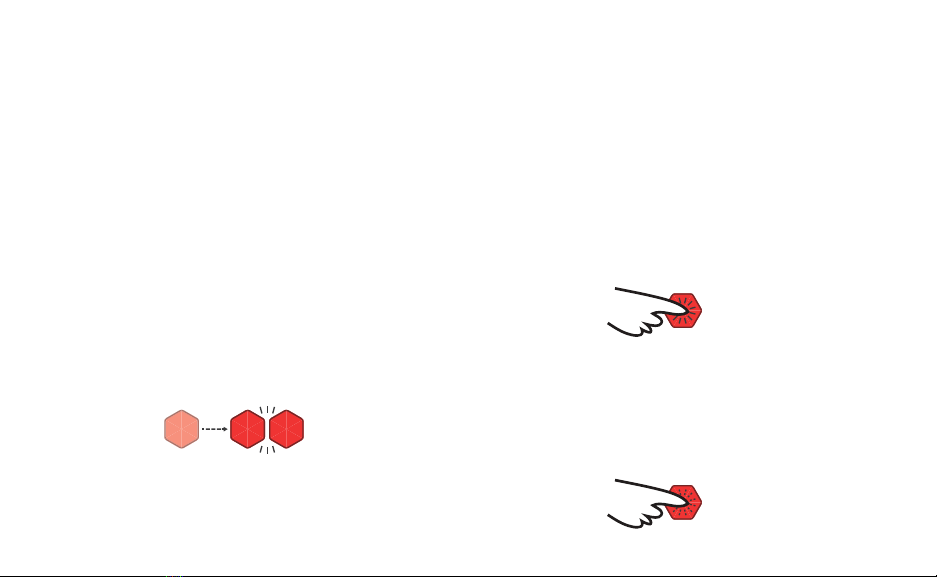
5 - WAIT
Wait for game transfer to complete
Don’t touch the Blinks while they are learning a
game. Blinks will transition from blue “learning” to
green“ready” state. Blinks will play their startup
animation once they have all learned the game.
6 - PLAY
Play Blinks!
All programmed Blinks will now
be playing the new game!
7 - SLEEP
Saving battery life
Blinks go to sleep after 10 minutes of inactivity. To save
battery life, you can press and hold a Blink until it falls
asleep, at least 6 seconds. If it is attached to a cluster,
all connected Blinks will sleep as well.
8 - CHANGE BATTERY
Remove the back panel to change batteries
Blinks use a CR2032 battery, a common watch battery.
To insert a new battery, simply remove the back panel
and swap it out.
6
BLINKS BASICS
Every Blinks game is dierent, from thoughtful games
like Berry, to action-packed games like WHAM.
But what they all have in common is a few basic
techniques. Here’s what you’ll need to know to play
games with the Blinks game system.
MAKING CONNECTIONS
Blinks are magnetic. They connect with a satisfying
“clack” when pushed together. When physically
connected like this, they communicate with each other.
This ability allows complex game play and emergent
behavior.
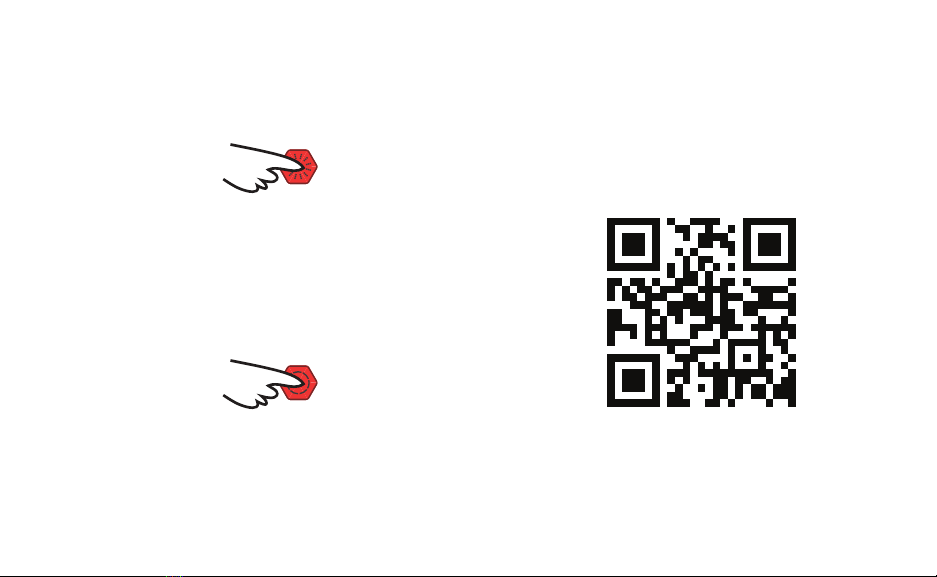
PLAYER INPUT
You can also interact with Blinks by pressing the button
on top. Remember, Blinks are not touch screens –
they have physical buttons. Blinks recognize several
dierent types of presses.
SINGLE-CLICK
Press and release the button quickly to perform a
single-click.
DOUBLE-CLICK
Like a mouse button, Blinks can also be double-
clicked. Make sure you do this quickly, or it might
register as two single-clicks!
7
MULTI-CLICK
Rapidly click the button 3 or more times to perform a
multi-click.
LONG PRESS
If you press and hold the button for 1½ seconds then
release, you’ve performed a long press. Be careful,
though: if you continue to hold the button for longer,
you may accidentally reset the Blink or put it to sleep.
GAME INSTRUCTIONS
No two games are alike, and they all use these
techniques dierently. This booklet contains the basic
rules of all of your games, but you can also follow
the QR code below to access detailed rules, helpful
gameplay videos, and more!
SCAN HERE FOR ONLINE
RULES AND GAMEPLAY VIDEOS.
VISIT BLINKS.GAMES!
8
ASTRO
by Daniel King, Diamond & Colby Gutierrez-Kraybill
2–4 Players | 8+ Blinks | 10-15 Min.
An asteroid eld rich with rare space ore awaits you.
Can you collect enough to ll your cargo hold before
your competition does? This action-packed space
adventure will get your jets going.
SETUP:
To begin, separate all Blinks individually, and distribute
them around the play surface to create an “Asteroid
eld.” Each player then grabs an Asteroid and long
presses it. Those Blinks will become “Ships,” ashing
brightly with their rst mission color. All players hold
their Blinks at the edge of the asteroid eld and count
down from 5. When they reach 0, the game begins.
GAMEPLAY:
There are no “turns” in Astro - all players are free
to move and mine as quickly as possible. To move,
slide your Ship around the play surface and attach to
Asteroids containing ore that matches your mission
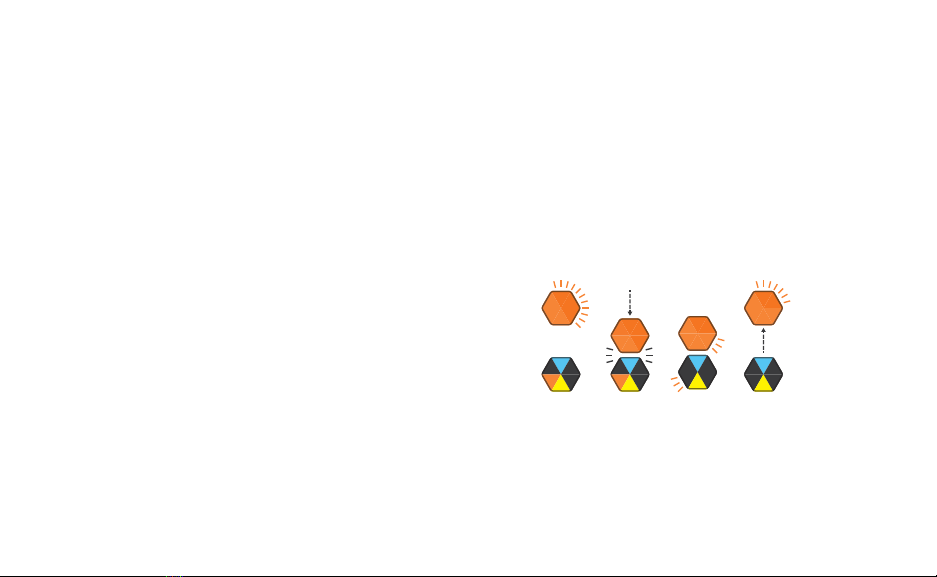
color. When you attach, you will automatically begin
mining. Ore will disappear from the asteroid and
appear on your ship. Then you are free to disconnect
and continue movin
Ore collection example
Questo manuale è adatto per i seguenti modelli
13
Indice


