
Moxee m2160 Manuale utente

m2160
User Manual
v 4.0

2Moxee m2160 User Manual
Contents
Basics .............................................................................5
In Box......................................................................................... 5
Phone Overview ...................................................................... 6
Battery....................................................................................... 7
Turning Phone On or Off........................................................ 9
Touchscreen Gestures ............................................................ 9
Using the Onscreen Keyboard .............................................. 10
Editing Text............................................................................... 13
Getting Started.............................................................15
Google Account ....................................................................... 15
Getting to Know the Home Screen ...................................... 17
Customizing the Home Screen ............................................. 18
Essential Display Icons........................................................... 19
Notifications Panel ................................................................. 21
Opening & Switching Between Applications ..................... 22
Sleep Mode .............................................................................. 23
Adjusting Volume .................................................................... 24
Searching Your Phone and the Web .................................... 25
Connecting Your Phone to a Computer .............................. 26
Phone Calls ...................................................................27
Making Calls ............................................................................. 27
Answering or Rejecting Calls................................................. 29
Using In-Call Options ............................................................. 31

3Moxee m2160 User Manual
Using Call Log........................................................................... 32
Listening to Your Voicemail ................................................... 34
Using Voice Dialer.................................................................... 34
Contacts.........................................................................35
About contacts ........................................................................ 35
Getting Started ........................................................................ 35
Editing/Deleting Contacts ..................................................... 38
Communicating........................................................................ 40
Account Setting ....................................................................... 41
Messaging......................................................................42
About Messaging ..................................................................... 42
Sending Messages................................................................... 43
Reading Messages................................................................... 45
Receiving Emergency Alerts Messages................................ 46
Changing Messaging Settings ............................................... 48
Google ..........................................................................49
Gmail.......................................................................................... 49
Maps .......................................................................................... 52
Calendar.................................................................................... 55
Google Play Store.................................................................... 59
Web ................................................................................62
Chrome ...................................................................................... 62
YouTube..................................................................................... 65
Wi-Fi .......................................................................................... 69

4Moxee m2160 User Manual
Bluetooth ......................................................................70
Using Bluetooth....................................................................... 70
Disconnecting or Un-pairing from a Bluetooth Device.... 71
Connecting to a Bluetooth Headset.................................... 71
Sending and Receiving Information Using Bluetooth...... 72
Entertainment...............................................................74
Camera/Camcorder................................................................. 74
Sound Recorder....................................................................... 78
Tools...............................................................................79
Clock ........................................................................................ 79
Calculator.................................................................................. 81
Settings..........................................................................82
Settings on Your Phone ........................................................ 82
System update ...................................................................... 89
Safety and use ..............................................................90
Please read before proceeding ............................................ 90
Limitation of damages ........................................................... 91
Important health information and safety precautions .... 91
Regulatory agency identifications ....................................... 102

Basics
In Box
The Moxee™ m2160 comes with the following items included
in the box:
1. Moxee m2160 phone
2. Micro USB cable
3. Battery
4. Battery cover
5. USB power adapter
6. Quick Start Guide

6Moxee m2160 User Manual
Phone Overview
1. Headset Jack
2. Secondary microphone
3. Earpiece
4. Front camera
5. Main camera
6. Flash module
7. Volume Button
8. Power Button
9. USB Type-C Charging
10. Main microphone
11.Speaker
7Moxee m2160 User Manual
Battery
Note that browsing the web frequently, extended data
usage, being in a poor signal area, or subjecting the device
to extreme temperatures will cause the battery to discharge
quicker than normal. To increase battery life, limit your data
usage, or turn off GPS and Bluetooth when not required.
Charging your battery
1. Before you turn on your device and start using it
is recommended that you charge the battery.
2. Plug the USB cable into the USB power adapter.
3. Plug the power adapter into a standard outlet.
4. Locate the USB port located on the
underneath of your device.
5. Plug the other end of the USB cable into
the phone’s micro-USB port.
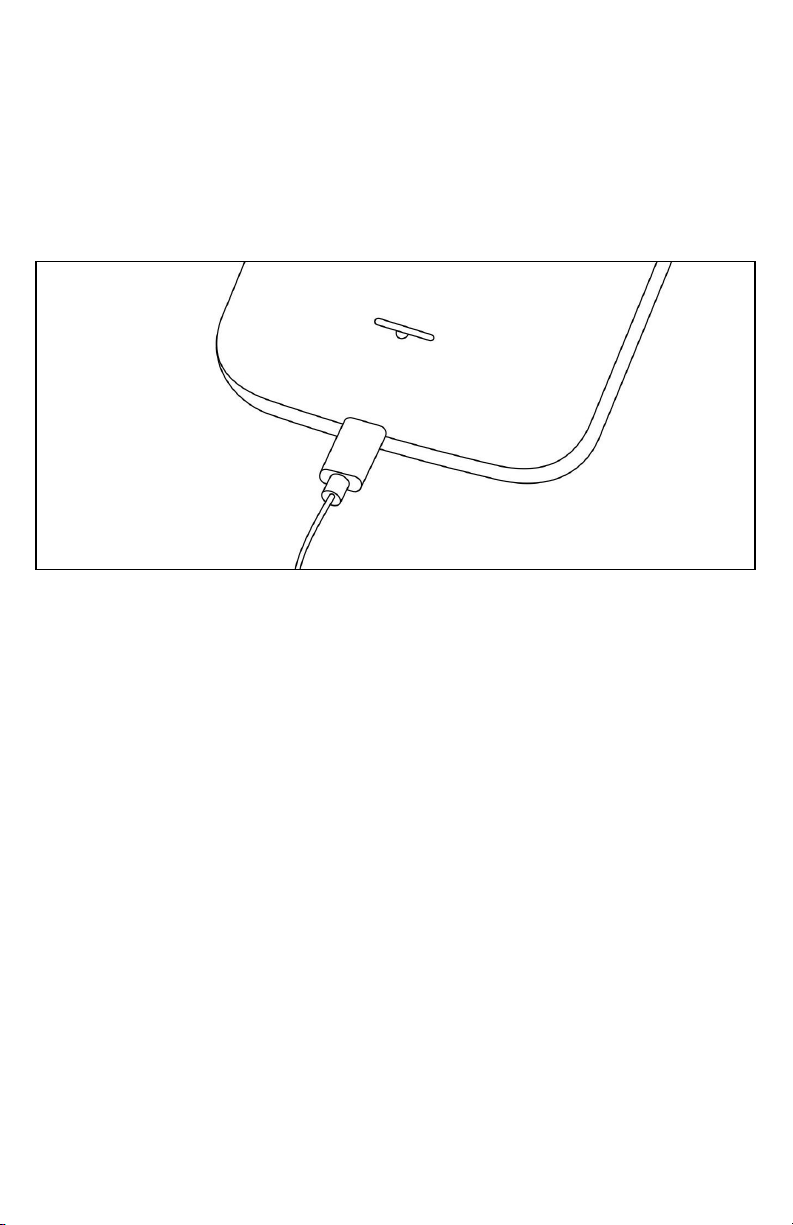
6. The USB icon on the cable should always face up
when connecting the cable to your device as shown.
Note:
• It is more efficient to charge the battery with your device powered off.
• Battery operating time gradually decreases over time.

8Moxee m2160 User Manual
MicroSD Card (not included)
Use the microSD (not included) card to store your photos,
videos, music and certain apps from Google PlayTM Store.
You can also move and copy files to your computer from your
device.
Note: When you insert or remove the microSD card, you should remove the
battery cover.
Insert the microSD card
1. Locate the microSD card slot and remove the cover.
2. Insert the microSD card into the slot with its gold contacts
facing right above battery until it clicks into place.
Removing the microSD card
1. Remove the microSD card cover.
2. Press the microSD card to eject it from the
slot then slide it out the rest of the way.
Removing the microSD card while the phone is on
If you need to remove the microSD card while the phone is
on, unmount the microSD card first to prevent corrupting or
damaging the files in the microSD card.
1. From the Home screen, swipe screen Apps > Settings.
2. Tap Storage > Unmount SD card > OK.
3. Remove the microSD card by following the
steps in “Removing the microSD card”.

9Moxee m2160 User Manual
Turning Phone On or O
Turning your phone on
1. Press and hold Power/Lock key.
Note: The first time you use your phone you’ll need to set it up. See the Getting
Started chapter for details.
Turning your phone off
1. If the display is off, press Power/Lock to turn it back on.
2. Press and hold Power/Lock for a few seconds.
3. When Phone options menu appears,
tap Power off > OK.
Touchscreen Gestures
Tap
To select onscreen items such as application and settings
icons or press onscreen buttons, simply touch them with your
finger.
Tap and hold
To open available options for the item, simply touch and
hold your finger on the screen over the item.
Swipe or slide
Quickly drag your finger vertically or horizontally across the
screen.
Drag
Tap and hold your finger before you start to drag. While
dragging, do not release your finger until the item reaches
your desired location.
Rotate
For most screens, you can automatically change the screen
orientation from portrait to landscape by turning the phone
sideways. When entering text, you can turn the phone
sideways to bring up a bigger on-screen keyboard.

10Moxee m2160 User Manual
Using the Onscreen Keyboard
You can enter text using the onscreen keyboard. Some
applications open the keyboard automatically. In others, tap
anywhere in a text field to open the keyboard.
1. Tap each letter on the on-screen keypad.
2. Tap and hold a letter for additional key options (not all
keys have additional options). Additional key options
include numbers and letters with accent marks. If options
are available, you will see a box with all the options
shown. Slide your finger to select the character you want.
3. Continue until you have finished the word.
Indice
Altri manuali Moxee Telefono cellulare


