
MSG Equipment MS006 Manuale utente

2022.08.02
MS006
OPERATION MANUAL
ON DIAGNOSTICS OF ALTERNATORS
INSTRUKCJA DIAGNOSTYKI
ALTERNATORÓW
ИНСТРУКЦИЯ ПО ДИАГНОСТИКЕ
ГЕНЕРАТОРОВ
UNIQUENESS
TRAINING
SERVICE
NNOVATIO
WARRANTY
QUALITY


English
Operation manual
3
CONTENTS
INTRODUCTION....................................................................................................................................................4
1. TEST BENCH DESCRIPTION...........................................................................................................................5
2. TEST BENCH MENU..........................................................................................................................................7
2.1. Test menu of an alternator................................................................................................................9
3. APPROPRIATE USE........................................................................................................................................13
3.1. Safety regulations..............................................................................................................................14
3.2. Installation and de-installation of the alternator.....................................................................14
3.3. The connection of the bench diagnostic outputs to alternator............................................17
4. ALTERNATOR TESTING.................................................................................................................................21
4.1. Alternator testing in manual mode...............................................................................................21
4.2. Alternator testing in automatic mode..........................................................................................23
APPENDIX 1.........................................................................................................................................................25
CONTACTS.......................................................................................................................................................... 28
APPENDIX 2 ........................................................................................................................................................81

English
Test bench MS006
4
INTRODUCTION
The present operation manual contains the description of the methods on the diagnostics of the
technical condition of the automotive alternators on the test bench MS006 COM (hereinafter, “the
bench”).
WARNING! The manufacturer is not responsible for any damage or injury to human health
resulting from non-compliance with the requirements of this manual.
The bench is designed for the diagnostics of the 12/24V automotive alternators with the different
connection terminals, the 12V alternators of ‘start-stop’ system (Valeo I-StARS) and 24V I-ELOOP
alternators (Mazda). The alternator diagnostics mode is either manual or automatic. The results
of automatic diagnostics can be printed on the portable Bluetooth printer (included into the
supply slip).
Below are the criteria for alternator performance assessment:
- stabilizing voltage;
- control lamp operation;
- FR (displayed FR signal frequency and waveform, voltage regulator feedback).
- the AC pulsation value.
For COM alternator:
- ID;
- Protocol type;
- Data exchange rate;
- LIN protocol type;
- Voltage regulator self-diagnosis faults.
English
Operation manual
5
1. TEST BENCH DESCRIPTION
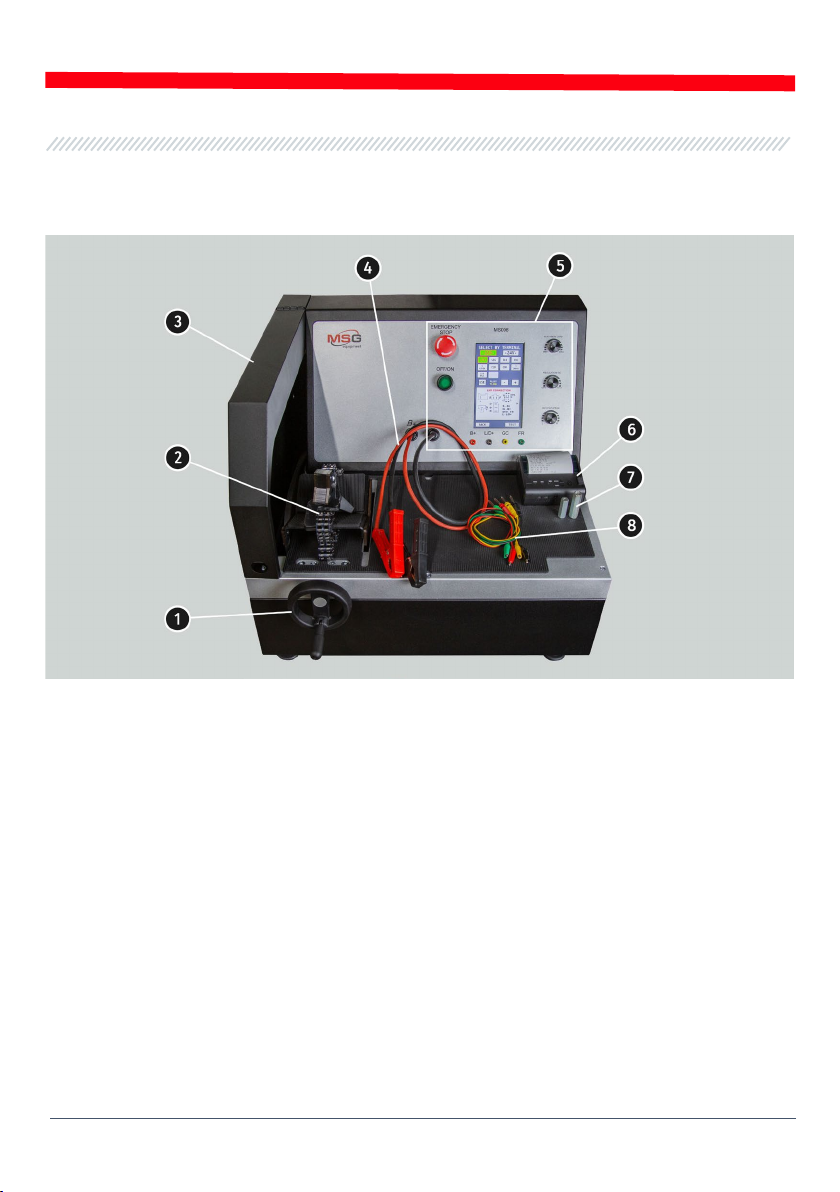
Figure 1. General view
1 – An alternator drive belt tensioning mechanism.
2 – A mounting face and a chain for fixing an alternator on the test bench.
3 – A protective cover. The cover opening will lead to the procedure emergency shutdown.
4 – Power cables for connection to the alternator.
5 – A control panel.
6 – A Bluetooth printer.
7 – An adapter for the alternator positive terminal.
8 – A set of wires for connection to the voltage regulator of an alternator.

English
Test bench MS006
6
Main elements of the control panel (Fig.2):
Figure 2. Control panel
1 – Touch screen: screen to output the parameters of the tested alternator and control the test
bench operation.
2 – “OFF/ON”: button to turn the test bench off/on. Button “OFF/ON” is inoperative when the
“EMERGENCY STOP” button is pressed.
3 – “EMERGENCY STOP”: button for test bench emergency shutdown.
4 – Adjustment knobs: to set and adjust operating parameters:
• «ELECTRICAL LOAD»:knob to set electric load on an alternator (simulates vehicle power
consumers). Press the knob shortly to reset the load to zero smoothly.
• «REGULATION GC»:knob to set/adjust an alternator output voltage. It is used when the
alternator is connected to the “GC” terminal. Press the knob shortly to reset the preset voltage
to the default values (13.8V).
• «ROTATION SPEED»:knob to set/adjust the drive speed (RPM) and rotation direction. Press
the knob shortly to stop the drive.
5 – Diagnostic terminals: to connect the test bench to the voltage regulator terminals:
• «B+»:test bench terminal to connect to the alternator terminals: “B+”, “IG”, “S”, “AS’, “BVS”,
“A”, “15”;
• «L/D+»: output to the voltage regulator control lamp; it is connected to the following
terminals: “L”, “D+”, “I”, “IL”, “61”;
• «GC»:alternator control terminal. It is connected to the terminals “COM”, “LIN”, “D”, “RLO”, “C”,
“G”, “SIG”, “L(RVC)”, “RC”;

English
Operation manual
7
• «FR»:alternator load control; it is connected to the voltage regulator terminals: “FR”, “DFM”,
“M”, “LI”.
A set of four diagnostic cables (Fig.3) is included in the package set.
Figure 3. MS0105 – a set of diagnostic cables for connection to the terminals of the voltage
regulator
Diagnostic cables are connected to the test bench sockets (Fig.2, n.5), observing the color marking.
2. TEST BENCH MENU
The test bench main menu (Fig. 4) contains:
Figure 4. Test bench main menu

English
Test bench MS006
8
«SELECT ALTERNATOR BY TYPE» - menu to select the alternator type;
«SELECT ALTERNATOR BY NUMBER» - menu to select the alternator by its serial number;
«SETTINGS» - test bench parameters menu;
«INFORMATION» - “About the test bench” menu.
Settings menu (Fig. 5) contains:
Figure 5. Settings menu of test bench
«TIME» и «DATE» – time and date setting;
«PRINTER SETTING» – connection of a Bluetooth-printer to the test bench;
«MANUAL TEST SETTING» – manual test mode setting, has several parameters:
– «Enable start check for short circuit» – enable the start check for short circuit;
– «Enable K15 in for COM type terminal» – to enable terminal 15 (ignition) for COM alternators;
– «Reverse rotation» – to reverse the rotation of the drive;
– «Print result in exhibition mode» – to print out test results in presentation mode.
«SET MEASUREMENT COEFFICIENT» provides an access to the bench calibration menu which is
used to adjust the bench by the manufacturer specialists only.
WARNING!It’s forbidden to make any changes in bench calibration without manufacturer
specialist assistance.
«LIN ANALYZING» – Lin bus data reading menu.

English
Operation manual
9
In the menu window SELECT ALTERNATOR BY TYPE (fig. 6) you can choose the rated voltage (12 V
or 24 V) and the type of the diagnosed alternator. The chosen parameter is highlighted.
In case the alternator diagnostics requires the rotation rates that are equal to the rates of a car,
press the buttons “-“ / “+” to set the sheave diameter that is similar to the sheave diameter of a
car. To confirm the settings, press USE.
Press TEST to go to diagnostics mode.
Figure 6. Alternator selection menu
2.1. Test menu of an alternator
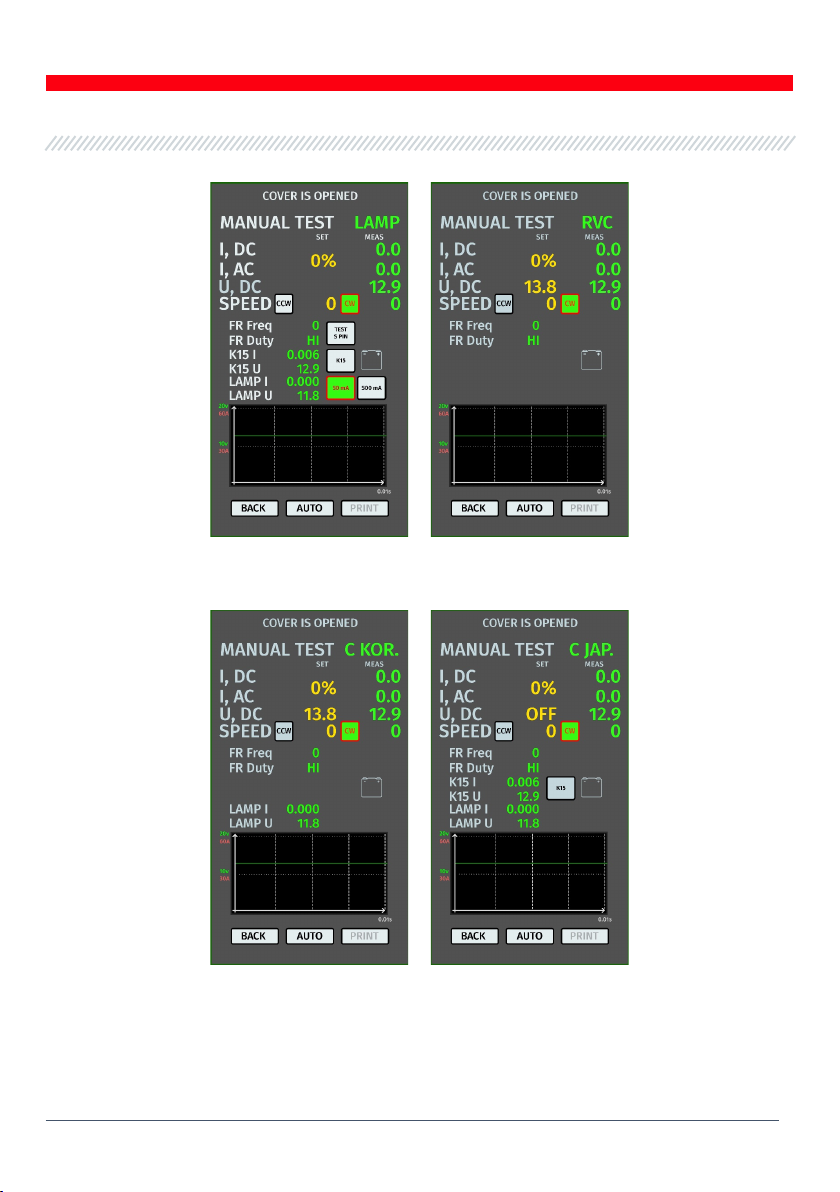
When you enter the alternator diagnostics mode, you can read the following information on the
screen (see fig. 7-10):
Yellow indicates set points for testing; green indicates actual (measured) points.
WARNING! “COVER IS OPENED” message signals that the protective cover of the bench is
opened. The diagnostic procedure cannot be activated while the protective cover is opened.
English
Test bench MS006
10
Figure 7. Test menu for alternators LAMP and RVC type
Figure 8. Test menu for alternators C KOR and C JAP type.
Indice
Lingue:
Altri manuali MSG Equipment Apparecchiature diagnostiche


