MSI LIbERATOR Manuale utente


1

1
INDEX
01 English��������������������������������������������������������������������������������������������������������������3
02 Deutsch ������������������������������������������������������������������������������������������������������������7
03 Français����������������������������������������������������������������������������������������������������������11
04 日本語�������������������������������������������������������������������������������������������������������������15
05 한국어�������������������������������������������������������������������������������������������������������������19
06 繁體中文���������������������������������������������������������������������������������������������������������23
07 中文简体���������������������������������������������������������������������������������������������������������27
08 Türkçe ������������������������������������������������������������������������������������������������������������31
09 Русский����������������������������������������������������������������������������������������������������������35
10 Nederlands �����������������������������������������������������������������������������������������������������39
11 Dansk �������������������������������������������������������������������������������������������������������������43
12 Norsk ��������������������������������������������������������������������������������������������������������������47
13 Svenska����������������������������������������������������������������������������������������������������������51
14 Español ����������������������������������������������������������������������������������������������������������55
01 Polski��������������������������������������������������������������������������������������������������������������59
16 Italiano������������������������������������������������������������������������������������������������������������63
17 ไทย �����������������������������������������������������������������������������������������������������������������67
18 Finnish������������������������������������������������������������������������������������������������������������71

2
19 Slovenčina������������������������������������������������������������������������������������������������������75
20 Português�������������������������������������������������������������������������������������������������������79
21 Tiếng Việt �������������������������������������������������������������������������������������������������������83
22 Română����������������������������������������������������������������������������������������������������������87
23 Ελληνικά���������������������������������������������������������������������������������������������������������91
95 ����������������������������������������������������������������������������������������������������������� תירבע 24

3
01 English
Introductions
Thank you for choosing the MSI Liberator with marvelous design� This gaming
pedal will give you a pleasant and professional PC gaming experience� Besides
gaming, you can also use it in video editing and programming� This guide provides
instructions to help you understand the product and get started quickly� Therefore, it
is recommended that you read this guide before using the MSI Liberator�
Unpacking
MSI Liberator Gaming Foodpedal
USB Cable
Swappable Key Cap, a pair of size Small, Medium and Large each
USB Adapter
User Guide
System Requirements
PC with available USB port
Windows 10/ 8�1/ 8/ 7

4
Overviews

5
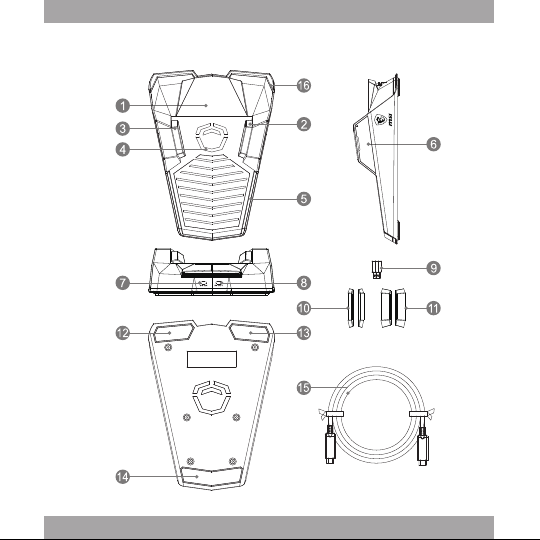
1� Middle Button
2� Right Button
3� Left Button
4� Backlit RGB LED (Brand Logo)
5� Rear RGB LED in the Round
6� Swappable Key Cap
7� USB-C Port (Input: 5V == 3 A)
8� USB-C Port (Output: 5V == 1.5 A)
9� USB Adapter (USB-C to USB-A)
10� Swappable Cap (Small)
11� Swappable Cap (Large)
12� Front Right Anti-slip Foot
13� Front Left Anti-slip Foot
14� Rear Anti-slip Foot
15� USB Cable
16� Front RGB LED in the Round
Get Started
1� Connect the MSI Liberator USB-C Input port ( ) to the PC USB-C port with the
provided USB Cable�
2� Use the provided USB adapter ( ) for conversion from USB-A to USB-C, if
necessary�
※Only USB-A and USB-C are supported for connection.
3� Scan the QR Code on the right to download the Liberator Control APP�
※The left/ middle/ right buttons of the gaming foodpedal
corresponds to the left/ middle/ right buttons of mouse�
Use the Liberator Control APP to make advanced
settings, if needed�

6
4� Or, you may go to
http://download.msi.com/uti_exe/gaming-gear/MSI_Liberator_V2.zip
to download the Liberator Control APP�
5� Find and click the “?” icon within Liberator Control APP to make Light Effects
and Marco settings, and to get the detailed product instructions�
※Visit MSI official website at www.msi.com to get further information.
※This device should be operated under maximum ambient temperature of
45ºC�

7
02 Deutsch
Einleitung
Vielen Dank, dass Sie sich für den MSI Liberator mit wunderbarem Design
entschieden haben� Dieses Gaming-Pedal wird Ihnen ein angenehmes und
professionelles PC-Spielerlebnis bieten� Neben Gaming können Sie es auch für
die Videobearbeitung und Programmierung verwenden. Dieses Handbuch enthält
Anweisungen, die Ihnen helfen, das Produkt zu verstehen und schnell loszulegen�
Daher wird empfohlen, dass Sie dieses Handbuch lesen, bevor Sie den MSI
Liberator verwenden�
Auspacken
MSI Liberator Gaming Fußpedal
USB-Kabel
Auswechselbare Seitentasten, je ein Paar in den Größen Small, Medium und
Large
USB-Adapter
Benutzerhandbuch
Systemanforderungen
PC mit freiem USB-Anschluss
Windows 10/ 8�1/ 8/ 7

8
Überblick
Indice
Lingue:
Altri manuali MSI Accessori per computer