
Multilaser Diamond Lite Manuale utente

User’s Manual
Manual del Usuario
Tablet PC Diamond Lite

2
WARRANTY TERMS
This warranty does not cover any deffect for bad use or natural wear, or even IF it is
not used according to our guidelines.
This warranty does not cover any deffct caused by use of non original or non compa-
tible peripherals and third party software installation.
In case this product has a factory defect, since you can prove it, Multilaser is compro-
mises to fix it or replace your product.
The below cases are not covered by this warranty:
· Natural use
· Damages caused by liquids, high temperature (Hot or cold)
· Oxidation or fungus
· Shocks
· Impacts
· Damages caused t LCD because of bad use, pressing, shock or humidity
This certified is only valid under the presentation of the purchase receipt.

3
Sumary
Index | ENGLISH
1. Tips............................................................................................. 6
2. Appearance................................................................................. 7
3. Power switch usage ................................................................... 8
4. Touch screen .............................................................................. 8
5. Adapter cable.............................................................................. 8
6. Micro SD usage ......................................................................... 9
7. Getting started ......................................................................... 10
8. Desktop .................................................................................... 12
9. Locking desktop........................................................................ 13
10. Main applications.................................................................... 14
11. Desktop menu function........................................................... 17
12. Program Manager................................................................... 17
13. Sound recorder ....................................................................... 19
14. Clock ...................................................................................... 20
15. Downloads............................................................................. 21
16. Browser.................................................................................. 22
17. Calendar ................................................................................. 22
18. Camera................................................................................... 23
19. Calculator ............................................................................... 24
20. E-mail..................................................................................... 25
21. Explorer .................................................................................. 28
22. My music................................................................................ 28
23. Vídeo....................................................................................... 29
24. Gallery .................................................................................... 30
25. Maps ...................................................................................... 31
26. search ................................................................................... 31
27. Play Store ............................................................................... 32
28. Specifications ......................................................................... 32

4
Indice | ESPAÑOL
1. Recomendaciones de empleo.................................................... 35
2. Descripción del tablet ............................................................... 36
3. Uso del botón de poder ........................................................... 37
4. Pantalla al tacto ....................................................................... 37
5. Conexión de transferencia......................................................... 37
6. Uso de Micro SD ....................................................................... 38
7. Iniciando para usar .................................................................. 39
8. Escritorio .................................................................................. 41
9. Interfaz de Bloqueo de Pantalla ................................................. 42
10. Programa................................................................................ 43
11. Menú ...................................................................................... 45
12. Programa de aplicación.............................................46
13. Registro de Sonido.................................................................. 48
14. Reloj ....................................................................................... 49
15. Descargar aplicaciones e instalar........................................... 51
16. Buscador ................................................................................ 51
17. Calendario .............................................................................. 52
18. Cámara.................................................................................. 52
19. Calculadora............................................................................. 53
20. E-mail..................................................................................... 54
21. Explorador de Archivos............................................................ 56
22. Música.................................................................................... 57
23. Vídeo....................................................................................... 58
24. Galería de Fotos...................................................................... 59
25. Mapas .................................................................................... 60
26. Búsqueda local ..................................................................... 60
27. Play Store ............................................................................... 61
28. Especificaciones ..................................................................... 62

5
English

6
1. Tips
When you use this device, please follow the safety notice below to prevent fire, electric
shock and injury.
· Keep the device away from rain and moisture.
· Keep the device away from direct sunlight and heat source.
· Protect the power cord. When connect the power cord, do not step onto it or place any
object on it, which may cause extrusion. Protect the connector of the power cord connec-
ted devices specially.
· Please use the original power adapter for charging. Nonconforming chargers may cause
harms.
· Do not disassemble the shell or repair it without authorization.
Cleaning
Handle the screen gently. To clear the fingerprints or dust on the screen, use soft cloth
dedicated for camera lens instead of gauze.

7
2. Appearance
camera
vol +
power
vol -

8
3. Power switch usage
·Turning on: Press and hold the power switch for five seconds.
·Turning off: Press and hold the power switch for five seconds – Tap Turn Off – Tap OK.
·Screen locking/unlocking: Press the power switch to lock/unlock the screen.
·Force shut-down: If the device doesn’t have response, press the Reset key to restart
the device.
Note: Do not force shut down the device unless necessary. Under normal condi-
tion, please follow the normal procedure to turn off the device.
·Reset key: Press the Reset key to restart the device.
4. Touch screen
The User Instructions guide you to operate the touch screen as follows:
· Tap: Tap to select an icon or option.
· Tap and hold: Tap and hold an icon to drag it to the desktop.
· Drag and drop: Drag and drop on the desktop to switch among different interfaces.
To avoid scratching or breaking the screen, do not put any object on it
5. Adapter cable
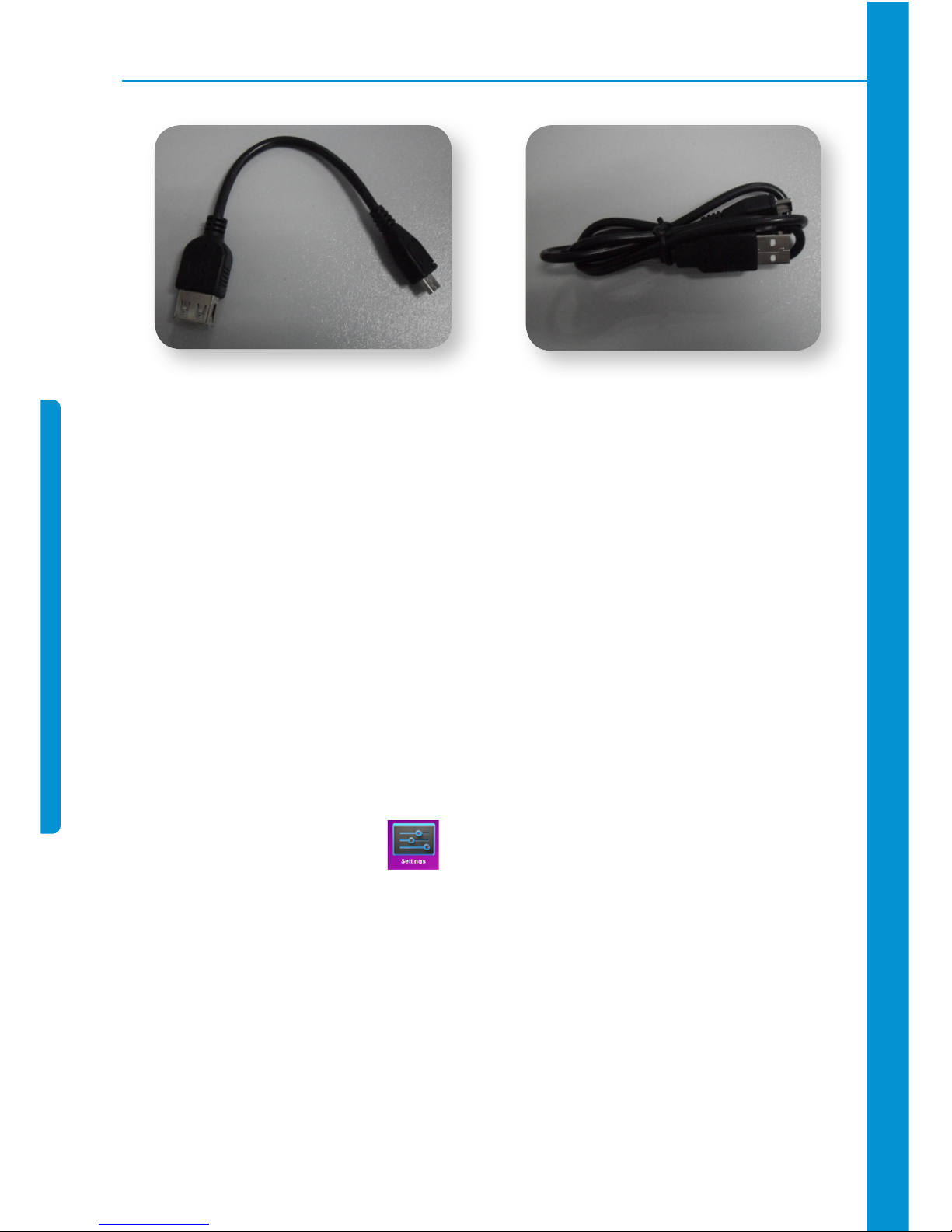
To use USB storage device, it is required to connect the adapter cable and then
connect to PC.
USB flash drive
· Connect one end of the OTG cable to the flash drive and the other end to the USB OTG
interface of the device. You can use the flash drive when it is ready.
9
OTG cable USB cable
Do not insert/remove the USB flash drive frequently, or else it may damage the
flash drive.
6. Micro SD usage
The device supports memory card up to 32GB.
· Insert the memory card into the slot, press with fingers to clamp it; the screen will show
Preparing SD card, and the Micro SD is ready for use when the characters disappear. You
can operate when the card is ready.
Removing Micro SD
· Close all programs or files opened from the memory card.
· Cancel Micro SD: tap Settings > Storage > Unmount SD Card > OK
· Press the card and it will eject.
Do not insert/remove the memory card repeatedly, or else it may damage the
card.
Please use qualified memory card to avoid incompatibility.

10
7. Getting started
Charging the device
· Connect the adaptor on the device and the other extremity with plug must be connected
to the socket when the battery is charging, the icon will be displayed at the bottom
right of the screen.
· After charged, the battery symbol turns into: .
You can use USB cable to charge the device.
You can use the device while charging; however, it will extend the charging time.
Battery management
“The battery is provided with incomplete load, so we recommend charging the battery
for at least 5 hours before using the device, or until the icon indicates a full charge.
The charging time and discharging time of the battery are limited. However, you can
try the following measures to extend the life of the battery:
· Use the device at least once every week.
· Charge the battery regularly.
· Do not keep the battery too low for long time.
· Always keep the device and battery away from heat source.
Start-up
Press and hold the power switch for five seconds ( ).
Indice
Lingue:
Altri manuali Multilaser Tavoletta

Multilaser
Multilaser ML Supra Manuale utente

Multilaser
Multilaser Elite Manuale utente

Multilaser
Multilaser OXY Manuale utente

Multilaser
Multilaser diamond Manuale utente

Multilaser
Multilaser M7s Dual Core Manuale utente

Multilaser
Multilaser ONIX Manuale utente

Multilaser
Multilaser Tablet PC Life Manuale utente

Multilaser
Multilaser Vibe Manuale utente
Multilaser
Multilaser SKY Manuale utente

Multilaser
Multilaser APOLO Manuale utente


