
Musway D8v3 Manuale utente

D8
8-CHANNEL CLASS D AMPLIFIER
WITH 10-CHANNEL DSP
VERSION 1.0
V3

2
ENGLISH
TECHNICAL SPECIFICATIONS
POWER SUPPLY
Voltage: 7.5 - 15 VDC
Idle current: 1.5 A
Switched off: <0.1 mA
Consumption @ 13.8 VDC 2 Ω Max. Musical Power : 40 A
Remote IN: 9 - 15 VDC (1 mA)
Remote OUT: 11 - 15 VDC (200 mA)
Fuse: 40 A
AMPLIFIER STAGE
Distortion - THD (1 kHz @ 4 Ω, 90% Power): 0.05 %
Bandwidth (-3 dB, 2 V RMS, 4Ω): 15 Hz - 22 kHz
S/N ratio @ A weighted, 1 V, Max. Power: 95 dB A
Damping factor @ 1 kHz, 2 V RMS, 4 Ω: > 70
Input sensitivity: 1 0 V RMS or 18V RMS (High-level); 4 V RMS (Line-level)
Input impedance: 13 Ω (High-level); 47 kΩ (Line-level)
LOAD IMPEDANCE (MIN):
8CH: 2 Ω
4CH - Bridge (1-2) (3-4) (5-6) (7-8) : 4 Ω
OUTPUT POWER (RMS) @ 13.8 VDC, 1% THD:
8CH @ 4 Ω: 50 W x 8
8CH @ 2 Ω: 75 W x 8
4CH - (Bridge 1/2; 3/4; 5/6; 7/8) @ 4 Ω: 150 W x 4
SIGNAL CONNECTIONS
RCA Pre-Out: 4 V RMS Max.
Declaration of Conformity
Audio Design GmbH hereby declares that the MUSWAY D8V3 device complies with Directive
2014/53/EU. The full declaration of conformity can be viewed at "www.musway.de/ce".

3
ENGLISH
DIGITAL SIGNAL PROCESSOR (32 bit Clock speed: 330 MHz)
Crossover: Full / Hi Pass / Lo Pass / Band Pass
Crossover type and slope: Bessel / Butterworth / Linkwitz @ 6/12/18/24/30/36/42/48 dB/0ct
Crossover Frequency: 1 Hz step @ 20 Hz - 20 kHz
Phase inversion: 0° / 180°
Output Equalizer: 31-Band Parametrical Equalizer: ±15 dB
Time Alignment Distance: 0 - 601.392 cm 0-236.796 inch
Time Alignment Delay: 0 - 17.688 ms
Time Alignment Step: 0,08 ms; 2,8 cm
Time Alignment Fine Set: 0,02 ms; 0,7 cm
Presets (Local Stored): 6 Presets
GENERAL REQUIREMENTS
PC connections Micro USB (1.1 / 2.0 / 3.0)
Software/PC requirements: Microsoft Windows (32/64 bit):
XP, Vista, Windows 7, Windows 8, Windows 10
Graphic card min. resolution: 1024 x 768
Ambient operating temperature range: 0 - 55 °C
SIZE / WEIGHT
Size without brackets (mm): 127 x 37 x 205
Net Weight (kg): 1,5
SCOPE OF DELIVERY
1 x D8V3 DSP Amplifier
1 x 1,5 m USB Cable
1 x 20-pole Cable Adapter (Speaker Outputs)
1 x 20-pole Cable Adapter (High Level Inputs, REM In- and Outputs)
1 x 8-pole Cable Adapter (Pre-Amplifier In- and Outputs)
1 x Owner’s Manual (English/German)
1 x 40 A replacement fuse
1 x 3 mm hex key

4
ENGLISH
THE PURCHASED DEVICE IS ONLY SUITABLE FOR AN OPERATION WITH A 12V ON-BOARD ELECTRI-
CAL SYSTEM OF A VEHICLE.
PLEASE DO NOT MAKE ANY OPERATION OF THE SOUND SYSTEM, WHICH DISTRACT YOU FROM A
SAFE DRIVING. Do not make any procedures, which demand a longer attention. Perform these operations not
until you have stopped the vehicle on a safe place. Otherwise the risk of accident consists.
ADJUST THE SOUND VOLUME TO AN APPROPRIATE LEVEL, THAT YOU ARE STILL ABLE TO HEAR
EXTERIOR NOISES WHILE DRIVING. High performance sound systems in vehicles may generate the acous-
tic pressure of a live concert. The permanent listening to extreme loud music may cause the loss of your hear-
ing abilities. The hearing of extreme loud music while driving may derogate your cognition of warning signals in
the risk of accident consists.
DO NOT COVER COOLING VENTS AND HEAT SINKS. Otherwise this may cause heat accumulation in the
DO NOT OPEN THE DEVICE.
cause a loss of the warranty.
REPLACE FUSES ONLY WITH FUSE WITH THE SAME RATING.
shock consists.
DO NOT USE THE DEVICE ANY LONGER, IF A MALFUNCTION OCCURS, WHICH REMAINS NOT REM-
EDIED. Refer in this case to the chapter TROUBLE SHOOTING. Otherwise risk of injury and the damage of
the device consists. Commit the device to an authorized retailer.
INTERCONNECTION AND INSTALLATION SHOULD BE ACCOMPLISHED BY SKILLED STAFF ONLY. The
interconnection and installation of this device demands technical aptitude and experience. For your own safe-
ness, commit the interconnection and installation to your car audio retailer, where you have purchased the
device.
DISCONNECT THE GROUND CONNECTION FROM THE VEHICLE’S BATTERY BEFORE INSTALLATION.
Before you start with the installation of the sound system, disconnect by any means the ground supply wire
from the battery, to avoid any risk of electric shock and short circuits.
CHOOSE AN APPROPRIATE LOCATION FOR THE INSTALLATION OF THE DEVICE. Look for an appropri-
and open spaces in the trunk area. Less suitable are storage spaces behind the side coverings or under the
car seats.
DO NOT INSTALL THE DEVICE AT LOCATIONS, WHERE IT WILL BE EXPOSED TO HIGH HUMIDITY AND
DUST. Install the device at a location, where it will be protected from high humidity and dust. If humidity and
dust attain inside the device, malfunctions may be caused.
MOUNT THE DEVICE AND OTHER COMPONENTS OF THE SOUND SYSTEM SUFFICIENTLY. Otherwise
the device and components may get loose and act as dangerous objects, which could cause serious harm and
damages in the passenger room.
ENSURE CORRECT CONNECTION OF ALL TERMINALS.
and lead to damages of the device.
SAFETY INSTRUCTIONS
5
ENGLISH
MOUNT THE DEVICE AND OTHER COMPONENTS OF THE SOUND SYSTEM SUFFICIENTLY. Otherwise
the device and components may get loose and act as dangerous objects, which could cause serious harm and
damages in the passenger room.
ENSURE NOT TO DAMAGE COMPONENTS, WIRES AND CABLES OF THE VEHICLE WHEN YOU DRILL
THE MOUNTING HOLES. If you drill the mounting holes for the installation into the vehicle’s chassis, ensure
by any means, not to damage, block or tangent the fuel pipe, the gas tank, other wires or electrical cables.
DO NOT INSTALL AUDIO CABLES AND POWER SUPPLY WIRES TOGETHER. Ensure while installation
not to lead the audio cables between the head unit and the processor together with the power supply wires
on the same side of the vehicle. The best is a areal separated installation in the left and right cable channel of
the vehicle. Therewith a overlap of interferences on the audio signal will be avoided. This stands also for the
equipped bass-remote wire, which should be installed not together with the power supply wires, but rather with
the audio signal cables.
ENSURE THAT CABLES MAY NOT CAUGHT UP IN CLOSE-BY OBJECTS. Install all the wires and cables
like described on the following pages, therewith these may not hinder the driver. Cables and wires which are
installed close-by the steering wheel, gear lever or the brake pedal, may caught up and cause highly danger-
ous situations.
DO NOT SPLICE ELECTRICAL WIRES. The electrical wires should not be bared, to provide power supply to
other devices. Otherwise the load capacity of the wire may get overloaded. Use therefor a appropriate distribu-
DO NOT USE BOLTS AND SCREW NUTS OF THE BRAKE SYSTEM AS GROUND POINT. Never use for
the installation or the ground point bolts and screw-nuts of the brake system, steering system or other security-
ENSURE NOT TO BEND OR SQUEEZE CABLES AND WIRES BY SHARP OBJECTS. Do not install cables
and wires not close-by movable objects like the seat rail or may be bent or harmed by sharp and barbed edges.
If you lead a wire or cable through the hole in a metal sheet, protect the insulation with a rubber grommet.
KEEP AWAY SMALL PARTS AND JACKS FROM CHILDREN. If objects like these will be swallowed, the risk
of serious injuries consists. Consult promptly a medical doctor, if a child swallowed a small object.

6
ENGLISH
MECHANICAL INSTALLATION
Before you start with the installation, disconnect necessarily the GROUND connection wire
from the battery to avoid any risk of electric shocks and short circuits.
WARNING
• Avoid any damages on the components of the vehicle like air bags, cables, board computer, seat belts, gas
tank or the like.
•
into small or sealed spaces without air circulation near by heat dispersing parts or electrical parts of the
vehicle.
•
loosen inside.
• The wires and cables of power supply and the audio signal must be as short as possible to avoid any losses
and interferences.
7
ENGLISH
ELECTRICAL INTERCONNECTION
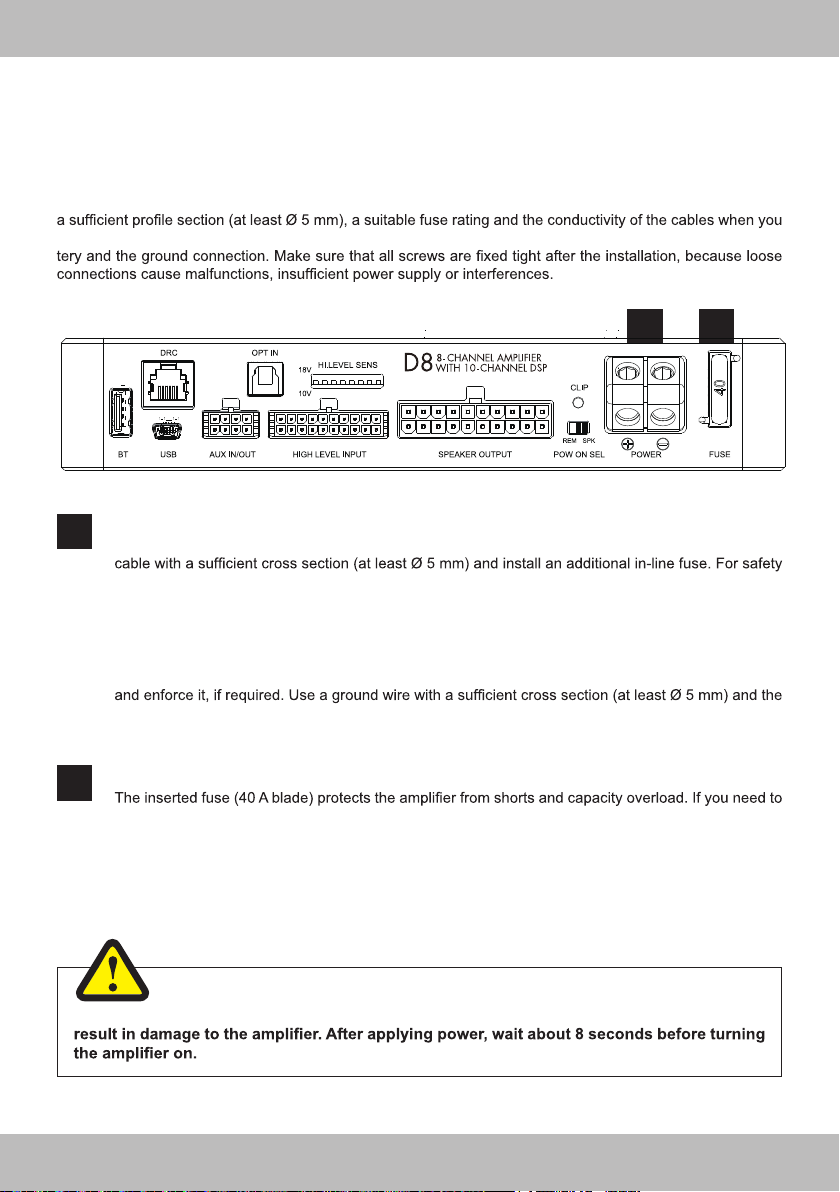
FUSE
replace the fuse, make sure to use the same type of fuse with the same rating.
BEFORE CONNECTING
For the professional installation of a sound system, car audio retail stores offers appropriate wiring kits. Ensure
purchase your wiring kit. Clean and remove rust-streaked and oxidized areas on the contact points of the bat-
POWER
Connect the POWER + terminal (+12V) with the +12V pole of the vehicle’s battery. Use a suitable
reasons the distance between the fuse block and the battery should be shorter than 30 cm. Do not set
in the fuse into the fuse block until the installation is accomplished.
Connect the POWER – terminal (ground) with a suitable contact ground point on the vehicle’s chas-
sis. The ground wire must be as short as possible and must be connected to a blank metallic point at
the vehicle’s chassis. Ensure that this ground point has a stable and safe electric connection to the
negative “–”pole of the battery. Check this ground wire from the battery to the ground point if possible
same size like the positive + power supply wire. This helps reduce most of the interference than can
occur in audio reproduction.
1
2
1
2
Make sure the connection polarity is as indicated on the terminals. A misconnection may
WARNING

8
ENGLISH
AUX IN:
AUX OUT:
-
ers, such as subwoofer or center speakers etc.
BT
This USB input is suited for an external Bluetooth™ dongle with wireless audio streaming function
with/or adjusting the DSP by an APP through a smart phone/mobile device.
Check the website “www.musway.de” for more information or ask your car audio retailer.
USB
This USB input is suited for the connection with a PC/laptop computer to manage the functions of
1.1/2.0/3.0 compatible. For downloading the software please visit “www.musway.de/dsp”.
AUX IN/OUT
Front view
4
3
5
1:
5:
4: Line Level Input – (CH9)
8: Line Level Input + (CH9)
2:
6:
3: Line Level Input – (CH10)
7: Line Level Input + (CH10)
DESCRIPTION OF OPERATION
3 4
9 10 11
5 6 7 8
12

9
ENGLISH
HIGH LEVEL INPUTS CH1 - 8:
CH1 features the Auto Turn-On function through the connection with the speaker outputs of the head
unit.
HIGH LEVEL INPUT
20 pole multipolar connector to manage the input high-level signals, REM IN connections, etc.
REV LIGHT IN:
If you connect the reverse gear light cable here, the audio streaming in Bluetooth™ Mode will be
interrupted and the regular audio from the head unit is audible to perceive signal tones from the park
distance control.
REM OUT:
current capability can also drive an auto-motive relay.
REM IN:
-
able. The voltage must be between 7.5 and 15 VDC.
6
Front view
1: Not in use
11: REV LIGHT IN
2: REM OUT
12: REM IN
3: HIGH LEVEL INPUT CH 8 –
13: HIGH LEVEL INPUT CH 8 +
4: HIGH LEVEL INPUT CH 7 –
14: HIGH LEVEL INPUT CH 7 +
5: HIGH LEVEL INPUT CH 6 –
15: HIGH LEVEL INPUT CH 6 +
6: HIGH LEVEL INPUT CH 5 –
16: HIGH LEVEL INPUT CH 5 +
7: HIGH LEVEL INPUT CH 4 –
17: HIGH LEVEL INPUT CH 4 +
8: HIGH LEVEL INPUT CH 3 –
18: HIGH LEVEL INPUT CH 3 +
9: HIGH LEVEL INPUT CH 2 –
19: HIGH LEVEL INPUT CH 2 +
10: HIGH LEVEL INPUT CH 1 –
20: HIGH LEVEL INPUT CH 1 +

10
ENGLISH
SPEAKER OUTPUTS CH1-8:
Connect here speakers (2 - 4 Ohms) according to your sound system. A maximum of 8 speakers can be con-
If you want to bridge the speaker outputs (BTL mode)and drive the connected speakers/subwoofers with a 4
Ohm load, bridge the channels as follows:
Channel pair 1: SPEAKER OUT1+ (+) & SPEAKER OUT2- (-) with 4 Ohms
Channel pair 2: SPEAKER OUT3+ (+) & SPEAKER OUT4- (-) with 4 Ohms
Channel pair 3: SPEAKER OUT5+ (+) & SPEAKER OUT6- (-) with 4 Ohms
Channel pair 4: SPEAKER OUT7+ (+) & SPEAKER OUT8- (-) with 4 Ohms
SPEAKER OUTPUTS
.
7
WARNING
Front view
1: BAT –
11: BAT +
2: BAT –
12: BAT +
3: SPEAKER OUTPUT CH 8 –
13: SPEAKER OUTPUT CH 8 +
4: SPEAKER OUTPUT CH 7 –
14: SPEAKER OUTPUT CH 7 +
5: SPEAKER OUTPUT CH 6 –
15: SPEAKER OUTPUT CH 6 +
6: SPEAKER OUTPUT CH 5 –
16: SPEAKER OUTPUT CH 5 +
7: SPEAKER OUTPUT CH 4 –
17: SPEAKER OUTPUT CH 4 +
8: SPEAKER OUTPUT CH 3 –
18: SPEAKER OUTPUT CH 3 +
9: SPEAKER OUTPUT CH 2 –
19: SPEAKER OUTPUT CH 2 +
10: SPEAKER OUTPUT CH 1 –
20: SPEAKER OUTPUT CH 1 +
BATTERY TERMINALS +/-:
These power terminals are paralleled with the POWER terminals internally. The power cables must be properly
insulated to prevent electrical short. If the POWER terminals are connected with the battery, it is not mandatory
to connect the power supply here.
Indice
Lingue:
Altri manuali Musway Amplificatore


