
NatComm DMS Manuale utente

DMS
USER GUIDE
For Technical Assistance
Please Phone: (07) 5596 5128
September 2015
Page 2 National Communications
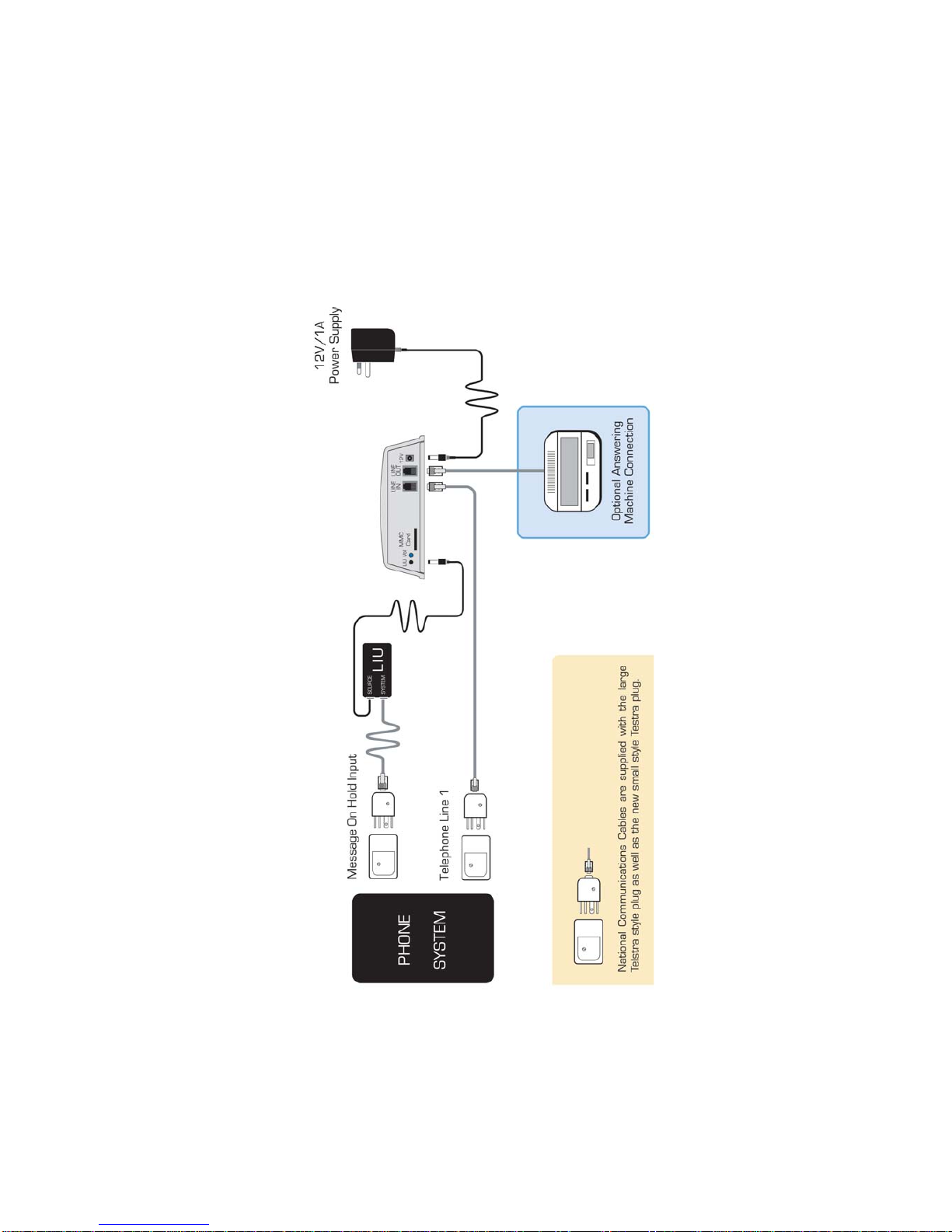
INSTALLATION DIAGRAM

PRODUCT DESCRIPTION
Our DMS Digital Message Player, is designed to connect to a PABX or other
Multi-LineTelephone Systemto provide:
•AHigh Quality Message On Hold facility.
and
•AHigh QualityAfter HoursAnnouncement.
This means that in addition to a High Quality MESSAGE ON HOLD facility,
you can now provide a STUDIO QUALITYAfter Hours announcement to all
callers when your office is closed and this message can be of any length.At
the end of your announcement, DMS can then either :
•HANGUP
or
•RINGYOURANSWERINGMACHINE (DefaultMode)
so your callers can leave a Message
ThereisanANSWERON/OFFTouch Switch located onthefrontface.Touching
this switch once, will turn theAnswering Facility ON (Red Light will turn ON).
You should dothis whenleaving the office.Touchingit againwill turn theAfter
Hours Answering Announcement facility OFF (Red Light will turn OFF). You
shoulddo thiswhen arriving at the office.
ATTENDED OFFICE OPERATION
Red Light should be OFF
DMS will provide a MESSAGE ON HOLD feed to your Telephone System.
AFTER HOURS OPERATION
Red Light should be ON
DMS will ANSWER your INCOMING CALLS, play your After Hours
ANNOUNCEMENT MESSAGE and then Hang Up or Ring an Answering
Machine attached to it if you wish to allow your callers to leave a Message.
National Communications Page 3

Page 4 National Communications
ANSWERING MACHINE OPERATION
DMS issetby DEFAULT tooperateWITHOUTan Answering Machine.
This means that it will HANG UP immediately once the Announcement
Messagehas been completed..
DMS issetby DEFAULT tooperateWITHOUTan Answering Machine.
DMS can also operate with your ANSWERING MACHINE so that your
callers can leave a Message.
Ifyouwishtoutilisethiscapability,youshouldconnectyourAnsweringMachine
to the LINE OUT port of DMS, as described on pages 10-11.
DMS will then RING your Answering Machine at the completion of your
AnnouncementMessage.
TO SET : DMS TO OPERATE WITH AN ANSWERING MACHINE
enter #410 when in the programming mode
See page 15, Section D 2 for more details
Important Notes
1) You should turn yourAnswering Machine ON and leave it ON at all times.
2) You should set yourAnswering Machine to answer as quickly as possible,
tominimize thedelaybetweentheendof yourAnnouncementandthebeginning
ofthe Out-Going Message of yourAnsweringMachine.
3) As it is always necessary for anAnswering Machine to have an Out-Going
Message, you should record a short instruction on the Answering Machine
such as :
“Please leave your message after the BEEP “.

SD FLASH CARD
DMS is supplied with an 2GB (or greater) SD Flash
Card to store the MP3 based messages that it should
play.
Two MP3 files need to be loaded onto the Flash Card.
One MP3 File is used for the PABX ‘On Hold Message’.
One MP3 File is used for the PABX ‘After Hours Message’.
DMS must be able to differentiate the Two files that have been loaded
onto the SD card and it does this by looking at the file name.
DMS differentiates theTwo files by looking for the number of the first 3
digits of MP3 filenames.
The Filenames of the MP3 Files used with DMS must be named as
follows :
One MP3 file is for the ANNOUNCEMENT MESSAGE.
NOTE - The filename of this message MUST START WITH 001, so that
DMS knows that this Message is to be used for announcements.
example : 001XYZcompanyannouncement.MP3
The other MP3 file is for the ON HOLD MESSAGE.
The filename of this message MUST START WITH 002 (or any number
up to 019), so that DMS knows that this Message is to be used for On
Hold use. example : 002XYZcompanyonhold.MP3
If your DMS IS fitted with the OPTIONAL Message File Time
Programming facility, refer to the information on page 6.
If your DMS IS NOT fitted with the OPTIONAL Message File Time
Programming facility, please proceed to page 8.
National Communications Page 5

Page 6 National Communications
TIME PROGRAMMABLE FILES
If your DMS IS fitted with the OPTIONAL Message File Time Programming
facility, then you can load :
* Up to a Maximum of FIVE Separate ‘On Hold Messages’
* Up to a Maximum of FIVE ‘After Hours Messages’.
Each of the Maximum of TEN ‘Messages’ can be programmed to play at :
* Different Times of the Day
* Different Days of the Week
* Between Preset Date Periods
1.The ‘Announcement Messages’must benumbered with filenames
beginning with 001, 002, 003, 004 and 005. You can up to FIVE :
001XYZcompanyannouncement.MP3
002XYZcompanyannouncement.MP3
003XYZcompanyannouncement.MP3
004XYZcompanyannouncement.MP3
005XYZcompanyannouncement.MP3
2.The ‘On HoldMessages’ must be numbered with filenames beginning
with 006, 007, 008, 009 and 010. You can up to FIVE :
006XYZcompanyonhold.MP3
007XYZcompanyonhold.MP3
008XYZcompanyonhold.MP3
009XYZcompanyonhold.MP3
010XYZcompanyonhold.MP3
3. LoadAll Mesaages onto the SD Card in strict numeric order.
4. Install the DMCControl Program as per the separate ‘Time
ProgrammableMessage ChangeUser Guide alsosupplied with this option.
5. Program Each File with the required Play Times, Days or Date Periods,
usingthe DMCControl Programsupplied on the enclosed CD.
Important Note : Only 1 ‘After Hours Message’ and 1 ‘On Hold Messages’
can be programmed play at any 1 time. If more than 1 of either type of
Message is set to play at the same time, then only the filename with the
lowest 3 digit filename prefix will play.

National Communications Page 7
INSTALLATION - OVERVIEW
There are TWO stages involved in the installation of your DMS device.
1) MESSAGE ON HOLD - INSTALLATION
This involves connecting DMS to a Telephone System On Hold Port,
using a Line Isolation Unit.
Please refer to pages 8-9
2) AFTER HOURS ANNOUNCEMENT - INSTALL
This involves connecting DMS in place of an Answering Machine
OR
If anAnswering Machine has not been used previously, DMS will
need to be connected in parallel to LINE 1 of the Telephone System.
Please refer to pages 10-11
Important Note
DMS should be connected in
parallel with Line 1

Page 8 National Communications
MESSAGE ON HOLD - INSTALLATION
Where an existing RADIO, CD or TAPE player
is being replaced
1. Disconnect Power to the existing audio device.
2. Disconnect theAudio Output Cord of the existing Line
Isolation Unit (LIU) from the existing audio device.
Note -An LIU (Line Isolation Unit) is used to connectAudio
from theAUX or HEADPHONE outlet of the existing device
through to the telephone system.
This is anACMA safety requirement.
3. Connect theAudio Output Cord of the existing LIU to the
3.5mmAudio Output connector of your DMS unit.
Note - If the existing LIU does not use a 3.5mmAudio Plug,
then you will need to replace the existing LIU with a new
LIU which has a 3.5mm Audio Plug. These are available
from National Communications (ph 07 55965128).
4. Power Connection
A12VAC/1Apower adaptor is supplied with your unit. This
must be connected to an electrical power outlet, which is
switched ON.
5. Message VolumeAdjustment
Place a call to the telephone system, put the call ON HOLD
and adjust the volume to a suitable level using the volume
pot located on the rear of DMS. Turning the POT clockwise
will increase the volume.

National Communications Page 9
MESSAGE ON HOLD - INSTALLATION
Where an existing RADIO, CD or TAPE player
IS NOT being replaced
1. An ON HOLD connection port is required for the connection
of anAudio Source to the Telephone System. This connection is
normally a 610 Style Telephone Socket (ie the old styleAustralian
telephone socket) or a Modular Style Telephone Socket (ie the
new styleAustralian telephone socket).
Note : If the Telephone System is NOT fitted with an ON HOLD
connection port, then you will need to arrange for anACMA
qualified Telephone Technician to fit one. The contact details
of suitable technicians, in most areas, are available by
contacting National Communications on (07) 55965128.
2. An LIU (Line Isolation Unit) fitted with the appropriate telephone
plug connection and a 3.5mm audio connector must be used to
connect the audio output from your DMS unit to the ON HOLD
input port of your telephone system. This is an ACMA safety
requirement.
Note : Some Telephone Systems may use an RCAor a 3.5mm
audio socket for their ON HOLD connection port. If this is the
case, you will need to use an LIU fitted with the appropriate
plug. LIU’s with all connection types are available by contacting
National Communications on (07) 55965128.
3. Connect theAudio Output port of DMS to the Telephone
System ON HOLD connection port, using the LIU.
Note : IfAudio from DMS cannot be heard when calls are placed
On Hold, then your Telephone System may need to be
programmed to advise it that a MESSAGE on HOLD facility
has been fitted to it. You should contact your Telephone System
supplier for assistance.
4. Power Connection
A 12VAC/1A power adaptor is supplied with your unit. This must
be connected to an electrical power outlet, which is switched ON.

Page 10 National Communications
ANNOUNCEMENT - INSTALLATION
WhereanexistingANSWERING MACHINE is being replaced
1. Disconnect Power to the existingAnswering Machine.
2. Remove the Telephone Cable which is connected to the existing
Answering Machine, from the socket where it connects to it.
3. Connect theTelephone Cable (removed above) to the LINE
IN port located at the rear of DMS.
Please Note : If theAnswering Machine is still required to record
incoming messages, then you should connect it to the LINE OUT
port located at the rear of DMS.
4. Power Connection
A12VAC/1Apower adaptor is supplied with your unit. This must be
connected to an electrical power outlet, which is switched ON.
5. Announcement Message Volume Check
Turn On the Announcement facility by pressing the Button located
on the top face of DMS.
Place a call to the telephone system by dialing your normal telephone
number. DMS will then ANSWER your call and play your
Announcement Message before hanging up (note - DMS will take
approx 15 seconds before hanging up, as it is programmed by default
to ring anAnswering Machine that may be connected to the Line Out
port.
If the volume is too high or too low, you can adjust the volume to a
suitable level using the volume pot located on the rear of DMS.
Turning the POT clockwise will increase the volume.
Note - Changing the volume will also change the volume of the
ON HOLD MESSAGE as well, so you will need to set a volume
which is suitable for both MessageApplications.
DMS should be connected in parallel with Line 1
Indice


