NEC 920 Manuale utente

TalkTime Max™ 920
Owner’s Manual

i
ATTENTION
Before Using the Phone:
It is necessary that you CHARGE your phone
battery fully before attempting to make or receive a call.
Battery Disposal:
DO NOT PLACE USED BATTERIES IN YOUR REGULAR
TRASH. THIS NICKEL-CADMIUM (Ni-Cd) BATTERY MUST
BE COLLECTED, RECYCLED OR DISPOSED OF IN AN
ENVIRONMENTALLY SOUND MANNER.
Battery Recommendations:
The NEC TalkTime MAX™ 920 cellular phone you have
purchased was designed to deliver quality performance and
provide you with years of use. In order to maintain optimum
performance, NEC recommends that only NEC Authentic
Accessories™ be used with the TalkTime phones.
Specifically, NEC recommends only the use of Nickel
Cadmium (NiCd) batteries with the TalkTime MAX™ 920
phone. Use of other batteries, such as Nickel Metal Hydride
(NiMH) may result in poor battery performance, and in some
cases, create a potential safety risk due to overheating of the
battery.
The incineration, landfilling or mixing of nickel-cadmium
(Ni-Cd) batteries with municipal solid waste stream is
PROHIBITED BY LAW in most areas.
Return this battery to a federal or state approved nickel-
cadmium (or “sealed lead”) battery recycler. This may be
where you purchased the battery or a local seller of
automotive batteries. In all states, call 1-800-822-8837,
except Minnesota if further disposal information is required.
In Minnesota, call 1-800-225-PRBA.
Contact local waste management officials for other
information regarding the environmentally sound collection,
recycling and disposal of this battery.
In-Vehicle Operation:
For In-Vehicle Operations, the phone battery must be
charged, since In-Vehicle Adapter Kits serve only as a trickle
battery charger.

ii
IMPORTANT
READ THIS INFORMATION BEFORE USING
YOUR HAND-HELD PORTABLE CELLULAR
TELEPHONE
First introduced in 1984, the hand-held portable cellular
telephone is one of the most exciting and innovative
electronic products ever developed. With it you can stay in
contact with your office, your home, emergency services, and
others.
For the safe and efficient operation of your phone, observe
these guidelines.
Your cellular telephone is a radio transmitter and receiver.
When it is ON, it receives and also sends out radio frequency
(RF) energy. The phone operates in the frequency range of
824 MHz to 894 MHz and employs commonly used
frequency modulation (FM) techniques. When you use your
phone, the cellular system handling your call controls the
power level at which your phone transmits. The power level
can range from 0.006 of a watt to 0.6 of a watt.
Exposure to Radio Frequency Energy
In 1991 the Institute of Electrical and Electronics Engineers
(IEEE), and in 1992 the American National Standards
Institute (ANSI) updated the 1982 ANSI Standard for safety
levels with respect to human exposure to RF energy. Over
120 scientists, engineers, and physicians from universities,
government health agencies, and industry, after reviewing the
available body of research, developed this updated Standard.
In March, 1993, the Federal Communications Commission
(FCC) proposed the adoption of this updated Standard.
The design of your phone complies with this updated
Standard. Of course, if you want to limit RF exposure even
further than the updated ANSI Standard, you may choose to
control the duration of your calls and operate your phone in
the most power efficient manner.
Efficient Phone Operation
For your phone to operate at the lowest power level,
consistent with satisfactory call quality, please observe the
following guidelines:

iii
If your phone has an extendable antenna, extend it
fully. Some models allow you to place a call with the
antenna retracted. However, your phone operates more
efficiently with the antenna fully extended.
Hold the phone as you would any other telephone. While
speaking directly into the mouthpiece, position the antenna
up and over your shoulder. Do not hold the antenna when
the phone is “IN USE.” Holding the antenna affects call
quality and may cause the phone to operate at a higher
power level than needed.
Antenna Care and Replacement
Do not use the phone with a damaged antenna. If a
damaged antenna comes into contact with the skin, a minor
burn may result. Replace a damaged antenna immediately.
Consult your manual to see if you can change the antenna
yourself. If so, use only a manufacturer approved antenna.
Otherwise, take your phone to a qualified service center for
repair.
Use only the supplied or approved antenna. Non-approved
antennas, modifications, or attachments could impair call
quality, damage the phone, and violate FCC regulations.
Driving
Check the laws and regulations on the use of cellular
telephones in the areas where you drive. Always obey them.
Also, when using your phone while driving, please:
* give full attention to driving,
* use hands-free operation, if available, and
* pull off the road and park before making or answering
a call if driving conditions so require.
Electronic Devices
Most modern electronic equipment is shielded from RF
energy. However, RF energy from cellular telephones may
affect inadequately shielded electronic equipment.

iv
RF energy may affect improperly installed or inadequately
shielded electronic operating and entertainment systems in
motor vehicles. Check with the manufacturer or its
representative to determine if these systems are adequately
shielded from external RF energy. You should also check
with the manufacturer of any equipment that has been added
to your vehicle.
Consult the manufacturer of any personal medical devices
(such as pacemakers, hearing aids, etc.) to determine if they
are adequately shielded from external RF energy.
Turn your phone OFF in health care facilities when
any regulations posted in the areas instruct you to do so.
Hospitals or health care facilities may be using equipment
that could be sensitive to external RF energy.
Aircraft
Turn your phone OFF before boarding any aircraft.
* Use it on the ground only with crew permission.
* Do not use it in the air.
To prevent possible interference with aircraft systems,
Federal Aviation Administration (FAA) regulations require you
to have permission from a crew member to use your phone
while the plane is on the ground. To prevent interference
with cellular systems, FCC regulations prohibit using your
phone while the plane is in the air.
Children
Do not allow children to play with your phone. It is not a toy.
Children could hurt themselves or others (by poking
themselves or others in the eye with the antenna for
example). Children also could damage the phone, or make
calls that increase your telephone bills.
Blasting Areas
To avoid interfering with blasting operations, turn your unit
OFF when in a “blasting area” or in areas posted:
“Turn off two-way radio.”
Construction crews often use remote control RF devices to
set off explosives.
Air Bags
An air bag inflates with great force. DO NOT place objects,
including both installed or portable wireless equipment, in the
area over the air bag or in the bag deployment area. If in-
vehicle wireless equipment is improperly installed and the air
bag inflates, serious injury could result.

v
Potentially Explosive Atmospheres
Turn your phone OFF when in any area with a potentially
explosive atmosphere. It is rare, but your phone or its
accessories could generate sparks. Sparks in such areas
could cause an explosion or fire resulting in bodily injury or
even death.
Areas with a potentially explosive atmosphere are often, but
not always, clearly marked. They include fueling areas such
as gas stations; below deck on boats; fuel or chemical
transfer or storage facilities; areas where the air contains
chemicals or particles, such as grain, dust, or metal powders;
and any other area where you would normally be advised to
turn off your vehicle engine.
Do not transport or store flammable gas, liquid, or explosives
in the compartment of your vehicle that contains your phone
or accessories.
Vehicles using liquefied petroleum gas (such as propane or
butane) must comply with the National Fire Protection
Standard (NFPA-58). For a copy of this standard, contact
the National Fire Protection Association, One Batterymarch
Park, Quincy, MA 02269, Attn: Publication Sales Division.
Pacemaker/ICDs
Research sponsored by the Wireless Technology Research,
LLC (“WTR”), indicates that some wireless telephones cause
interference with pacemakers. Accordingly, NEC America
endorses the following recommendations issued by the WTR:
Wireless phones should be kept at a safe distance from a
pacemaker. Existing data indicate that the greater the
distance between a pacemaker and a wireless phone, the
less risk of interference. These data further indicate that six
inches is the proper separation distance for minimal risk.
Practical steps to achieve this separation distance include:
o The wireless telephone should not be placed over the
pacemaker, such as in a breast pocket, when it is in the
“ON” position. (A phone is “ON” when power is being
supplied to the telephone by the battery.)
o The phone should be used at the ear opposite the
pacemaker.
Note: There is nothing in the comprehensive data to
suggest that bystanders with pacemakers would be at risk of
interference from others who are using wireless phones.

vi
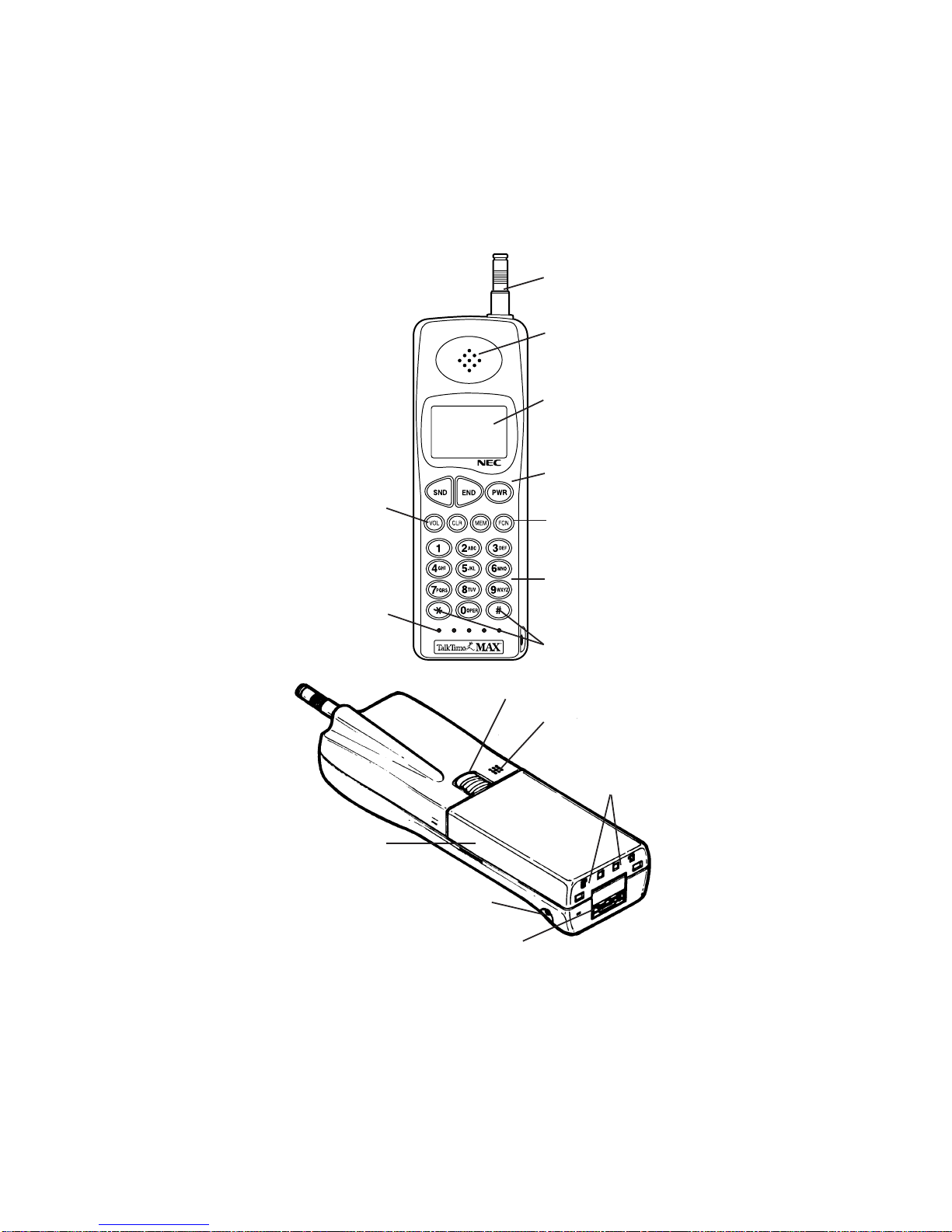
CONTROLS AND FEATURES
Antenna
Earpiece Receiver
Liquid Crystal
Display
Call Control Keys
Function Keys
Dialing
Indicators
Symbol Keys/
Scroll Keys
Volume Key
Microphone
Battery Locking Catch
Sounder/Speaker
Rechargeable
Battery Pack
Battery Charging
Jack
External Connector
Battery
Charging
Contacts

-1-
CONTENTS
Getting Started 2
Installing and Removing the Battery 2
The Battery Charge Indicator 3
Charging and Recharging the Battery 3
Display Indicators 4
Quick Reference Guide 4,5
Operation of the Phone 6
Turning On or Off 6
Placing a Call 6
Receiving a Call 7
Signal Strength 7
Volume Key 7
Last Number Redial 8
Speed Dialing 8
The Memory 8
Storing Information 9
Recalling A Number From Memory 9
Editing Numbers 9
Displaying “Hidden” Numbers 10
Deleting Information from Memory 10
Scanning for a Number 10
Scratchpad 11
Displaying Your Own Phone Number 11
Features 11
NAM Select 11
Locking/Unlocking the Phone 11
Length of Your Calls 13
Resetting the Call Timers 14
Backlighting 15
Setting the Ringing Volume 15
Using the Phone on Two Networks 15
Pause Dialing 16
Roaming(System Select) 16
SID Management 18
DTMF Tone 18
Mute 19
Low Battery Alarm 20
Error Tone 20
Self Diagnostic Check 20
NAM Programming 20
Temporary Lock Code Set 21
One-Touch Dialing 21
Hands-Free 22
Caller Line Identification 22
Voice Messaging Service 23
Voice Mail Message Indication 23
Limited Warranty 24
Troubleshooting 26
Technical Information 27
Care and Maintenance 27
NEC Service Support 28

-2-
GETTING STARTED
Your phone is powered by a rechargeable battery.
A new battery must be fully charged
before being used for the first time.
If left unused, a fully charged battery will discharge itself in
about a month. Store batteries uncharged in a cool, dark,
and dry place.
The battery pack is a sealed unit with no serviceable parts
inside. Do not attempt to open the case.
WARNING: Use only NEC approved batteries, antennas,
and chargers. The use of any other types will invalidate
any approval or warranty applying to the telephone.
INSTALLING AND REMOVING THE BATTERY
To Install the Battery:
1. Insert the bottom of the battery into
the base of the phone.
2. Fasten it to the phone by
pressing slightly downward on
the battery until the locking
catch snaps into place.
3. Make sure the battery is properly
installed.
To Remove the Battery:
Remember to switch the power off before removing
the battery.
1. Slide the locking latch located at the top of the battery
upward and gently pull the battery away from the phone.
➁
①

THE BATTERY CHARGE INDICATOR
The Battery Charge Indicator can be
accessed by pressing [FCN] [8] keys
after power has been applied to the
phone. The display screen indicates the
battery charge level ranging from [o] to
[oooo]. [o] representing low battery and
[oooo] representing full battery.
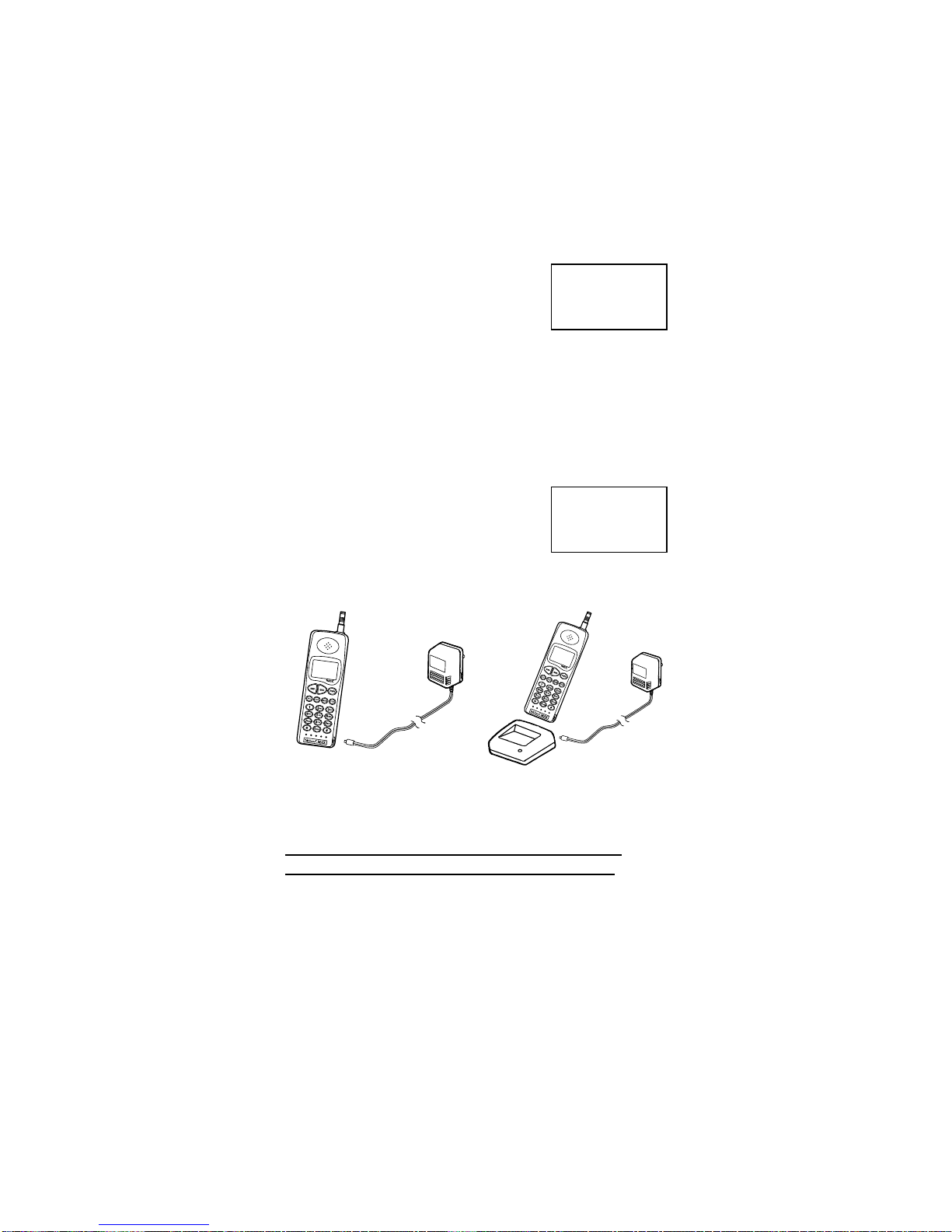
CHARGING AND RECHARGING THE BATTERY
Charging the battery can be accomplished two ways.
(A) By direct connect of the AC Adapter to the charging jack
of the phone.
(B) By placing the phone into the charging stand.
(A)
1. Plug the AC Adapter into a standard
110V AC outlet.
2. Insert the DC plug into the phones
battery jack.
3. With PWR on display will show:
(B)
1. Plug the AC Adapter into a standard 110V AC outlet.
2. Plug the Charging Stand into the Adapter.
Note: Initial charging and recharging of the battery
usually takes approximately 10 hours.
A new battery must be fully charged
before being used for the first time.
Batteries last longer and perform better if allowed to
discharge fully at least once a week. You can do this by
leaving the phone switched on overnight, or until the
message RECHARGE BATTERY is displayed and the phone
shuts itself off.
NOTE: If the battery is too hot or cold, charging will be
interrupted until the battery reaches a normal temperature.
-3-
PWR
b a t t
o o o o
PWR
o o o o
C H A r g i n g
(B)
(A)
Questo manuale è adatto per i seguenti modelli
1
Indice
Altri manuali NEC Telefono cellulare