Net to Net Technologies SIA2410R Manuale utente

S
SI
IA
A2
24
41
10
0R
R
S
SH
HD
DS
SL
L
R
Ro
ou
ut
te
er
r
U
Us
se
er
r
M
Ma
an
nu
ua
al
l
Revision 1.3 Software version 3.9.2
Net To Net Technologies
Copyright © 2002 Net To Net Technologies, Inc. All rights reserved.
Tel: (603)422-0600
E-mail: [email protected]

Net To Net Technologies SIA2410R User Manual
Net To Net Technologies 1
Contents
PART I: SIA2410R Introduction ...........................................2
Introduction.................................................................................................................... 3
Specifications................................................................................................................. 4
PART II: Installing the Router ...............................................7
Getting started.............................................................................................................. 8
SIA2410R Package Contents................................................................................... 9
Connecting cables......................................................................................................10
PART III: Configuring the Router ........................................12
Accessing the Console..............................................................................................13
User Mode .....................................................................................................................14
Establishing LAN Interface .....................................................................................16
Establishing WAN(SHDSL) Interface..................................................................18
Configuring the Routing Table ..............................................................................22
Configuring the ARP Table......................................................................................26
Saving the Configuration ........................................................................................28
Rebooting the system ..............................................................................................31
PART IV: Configuring advanced Functions ...........................32
Configuring Bridge Function ..................................................................................33
Configuring DHCP Function....................................................................................36
Configuring NAT Function .......................................................................................40
Configuring VLANs and QoS ..................................................................................45
VLAN Modes..................................................................................................................45
QoS Methods................................................................................................................45
Configure Simple Network Time Protocol (SNTP) ........................................50
PART V: System maintenance ..............................................51
Accessing Telnet .........................................................................................................52
Configuring SNMP Functions .................................................................................52
Upgrading the System Software..........................................................................53
PART VI: Configuration Examples........................................56
Configuring NAT/PAT Functions............................................................................56
Appendix .............................................................................57
Connector Pin-outs....................................................................................................57

Net To Net Technologies SIA2410R User Manual
Net To Net Technologies 2
PART I: SIA2410R Introduction
•Overview and Features
•Specifications

Net To Net Technologies SIA2410R User Manual
Net To Net Technologies 3
Introduction
Introduction to the Net To Net Technologies SIA2410R Router
Overview
The SIA2410R router with SHDSL is a full-featured, stand-alone router with
VLAN and QoS support for connecting diverse Local Area Networks (LANs) to
the Internet and other remote networks. It provides a fast SHDSL (Symmetric
High-speed Digital Subscriber Line) connection to the Internet or between
LANs. The SIA2410R supports a packet-based network technology that
allows high-speed transmission over twisted-pair copper wire between a
DSLAM in the central office and a customer site, or on copper loops between
two sites. The SIA2410R provides a single G.SHDSL port and four Ethernet
switch ports, this allows up to four devices to be connected to the router
without the use of an external hub or switch.
Features
The SIA2410R provides the following features.
•Multiple line rates from 72kbps to 2320kbps including rate adaptive mode
when used in point to point configurations
•Interoperates with SµD2000-6/12, SMD2000G-12, SMD2000-24,
SAM2000G-12 and SIM2000-24 Net to Net products
•Integrated 4 port Ethernet switch with MID/MID-X auto sensing ports.
•LED’s on the front side for monitoring and troubleshooting
•IP routing for internet and intranet connectivity
•Various management tools. (RS232 CLI, Telnet CLI and SNMP)
•RIP1, RIP2 IP routing protocol
•Support for Network Address Translation (NAT/PAT)
•DHCP that assigns an IP address to local network nodes automatically
and dynamically
•Configuration flexibility of 802.1Q VLAN support
•Quality of Service (QoS) features including 802.1p Priority, Differentiated
Services Code Point (DSCP) – RFC#2474, and LAN Port based Priority.
•Diagnostic utilities such as Ping and Traceroute

Net To Net Technologies SIA2410R User Manual
Net To Net Technologies 4
Specifications
[Table 1-1] The SIA2410R router specification
Hardware Specifications
Line Coding Method G.SHDSL (TCPAM, ITU G.991.2)
DSL Port (for G.SHDSL) 1 port with RJ-11
LAN Port (for Ethernet) 4 ports with RJ-45
Console Port RS232 RJ-45
Data Rate WAN: 72kbps~2320kbps
LAN: 10/100Mbps auto negotiating
Power External Adapter 5V 2.0A
Dimension 230mm(W) x 165mm(D) x 35mm(H)
Software Specifications
LAN IP
WAN NTNHDLC
Routing RIP I, RIP II
Management SNMPv1 (MIB I, MIB II), http NMS, CLI
VLAN 802.1Q
QoS
802.1p Priority
DiffServ (DSCP) RFC 2474
Port based Priority
Application
TELNET RFC 854
DHCP RFC 1531
NAT/PAT
IP Filter
TFTP software upgrade

Net To Net Technologies SIA2410R User Manual
Net To Net Technologies 5
POWER ACT COL
Net to Net
Technologies
LINK SYNC TX RX
The front side of the SIA2410R Router
The Net To Net Technologies SIA2410R router has various LED’s on the front
panel to provide port status and diagnostic information.
[Figure 1-2] The front side of the SIA2410R
[Table 1-2] LED Descriptions
LED STATUS DESCRIPTION
POWER ON/OFF Power ON/OFF
ACT Blink NOT USED
COL ON/OFF NOT USED
LINK ON/OFF LAN port physical cable connection status
SYNC ON/OFF DSL port G.SHDSL synchronization status
TX Blink DSL port data transmitting
RX Blink DSL port data receiving

Net To Net Technologies SIA2410R User Manual
Net To Net Technologies 6
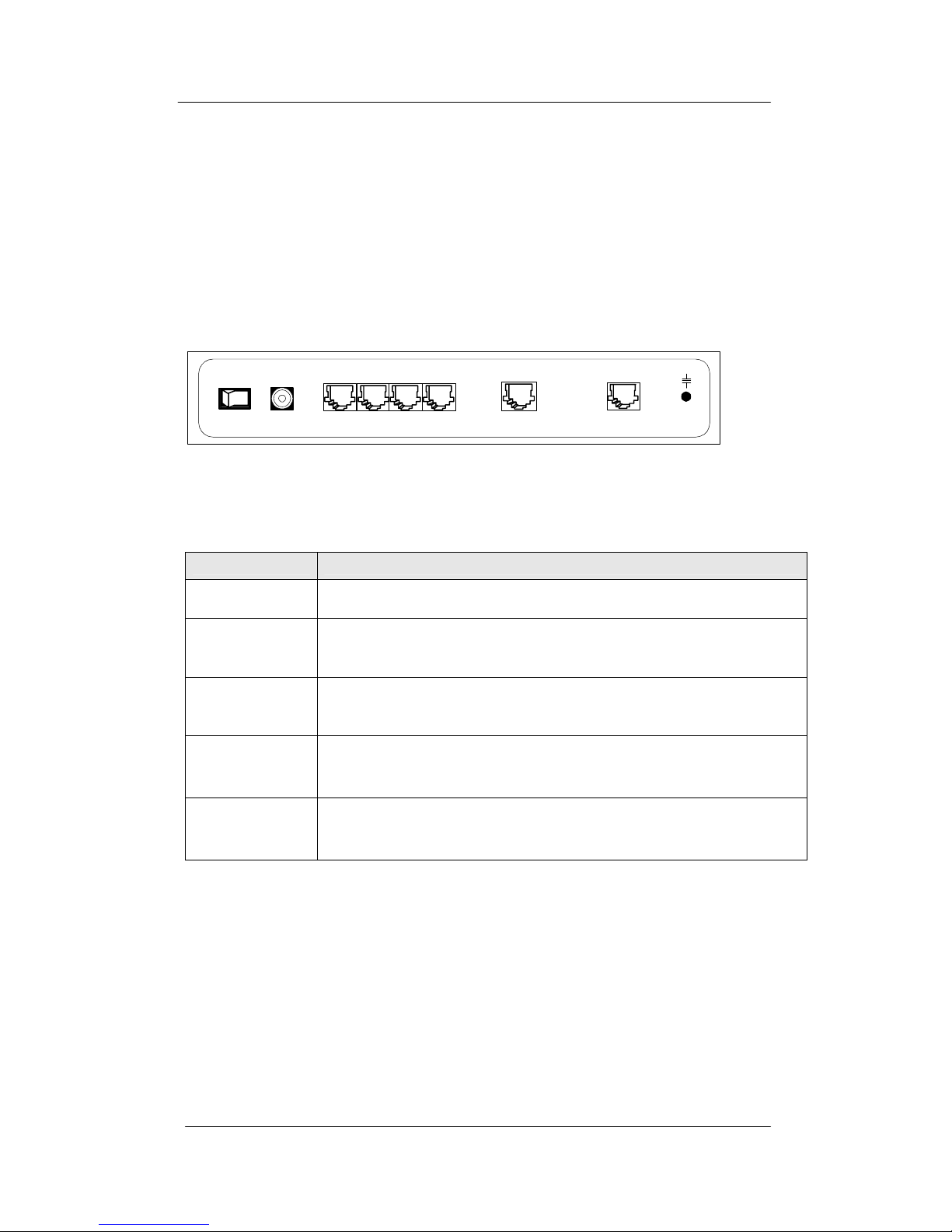
The rear panel of the SIA2410R Router
Sockets for the Power, LAN, Console and DSL connections in addition to the
ON/OFF switch are located on the rear panel of the SIA2410R.
[Figure 1-4] The rear side of the SIA2410R router
[Table 1-3] Port Descriptions
Port Explanation
DC 5V Connection to the 5V DC mains adapter
CONSOLE
(RJ-45 to DB9)
Serial port for connection to an RS-232 serial port of a PC (e.g.
COM 1).
LAN
(RJ-45)
Provides 4 Ethernet ports for connectivity to PCs and network
devices.
DSL
(RJ-11)
Connect a pair of copper wires for G.SHDSL connection, tip
and ring are on center two pins of the RJ-11 jack (6pin
connector)
Earth Ground
Lug An earth ground connection is provided if required.
CONSOLE DSL
ON OFF DC5V
LAN
1234

Net To Net Technologies SIA2410R User Manual
Net To Net Technologies 7
PART II: Installing the Router
•Getting Started
•Package Contents
•Connecting Cables

Net To Net Technologies SIA2410R User Manual
Net To Net Technologies 8
Getting started
Check the items below before you begin.
Physical Environments
To ensure reliable operation of the SIA2410R a suitable location must be
chosen which meets the following environmental conditions:
•Operating Temperature: 0ºC to 50ºC
•Operating Relative Humidity: 5% to 95% (non-condensing)
Required Parameters
The SIA2410R needs to be configured with various parameters to enable
network connectivity, if you are uncertain of these please contact your
network administrator or service provider.
For basic operation the following values will be needed:
•WAN IP address and subnet mask
•LAN IP address and subnet mask
•Default gateway IP address
•Primary and secondary domain name server (DNS) IP address

Net To Net Technologies SIA2410R User Manual
Net To Net Technologies 9
SIA2410R Package Contents
Package Contents
Following items are needed for the set up of the Net To Net Technologies
SIA2410R Router:
•Power cable and AC/DC adapter
•UTP CAT 5 Ethernet cable with RJ-45 connectors for LAN connection
•Console cable (RJ-45 to DB9 connector)
•Telco cable with RJ-11 (use center pins) for SHDSL connection
The SIA2410R package should contain the following items:
[Table 2-1] Net To Net Technologies SIA2410R router package:
Item Quantity Description
SIA2410R 1 Router
Power Cable 1 Country specific mains lead
Power Adapter 1 AC/DC adapter (DC 5V)
Console Cable 1 RJ-45 to DB-9 pin serial cable
UTP Cable 1 For a Local Area Network (LAN) connection
Documentation 1 This Guide
Indice
Manuali Router di rete popolari di altre marche

NETGEAR
NETGEAR FS526T - Switch Manuale utente

Korenix
Korenix JetNet 5710G Series Manuale utente

Automated Logic
Automated Logic ZN551 Manuale del proprietario

Cisco
Cisco ASR 1000 Series Manuale dell'operatore

EnGenius
EnGenius ESR-9710 Manuale utente

Cisco
Cisco 805 Series Istruzioni operative e di sicurezza