
NGTeco NG-RV2100 Manuale utente
Due to the regular upgrades of systems and products, NGTeco could not guarantee exact consistency between the
actual product and the written information in this manual.
Model: NG-RV2100
Version: 1.0
User Manual
English

Table of Contents
1. Important Notes ............................................................................................................1
2. What’s in the Box ...........................................................................................................3
3. Product Overview .........................................................................................................4
4. Other Accessories ..........................................................................................................5
5. Keys and Indicators.......................................................................................................6
6. Clean Mode......................................................................................................................7
7. Installation Steps .........................................................................................................10
8. Mopping Components .............................................................................................13
9. Instructions for Use.....................................................................................................15
10. Connecting to NGTeco Home App ...................................................................17
11. Routing Maintenance ............................................................................................18
12. Basic Information .....................................................................................................20
13. FAQ ................................................................................................................................21
14. Troubleshoot .............................................................................................................22
15. Product Hazardous Substance Content and Name ....................................23

Important Notes
1
pack.
16) Use appliances only with specifically designated battery packs. Use of any other battery
When using an electrical appliance, basic precautions should always be followed, including
the following:
BEFORE USING (THIS APPLIANCE)
before servicing.
2) Do not use in outdoors or on wet surfaces.
3) Do not allow to be used as a toy. Close attention is necessary when it is used by or near
recommends..
ashes.
13) Do not use without dust bag and/or filters in place.
14) Prevent unintentional starting. Ensure the switch is in the off-position before connecting
children.
4) Use only as directed by this manual. Use only the attachments that the manufacturer
parts.
9) Turn off all controls before unplugging.
10) Use extra care when cleaning on stairs.
11) Do not use to pick up flammable or combustible liquids, such as gasoline, or use in areas
finger on the switch or energizing appliance that have the switch on invites accidents.
15) Recharge only with the charger specified by the manufacturer. A charger that is suitable
WARNING -To reduce the risk of fire, electric shock, or injury:
other obstructions that can restrict airflow; do not use with any openings blocked.
8) Keep hair, loose clothing, fingers, and all parts of body away from openings and moving
for one type of battery pack may create a risk of fire when used with another battery
If contact accidentally occurs, flush with water. If liquid contacts eyes, additionally seek
medical help. Liquid ejected from the battery may cause irritation or burns.
where they may be present.
12) Do not pick up anything that is burning or smoking, such as cigarettes, matches, or hot
READ ALL INSTRUCTIONS
dropped, damaged, left outdoors, or dropped into the water but is still networking as it should.
6) Avoid using wet hands to handle plugs or appliances.
7) Do not insert anything into openings. Keep all openings clear of dust, lint, hair, and
5) Do not use with damaged cord or plug. Return the appliance to a service center if it has been
1) Do not leave appliance when plugged in. Unplug from outlet when not in use and
to battery pack, picking up or carrying the appliance. Carrying the appliance with your
packs may create a risk of injury and fire.
17) Avoid contact when liquid may be ejected from the battery under abusive circumstance.

2
Important Notes
18) Do not use a battery pack or appliance that is damaged or modified. Damaged or
of injury.
19) Do not expose a battery pack or appliance to fire or excessive temperature. Exposure to
fire or temperature above 130°C may cause explosion.
20) Follow all charging instructions and do not charge the battery pack or appliance
modified batteries may exhibit unpredictable behavior resulting in fire, explosion or risk
outside of the temperature range specified in the instructions. Charging improperly or
at temperatures outside of the specified range may damage the battery and increase
the risk of fire.
21) Allow a qualified repair person to serviceusing only identical replacement parts. This
will ensure that the product's safety is maintained.
22) Do not modify or attempt to repair the appliance except as indicated in the instructions
use only with NLC090200W1U1S58 (or provided by manufacturer) charger.
27) The appliance is only to be used with the power supply unit provided with the appliance.
26) Children should be supervised to ensure that they do not play with the appliance.
SAVE THESE INSTRUCTIONS
for use and care.
they have been given supervision or instruction concerning use of the appliance by a
23) This product is used for household, not for commercial use.
24) For use only with CMICR18650F8M7-4S2P (or provided by manufacturer) battery pack. For
physical, sensory or mental capabilities, or lack of experience and knowledge, unless
person responsible for their safety.
25) This appliance is not intended for use by persons (including children) with reduced
28) Batteries in this appliance can only be changed by qualified persons.
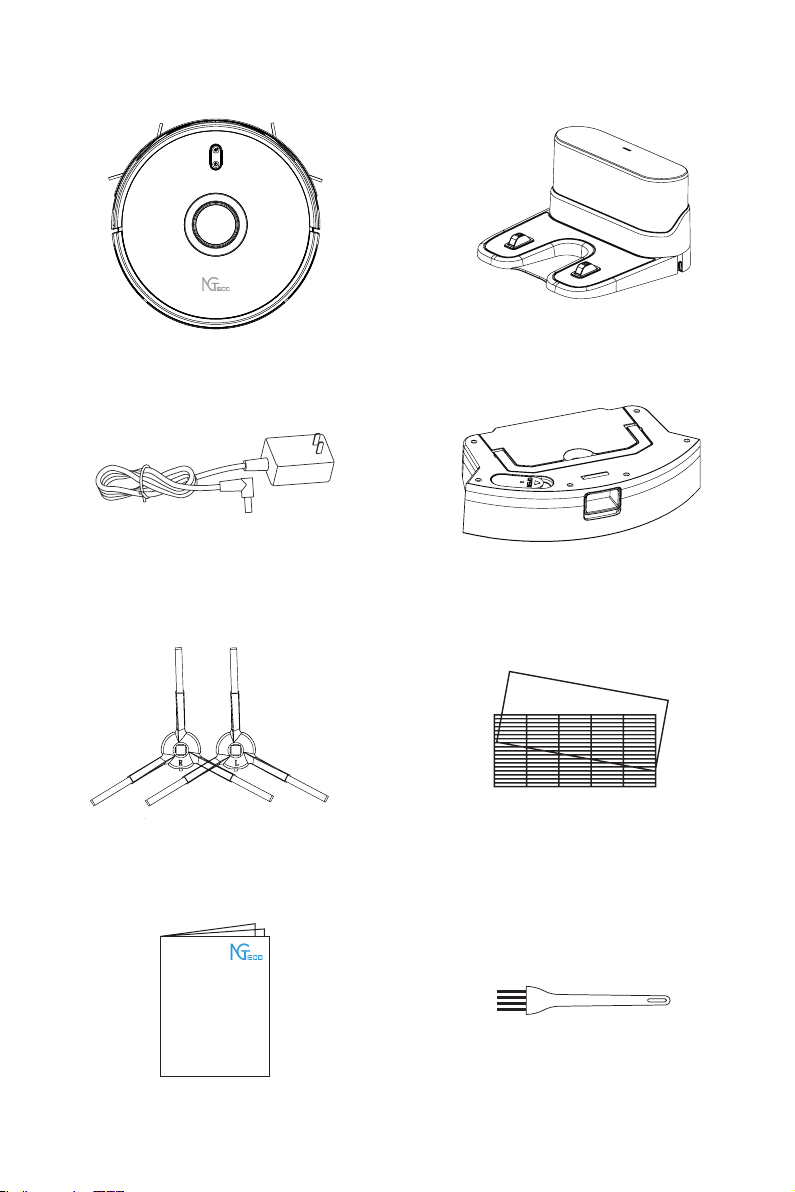
What’s in the Box
Charger X1
Adapter X1
Brash in left X2
Brush in right X2
Two-in-one Water Pump Tank X1
HEPA and Filter Sponge X1
3
Quick Start Guide X1
Quick Start Guide
Robot Vacuum X1
Cleaning Brush X 1
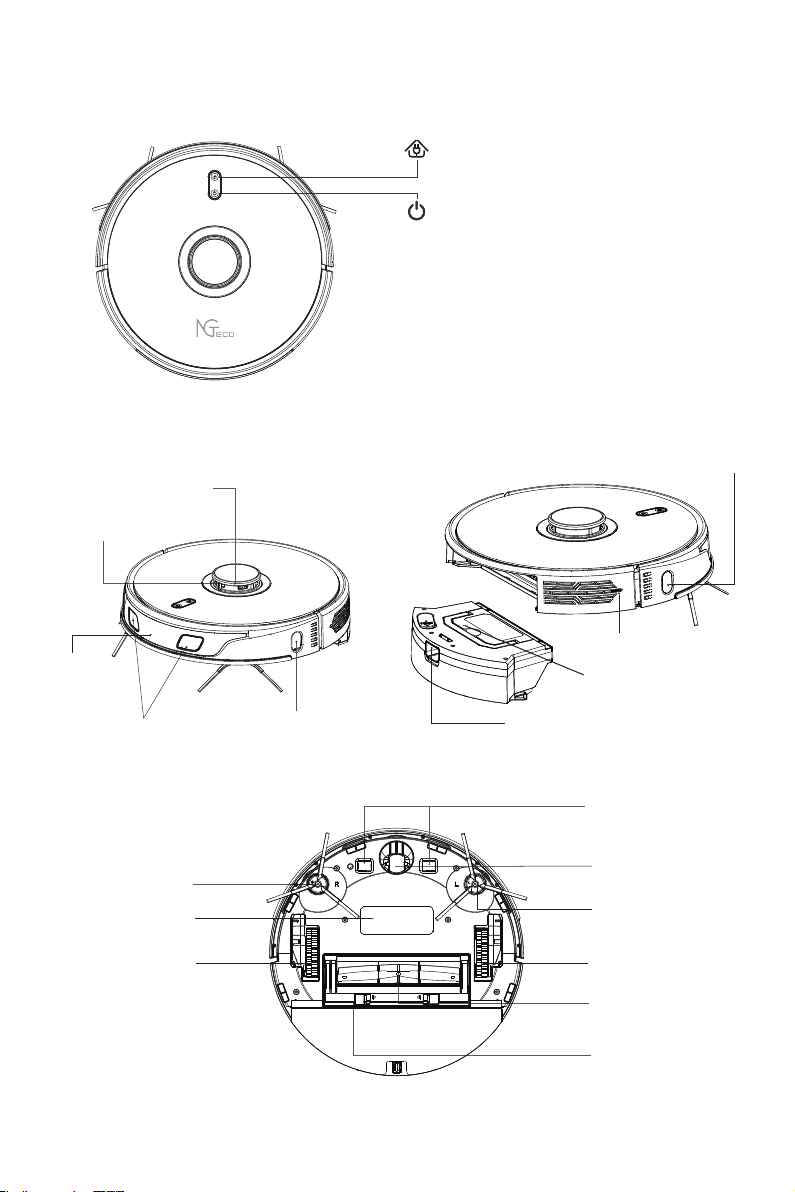
Product Overview
1.Top view
2.Side View
3.Bottom View
4
Reset WiFi
· Press two buttons simultaneously and
hold it for 3s.
Recharge Key/Pause
· Short press to Start/Pause recharging.
ON/OFF/Clean/Pause
· Press and hold it for 3s to turn on/off the
machine.
· Short press to Start/Pause cleaning.
· Under abnormal circumstances, press
and hold it for 15s to force the shutdown.
Charging Contact
Universal Wheel
Left Driving Wheel
Rolling Brush
Rolling Brush
Cover Buckle
Battery Cover Left Side Brush
Right Driving Wheel
Right Side Brush
Laser Ranging Sensor
Anti-collision Sensor
Left Recharge Sensor
Linear Laser Sensor
Recharge
Sensor
Linear Laser Wall Sensor
System Reset Key
Dust Box
Dustbin Push Button
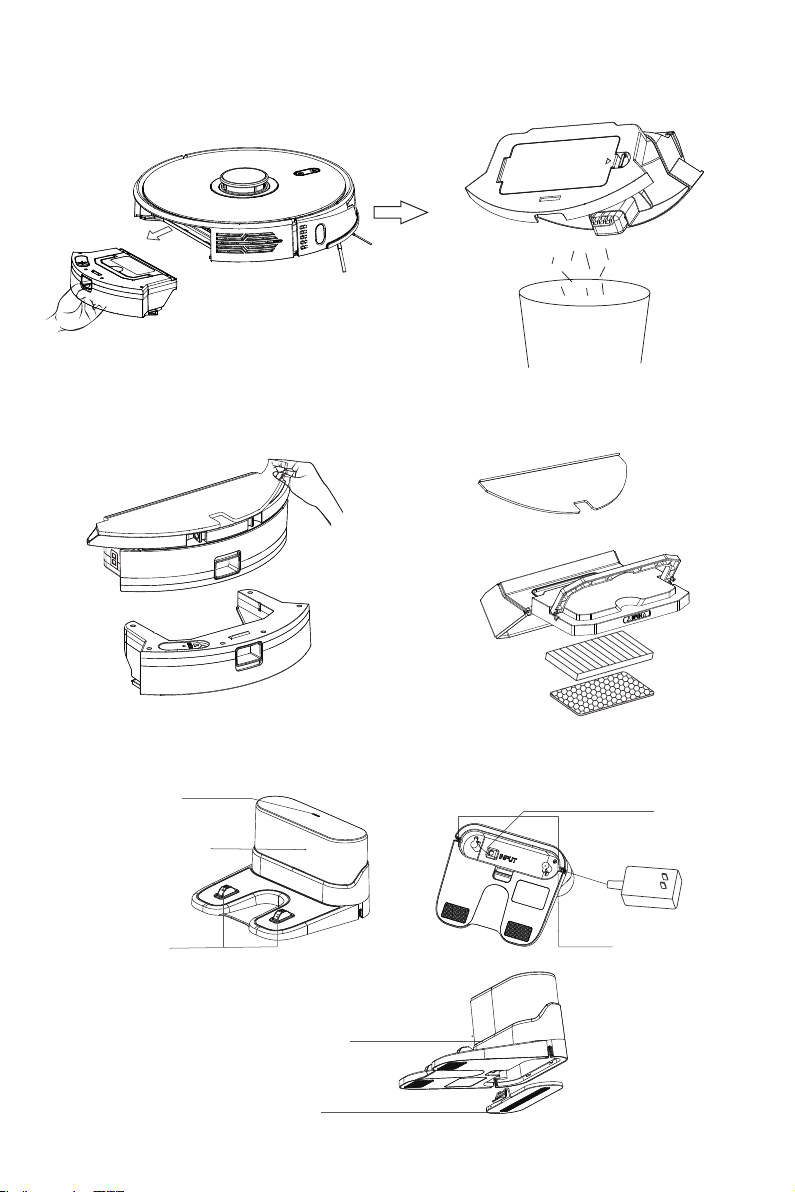
Button Slot
Cover
Outlet Slot Power
Winding Post
Signal Transmission
Charger Panel
Power Indicator
1.Dust Box
Other Accessories
3.Charger
2.Two-in-one Water Pump Tank
5
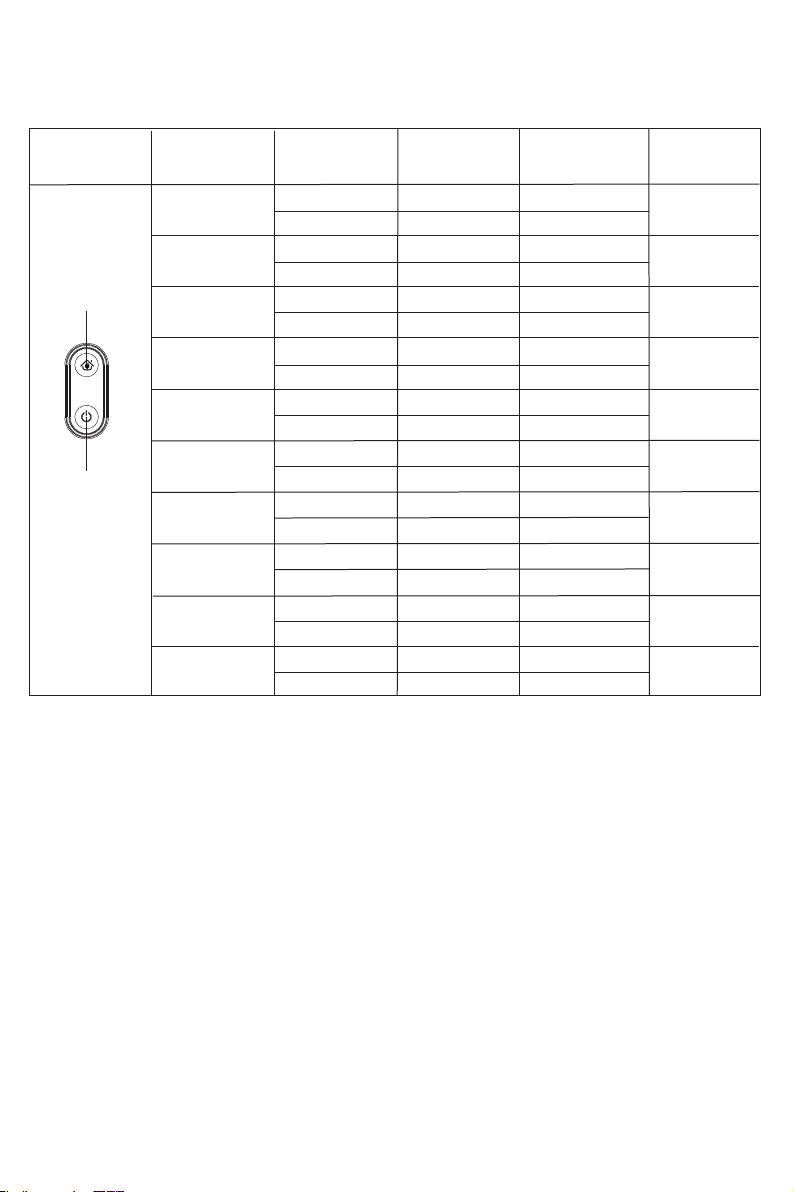
Keys and Indicators
6
Machine State Network State
Recharging Key
Power Button
Recharging
Key
Machine Boot
Machine Cleaning
Remarks
Graphic
Power Key
The machine
works on low
electricity
The machine is
recharging
Low power
recharging of the
machine
The machine
is in standby
Machine in sleep
Machine Charging
Machine fully
charged
Abnormal Alarm
No distribution
network
Has distribution
network
No distribution
network
Has distribution
network
No distribution
network
Has distribution
network
No distribution
network
Has distribution
network
No distribution
network
Has distribution
network
No distribution
network
Has distribution
network
No distribution
network
Has distribution
network
No distribution
network
Has distribution
network
No distribution
network
Has distribution
network
Has distribution
network
No distribution
network
Has distribution
network
Has distribution
network
No distribution
network
Has distribution
network
No distribution
network
Has distribution network
The orange light flashes
slowly until it goes out
The blue light blinks
slowly until it goes out
lights out
The orange indicator
blinks slowly
The blue light blinks
slowly
Orange breathing
lamp
Blue breathing lamp
lights out
lights out
lights out
lights out
lights out
lights out
lights out
lights out
lights out
lights out
lights out
Orange light on
Blue light on
The orange indicator blinks
slowly until steady on
The blue indicator blinks
slowly until steady on
electricity>20%
electricity
<20% to 15%
electricity>20%
electricity
<20% to 15%
Blue light on
Orange light on
The red light
is flashing
lights out
lights out
lights out
lights out
lights out
lights out
lights out
lights out
Orange light on
Orange light on
Blue light on
Blue light on
The red light is flashing
The orange indicator
blinks slowly
The blue light blinks
slowly
7
Spot Cleaning
Note:
Do not move the robot casually and frequently while it is cleaning. After moving, please put
the robot near the original position and then re-start it, and the robot will try to reposition
itself. If positioning is successful, the robot will follow the planned path and continue to work.
If the positioning failed, the robot will abort all previous mission, and then scan the room map
and start a new cleaning. When it completes the cleaning it may not find the charging station.
Automatic Total Cleaning
You can use Mobile APP or the button on the robot to enter this mode.
The machine will automatically scan the room and generate a map, and divide the map
into several zones. In each zone, robot will start edge cleaning firstly and then would be
planning to clean the whole area in a zig-zag path. The machine will complete the cleaning
in each partition one by one, orderly and efficiently, full coverage and without omission.
After completing the whole cleaning, the machine will automatically return to the charging
station.
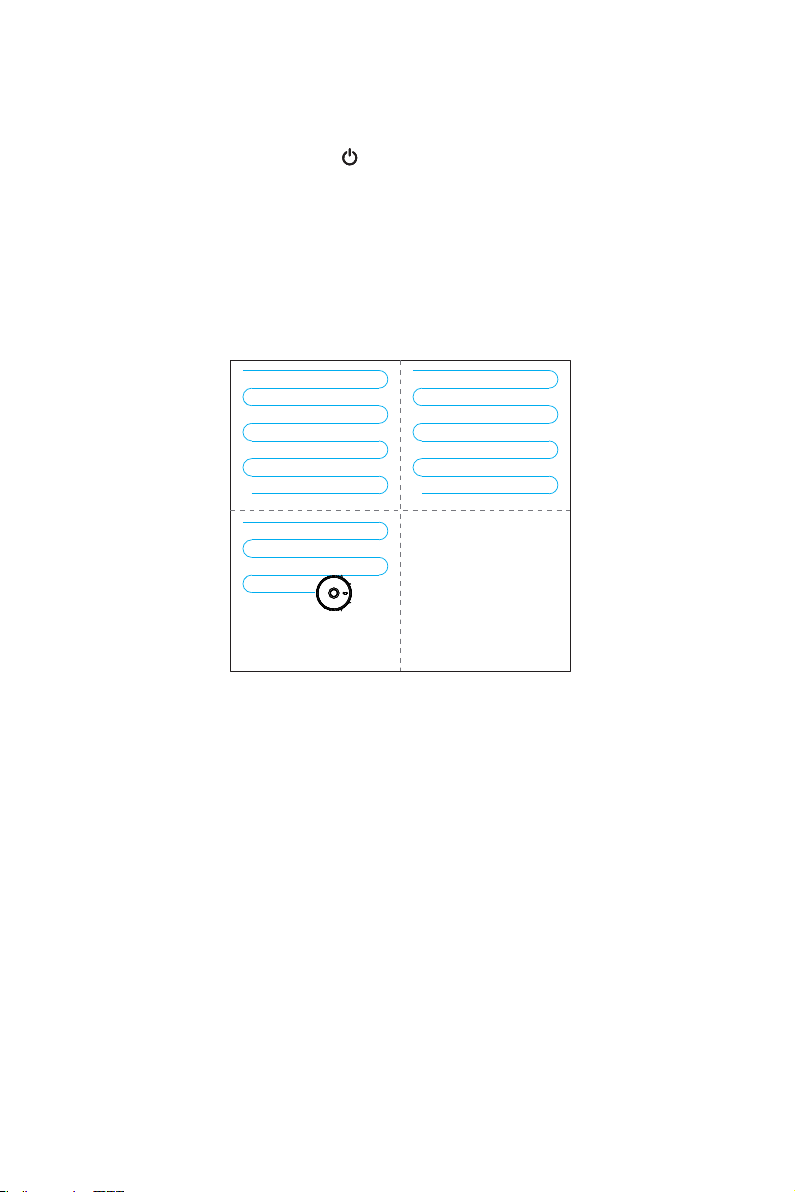
You can use the mobile APP to enter this mode.
The robot will take the point of its placement as the center, start an auto cleaning in a
square area of 1.5m*1.5m. It will clean along the edge firstly, after the edge path is closed
the robot will start a zig-zag cleaning in this area for two times with the 3rd gear suction,
and finally complete a # shape path. After completion of the cleaning, the machine will
automatically return to the charging station.
Completed Area Completed Area
Area being cleaned Area to be cleaned
Cleaning Mode
1.5m
1.5m
User-defined Area Cleaning
You can use Mobile APP to set the size and
location of an area where you want to clean
and custom region: region merge, region
split, region name, region customization (set
suction and water volume of the region), and
region cleaning sequence .You can set one or
more areas. The robot will clean these areas
according to your set.
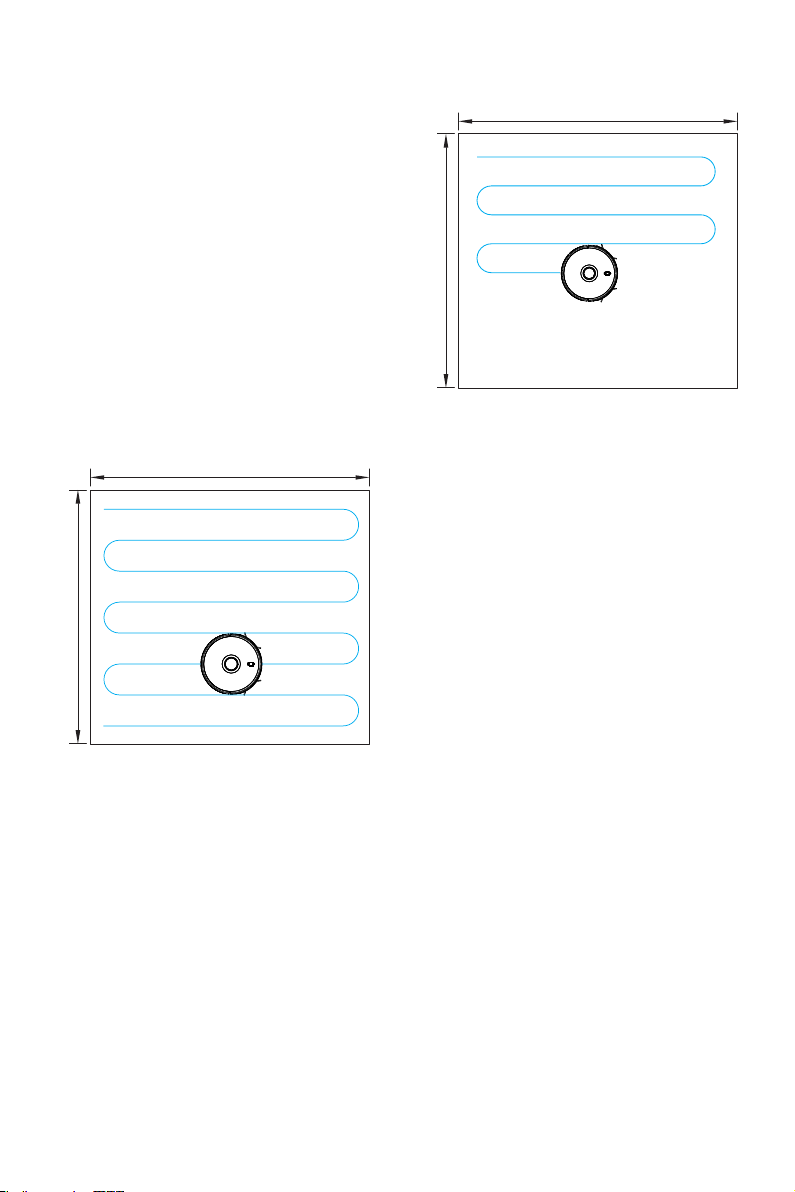
Local Cleaning
You can use mobile APP or remote controller
or long press the button on the robot for 3s to
enter this mode. The robot will take the point
of its placement as the center and start an auto
cleaning in a square area of 1.5m*1.5m. It will
clean along the edge firstly, after the edge path
is closed robot will start a zig-zag cleaning in
this area for two times, and finally complete a #
shape path. After completion of the cleaning,
the machine will automatically return to the
charging station.
1.5m
1.5m
Electoral District Cleaning
· You can use the mobile APP setting to select the divided area and perform cleaning, which
can support multiple selection.
Before using this function, you must complete a planned cleaning task, and clean the map ·
area according to different colors.
After the cleaning starts, the host may enter outside the selected area. Please pay attention·
to clear the ground obstacles around the selected area. This area does not provide safe
isolation.
8
Cleaning Mode
Indice


