
Nidac Presco 2 Series Manuale utente

VR43 & VR62
Series 2
Vandal and Weather
Resistant Keypads
N761

i
TABLE OF CONTENTS PAGE
Features.................................................................................1
Package Contents.................................................................1
Specifications .......................................................................2
VR43.................................................................................2
VR62.................................................................................3
Wires......................................................................................4
Installation.............................................................................5
Using the VR keypads with Presco™..................................6
VR to PAC1/PAC2 wiring diagram....................................7
VR to KC2, KC6 & PDA wiring diagram............................7
Using the VR keypads with Wiegand..................................8
VR to Wiegand wiring diagram..........................................8
Options..................................................................................9
General Options................................................................9
Wiegand Options.............................................................10
Presco™ Options............................................................12
Setting the options via the VR keypad ............................13
Warranty..............................................................................14

1
FEATURES
Suitable for indoor and outdoor usage.
Durable and stylish metal keypad construction (satin chrome
plated zinc die cast).
8 to 26 Volt D.C. operation.
Vandal Resistant.
Weather Resistant (IP67).
Outputs Presco™ and Wiegand data.
Blue LED Backlighting on keys standard.
Compatible with all Nidac Presco decoders.
Fully configurable for custom Wiegand modes.
Operating temperature range of -20ºC to 70ºC.
36 month (3 year) manufacturer’s warranty.
PACKAGE CONTENTS
Included in the package for your VR keypad is:
1 x VR43 or VR62 keypad.
1 x Installation manual (this document).
1 x VR keypad cable with rubber sealing boot.
1 x Hex Allen key to remove screw for fascia.
1 x Mounting template.
If any of these items are missing please contact your supplier.

2
SPECIFICATIONS
Voltage: 8V to 26V D.C. recommended.
7V to 30V D.C. absolute limits.
Current: 60mA max @ 7V D.C. (without backlighting)
110mA max@ 7V D.C. (with backlighting)
35mA max @ 12V D.C.(without backlighting)
70mA max @ 12V D.C.(with backlighting)
30mA max @ 24V D.C.(without backlighting)
55mA max @ 24V D.C.(with backlighting)
Ingress Protection Rating: IP67
VR43
Weight: 780 grams (including cable).
Dimensions: 132mm x 92mm x 20mm (H x W x D).

3
VR62
Weight: 620 grams (including cable).
Dimensions: 161.7mm x 45mm x 23mm (H x W x D).

4
WIRES
There are 12 wires for the VR keypads, not all will be needed for
each installation. The unused wires should always be
terminated and left unconnected.
Black 0V (Ground).
Red +12V to +24V D.C.
White DTA (Presco™ data line).
Dark Green D0 (Wiegand Data 0).
Yellow D1 (Wiegand Data 1).
Violet +3V to +24V D.C. Backlighting control.
Blue Green LED control wire, +3V to +24V active.
Orange Red LED control wire, +3V to +24V active.
Brown Buzzer control wire, 0V active.
Light Green Green LED control wire, 0V active.
Pink Presco™/Wiegand mode select wire, 0V active
for Wiegand mode.
Grey Chassis Earth connection.
NOTE: The Blue, Orange, Brown, Light Green and Pink wires
can be programmed to control different functions. Refer to the
Options section on page 8.
IMPORTANT: When using the VR43 or VR62 in an area subject
to static discharges the chassis of the VR keypad should be
connected to EARTH via the grey wire. It is highly
recommended that this always be done no matter what the
environment.

5
INSTALLATION
1. Using the supplied template mark out the location of the
mounting screws and the cable exit. Drill out all points as
necessary.
2. Using the supplied key remove the hex allen screw(s) at the
bottom of the keypad that secure the fascia to the chassis.
3. Swing the fascia up from the bottom and it will unhook at the
top allowing access to the mounting screw holes.
4. Attach the supplied cable by plugging in the connector (you
may need to use a screw driver to push the connector
around the edges to ensure it is in firmly). Note that it is
designed to be inserted in one way only, however use of
excessive force could allow it to be inserted wrongly so
check the guide locators match before inserting.
5. Slide the rubber boot down the cable and press the first
flange into the hole and leaving the second flange on the
outside of the keypad. Make sure that it sits neatly in all
places to ensure a correct seal.
6. Mount the keypad and reverse steps 2 & 3 to reattach the
fascia to the keypad chassis.

6
USING THE VR KEYPADS WITH PRESCO™
The VR43 & VR62 can be used to perform all the functions of a
standard Presco PRE keypad. The only difference in operation
is the use of the #key instead of the Ekey.
The #key is a dual purpose key. When it is pressed as the first
key in a code sequence it generates a #, when pressed as a
subsequent key it then becomes the Ekey.
Should it be necessary to generate a # in the middle of a code
sequence then you must press and hold down the *key, press
the #key then release both keys.
To use the keypad in Presco™ mode, press the code then the
#key. The keypad can be set up to automatically send the
code after a given number of key presses by setting memory
007 (refer to the OPTIONS section on page 8).
Example Code Sequences
PRE sequence VR equivalent
1. * 000 1E* 000 1#
2. 1234 E1234 #
3. # 000 E# 000 #
Remember to press #after the code to send it unless memory
007 has been set to auto send after a given number of keys.

7
VR TO PAC1 / PAC2 WIRING DIAGRAM
VR TO KC2, KC6 & PDA WIRING DIAGRAM
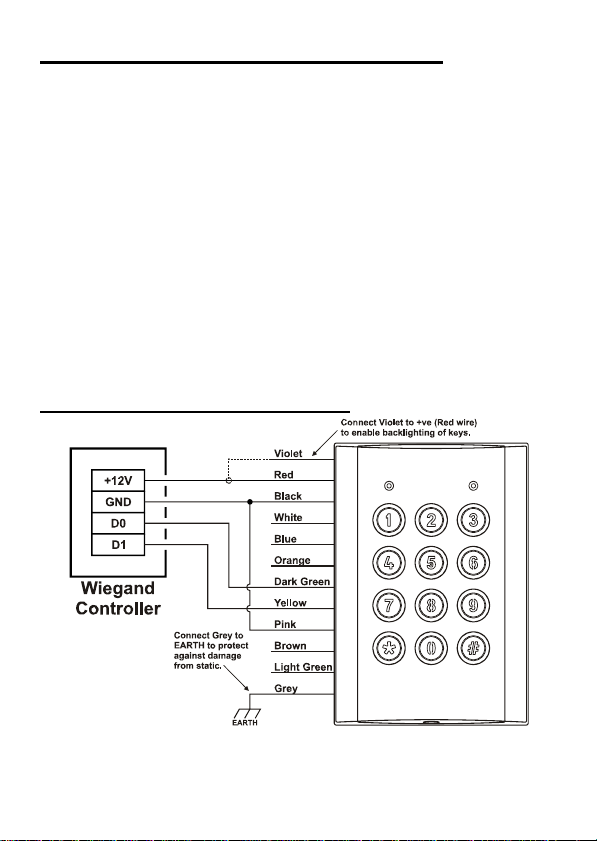
8
USING THE VR KEYPADS WITH WIEGAND
The VR43 & VR62 can be used with any standard wiegand and
most non standard wiegand controllers. The site (facility) code
can be set from the keypad itself (refer to the Wiegand Options
sections on page 9) and the wiegand data is fully configurable
with up to 64 bits of data. The VR keypads also support
controllers that require burst mode format wiegand.
The Pink wire needs to be connected to 0V (the Black wire) to
set Wiegand output mode (unless the unit has been
programmed to force it into Wiegand mode via memory 005
(refer to the Wiegand Options sections on page 9)
To use the keypad in wiegand (non burst) mode, press the code
then the #key. The keypad can be set up to automatically
send the code after a given number of key presses by setting
memory 007 (refer to the OPTIONS section on page 8).
VR TO WIEGAND WIRING DIAGRAM
Remember to press #after the code to send it unless memory
007 has been set to auto send after a given number of keys.
Questo manuale è adatto per i seguenti modelli
2
Indice
Altri manuali Nidac Tastiera


