Nisuta 11N Manuale utente

11N Wireless Broadband Router User Guide

11N Wireless Broadband Router User Guide
Copyright Statement
is the registered trademark of Nisuta. All the products and
product names mentioned herein are the trademarks or registered
trademarks of their respective holders. Copyright of the whole
product as integration, including its accessories and software,
belongs to Nisuta. Without the permission of Nisuta, any individual
or party is not allowed to copy, plagiarize, reproduce, or translate it
into other languages.
All the photos and product specifications mentioned in this guide
are for references only. Upgrades of software and hardware may
occur, and if there are changes, Nisuta is not responsible for
notifying in advance. If you would like to know more about our
product information, please visit our website at www.nisuta.com.

11N Wireless Broadband Router User Guide
Contents
CHAPTER 1 PRODUCT INTRODUCTION ...................................... 1
1.1 Package Contents ................................... 1
1.2 LED Indicators and Port Description .......... 1
CHAPTER 2 PRODUCT INSTALLATION ........................................ 4
CHAPTER 3 HOW TO CONFIGURE TO ACCESS THE
INTERNET ........................................................................................... 6
3.1 How to Set the Network Configurations ..... 6
3.2 Log in to the Router .............................. 11
3.3 Fast Internet Access ............................. 11
3.4 Fast Encryption .................................... 12
CHAPTER 4 ADVANCED SETTINGS ............................................. 14
4.1 System Status ..................................... 14
4.2 WAN Settings....................................... 15
4.3 LAN Settings ........................................ 19
4.4 DNS Settings ....................................... 20
4.5 WAN Medium Type ................................ 21
4.6 Bandwidth Control ................................ 22
4.7 Traffic Statistics.................................... 25
CHAPTER 5 WLAN SETTINGS ....................................................... 27
5.1 Wireless Basic Settings ......................... 27
5.2 Wireless Security Settings ..................... 32
5.2.1 WPS Settings .................................... 32
5.2.2 WPA- PSK ......................................... 34
5.2.3 WPA2- PSK ....................................... 34
5.3 Wireless Access Control......................... 35
5.4 Connection Status ................................ 36

11N Wireless Broadband Router User Guide
CHAPTER 6 DHCP SERVER ............................................................ 37
6.1 DHCP Server ........................................ 37
6.2 DHCP Client List ................................... 37
CHAPTER 7 VIRTUAL SERVER ..................................................... 39
7.1 Port Range Forwarding .......................... 39
7.2 DMZ Settings ....................................... 41
7.3 UPNP Settings ...................................... 42
CHAPTER 8 SECURITY SETTINGS ............................................... 43
8.1 Client Filter Settings ............................. 43
8.2 MAC Address Filter ............................... 44
8.3 URL Filter Settings ................................ 46
8.4 Remote Web Management ..................... 49
CHAPTER 9 ROUTING SETTINGS ................................................ 50
9.1 Routing Table ....................................... 50
9.2 Static Routing ...................................... 50
CHAPTER 10 SYSTEM TOOLS ....................................................... 52
10.1 Time Settings ..................................... 52
10.2 DDNS ................................................ 52
10.3 Backup/Restore .................................. 53
10.4 Restore to Factory Default ................... 55
10.5 Upgrade ............................................ 56
10.6 Reboot the Router .............................. 56
10.7 Password Change ............................... 57
10.8 Syslog ............................................... 57
10.9 Log out ............................................. 58
APPENDIX 1 GLOSSARY................................................................. 59
APPENDIX 2 PRODUCT FEATURES .............................................. 60

11N Wireless Broadband Router User Guide
APPENDIX 3 FAQ.............................................................................. 61
APPENDIX 4 CLEAR WIRELESS CONFIGURATION .................. 63
APPENDIX 5 REGULATORY INFORMATION .............................. 65

11N Wireless Broadband Router User Guide
1
Chapter 1 Product Introduction
Thank you for purchasing the Nisuta Wireless N Broadband Router!
This easy-to-use router provides simple configuration interface which enables you to
configure it with ease. It is based on the latest IEEE802.11n standard, and is backward
compatible with devices of IEEE802.11b/g standards.
The Nisuta wireless router,including router, wireless AP, four-port switch and firewall in
one,provides powerful online monitor function and supports URL filter and MAC filter. With
WDS function, it can repeat and amplify wireless signals so as to enlarge network coverage
area. It truly supports UPnP and WMM to make your audio and video smoother. With QoS
function, it can efficiently distribute the downloading rate for the clients. With super
compatibility, the router can break the access limits in some areas so that multiple
computers can share the Internet access. Additionally, it supports WISP function to access
to the ISP’s wireless hotspots (this function applies only to some of the products).
1.1 Package Contents
Please verify the following items after you open the package:
One Wireless N Broadband Router
One Quick Installation Guide
One Power Adapter
One Software CD
If any of the listed items are missing or damaged, please contact the Nisuta reseller for
immediate replacement.
1.2 LED Indicators and Port Description
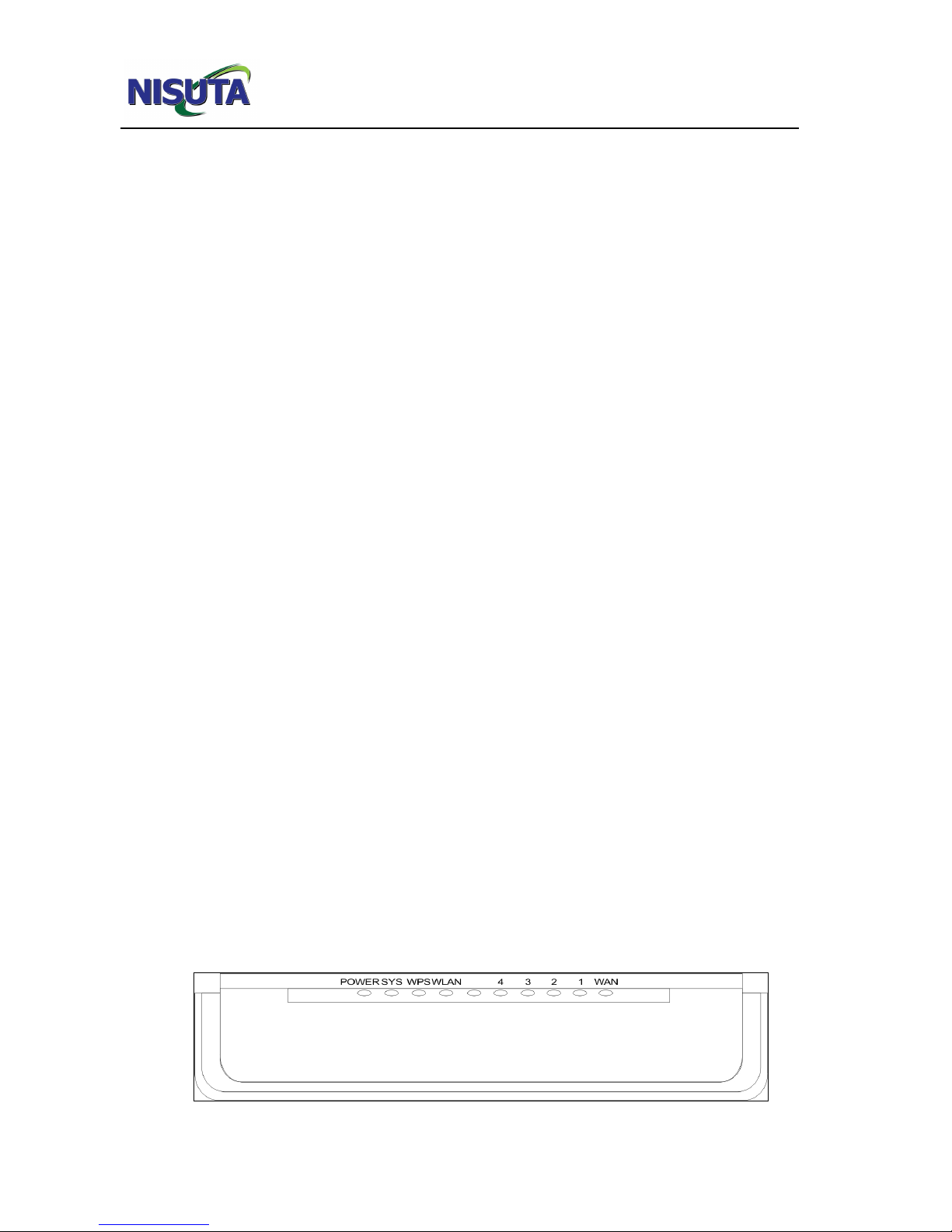
Panel and LED indicators show:

11N Wireless Broadband Router User Guide
2
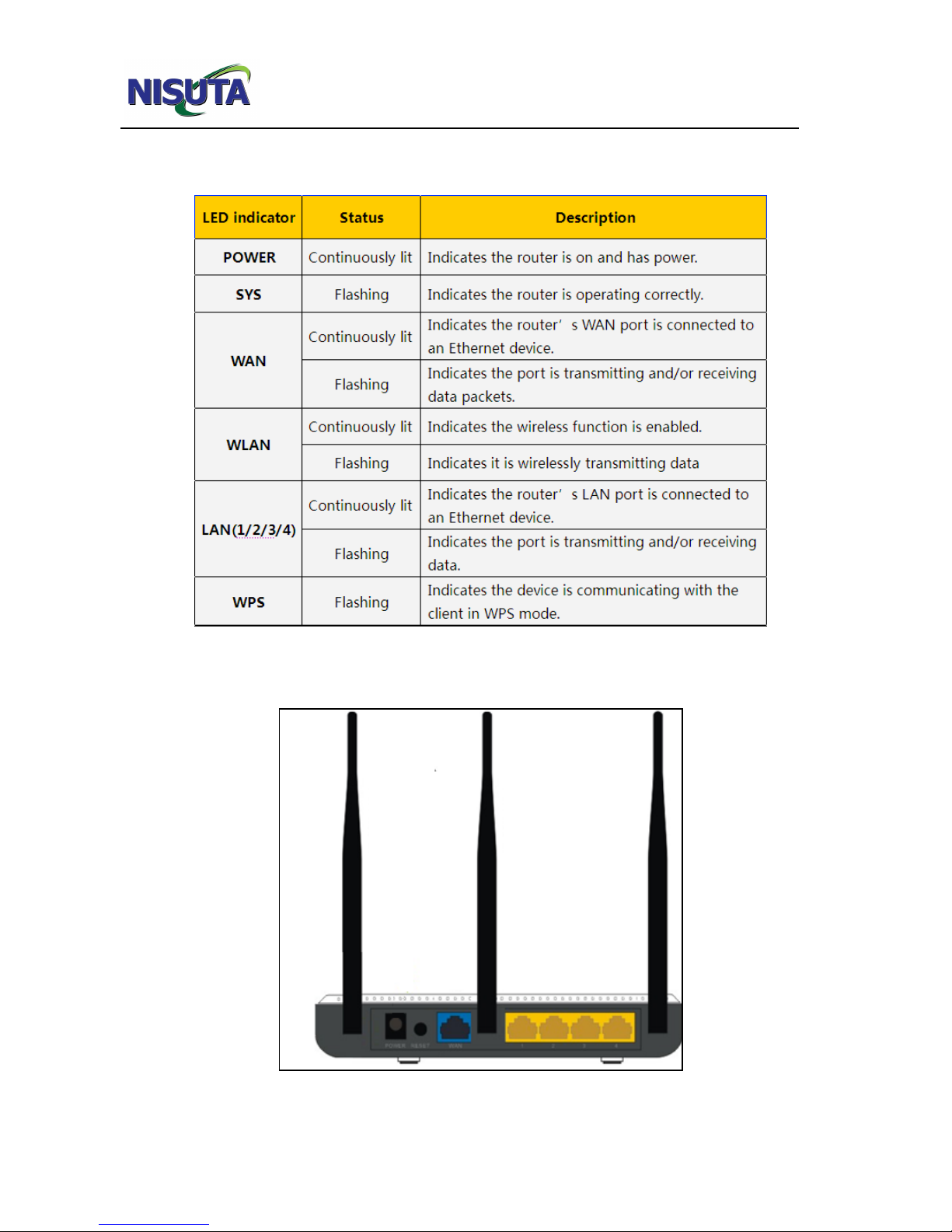
LED indicator description on the front panel
Back panel port show

11N Wireless Broadband Router User Guide
3
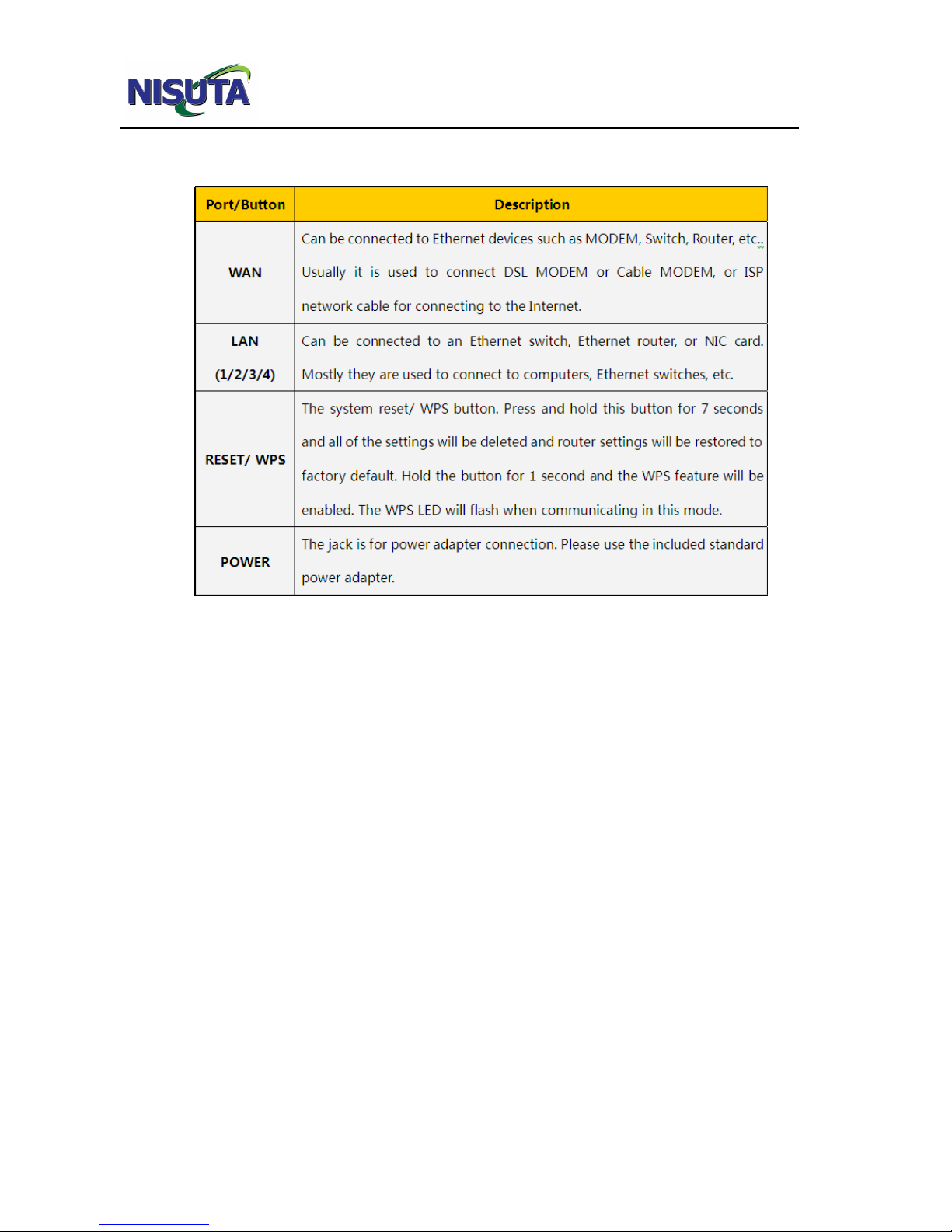
Back panel port description

11N Wireless Broadband Router User Guide
4
Chapter 2 Product Installation
In this user guide, we take NS-WIR300N as an example to explain the installation steps.
The installation steps of other products are similar to this one.
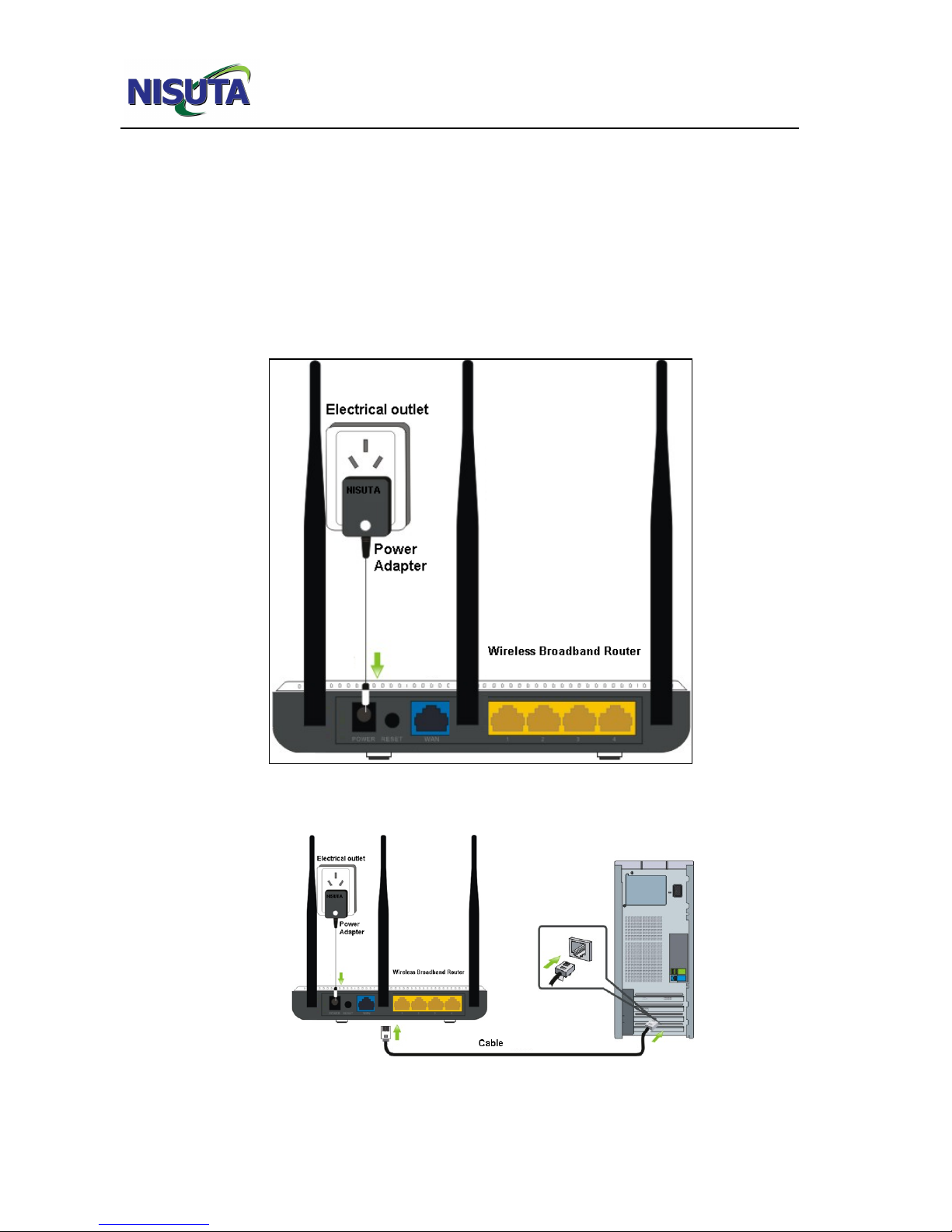
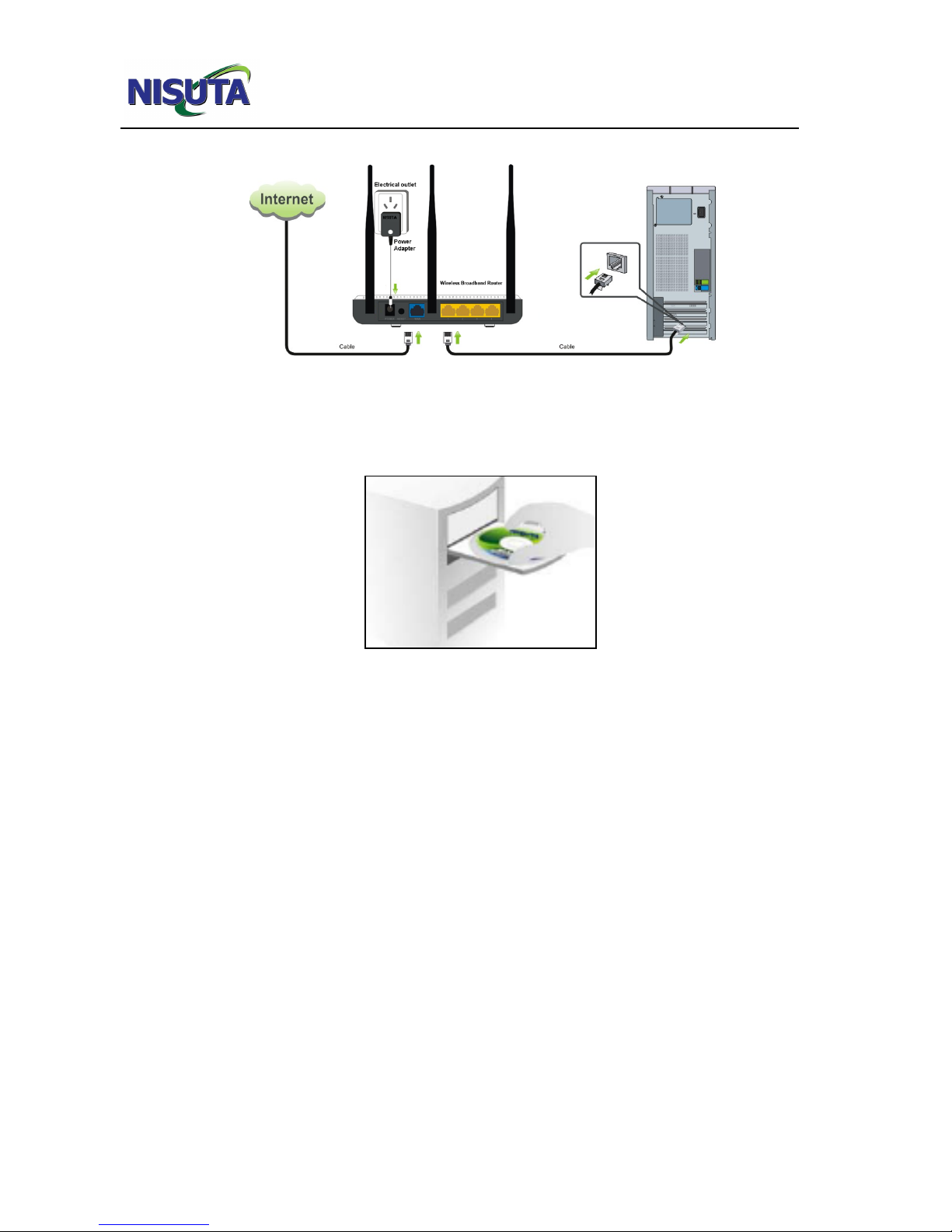
1. Please use only the included power adapter to power your router. (NOTE: Use of an
unmatched power adapter could cause damage to this product).
2. Please connect the router’s LAN port to your computer with an Ethernet cable as shown
below.

11N Wireless Broadband Router User Guide
5
3. Please connect your broadband line provided by your ISP to the router’s WAN port.
4. Insert the included software CD into the CD drive of your computer. After the software
automatically initiates, double click the “Setup” icon and follow the instructions to complete
the installation. You can also enter the router’s Web-based Utility to complete the
configuration.
Questo manuale è adatto per i seguenti modelli
1
Indice
Altri manuali Nisuta Router wireless