
Nokia Internet Stick CS-18 Manuale utente
Nokia Internet Stick CS-18
9222366/1
6
5
7
314
2

89
10 11 12
13 14 15
ENGLISH
DECLARATION OF CONFORMITY
Hereby, NOKIA CORPORATION declares that
this RD-11 product is in compliance with the
essential requirements and other relevant
provisions of Directive 1999/5/EC. A copy of
the Declaration of Conformity can be found
at http://www.nokia.com/phones/
declaration_of_conformity/.
© 2010 Nokia. All rights reserved.
Nokia, Nokia Connecting People and the
Nokia Original Accessories logo are
trademarks or registered trademarks of
Nokia Corporation. Other product and
company names mentioned herein may be
trademarks or tradenames of their respective
owners.
Reproduction, transfer, distribution, or
storage of part or all of the contents in this
document in any form without the prior
written permission of Nokia is prohibited.
Nokia operates a policy of continuous
development. Nokia reserves the right to
make changes and improvements to any of
the products described in this document
without prior notice.
To the maximum extent permitted by
applicable law, under no circumstances shall
Nokia or any of its licensors be responsible
for any loss of data or income or any special,
incidental, consequential or indirect
damages howsoever caused.
The contents of this document are provided
"as is". Except as required by applicable law,
no warranties of any kind, either express or
implied, including, but not limited to, the
implied warranties of merchantability and
fitness for a particular purpose, are made in
relation to the accuracy, reliability or
contents of this document. Nokia reserves
the right to revise this document or
withdraw it at any time without prior notice.
The availability of particular products and
applications and services for these products
may vary by region. Please check with your
Nokia dealer for details, and availability of
language options. This device may contain
commodities, technology or software
subject to export laws and regulations from
the US and other countries. Diversion
contrary to law is prohibited.
ENGLISH
SAFETY
Read these simple guidelines. Not
following them may be dangerous or
illegal. Read the complete user guide for
further information.
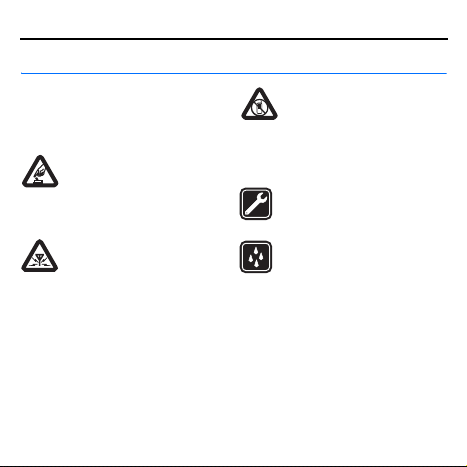
SWITCH ON SAFELY
Do not switch the device on
when wireless phone use is
prohibited or when it may cause
interference or danger.
INTERFERENCE
All wireless devices may be
susceptible to interference,
which could affect performance.
SWITCH OFF IN RESTRICTED
AREAS
Follow any restrictions. Switch
the device off in aircraft, near medical
equipment, fuel, chemicals, or
blasting areas.
QUALIFIED SERVICE
Only qualified personnel may
repair this product.
WATER-RESISTANCE
Your device is not water-
resistant. Keep it dry.
■About your device
The wireless device described in this
guide is approved for use on the (E)GSM
850, 900, 1800, and 1900, and UMTS
850/1900/2100 HSPA networks. Contact
your service provider for more
information about networks.
During extended operation,
such as a high speed data connection,
the device may feel warm. In most cases,

ENGLISH
this condition is normal. If you suspect
the device is not working properly, take it
to the nearest authorized service facility.
When connecting to any other device,
read its user guide for detailed safety
instructions. Do not connect
incompatible products.
■Network services
To use the device you must have service
from a wireless service provider. Some
features are not available on all
networks; other features may require
that you make specific arrangements
with your service provider to use them.
Network services involve the
transmission of data. Check with your
service provider for details about fees in
your home network and when roaming in
other networks. Your service provider can
explain what charges will apply. Some
networks may have limitations that
affect how you can use some features of
this device requiring network support.
Introduction
The Nokia Internet Stick CS-18 is
a wireless modem that lets you
transfer data in cellular networks.
To use the device with your computer,
you need the Nokia Internet Modem
application that is automatically
installed when you connect the device
to the computer for the first time.
Read this guide carefully before using
the device. Also read the user guides
for the Nokia Internet Modem
application, your computer, operating
ENGLISH
system, and any software that you use
with the internet connection set up
through the device.
For additional information, go to
www.nokia.com/support.
The operating temperature of this
device is -15°C to 35°C (5°F to 95°F),
and the storage temperature is -40°C
to 85°C (-40°F to 185°F).
Warning: The plug of this
device may contain a small
amount of nickel. Persons
who are sensitive to nickel may have
symptoms from prolonged skin
contact with the plug.
Read the user guide for Nokia
Internet Modem
To read the user guide for the Nokia
Internet Modem application, you must
have a PDF reader application
installed on your computer. You can
download the PDF reader, for example,
from the Adobe website.
To access the user guide, select the
question mark (Help) in the main view
of the Nokia Internet Modem
application. The user guide is
displayed in the language that you
selected during the installation of the
application.
Supported hardware and
software
The USB plug on the device supports
the data transfer rates defined in the
USB specification version 2.0.
To use the device for data transfer
with your computer, the computer
must have a 500 MHz 32-bit (x86)
or 64-bit (x64) processor or faster,
a compatible USB port, and
350 megabytes of available space
on the hard disk. You also need one
of the following operating systems:
Microsoft Windows XP (Service Pack 2
ENGLISH
with Hotfix KB943198, or Service Pack
3 or newer), Microsoft Windows Vista,
Windows 7, Linux Ubuntu 9.04, or
Apple Mac OS 10.4, 10.5, or 10.6.
Microsoft Windows XP 64-bit Edition
is not supported.
Get started
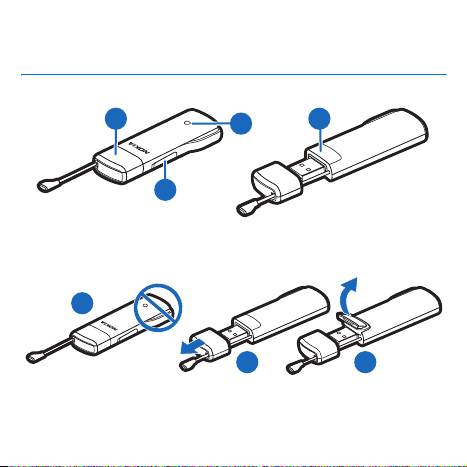
The device contains the following
parts shown on the title page:
indicator light (1), cover of the
memory card slot (2), USB plug
covered with a protection cap (3),
and cover of the SIM card slot (4).
Antenna locations
Your device has internal antennas.
Avoid touching the antenna area (5)
unnecessarily while the antenna is
transmitting or receiving. Contact with
antennas affects the communication
quality and may cause a higher power
level during operation and may reduce
the computer battery life.
Insert the SIM card
Warning: Keep the
protection cap out of the
reach of small children.
1. Remove the protection cap (6).
2. Lift the cover of the SIM card
slot (7).
3. Insert the SIM card (8).
Make sure the contact surface on
the card is facing down, and the
beveled corner is on the right.
4. To close the cover, press it against
the device (9), and slide it
into place.
ENGLISH
First time setup
To set up the device for your computer,
you may need the administrator rights
for the operating system. You may
also need to change the firewall
settings of your operating system to
let the device access the internet.
1. Make sure a SIM card is inserted in
the device.
2. Remove the protection cap from
the USB plug.
3. Switch on your computer, and
connect the device to the USB port
on the computer, so that the Nokia
logo is facing up.
Tip: To connect the device
to a compatible computer
using the Nokia
Connectivity Cable CA-175D,
connect the cable to the USB plug
and the USB port on the computer.
4. To install the device and the Nokia
Internet Modem application, do
one of the following:
• In Windows, the installer opens
automatically if the autorun
feature is enabled.
• In Mac OS, double-click the
Nokia Internet Stick CS-18
setup icon and then the Nokia
Internet Modem icon.
• In Linux, double-click the
CD drive and then the
nokiaInternetmodem.deb icon.
Select Install Package.
5. Select the desired language from
the list, and select OK. Follow the
displayed instructions.
Carefully read the end-user license
agreement and accept it.
The application and the needed
drivers are installed on your
computer. The installation may
take several minutes.

ENGLISH
6. Based on your SIM card, the device
automatically tries to define the
settings for the cellular network of
your service provider (operator).
7. When prompted, enter the
personal identification number
(PIN) code of your SIM card. The
PIN code helps to protect your SIM
card against unauthorized use and
is usually supplied with the card.
The main view of the Nokia
Internet Modem application
is displayed.
8. To exit the Nokia Internet Modem
application, select X.
9. To disconnect the device from the
computer, unplug the device from
the USB port.
You may need to stop the device
before disconnecting it, if your
operating system supports
this function.
Indicator light
If the indicator light is red, the device
cannot register to a cellular network
because the SIM card is not valid or
properly inserted or cannot find
a supported network in your location.
If the red light flashes, the device is
not registered to a cellular network
because you have not entered the
PIN code, if the PIN code request is
enabled in the Nokia Internet Modem
application.
If the indicator light is green, the
device is registered to a GSM network
and transferring data. If the green
light flashes, the device is registered
to a GSM network, but the data
connection is not active.
If the indicator light is blue, the device
is registered to a 3G network and
transferring data. If the blue light
flashes, the device is registered to

ENGLISH
a GSM network, but the data
connection is not active.
Insert a microSD card
The device includes a microSD card
reader that you can use to save files
to your compatible memory card.
The memory card is shown as
a removable disk in your operating
system.
Keep all microSD memory cards out of
the reach of small children.
Use only compatible microSD cards
approved by Nokia for use with this
device. Nokia uses approved industry
standards for memory cards, but some
brands may not be fully compatible with
this device. Incompatible cards may
damage the card and the device and
corrupt data stored on the card.
To insert a microSD card:
1. Open the cover of the memory card
slot (10).
2. Insert the card into the slot
with the contact surface facing
down (11).
3. Close the cover (12).
To remove the card, open
the cover (13), press the card
gently (14) and pull it out, and close
the cover (15).
Uninstall
To uninstall the device and the Nokia
Internet Modem application from your
computer, do one of the following:
• In Windows, select the uninstall
application from the Start menu.
• In Mac OS, select the uninstall icon
in the Nokia folder.
• In Linux, use the package manager.
Altri manuali per Internet Stick CS-18
1
Questo manuale è adatto per i seguenti modelli
1
Indice
Altri manuali Nokia Modem

Nokia
Nokia Internet Stick CS-17 Manuale utente

Nokia
Nokia CS-15 Manuale di servizio

Nokia
Nokia USB Modem Manuale utente

Nokia
Nokia FastMile Manuale utente

Nokia
Nokia CS-11 Manuale utente

Nokia
Nokia MobilityPass 3G Manuale di servizio

Nokia
Nokia Internet Stick CS-19 Manuale utente

Nokia
Nokia CS-15 Manuale utente

Nokia
Nokia RD-15 Manuale utente

Nokia
Nokia CS-12 Manuale utente


