Norcent DP220 Manuale utente

DP220

CAUTION: This Digital Versatile Disc Player employs a laser system. To prevent direct exposure to the laser
beam, do not open the enclosure. Visible laser radiation is present when enclosure is open. DO NOT STARE
INTO BEAM. Additionally, the use of controls or adjustments or performance of procedures other than those
specified herein may result in hazardous radiation exposure. To ensure proper use of this product, please read
this owner's manual carefully and retain for future reference. Should the unit require maintenance, contact an
authorized service location, or contact Norcent Technology.
This equipment generates, uses and can radiate radio frequency energy and, if not installed and used in
accordance with the instructions, may cause harmful interference to radio communication. However, this is no
guarantee that interference will not occur in a particular installation. If this equipment does cause harmful
interference to radio or television reception,which can be determined by turning the equipment off and on, the
user is encouraged to try to correct the interference by one of the following measures:
Reorient or relocate the receiving antenna
Increase the separation between the equipment and receiver
Connect the equipment into an outlet on a circuit different from that to which the receiver is connected
Consult the dealer or an experienced radio/TV technician for help
FCC Caution: Any changes or modifications not expressly approved by Norcent Technology could void the user's
authority to operate this equipment.
INDUSTRY CANADA REQUIREMENT
This Class B digital apparatus meets all requirements of the Canadian Interference-Causing Equipment
Regulations.
PROTECT YOURSELF!
Record the model and serial numbers for this unit while it is easy to see them. These numbers are located on the
back of the unit's cabinet. Retain this information for future reference.
Model No. : DP220
Serial No. :
Retain this information for future reference.
CAUTION
RISK OF ELECTRIC SHOCK DO NOT OPEN
CAUTION: TO REDUCE THE RISK OF ELECTRIC SHOCK, DO NOT REMOVE COVER (OR BACK). THERE IS
NO USER SERVICEABLE PART INSIDE. REFER SERVICING TO QUALIFIED SERVICE PERSONNEL.
1
WARNING: TO AVOID THE DANGER OF FIRE OR ELECTRIC
SHOCK, DO NOT EXPOSE THIS APPLIANCE TO RAIN OR
MOISTURE. NEVER OPEN THE CABINET, AS DANGEROUS HIGH
VOLTAGES ARE CONTAINED INSIDE. ONLY A QUALIFIED SERVICE
TECHNICIAN SHOULD ATTEMPT OPEN THE CABINET. CAUTION:
TO PREVENT ELECTRIC SHOCK, MATCH WIDE BLADE OF PLUG
TO WIDE SLOT, AND FULLY INSERT INTO ELECTRICAL SOCKET.

2
12 6
ant

Page
PRECAUTIONS …………………………………...................................... 1
IMPORTANT SAFETY INFORMATION……………………............................. 2
TABLE OF CONTENTS……………………………………................................ 3
ABOUT YOUR DVD PLAYER……………………………................................. 4
BRIEF INTRODUCTION OF THE FEATURE……………………………......... 5
CONTROL AND FUNCTIONS……………………………………...................... 6
Front panel……………………………............................................. 6
Back panel…………………………..........................................…... 6
REMOTE CONTROL…........……………………......................................…..… 7
CONNECTIONS………………………………......………................................... 8
BATTERY INSTALLATION…………………………….............................…..… 9
Battery installation…………………………..................................... 9
Precautions for battery use……………………............................. 9
BASIC OPERATION………………………………………................................. 10
Basic Playback……………………..........................................….. 10
Start playback ……………………..........................................…… 10
Stop playback……………………..........................................…… 10
Slow motion play……………………..........................................… 10
Fast search…………………….......................................…........… 10
Picture zooming............................................................................ 11
Changing Subtitle Language....................................................... 11
Angle selection............................................................................ 11
Changing Sound Track ................................................................. 11
When playing a DVD...................................................................... 12
When playing a CD........................................................................ 12
When playing a MP3 disc........................................................... 12
BASIC SETUP............................................................................................... 13
General setting............................................................................. 13
Setting the picture…………...................................................…… 13
TV SHAPE……….......................................…………. 13
TV SYSTEM…….........................................………... 13
VIDEO OUT…………....................................………. 13
SCREEN SAVER…………........................................ 13
Digital output……………............................................ 13
Night mode……………..........................................…. 13
Test tone……………............................................…... 14
Setting the language………….............................................….…. 14
Setting the features……………….............................................…. 14
SPECIAL FUNCTIONS…………………………................................…….....…. 15
Special DVD features.........…………........................................... 15
Changing subtitle language…………........................................... 15
Changing sound track language…….......................................… 15
Display status during playback….........................................…… 15
Move to another chapter/title……..........................................…. 15
Playback from a selected point….......................................……. 15
Repeat A B………………………....................................……….... 16
Repeat.......................................................................................... 16
Program play………………………....................................………. 16
Selecting the surround sound mode……................................... 16
Setting the sleep timer……..........................................…………. 16
Activating P/I (Progressive/Interlace) Mode ................…………. 16
CD_ROM……………………………….......................………………………..... 17
MP3 disks……………………..............................………………… 17
JPEG disks…………………………...............................…………. 17
LOCATING A TITLE……………................................………………………… 19
TROUBLE SHOOTING……………..............................………………………. 20
SPECIFICATIONS………....................................…………………………....... 21
LIMITED WARRANTY………….................................………………………… 22
TABLE OF CONTENTS
3

4
The following will help you get the most enjoyment from your Norcent DVD player.
BEST LOCATION
The unit should be placed on a firm, flat surface, away from VCRs, stereos, radios, or large speakers, as the
magnetic flux from these devices may cause distortion in the sound and a poor picture. If it is placed in a
cabinet, be sure there is at least 1 foot of free space completely around the unit for proper ventilation.
TO OBTAIN A CLEAR PICTURE
A DVD player is a precision device. If the optical pick-up lens and disc drive parts become dirty or worn
down, picture quality will become poor. To obtain a clear picture, regular inspection and maintenance are
recommended every 1,000 hours of use, depending on the operating environment. Contact dealer for details.
PLAYABLE DISCS
This Norcent DVD player will play the following types of discs: DVD, MP3,CD, CD-R, and CD-RW
DVD+R/RW,DVD-R/RW and MPEG4 with super-error correction ability. It is also capable of displaying
picture CDs and digital photo albums. It supports eight languages, up to 32 subtitles, and multi-angle
viewing.
It features easy setup and operation with on-screen menus. It has full function CPU upgradeable capability.
DIGITAL AUDIO OUTPUT
The unit's coaxial output capability enables you to connect an external six-channel AV amplifier and
processor with built-in Dolby Digital codes and MPEG modulating capacity with just one cord. This enables
you to conveniently enjoy different DVD, CD and MP3 discs.
LASER-HEAD OVER-CURRENT PROTECTION SYSTEM
To extend the service life of the laser head, the unit includes a unique laser-head over-current protection
system, ensuring a constant laser current.
discs

5
x1.5, x2, x3
three
.
2
DVD+R/RW
discs.
discs
discs.
discs.
discs
discs

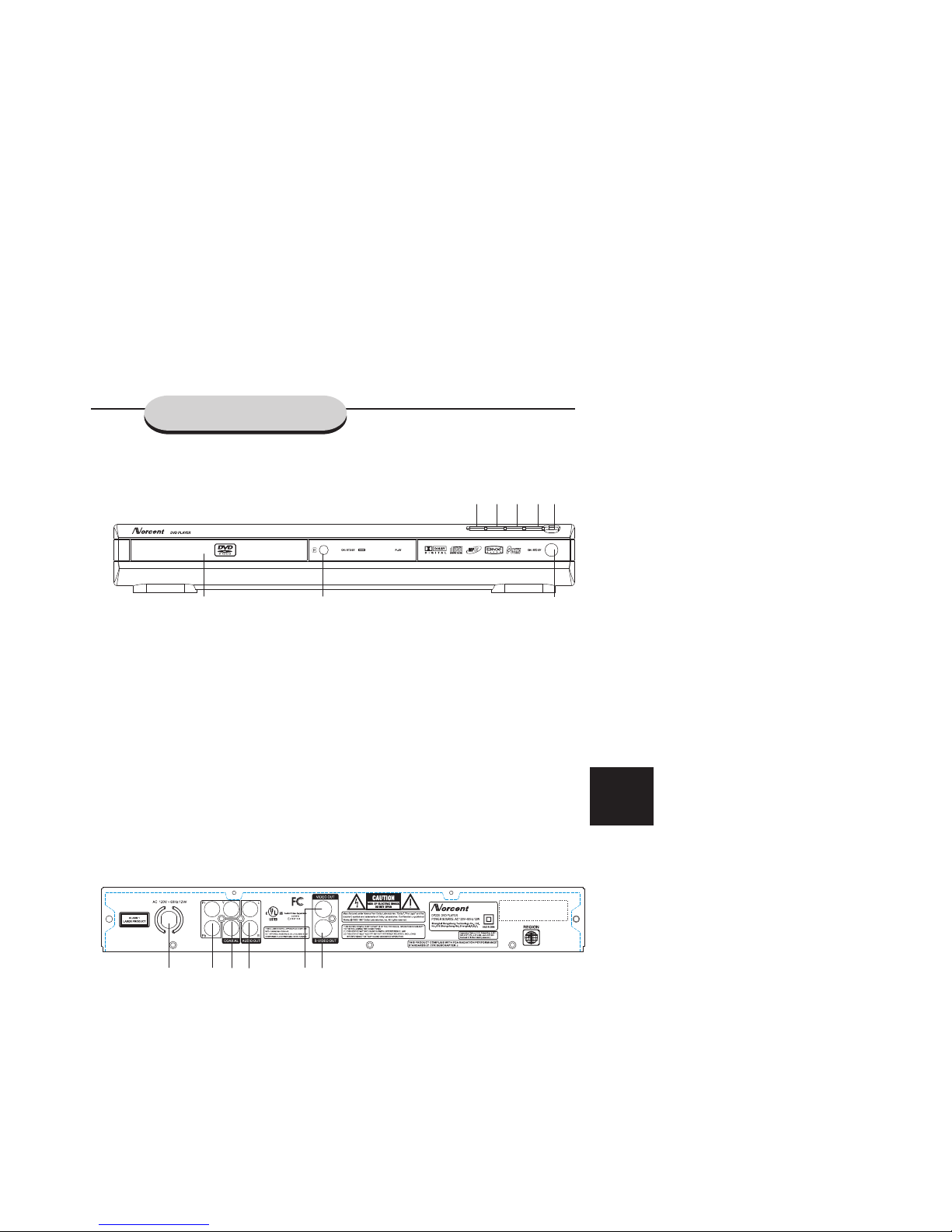
Main unit (Front panel)
Main unit (rear panel)
1 LOADER TRAY Disc tray
2 IR Point the remote control towards this sensor
3 EJECT Open or close the disc tray
4 I<<SKIP In Disc mode, press to skip to previous track
5 SKIP>>I In Disc mode, press to skip to next track
6 STOP Press to stop the playback
7 PLAY/PAUSE Press to start or stop temporarily playback
8 ON/STD BY Switch the main power on or off.
1 AC LINE CORD Connect to AC outlet
2 AUDIO OUT Connect to the AUDIO IN of TV or Amplifier
3 COAXIAL Coaxial digital Audio signal output
4 S-VIDEO OUT Connect to a TV with S-VIDEO input
5 COMPONENT SIGNALS OUTPUT Progressive component signals output
6 COMPOSITE SIGNAL OUTPUT Connect to the Composite signal input of your TV
CONTROLS AND FUNCTIONS
6
12
34
5 6
8
1 2
3 4 5 67

Remote Control
1 2 3 4
8
9
10
12
15
16
17
18
5
6
7
13
11
14
23
19
20 21 22
CONTROLS AND FUNCTIONS
7
1. OPEN/CLOSE button
2. STOp button
3. MENU/PBC button
4. ON/STD BY button
5. PLAY / PAUSE button
6. FR button
7. Prev button
8. FF button
9. Next button
10. OK button
11. Left button
12. Right button
13. Up button
14. Down button
15. SETUP button
16. TITLE button
17. P/I button
18. SLOW button
19. DISPLAY button
20. ANGLE button
21. ZOOM button
22. MUTE button
23. NUMBER buttons

Connecting your player to the TV
CONNECTIONS
Connect the S-VIDEO OUT jack to the S-Video input jack on the TV using a S-Video cable.
Connect the VIDEO OUT jack to the Video input jack on the TV using a video cable.
Use the audio cables to connect AUDIO OUT jacks to the corresponding AUDIO IN jacks on the TV, CD or
TAPE recorder.
Use the Coaxial cables to connect COAXIAL jack to correspond to receive digital Audio signal.
8

Battery installation
1. Open the battery cover.
2. Insert the supplied batteries according to the direction
indicated in the battery compartment.
When inserting or removing the batteries, push them
towards the battery terminals.
3. Close the cover.
Precautions for battery use:
Caution:
Do not use rechargeable batteries.
Installing the batteries incorrectly may cause the unit to
malfunction.
Notes concerning use:
BATTERY INSTALLATION
9
Replace all old batteries with new ones at the
same time.
Do not mix old and new batteries.
Remove the batteries if the unit is not to be used
for long periods of time. This will prevent potential
damage due to battery leakage.
Replace the batteries if the operating distance is
reduced or if the operation becomes erratic.
Purchase 2 AAA size batteries
Periodically clean the transmitter on the remote
control and the sensor on the unit with a soft cloth.
Exposing the sensor on the unit to strong light may
interfere with operation. Change the lighting or the
direction of the unit.
Keep the remote control away from moisture,
heat, shock, and vibrations.
Indice
Altri manuali Norcent Lettore DVD