Now Technologies Switch-It Vigo Manuale utente

Switch-It®Vigo
Head Drive & Head Mouse
USER MANUAL
Document identifier: NOW.Q.CE.M.EN-SIV-0002-06
Revision: 06
Date of issue: 15 January 2023
©2023 NOW technologies Ltd. All rights reserved.
European representative of the Manufacturer:
NOW technologies Ltd., 18. Reáltanoda street, Budapest, 1053 Hungary
www.nowtech.hu
You can find step-by-step tutorial videos at
www.nowtech.hu/tutorials/

Table of Contents
Table of Contents 2
User Guide 5
SYSTEM REQUIREMENTS 6
STATEMENT OF THE INTENDED PURPOSE AND USERS 6
Safety and Handling Instructions 7
BATTERIES 7
MEDICAL DEVICE INTERFERENCE 7
SPECIAL SAFETY WARNING 8
Getting Started 9
What’s in the box 9
Vigo 11
Cubo 12
LINK 12
Switch-It® Vigo Mouse Desktop Application 13
Switch-It® Vigo Drive Desktop Application (Available for authorized dealers only) 14
Switch-It® Vigo Toolbox Mobile Application 15
Assembly instructions 16
System connection diagram 16
Vigo assembly 16
Link installation 17
Link Mounting 18
Link Wiring to PGDT 19
Cubo Mounting 21
Connecting the Cubo to the Link and to the Headrest Sensor 22
Headrest and Headrest Sensor 23
Headrest Requirements 23
Jack connector on Cubo 25
How to place the Headrest Sensor on the wheelchair 25
Setting up the System 26
Setting up the Omni and the Link 26
Programming the Omni 26
Setting up the IOM and the Link 28
Setting up the Dynamic Controls Linx DLX-IN500 and the Link 28
2

Setting up the Quantum Rehab Q-Logic 3 EX Enhanced Display or SCIM Module and
the Link 28
Pairing instructions 29
Setting up the Vigo 29
Pairing with your phone (optional: to receive calls and listen to auditory type
entertainment) 29
LINK CONFIGURATION (Available for authorized dealers only) 30
Personalize the driving experience 30
Setting the driving parameters in the OMNI for safe and smooth acceleration 31
How to wear and drive with the Vigo 33
How to wear the Vigo 33
Turn on the System (for assistants/carers) 34
Driving and mousing with the Vigo 35
Switch modes with the Vigo 35
Drive mode 35
Emergency stop/Leave driving mode: 35
Enter the Omni menu: 35
Mouse mode 35
Standby mode 36
Switching between available functions 36
Resting 36
Two Dongle Support 37
Drive with your Vigo 37
Using the OMNI Menu 37
Other Vigo Functions: 38
Answer an incoming call 38
End a call 38
Reject a call 38
Adjust the volume 38
Play/Pause 38
Power off 38
Battery charging & battery level 38
Music streaming 39
Vigo Product Specifications 39
Appendix 40
Vigo LED Indications: 40
Dongle LED Status Feedback 40
Resetting the Dongle manually 41
Link LED (GyroSet™ Logo) Indications: 42
3

User Guide
R-Net OmniⓇand the R-Net logo is the property and registered trademark of PG Drives
Technology. NOW technologies Ltd. is not associated with PG Drives Technology.
Quantum Q-Logic is the property and registered trademark of Quantum Rehab. NOW
technologies Ltd. is not associated with Quantum Rehab.
Linx is the property and registered trademark of Dynamic Controls. NOW technologies
Ltd. is not associated with Dynamic Controls.
It is expressly advised to review this user manual before using the
Vigo with Cubo.
Information contained in this publication regarding device applications and the like is provided
only for your convenience and may be superseded by updates. It is your responsibility to ensure
that your application meets with your specifications. NOW TECHNOLOGIES MAKES NO
REPRESENTATIONS OR WARRANTIES OF ANY KIND WHETHER EXPRESS OR IMPLIED,
WRITTEN OR ORAL, STATUTORY OR OTHERWISE, RELATED TO THE INFORMATION,
INCLUDING BUT NOT LIMITED TO ITS CONDITION, QUALITY, PERFORMANCE,
MERCHANTABILITY OR FITNESS FOR PURPOSE. NOW technologies disclaims all liability
arising from this information and its use. Use of NOW technologies devices in life support and/or
safety applications is entirely at the buyer’s risk, and the buyer agrees to defend, indemnify and
hold harmless NOW technologies from any and all damages, claims, suits, or expenses
resulting from such use. No licences are conveyed, implicitly or otherwise, under any NOW
technologies intellectual property rights.
It is our intention to provide our valued customers with the best documentation possible to
ensure the successful use of your NOW technologies products. To this end, we will continue to
improve our publications to better suit your needs. Our publications will be refined and
enhanced as new volumes and updates are introduced. If you have any questions or comments
welcome your feedback.
You can find detailed tutorial videos on setting up the system at
https://www.nowtech.hu/tutorials/
5

SYSTEM REQUIREMENTS
Awheelchair equipped with:
●PGDT R-Net:
○Omni or
○Omni2 or
○IOM Input/Output Module, or
●Dynamic Controls:
○Linx DLX-IN500, or
●Quantum Rehab:
○Q-Logic 3 EX Enhanced Display or SCIM Module
Requirements for the Switch-It® Vigo Drive software that enables the personalization of the
driving experience and Switch-It® Vigo Mouse software that allows customization of the
mousing experience:
● Either a Mac computer with Catalina operating system or later
● Or a personal computer with a Windows 10 operating system or later
STATEMENT OF THE INTENDED PURPOSE AND USERS
The device is intended to be used as a specialty controller input device attached to power
wheelchair controller systems. Users of the device are power wheelchair users who have
difficulty using standard wheelchair input devices.
This device may be useful to people with the following disabilities or conditions:
● Spinal cord injuries
○ Cervical injuries
○ Herniated cervical disc
○ Central cord syndrome
● Cerebral Palsy
● Multiple sclerosis
● Muscular Dystrophy
● Tetraplegia
● Dysmelia
● Traumatic brain injuries
○ Intracranial bleeding
○ Cerebral contusions
○ Concussion
○ Intracranial haemorrhage
○ Subdural haematoma
○ Epidural haematoma
● Stroke
6

○ MCA and ASA infarctions
○ Lacunar infarction
● Brain tumours
● Brachial Plexus injury
● Peripheral Nerve injuries
● Acquired and congenital Myopathies
● Amyotrophic Lateral sclerosis
● Spinal muscular Atrophy
Safety and Handling Instructions
BATTERIES
Don’t attempt to replace any of the Switch-It® Vigo System’s batteries yourself – you may
damage the battery, which could cause overheating, fire, and injury. The lithium-polymer battery
in your Vigo headset should be serviced or recycled by NOW technologies Ltd. or an authorized
service provider and must be recycled or disposed of separately from household waste. Dispose
of the batteries according to your local environmental laws and guidelines.
THE Switch-It® VIGO HEADSET USES A LITHIUM-POLYMER BATTERY
Keep it away from anything that can catch fire and make sure it cannot get hit by sharp objects.
For charging, only use the charging cord provided.
Avoid storing and using the Vigo below -10 and above 50 degrees Celsius. Do not place the
Vigo in direct sunlight or keep it in hot vehicles.
Stop using the Vigo if you notice these problems: odor, change in color, too much heat, change
in shape, leaking, odd noises. If it is safe to do so, move the device away from anything that can
catch fire.
MEDICAL DEVICE INTERFERENCE
The Vigo and the Cubo contain components and radios that emit electromagnetic radiation. This
electromagnetic radiation – although unlikely - may interfere with pacemakers, defibrillators, or
other medical devices. Maintain a safe distance of separation between your medical device and
the above mentioned Switch-It® devices. Consult your physician and medical device
manufacturer for information specific to your medical device. If you suspect any of your
7

Switch-It® devices are interfering with your pacemaker, defibrillator, or any other medical
device, stop using the Switch-It® Vigo system.
SPECIAL SAFETY WARNING
When driving with the Switch-It® Vigo system, do not forget to switch modes in order to
be able to safely look around or control the actuator(s).
When driving with the Switch-It® Vigo system, make sure that the user is properly trained
by a trained professional and have enough (a couple of weeks minimum) indoor
experience driving the wheelchair before starting to drive outdoors in traffic.
Always make sure that the blink detection sensor is at a safe distance from your eye,
cheek, or the corner of your mouth – 1-3 cm – and in a position that a sudden change in
the position of the Vigo won’t hurt your eye.
Circumstances that can affect the operation of the Vigo:
The Switch-It® Vigo head drive offers unprecedented freedom of movement by using wireless
radio communication. The operation can be disturbed in environments with above-average
Bluetooth or Wifi device usage, this may result in a safety stop.
Please refer to our special safety checklist at the end of this document!
8

Getting Started
What’s in the box
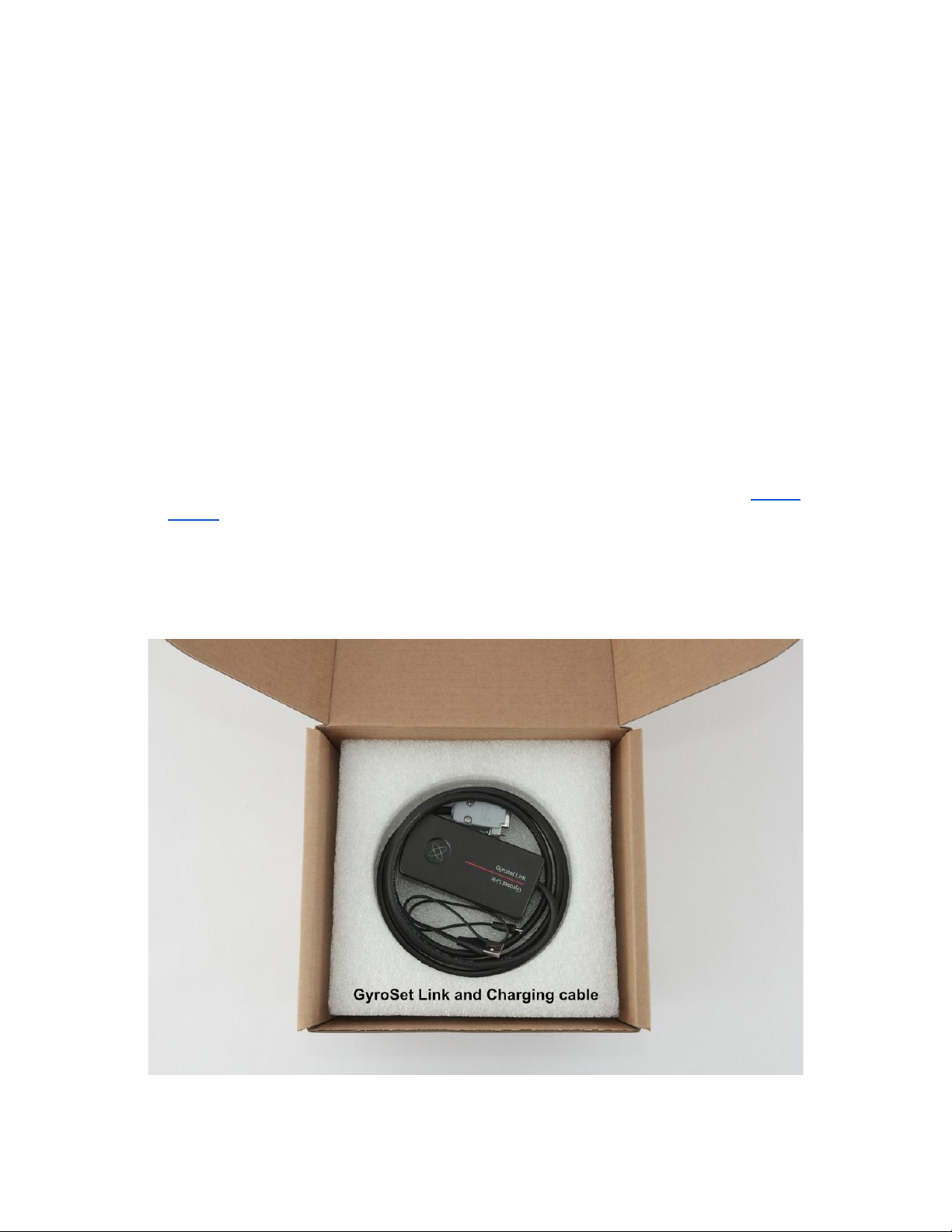
- Link (formerly known as GyroSet™ Link)
- USB to micro-USB cable to charge the Vigo
- Dongle (formerly known as GyroSet™ Dongle)
- Vigo with plastic “C” mounting ring
- The headband of the Vigo (formerly known as GyroSet™ Vigo)
⚠Caution! If you have a history of allergies to plastics, you should exercise care when using the
headband.
- Special Micro-USB to Micro-USB cable to connect the Link and the Cubo
⚠Please handle this cable with care!
Due to the nature of its placement, it can be damaged easily. If that happens, please contact
support and ask for a replacement.
Do not attempt to replace the cable with other Micro-USB cables! It is a crosslink cable specially
made for these devices.
- Cubo (formerly known as GyroSet™ Cubo)
- Headrest Sensor
9

10
Altri manuali per Switch-It Vigo
1
Indice
Altri manuali Now Technologies sedia a rotelle