
NPower 4572000 Manuale utente
TO REDUCE THE RISK OF INJURY, USER MUST READ AND
UNDERSTAND THIS INSTRUCTIONAL MANUAL. THIS MANUAL CONTAINS
IMPORTANT INFORMATION REGARDING THE OPERATION AND
WARRANTY OF THIS PRODUCT. PLEASE RETAIN FOR FUTURE
REFERENCE.
1500W Power Inverter
OWNER’S MANUAL
Model number-4572000

CONTENTS
1. Introduction..............................................................................................
2. Important Safety Information...................................................................
3. Protective Features................................................................................
4. Features..................................................................................................
5. Installation...............................................................................................
6. Operating Instructions.............................................................................
7. Troubleshooting......................................................................................
8. Specifications..........................................................................................
9. Warranty.................................................................................................
2
2
4
5
6
8
11
13
14

2.
Thank you for purchasing the NPower 1500W Power Inverter, a high
performance solution to use household power while on the road. Connected to
the 12V volt output in your vehicle, the inverter efficiently and reliably supplies
110V/60Hz AC power with 1500W continuous output power for a wide variety of
loads, such as all kinds of jacklights, TV sets, audio/video systems and
electromotion tools with power consumption under 1500 watts. It has been
tested and found to be in line with the requirement of ETL certification. With
proper care and appropriate usage, it will give you years of dependable service
in your car, truck, RV and boat.
The inverter has the safety features such as over input voltage shut off, low
input voltage shut off, low input voltage alarm, low voltage turn-off resume, over
heating shut off, overload shut off, short circuit protection.The unit is not
designed to be waterproof. It applies to the ambient temperature for
32°F~104°F(0°C~40°C).
1. Introduction
2. Important Safety Information
CAUTION: Instructions provide information that could damage your
inverter or equipment connected to it!
WARNING: Instructions provide information on conditions that
could result in personal injury or loss of life!
Warning!
Shock hazard! Keep away from children!
Warning!
The inverter produces the same potentially lethal AC power as normal
household outlets. It is suggested that you treat it as normal AC outlet.
For safe and optimum performance, the inverter must be installed and used
properly. Carefully read and follow the guidelines in this guide and give special
attention to the CAUTION and WARNING statements.

3.
Warning!
Do not operate the unit near flammable fumes or gases such as the cabin of
a gasoline power boat, or near propane tanks.
Warning!
Do not operate the unit in an enclosed area that contains automotive type
lead-acid batteries. This type of battery emits explosive hydrogen gas which
can be ignited by sparks.
Warning!
Always make all AC connections before making DC connections or the
components built into the inverter can become energized producing an
electrical shock hazard. Never work on the AC wiring without first physically
disconnecting the DC connections.
Caution!
Do not connect the unit to live AC power circuits or there would be damage to
the inverter. Do not connect any AC device which has its neutral conductor
connected to ground to the unit.
Warning!
The case to the unit may become very warm under high power
operationreaching 140°F(60°C). Be sure that there is at least 2 "(5cm) of
unobstructed air space around the entire surface of the inverter at all times.
During use, do not place materials that could be damaged by heat near the
unit.
Caution!
Some chargers for small nickel-cadmium batteries can be damaged if
connected to the unit. Do not use the unit on the following items:
Small battery-operated appliances such as flashlights, razors and
nightlights those can be plugged directly into an AC outlet to recharge.
4.
3. Protective Features
Caution!
Connect the unit to batteries with a normal output of 12V DC only. As 6V
batteries voltage is too low, and a 24V battery voltage is too high which will
damage the unit.
Additional Safety Guidelines!
Do not insert any foreign objects into the unit outlets, vents or fan openings.
Do not expose the unit to rain, water or any other liquid.
Do not connect the unit to any utility power distribution systems or branch
circuits.
Do not use the inverter in temperatures over 104°F(40°C) or under 32°F(0°C).
Failure to follow these safety guidelines will result in personal injury
and/or the damage to the unit. It may also void the warranty.
Certain battery chargers for battery packs used in hand power tools.
These chargers will have a warning label indicating that dangerous
voltages are present at the battery terminals.
Over Input Voltage Shut Off
When the 12 volt DC power supply voltage exceeds 15.5±0.5 volts, the inverter
will automatically shut down, and the digital display showing “OUP”.
Low Input Voltage Shut Off
When the 12 volt DC power supply voltage drops below 10.5±0.3volts, the
inverter will automatically shut down, and the digital display showing “LUP”.
Low Input Voltage Alarm
When the 12 volt DC power supply voltage drops below 11±0.3volts, an audible
alarm will sound, and the digital display showing “LUP”.
Over Heating Shut Off
When the internal temperature exceeds the regulated temperature due to the
5.
Figure 1
increase of surrounding air temperature, the inverter will automatically shut
down, and the digital display showing “LCP”.
When the internal temperature drops below the surrounding air temperature,
the inverter will automatically return to normal operation.
Overload Shut Off
When the starting power exceeds the rated power, the inverter will
automatically shut down, and the digital display showing “OLP”.
When being in over current protection state, the inverter can’t automatically
restore normal operation, but return to normal operation by using manual
switch.
Short Circuit Protection
This inverter is equipped with multiple internal fuses. When it is in short circuit
state, the unit will switch to protective mode, and the digital display showing
“OPP”.
4. Features

6.
5. Installation
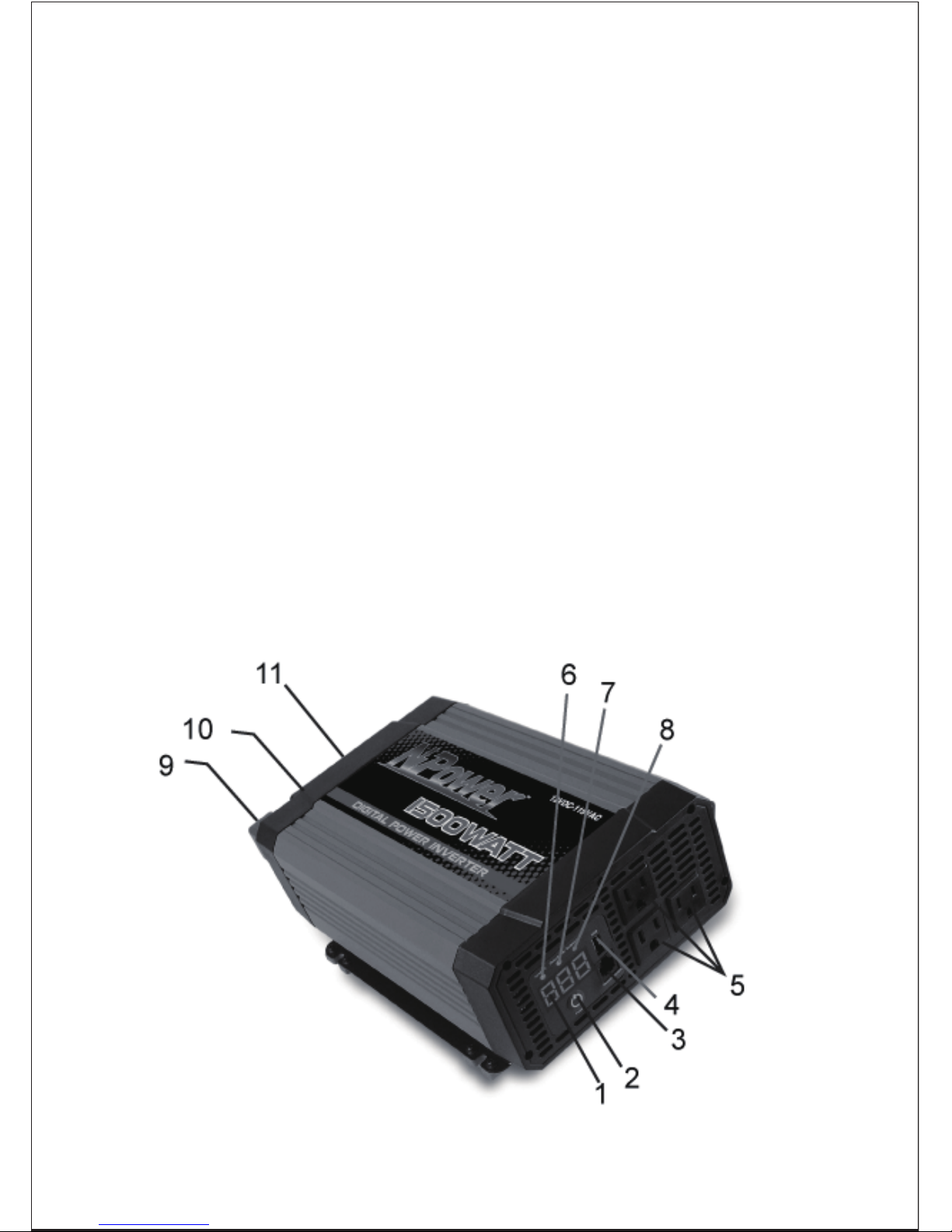
1. Digital Readout—it indicates the power and DC voltages. The allowed
power tolerance is 15% (with loads of over 200W), and the allowed voltage
tolerance is +/-0.2V (no load).
2. Button Power Switch— Connect the inverter to the DC power and press
down the button power switch, the AC power is available.
3. Port for Remote Control— Connect the remote control switch and press
down the switch, the remote control function acts.(remote control switch is not
included.)
4. USB Port— Offer 5V power to USB equipment.
5. AC Outlets— They allow you to plug in 110V AC products with a total
continuous of 1500W or less.
6. Green LED Indicator— Indicates the digital display is showing DC input
voltage.
7. Yellow LED Indicator — When the power exceeds 1000W, the yellow LED
indicator lights, and the digigal display showing output power loads in kilowatts.
8. Red LED Indicator— Indicates that the consumption of the loads is under
1000 W, and the digigal display showing output power loads in watts.
9. Positive DC terminal— Connect the red end of the DC power cord to it.
10. Negative DC terminal— Connect the black end of the DC power cord to it.
11. Cooling Fan and Ventilation Openings— The high speed cooling fan
protects the inverter from over-heating. And the ventilation openings should be
kept clear!
The unit must be operated in an area that meets the following requirements in
order to operate safely and provide optimum performance:
Dry Don’t allow water or other liquids to drop or splash on the unit.
Description
7.
Safe
Do not operate the unit in the same compartment as batteries
or in any compartment capable of storing flammable liquids
like gasoline.
Clean Do not operate the unit in an area that is prone to dirt, dust or
debris. Especially important if used in a work environment.
Your 1500W Power Inverter supplies 1500 watts of max continuous power
with 3000 watts of surge power. When you turn on an appliance or a tool that
operates using a motor or tubes, it requires an initial surge of power to start
up. This surge of power is referred to as the “starting load” or “peak load”.
Once started, the tool or appliance requires less power to continue to
operate. This is referred to as the “continuous load” in terms of power
requirements. You will need to determine how much power your tool or
appliance requires to start up and its continued running power requirements.
The inverter should be connected to your vehicle’s 12 V power supply with
the DC cables. We recommend that the equipment or appliance switch be in
the “OFF” position prior to plugging into the AC receptacle of the inverter.
Warning!
Shock hazard! Keep away from children!
Please be sure to put off some metal jewelry, such as rings, bracelets and
watches etc. in case any accident would happen!
Connecting the inverter:
1) Place the inverter on a flat surface, such as on the vehicle floor.
Cool Ambient air temperature should be between 32°F and104°F
(0°C~40°C)(the cooler the better within this range).
Ventilated Leave at least 2” (5cm) of clearance around the unit for airflow.
Ensure that the ventilation openings are not obstructed.
8.
6. Operating Instructions
2) Please make sure that the inverter is shut down.
3) Attach the ring type connector marked with red to the positive (+) DC
terminal on the power inverter, and attach the ring connector marked
with black to the negative (-) DC terminal.
Caution!
Reversing the polarity will cause a blown fuse or damage to the inverter,
which may also void the warranty.
Caution!
A loose connection will cause the voltage to drop and may cause the cables to
overheat, resulting in equipment damage or fire.
Caution!
If there are one more AC products connecting to the inverter, turn on
the larger power product first.
4) Tighten the nut on each DC terminal by hand until it is snug. Do not
over-tighten.
5) Connect the AC equipment.
6) When the power inverter is not in use, disconnect the DC cable clips
from the battery to prevent gradual discharge of battery.
Note: This product does not include DC battery cables. DC battery cables
sold separately.
1) When properly connected to a 12 V outlet or battery, turn on the
inverter, and the digital readout will switch on and the unit will deliver
AC power to the outlet(s).
2) Plug the AC product(s) you wish to operate into the AC outlet(s)
3) Switch them on, one at a time.
9.
Caution!
Most vehicle batteries are designed to provide short period of very high
current for starting the engine. They are not designed for a constant “deep
discharge”. Constantly operating the unit from a vehicle battery until the low
voltage shut off will affect the life of the battery. If you are operating electrical
products for extended periods of time, you should consider connecting the
unit to a separate deep discharge battery.
Should a defective battery charging system cause the battery voltage to rise
to the range of 15.0V~16.0VDC, the inverter automatically shuts down; and
the red LED lights.
Caution!
Although the inverter incorporates protection against over-voltage, it
may still be damaged if the input voltage exceeds 16 volts.
If an AC product rated higher than 1500W (or which draws excessive surge
power) is connected, the inverter will shut down. The red LED light will light.
The unit will shut down automatically if the inverter exceeds a safe operating
temperature due to insufficient ventilation or a high-temperature environment;
and the red LED indicator lights.
The cooling fan is designed with thermo-controlled technology.
4) The unit will operate from input voltages ranging from 11.0 V to 14.0 V
DC.
As the battery is used, its voltage begins to fall. When the inverter senses
that the voltage at its DC input has dropped to the range of 10.7~11.3V DC,
an audible alarm sounds. This allows time for computers or other sensitive
devices to be shut down. If the audible alarm is ignored, the inverter will
automatically shut down when the voltage dropped to the range of
10.2~10.8V DC. The red LED indicator illuminates, indicating a fault. This
protects the battery from being over-discharged. Turn off any devices that the
inverter is powering.
When input voltage rose to 11.7V~12.3V DC, inverter restores normal.
Indice
Altri manuali NPower Invertitore


