
Nubia SW1002 Manuale utente

1
Appearance
Speake
r
Touchscreen
Charging
Interface
Light/
Proximity
Sensor
Camera
MIC
Heart Rate
Sensor
Back Button
Power Button
Watchband
Clasp
2
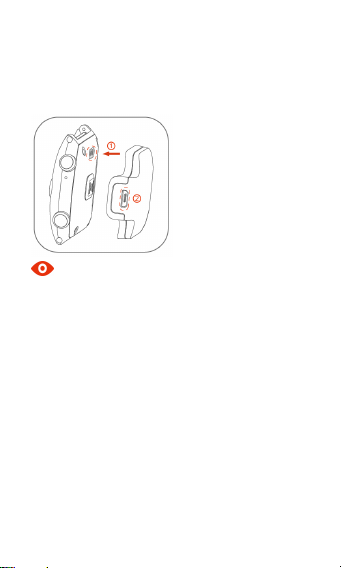
Charge your battery
Please align the charging point on the charging dock
at the metal point on your device, slightly press till
they are firmly clasped and connect the charge cable.
Note
You can also connect your device to the USB port
on your computer via the charge cable.
Please note that it is normal that your device and
charger might become hot appropriately during
charging.
Please use your nubia original accessories,
otherwise it might affect your device’s performance,
or even cause dangers such as fire, explosion, etc.
Wear your device
Press the buckle button on the watchband clasp to
unfold the clasp, wear your device on your wrist, fold
over the clasp and slightly press till it is firmly
buckled.
3
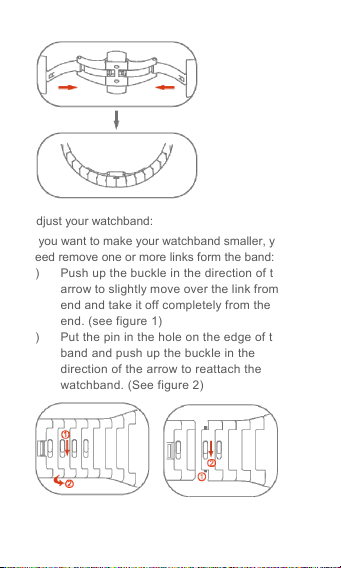
Adjust your watchband:
If you want to make your watchband smaller, you
need remove one or more links form the band:
1) Push up the buckle in the direction of the
arrow to slightly move over the link from one
end and take it off completely from the other
end. (see figure 1)
2) Put the pin in the hole on the edge of the
band and push up the buckle in the
direction of the arrow to reattach the
watchband. (See figure 2)
Figure1 Figure2

4
Start your trip to nubia α
First Step: Power on/off
Power on
Press & hold the power button till the power-on
screen appears.
Power off
Press & hold the power button to turn off your device.
Note
If your device cannot be normally turned off, please
press and hold the power button more than 10
seconds to turn it off and reboot.
Second Step: Download
For Android users, please scan the code or search
for ‘nubia wear’ in the Google Play to download.
Apple users should search for ‘nubia wear’ in the
App Store.
Visit the website: http://ausp.nubia.com/wear/ to
download.
Note
During the process of downloading the app, pairing
with your phone and synchronizing data, your phone
must connect to the Internet and keep connected with
nubia αvia Bluetooth.

5
Third Step: Pair αwith your phone
1. Please use your phone to scan the QR code
displayed on your device and pair your device to
your phone via Bluetooth according to the prompt.
2. Set it up as a newly-paired wearable phone.
Fourth Step: Fill in your personal
Info
Choose to wear the device on your left or right wrist
based on your wearing habits; synchronize your
personal data in order to calculate the sports
information.
Perform operations such as password settings,
notification management, etc. as per your
requirements.
Note
Please fill in your personal information truthfully so
that nubia αcan calculate sports data based on your
information.
Fifth Step: Synchronize data
Click the icon on the ‘nubia Wear’ app to
synchronize data in your phone such as Contacts,
Music, Calendar, etc.
Sixth Step: Learn basic operations
Buttons
Power button
Press & hold: turn on or turn off your device.

6
Press: power off the screen; wake up the screen
when it is off; return to the watch face.
Back button
Press: return to the previous menu; wake up the
screen when it is off.
Press the Power button and Back button at the same
time to capture the screen.
Watch Dial
Swipe up on the watch dial to show the
background apps and recently used apps.
Swipe down on the watch dial to show the
Notification Center and Control Center.
Swipe left/right on the watch dial to enter
the main menu.
Control Center
Notification Center
Background apps
Recently used apps

7
Descriptions of icons in the Control Center
Icons Descriptions Icons Descriptions
Adjust
screen-off time Mid-air gestures
Power Saving Lift up wrist to light
up screen
GPS Bluetooth
Do Not Disturb Airplane mode
Mute mode Vibration mode
Connected to
WLAN
Adjust screen
brightness
Screen Control
You can control your αthrough a series of
operations on the screen.
Tap: tap on an item on the screen to select it
or open whatever you tap.
Swipe: slide your fingers on the screen
horizontally or vertically to scroll left/right or
scoll up/down the page.
Pinch: pinch your fingers together on the
screen to return to the previous menu; pinch
your fingers on the watch dial to turn off the
screen.
With the help of mid-air gestures, you can wave
your hands above the screen to control the
screen operations through the induction sensor.

8
Wave your hands up/down: swipe up/down
the screen.
Wave your hands left/right: swipe the screen
to the left or right.
Seventh Step: Learn commonly
used functions
Note
During the process of using your α, you must keep
your αand phone connected via Bluetooth.
Call
You can use either of the following two methods to
make a call after tapping ‘Call’ on the main menu:
Method one: tap on the numeric buttons to
enter a telephone number and tap the button
to dial.
Method two: tap ‘Contacts’ to open the list of
contacts, select the contact you want to call
and tap the phone number to dial.
On the incoming call interface, swipe down to hang up
the call and swipe up to answer the call.
Messages
When receiving a new text message, you can lift
up your wrist to read it or choose ‘Reply’.

9
Sports & Health
Real-time heart rate monitoring
You can use your αto measure your real-time
heart rate once wearing it appropriately. When
measuring your heart rate, please fit your wrist to
the heart rate sensing area on your αand keep
wearing it comfortably and suitably. Wearing too
tightly or loosely will affect the measurement.
Sports mode
After you choose one from different sports modes
as per your requirements, your αwill
automatically detect your sports data. Double
click on the button ‘Double-click to end’ to exit the
sports mode.
You can select your favorite music while doing
your workout.

10
Disposal of your old wearable
phone
When the wheelie bin symbol is
attached to a product, it means the
product is covered by the European
Directive 2012/19/EU.
All electrical and electronic products should be
disposed of separately from normal household
waste via designated collection points provided
by government or local authorities.
The correct disposal of electrical and
electronic products will help protect the
environment and human health.
Indice
Altri manuali Nubia Orologio


