Nvidia DGX-1 Manuale utente

NVIDIA DGX-1
DU-08033-001 _v07 | January 2017
User Guide

www.nvidia.com
NVIDIA DGX-1 DU-08033-001 _v07|ii
TABLE OF CONTENTS
Chapter1.Introduction to the NVIDIA DGX-1 Deep Learning System................................. 1
1.1.Using the DGX-1: Overview............................................................................. 1
1.2.Hardware Specifications................................................................................. 2
1.2.1. Components.......................................................................................... 2
1.2.2. Mechanical............................................................................................ 2
1.2.3. Power.................................................................................................. 3
1.2.4.Connections and Controls.......................................................................... 3
1.2.5.Rear Panel Power Controls.........................................................................4
1.2.6. LAN LEDs..............................................................................................4
1.2.7.IPMI Port LEDs....................................................................................... 5
1.2.8.Hard Disk Indicators................................................................................ 6
1.2.9.Power Supply Unit (PSU) LED..................................................................... 6
Chapter2.Installation and Setup............................................................................ 8
2.1.Registering Your DGX-1.................................................................................. 8
2.2.Obtaining Software and Software Updates........................................................... 8
2.3.Choosing a Setup Location / Site Preparation....................................................... 9
2.4.Unpacking the DGX-1................................................................................... 10
2.5.What's In the Box....................................................................................... 11
2.6.Installing the DGX-1 Into a Rack..................................................................... 11
2.6.1.Installing the Rails.................................................................................12
2.6.2.Mounting the DGX-1............................................................................... 12
2.7.Attaching the Bezel.....................................................................................13
2.8.Connecting the Power Cables......................................................................... 14
2.9.Connecting the Network Cables...................................................................... 15
2.10.Setting Up the DGX-1................................................................................. 15
2.11.Configuring a System Proxy.......................................................................... 18
2.12.Configuring NFS Mount and Cache.................................................................. 18
Chapter3.Configuring and Managing the DGX-1........................................................ 21
3.1.Obtaining MAC Addresses.............................................................................. 21
3.2. Using the BMC........................................................................................... 24
3.2.1.Creating a Unique BMC Password for Remote Access........................................ 25
3.2.2.Viewing System Information......................................................................26
3.2.3.Submitting BMC Log Files.........................................................................26
3.2.4.Determining Total Power Consumption......................................................... 26
3.2.5.Accessing the DGX-1 Console.................................................................... 27
3.2.6.Powering Off / Power Cycling the System Remotely.........................................27
3.2.6.1.From the DGX-1 Console Window..........................................................27
3.2.6.2.From the BMC UI............................................................................. 27
Chapter4.Maintaining and Servicing NVIDIA DGX-1.................................................... 29
4.1.Problem Resolution and Customer Care............................................................. 29

www.nvidia.com
NVIDIA DGX-1 DU-08033-001 _v07|iii
4.2.Restoring the DGX-1 Software Image................................................................ 29
4.2.1.Obtaining the DGX-1 Software ISO Image......................................................30
4.2.2.Re-Imaging the System Remotely............................................................... 30
4.2.3.Creating a Bootable USB Flash Drive........................................................... 33
4.2.3.1.Creating a Bootable USB Flash Drive by Using the dd Command......................33
4.2.3.2.Creating a Bootable USB Flash Drive by Using Akeo Rufus............................. 34
4.2.4.Re-Imaging the System From a USB Flash Drive.............................................. 36
4.3.Updating the System BIOS............................................................................. 36
4.4.Updating the BMC....................................................................................... 39
4.5.Replacing System and Components...................................................................41
4.5.1.Replacing the System............................................................................. 41
4.5.2.Replacing an SSD...................................................................................42
4.5.3.Recreating the RAID Array........................................................................43
4.5.3.1.Access the BIOS Setup Utility.............................................................. 43
4.5.3.2.Delete the RAID0 Virtual Drive.............................................................46
4.5.3.3.Clear the Drive Group Configuration...................................................... 52
4.5.3.4.Recreate the OS Virtual Drive.............................................................. 56
4.5.3.5.Recreate the RAID0 Virtual Drive.......................................................... 64
4.5.4.Replacing the Power Supplies....................................................................76
4.5.5.Replacing the Fan Module........................................................................ 77
4.5.6.Replacing the DIMMs...............................................................................78
Chapter 5. Safety............................................................................................... 83
5.1.Safety Warnings and Cautions.........................................................................83
5.2.Intended Application Uses............................................................................. 84
5.3. Site Selection............................................................................................ 84
5.4.Equipment Handling Practices........................................................................ 85
5.5.Electrical Precautions...................................................................................85
5.6.System Access Warnings................................................................................86
5.7.Rack Mount Warnings................................................................................... 86
5.8.Electrostatic Discharge................................................................................. 87
5.9. Other Hazards............................................................................................88
Chapter6. Compliance........................................................................................ 90
6.1. United States.............................................................................................90
6.2.United States / Canada................................................................................ 90
6.3. Canada.................................................................................................... 91
6.4. CE.......................................................................................................... 91
6.5. Japan...................................................................................................... 91
6.6. Australia...................................................................................................92
6.7. China...................................................................................................... 92
6.8. Israel.......................................................................................................94
6.9. South Korea.............................................................................................. 94

www.nvidia.com
NVIDIA DGX-1 DU-08033-001 _v07|iv

www.nvidia.com
NVIDIA DGX-1 DU-08033-001 _v07|1
Chapter1.
INTRODUCTION TO THE NVIDIA DGX-1
DEEP LEARNING SYSTEM
The NVIDIA® DGX-1™ Deep Learning System is the world’s first purpose-built system
for deep learning with fully integrated hardware and software that can be deployed
quickly and easily.
1.1.Using the DGX-1: Overview
The NVIDIA DGX-1 is designed to operate in one of two modes - Base OS mode, and
Cloud Managed mode. However, Cloud Management is currently not available, but will
be available at a future date. Availability will vary by region.
Base OS mode provides the base operating system on the DGX-1 for customers who
want to use their own on-site scheduling and management software and who will build
and run their own applications.

Introduction to the NVIDIA DGX-1 Deep Learning System
www.nvidia.com
NVIDIA DGX-1 DU-08033-001 _v07|2
1.2.Hardware Specifications
1.2.1.Components
Component Qty Description
1 Dual Intel® Xeon® CPU motherboard with x2 9.6 GT/s QPI, 8 Channel
with 2 DPC DDR4, Intel®X99 Chipset, AST2300 BMC
1 GPU Baseboard supporting 8 SXM2 modules (Cube Mesh) and 4 PCIE x16
slots for InfiniBand NICs
Base Server
1 Chassis with 3+1 1600W Power supply and support for up to 12 2.5 inch
drives
1 10/100 BASE-T (GbE) IPMI Port
1 RS232 Serial Port
2 USB 3.0 Ports
Power Supply 4 1600 W each.
CPU 2 Intel® Xeon® E5-2698 v4, 20-core, 2.2GHz, 135W
GPU 8 Tesla P100, featuring
‣170 teraflops, FP16
‣16 GB memory per GPU
‣28,672 NVIDIA CUDA® Cores
System Memory 16 2133 MHz 32 GB DDR4 LRDIMM (512 GB total)
SAS Raid Controller 1 8 port LSI SAS 3108 RAID Mezzanine
Storage (RAID 0) (Data) 4 1.92 TB, 6 Gb/s, SATA 3.0 SSD
Storage (OS) 1 480 GB, 6 Gb/s, SATA 3.0 SSD
10 GbE NIC 1 Dual port, 10GBASE-T, X540 Mezzanine
InfiniBand EDR NIC 4 Single port, x16 PCIe, Mellanox ConnectX-4 VPI MCX455A-ECAT
1.2.2.Mechanical
Feature Description
Form Factor 3U Rackmount
Height 5.16” (13.1 cm)
Width 17.5" (44.4 cm)
Depth 34.1" (86.6 cm)
Gross Weight 134 lbs (61 kg)

Introduction to the NVIDIA DGX-1 Deep Learning System
www.nvidia.com
NVIDIA DGX-1 DU-08033-001 _v07|3
1.2.3.Power
Input
Specification for
Each Power Supply Comments
200-240 V (ac) 3200 W max. 1600 W @ 200-240 V,
8 A, 50-60 Hz
The DGX-1 contains four load-balancing
power supplies, with 3+1 redundancy.
1.2.4.Connections and Controls
ID Type Qty Description
1 Power button 1 Press to turn the DGX-1 on or off.
Blue: System power on
Off: System power off
Amber (blinking): DC Off and fault
Amber and blue (blinking): DC On and fault
2 ID button 1 Press to cause an LED on the back of the unit to flash as an identifier
during servicing.
3 InfiniBand 4 QSFP28 port; Mellanox ConnectX-4 VPI MCX455A-ECAT, EDR IB (100Gb),
x16 PCIe
4 USB 2 USB 3.0 ports are available to connect a keyboard.
5 VGA 1 The VGA port connects to a VGA capable monitor for local viewing of
the DGX-1 setup console or base OS.

Introduction to the NVIDIA DGX-1 Deep Learning System
www.nvidia.com
NVIDIA DGX-1 DU-08033-001 _v07|4
ID Type Qty Description
6 DB9 1 RS232 serial port for internal debugging
7 AC input 4 Power supply inputs
8 Ethernet (RJ45) 2 10GBASE-T dual port X540 Mezzanine
9IPMI (RJ45) 1 10/100 BASE-T (GbE) Intelligent Platform Management Interface (IPMI)
port
1.2.5.Rear Panel Power Controls
ID Type Qty Description
1 Power button 1 Press and hold the power button for four seconds to turn off the
motherboard. The BMC remains live.
2 Power LED 1 Off: Power off
Blue (steady): Power on
Blue (blinking): BMC reports system health fault.
3 Main Board Status
LED
1Off: Normal
Amber (blinking): BMC reports system health fault.
1.2.6.LAN LEDs
LEDs next to each Ethernet port indicate the connection status as described in the table
below:

Introduction to the NVIDIA DGX-1 Deep Learning System
www.nvidia.com
NVIDIA DGX-1 DU-08033-001 _v07|5
LED Status Description
Amber (steady) LAN link
Amber (blinking) LAN access (off when there is traffic)
1
(Port 0 Link/Activity)
Off Disconnected
Green 10 Gb/s
Amber 1 Gb/s
2
(Port 0 Speed)
Off 100 Mb/s
Amber (steady) LAN link
Amber (blinking) LAN access (off when there is traffic)
3
(Port 1 Link/Activity)
Off Disconnected
Green 10 Gb/s
Amber 1 Gb/s
4
(Port 1 Speed)
Off 100 Mb/s
1.2.7.IPMI Port LEDs
LEDs on the IPMI port indicate the connection status as described in the table below:
Link Activity Description
Off Off Unplugged
Green (steady) Green (blinking) 100M active link
Off Green (blinking) 10M active link

Introduction to the NVIDIA DGX-1 Deep Learning System
www.nvidia.com
NVIDIA DGX-1 DU-08033-001 _v07|6
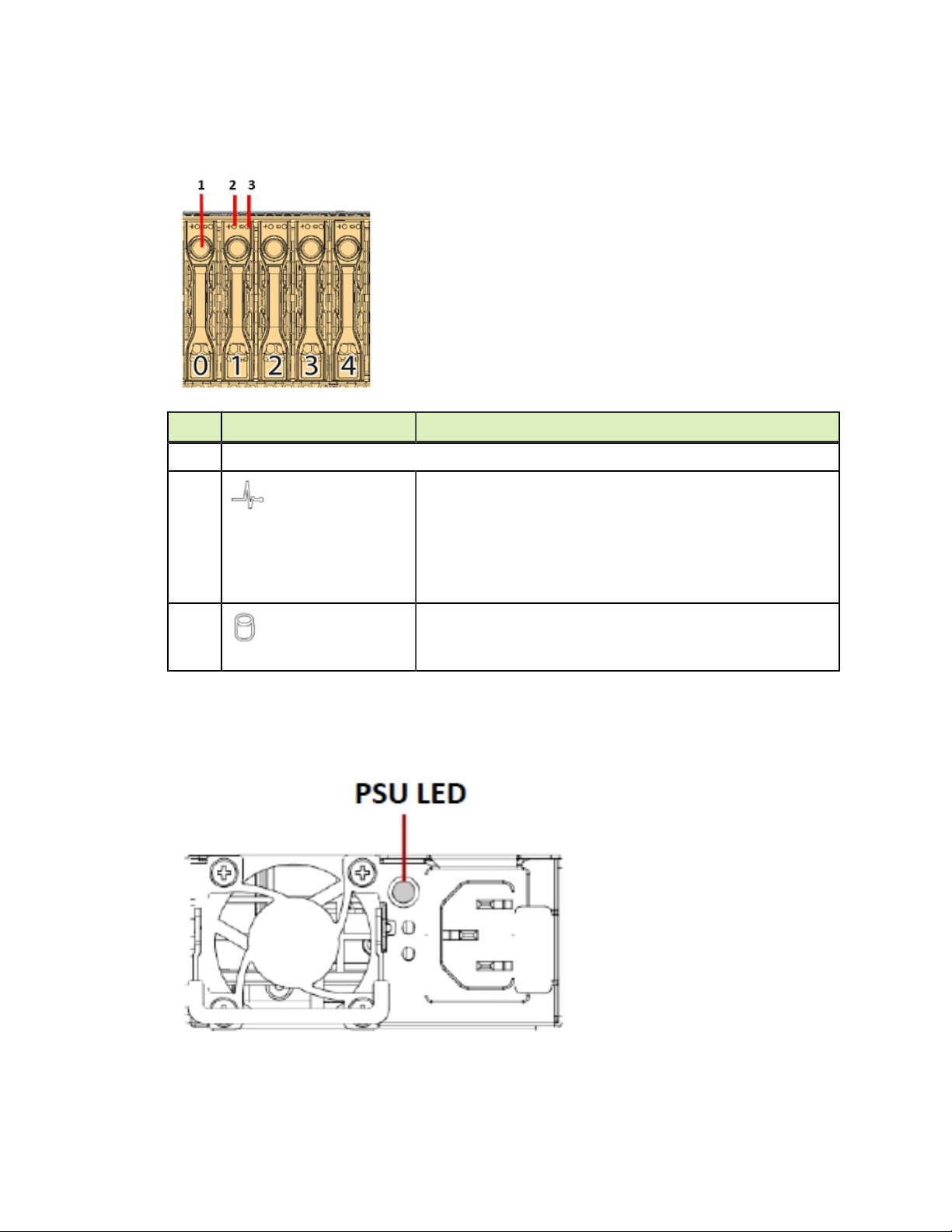
1.2.8.Hard Disk Indicators
ID Feature Description
1 Button and release level for removing the HDD
2
HDD present LED
Blue (Steady): Drive present
Blue (Blinking once/sec): Identification
Blue (Blinking twice/sec): Rebuilding
Amber (Steady): Warning/failure
Off: Slot empty
3
HDD activity LED
Blue: Access
1.2.9.Power Supply Unit (PSU) LED
The PSU LED indicates the operation status of the PSU as described in the table below:
Altri manuali per DGX-1
1
Indice
Altri manuali Nvidia Scrivania