
NXT Power Vanguard Manuale utente

Vanguard Three Phase 10-40KVA UPS
Battery Cabinet Installation and Operation Manual

1
Table of Contents
1. Important Safety....................................................................................................... 2
2. Introduction to the Rear View................................................................................. 3
2.1 Rear View Descriptions....................................................................................... 3
3. Installation and Operation....................................................................................... 4
3.1 Unpacking........................................................................................................... 4
3.2 Standard Package includes ................................................................................ 5
3.3 Battery Quantity.................................................................................................. 5
3.4 Selecting Installation Position............................................................................. 6
3.5 Installation of Accesories .................................................................................... 6
3.6 Installing The Battery .......................................................................................... 7
3.7 Battery Replacement .......................................................................................... 9
3.8 Wiring of Kronos UPS and Battery Bank.......................................................... 10
3.9 Storage Instructions...........................................................................................11
3.10 Specifications...................................................................................................11
4. Appendix................................................................................................................. 12

2
1. Important Safety
SAVE THESE INSTRUCTIONS
This manual contains important safety instructions. Read all safety, installation and operating instructions before installing the Battery Bank.
This manual contains important instructions that should be followed during installation and maintenance of the battery bank and batteries.
An Important Notice
Make sure the battery bank is installed within the proper environment as specified. (0~40°C/ 32~104°F and 30-90% non-condensing humidity)
Do not install the battery bank under direct sunlight. Your warranty will be void if the batteries fail due to overheating.
This battery bank is designed for indoor use only.
This battery bank is not designed for use in dusty, corrosive or high salt environments.
The warranty for this battery bank will be void if water or other liquid is spilt or poured directly onto the battery bank. Similarly we do not warrant
any damage to the battery bank if foreign objects are deliberately or accidentally inserted into the battery bank enclosure.
The batteries will self discharge if the system is unused for a period of time. It should be recharged every 2-3 months if unused. If this is not
done, then the warranty will be null and void. During normal operation, the batteries will be automatically maintained in charged condition.
External battery cabinets supplied by others to be installed with the Kronos UPS, shall have adequate installation instructions that define cable
sizes for connection to the UPS. Installation instructions for the battery bank shall be provided by the battery manufacturer.
To avoid risk of electrical shock, turn off the Kronos UPS and disconnect all of theAC and DC power sources before servicing the battery.
Do not disconnect the battery connectors under load under any circumstances.
Battery replacement and external battery cabinet installation shall be handled by qualified SERVICE PERSONNEL only.
Connection to the Kronos External Battery shall be made by qualified SERVICE PERSONNEL only.
Installation or replacement of batteries must be located in a SERVICEACCESS AREA:
The service manual shall include the following instructions for battery replacement and disposal:
A)Servicing of batteries should be performed or supervised by qualified personnel knowledgeable about batteries and the required
precautions.
B)When replacing batteries, replace with the same type and number of batteries or battery packs.
C)CAUTION: Do not dispose of batteries in a fire. The batteries may explode.
D)CAUTION: Do not open or mutilate batteries. Released electrolyte is harmful to the skin and eyes. It may be toxic.
E)CAUTION: A battery presents the risk of electrical shock and high short-circuit current. Contact with any part of a grounded battery can
result in electrical shock.
The following precautions must be observed when installing or servicing batteries:
a) Remove watches, rings, or other personal metal objects.
b) Use tools with insulated handles.
c) Wear rubber gloves and boots.
d) Do not lay tools or metal parts on top of batteries.
e) Disconnect the charging source and load prior to installing or maintaining the battery.
f)Remove battery grounds during installation and maintenance to reduce likelihood of shock. Remove the connection fromground if any part
of the battery is determined to be grounded.
Note: This equipment has been tested and found to comply with the limits for a Class Adigital device, pursuant to part 15 of the FCC Rules.
These limits are designed to provide reasonable protection against harmful interference when the equipment is operated in a commercial
environment. This equipment generates, uses, and can radiate radio frequency energy and, if not installed and used in accordance with the
instruction manual, may cause harmful interference to radio communications. Operation of this equipment in a residential area is likely to cause
harmful interference in which case the user will be required to correct the interference at his own expense.
WARNING: This is a category C2 UPS product. In a residential environment, this product may cause radio interference, in which case the user
may be required to take additional measures.

3
2. Introduction to the Rear View
2.1 Rear View Descriptions
1. Fuse holder
2. To UPS Battery Terminals
4
3. Installation and Operation
Note: The packing condition and the external surfaces of the cardboard should be inspected carefully before installation. Retain the packing
material for future use.
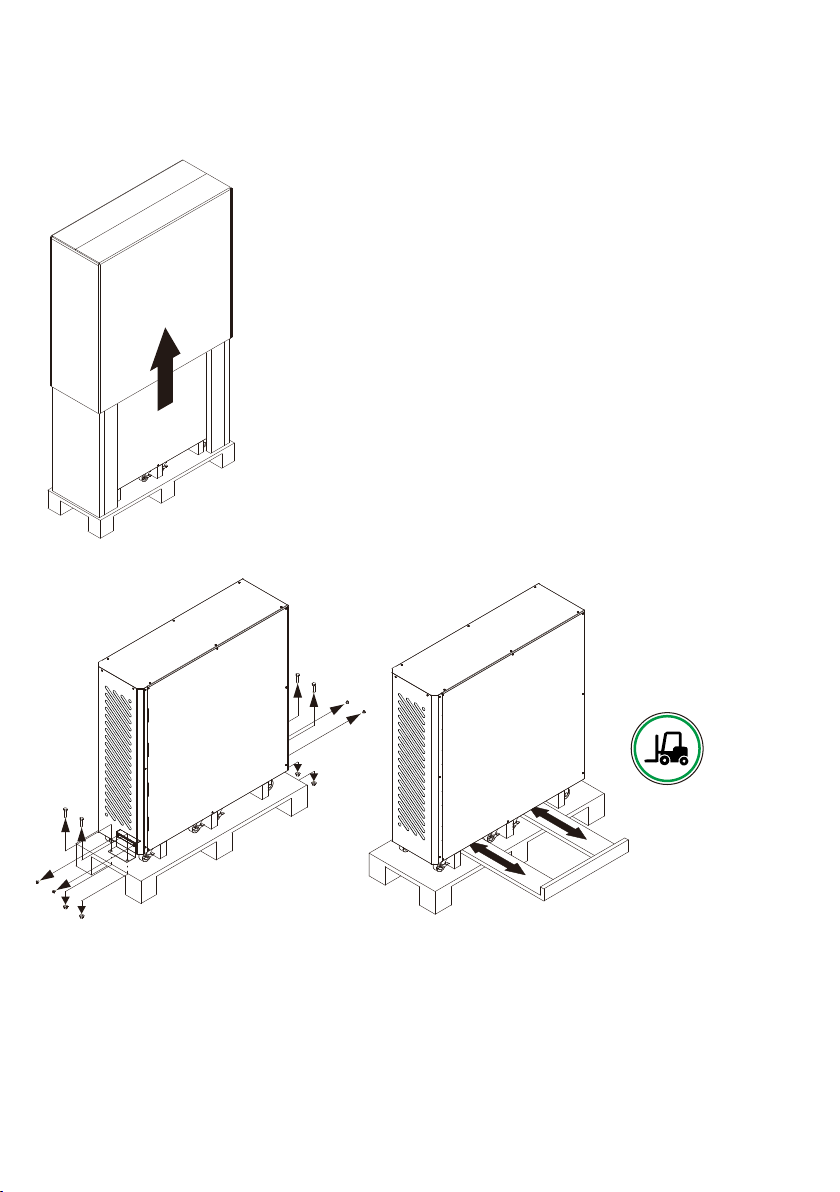
3.1 Unpacking
3.1.1 Remove the Kronos battery bank out of the PE foam.
3.1.2 Remove the packing materials. And unscrew the fastening rail kits on the front and rear side.
※Note: The battery bank with batteries is very heavy, be cautious when unpacking and lifting the unit to avoid injury. And stacker must be used
when moving.

5
3.2 Standard Package includes
The Kronos battery bank if shipped without the internal batteries installed, follow the procedures outlines below.
IF THE BANK IS SHIPPED WITH BATTERIES, SKIP THIS SECTION ANDPROCEED TO 3.8
User Manual
Accessories Kits as below:
Battery Fixed Support:10pcs
Screw (M3 x 6mm):
10pcs
Mylar Film:30pcs
Nylon Rivet:60pcs
Fuse:3pcs
Cable#0544:90pcs
Cable#6398:5pcs
Cable#5810:5pcs
Cable#6092:5pcs
Cable#5040:5pcs
3.3 Battery Quantity
Battery table below:
UPS Model No.
Number of Battery (pcs)
Max. strings of battery
7AH/9AH
KRONOS UL 10D
20
5
18
5
16
5
KRONOS UL 15D
20
5
18
5
16
5
KRONOS UL 20D
20
5
18
5
IMPORTANT:
It is very important to identify the VDC rating of the UPS
so that the above table can be used to correctly install the
quantity of batteries required. Failure t do so, will cause damage to
the batteries and also void all warranties.

6
3.4 Selecting Installation Position
It is necessary to select a proper environment to install the battery bank. In order to minimize the possibility of damage to the battery bank and
extend the life of the batteries. Please follow the instructions below:
3.4.1 Keep at least 20cm(8 inches) clearance from the rear panel of the battery bank from the wall or other obstructions.
3.4.2 Do not block the air-flow to the ventilation openings of the unit.
3.4.3 Please ensure the installation sites' environmental conditions are in accordance with the battery bank working specifications to avoid
overheat and excessive moisture.
3.4.4 Do not place the battery bank in a dusty or corrosive environment or near any flammable objects.
3.4.5 This battery bank is not designed for outdoor use.
3.5 Installation of Accesories

7
3.6 Installing The Battery
STEP1:Remove the right/left side panel.
STEP2:To install battery in the battery bank. (Please refer to Appendix).
STEP3:Install the battery guardrail.
STEP4:Using nylon rivet to fix mylar film.
STEP5:Connect Anderson terminal.
STEP6:Install the fuse into the fuse holder.
STEP7:Measure the voltage of terminal block to ensure the battery connections are correctly.
STEP8:Install the right/left side panel.
STEP1
STEP2
STEP3

8
STEP4
STEP5
STEP6
STEP7
STEP8
Batt+ Batt-N
VBatt+ VBatt-
N

9
3.7 Battery Replacement
STEP1:Disconnect the fuse holder.
STEP2:Remove the right/left side panel.
STEP3:Disconnect Anderson terminal.
STEP4:Remove the battery guardrail.
STEP5:Disconnect battery cable and take the battery out of the battery bank.
STEP1
STEP2
STEP3
STEP4
STEP5
Indice
Altri manuali NXT Power UPS


Manuali UPS popolari di altre marche

Pylontech
Pylontech Victron & Pylontech US5000 Manuale utente

Tecnoware
Tecnoware EVO DSP PLUS MM 6.8 Manuale utente

Mecer
Mecer ME-1000-WTU Manuale utente

Mustek
Mustek PowerMust 530(B) Plus Manuale di installazione e funzionamento

Emerson
Emerson Liebert NXL series Manuale utente

MAKELSAN
MAKELSAN BOXER SERIES Manuale utente


