
Olevia ZMT-620FTA Manuale utente

OLEVIA High Definition Digital
TV Receiver ZMT-620FTA
Firmware Ver 1.7.2
USER GUIDE
Date: 10 July, 2008
OLEVIA 高清數碼廣播接收器
ZMT-620FTA
軟體更新版本 1.7.2
使用說明
日期:2008 年7月10 日

軟體版本 1.7.2 更新功能
Additional Function of Firmware ver 1.7.2
1. 於相同頻道同步錄影兩個節目, 收看第三個電視台
Recording two TV programs, and watching the third one in the same
channel at the same time
2. 32 倍速搜畫
X 32 fast forward and backward
3. 時間切換
Time Shifting
4. 時間預錄
Time recording
5. 記憶播放
Memory play
6. 優化選擇播放錄影列表
Enhance the recorded play list
7. 優化預錄清單
Enhance EPG recording page
*錄影需另外購置外置硬盤機,建設使用 OLEVIA ZHD-UBSP35 250GB 硬
盤機或建議使用 3.5”, 160GB 外置硬盤.(外置硬盤必須連接電源)
*OLEVIA Settop Box ZMT-620FTA does not include an external hard disk,
OLEVIA ZHD-UBSP35 is recommended for recording. 3.5”, 160GB external
hard disc with independent power supply is suggested
*注意:此軟體版本只可於 ZMT-620FTA 軟體版本 1.2.2 或以上版本作升級
之用.但升級後,無法降回原本之軟體版本.如ZMT-620FTA 未更新為軟體版
本1.2.2,請先更新為軟體版本 1.2.2 或以上版本然後再更新軟體版本 1.7.2
*Attention: This firmware is irreversible and only applicable to ZMT-620FTA
firmware ver 1.2.2 or more recent; please upgrade firmware to ver 1.2.2before
upgrading to firmware ver 1.7.2

*注意: 如預設錄影節目, 可於完成設定後關機, 於錄影時間前重新開啓電源即可.
*Attention: you can switch off the set top box after adding recording schedule. Please
switch it on before the pre-record start time.
*注意: USB 記憶體內的所有內容或會因更新程序可能會被刪除,而硬盤內的所有
內容會亦會因格式化而被刪除,為避免重要資料流失,請先為硬盤作備份.
*Attention: the data inside USB flash drive may be affected due to the update process
and all the data in the hard disk will be erased after formatting. To avoid losing
important data, please backup before formatting.
以下的說明將會分為六部份
第一部份 更新軟體方法
第二部份 連接硬碟機方面
第三部份 最新預錄介面及功能
第四部份 同步錄影程序
第五部份 播放錄影片段
第六部份 時間切換
The following instruction is divided into six parts.
Part 1 Upgrade firmware
Part 2. Connecting a hard disk
Part 3. Pre-recording function and interface
Part 4. Recording two channels at the same time
Part 5. Replay the recorded program
Part 6. Time shift

第一部份. 更新軟體方法
Part 1 Upgrade firmware
1. 先從 www.schot.com 下載備有錄影功能的 Firmware
“Olevia_PVR_1.7.2_part1..zim” 及“Olevia_PVR_1.7.2_part2..zim” 至USB 記
憶體上.將USB 記憶體連接至 OLEVIA ZMT620-FTA 機背.
Download the Firmware, “Olevia_PVR_1.7.2_part1..zim” and
“Olevia_PVR_1.7.2_part2..zim” from www.schot.com and save in an USB flash
drive. Plug in the USB drive at the back of OLEVIA ZMT-620FTA.
2. 按遙控器上的 “Menu” ,在“主目錄”下選擇 “系統” “資訊”.
Press “Menu” on the remote and select “Information” under “System”.

3. “系統資料”將會顯示現有硬體及軟體資料.請按遙控器上的紅色鍵作更新.
The Hardware and Software version of the OLEVIA ZMT-620FTA is shown on
the System Information”. Press the red button on the remote for updating
firmware.
4. 選擇 “Olevia_PVR_1.7.2_part1..zim” 後按 “ENTER” 鍵.
Choose the firmware file, Olevia_PVR_1.7.2_part1..zim, inside the USB drive by
navigating on remote.

5. 選擇 “是” 及按 “ENTER” 鍵.
Confirm to update by selecting “Yes”.
6. 更新進行中.請稍後.
Please wait until the process finish.

9. 更新完成第一部份後, ZMT-620FTA 會自動重新啟動.
OLEVIA ZMT 620-FTA will reboot automatically after part 1.
10. 注意:ZMT-620FTA 的升級程序仍未完成,請繼續以下之步驟,直至完全升級為
止.
Attention: The upgrade has not been finished; please continue the following steps
until the upgrade complete.
從新開機後,請選擇以英文作為設定語言,並繼續以下程序.
Please select English as the language for the following process.
11. 請按遙控器上的 “Menu” ,在“Main Menu” 下選擇 “System” 然後再選擇
“Information”.
Press “Menu” on the remote and select “Information” under “System”.
12. 這時請按遙控器上的紅色鍵.
Press the red button on the remote for upgrading the firmware.

13. 這次要選擇 “Olevia_PVR_1.7.2_part2..zim”, 然後按 “ENTER”
Choose the firmware file, Olevia_PVR_1.7.2_part2..zim, inside the USB drive by
navigating on remote.
16. 再選擇 “YES” 及按 “ENTER” 鍵,以確認更新.
Confirm to update by selecting “Yes”.

17. 更新進行中. 請稍後.
Please wait until the process finish.
18. 更新完成後, ZMT-620FTA 會自動重新啟動.
OLEVIA ZMT 620-FTA will reboot automatically after the process.
19. 重新啓動後請選擇適當的語言並重新搜台.
Select the appropriate language and finish the upgrade by channels scanning.
第一部份完
The end of part 1
第二部份. 連接硬碟機方面
Part 2. Connecting a Hard Disk
此軟體備有預設錄影功能,你可以進行即時錄影或預設錄影,請配備外置硬盤作儲
存之用(建議使用 OLEVIA ZHD-UBSP35 250GB 硬盤機)
This firmware is capable of recording function; you can pre-record or record TV
program instantly and save in an external hard disk (OLEVIA ZHD-UBSP35 is
recommended for recording)
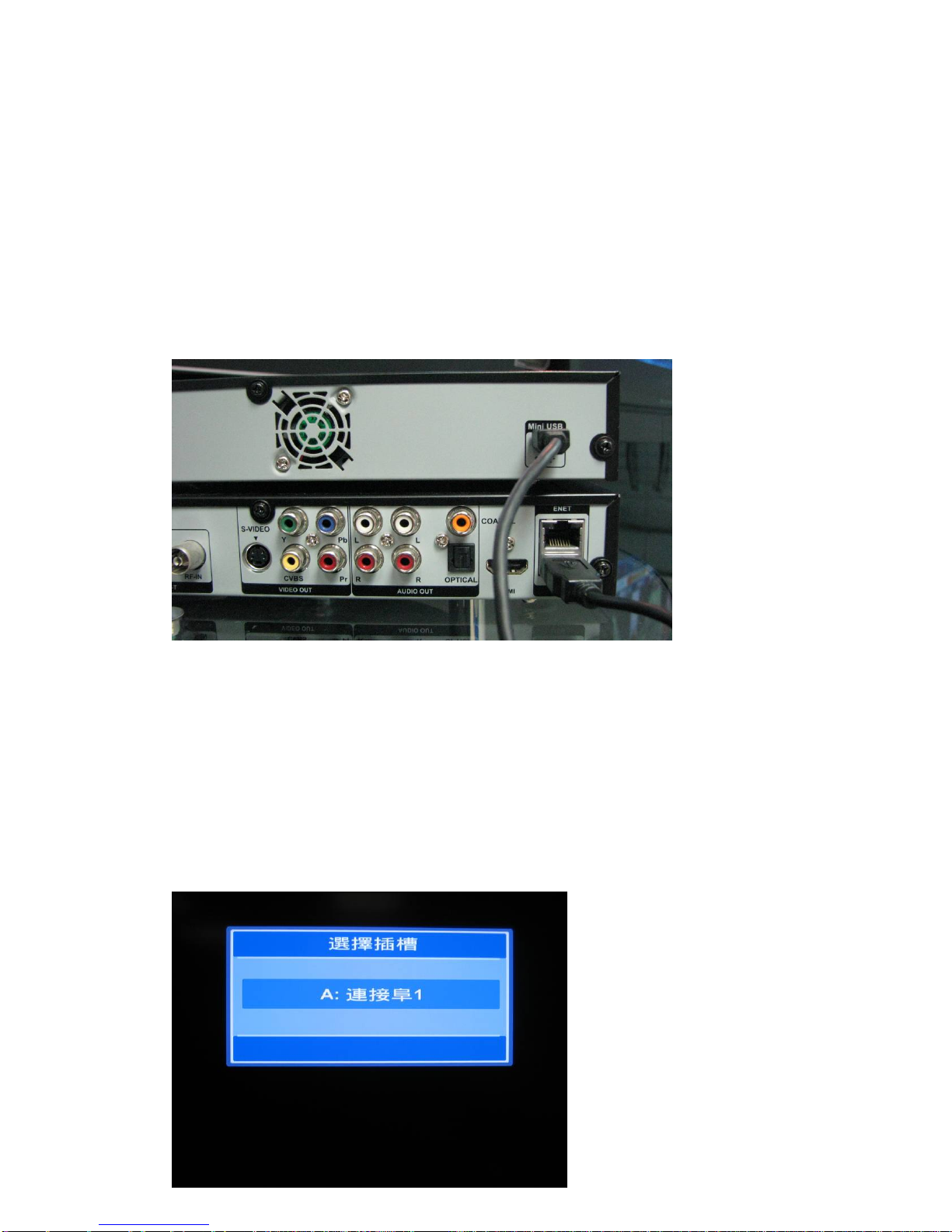
1. 請連接外置硬盤至 ZMT-620FTA 的USB 機背.
Connect the external hard disk with ZMT-620FTA through USB port.
2. 你可以跟據以下程序確認硬盤是否已連接 ZMT-620FTA.
- 按遙控器上的 “FILE” 鍵,如成功連接,選擇插糟內將會出現 “連接阜 1”,
但如出現 “未連結” ,即連接失敗,請確認連接線是否鬆脫或外置硬盤電
源已經開動.
Please confirm if the connection is success by the following step.
-Press the “File” button on the remote. “A: PORT 1” would be shown in
Select Slot if connection is success; “A: Empty” implies the external hard
disk has not yet connect with ZMT-620FTA, if so please check the cable and
the power of the devices.
Indice


