
Olin PD-7755 Manuale utente


Warning: To reduce therisk of fireor electric shock,do not exposethis apparatus torain
or moisture.
1) Please readthe instruction manualcarefully and followall the requirementsof safe
operation to operatethe device.
2) Do notuse this unitnear water.Do not placeover the unitany container withliquid
inside.
3) Do notinstall near anyheat sources suchas radiators, heatregisters, stoves, orother
apparatus (including amplifiers)that produce heat.
4) Unplug thisunit during lightningstorms or whenunused for longtime.
5) AboutCleaning: Unplug thesystem, use onlywet cloth toclean. Do notuse liquid
detergent or aerosol.
6) Only useaccessories specified bythe manufacturer.
7) Refer allservicing to qualifiedservice personnel, servicingis required whenthe unit
has been damagedin any way, such aspower supply cordor plug isdamaged, liquid
has been spilledor objects havefallen into theunit, exposed tomoisture, does not
operate normally.Don't try torepair the machineby yourself becauseof the dangerof
high voltage andelectric shock.
8) Do notuse irregular shapeddiscs such asheart or star-shapeddiscs as theymay
Cause the unitto malfunction.
Hi-voltage, Don't Openit
Remind user tobe careful to
avoid electric shock
Thank you forchoosing our portableDVD player.It includes a7” wide screen anda DVD
player. Theunit applies thelatest state ofart electronics andis designed foruse at home,
in hotels andin offices etcfor relaxation. Thecompact size makescarrying easier as
well as installation.Please read themanual carefully prior to use and keep it well for later
consultation.
1
SAFETY PRECAUTION
9)
)
)
)
)
)
)
Please ensure enoughclearance around thereceiver for goodventilation. Any
objects and theappliance should beat least 10cm apart.
10 The ventilation shouldnot be impededby covering theventilation openings with
items, such asnewspapers, table-cloths, curtains,etc
11 No naked flamesource, such aslighted candles, shouldbe placed onthe apparatus
12 Attention should bedrawn to theenvironmental aspects ofbattery disposal.
13 CAUTION : Dangerof explosion ifbattery is incorrectlyreplaced. Replace onlywith
the same orequivalent type.
14 The disconnect devicesshall remain readilyoperable.
15 Only used withthe provided adaptormodel no.: FM090010-C.

TABLE OF CONTENTS
Olin_Portable_DVD_Player_PD-7755_User_Manual_V2
2
1
2
3
3
3
4
4
4
5
6
7
7
8
9
10
12
13
13
14
14
15
16
16
16
17
17
18
18
18
20
21
21
21
21
22
23
11
TROUBLESHOOTING
SAFETY PRECAUTION
TABLE OF CONTENTS
PACKAGE CONTENTS/MAIN FEATURES
ABOUT OPTICAL DISCS
MAIN UNIT
SLAVE SCREEN
SYSTEM CONNECTION
REMOTE CONTROL
BASIC OPERATION
Repeat playing
PLAYING JPG /MP3 FILE
SYSTEM SETUP
SPECIFICATION
BATTERY
MOUNTING BAG
Main Features
Package contents
Powering and installation
Connecting to the Slave screen
Audio and Video Signal Output
The Use of Remote Control
Fast forward and fast backward
Repeat playing of favorite scene
Angle
Zoom In/ Out
Playing JPG file
Playing MP3 files
General Setup Page
Password Setup Page
Video Setup Page
Preference Page
Precautions related to Battery Recharge
Rechargeable Battery Use
Using and maintaining rechargeable battery supply
Disc Requirements
Disc Care and Maintenance

Main Features
High brightness color7”LCD screen
Compatible with discof DVD, VCD,MP3, CD, JPEG,etc.
Built-in stereo speakers
Built-in rechargeable Lithiumpolymer battery
Support PALor NTSC system
Support English OSD,speed forward/backward, repeatfunction
Zoom in/out function
1
1
1
1
1
1
2
Remote Control withbattery
Audio/Video Cable
AC/DC Power Adapter
Cigarette LighterAdapter
User Manual
Headphone
PACKAGE CONTENTS/MAIN FEATURES
7 '' Slavescreen & DVD Player
1
DC+Audio/Video Cable
Please make surethe following items are included inthe package. Ifany
item is missing,contact your dealer.
Package contents
Mounting Bag
Quick guide
Warranty card
2
1
1
3

ABOUT OPTICAL DISCS
4
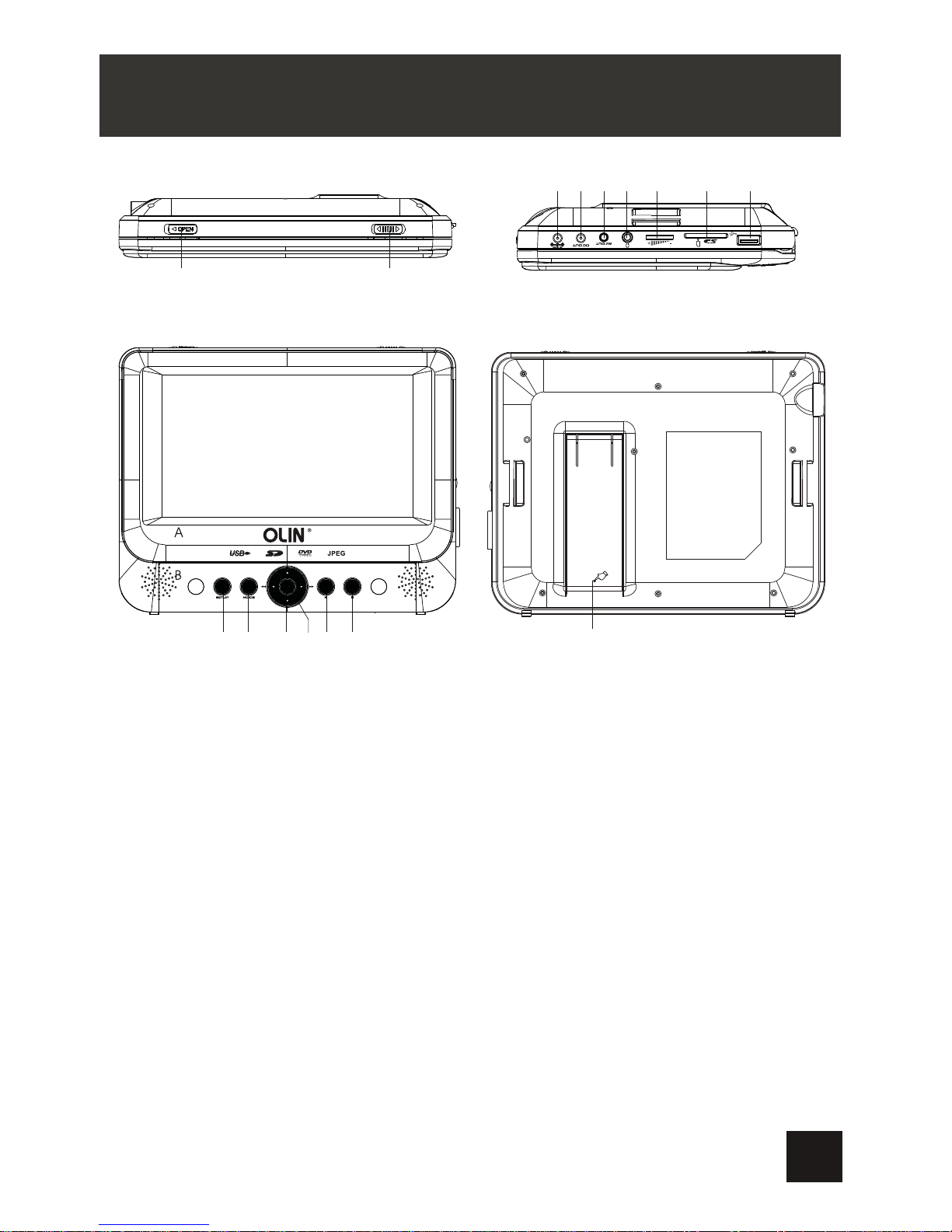
MAIN UNIT
ON OFF
12
CLOSE
16
910111213 14 15
345678
1.Open Knob
Switch the knob to unlock the disc cover
2.Power ON/OFFSwitch
Switch the DVDplayer on/off
3.SETUP Button
Press SETUP to display the system
setup menu
4.MODE Button
Press MODE toselect the source
between DVD andMedia
5.Navigation Buttons
6.OK Button
Press OK toconfirm selection
7.PLAY/PAUSE Button
Press Play/Pause to start/hold playback
8.STOP Button
Press STOP to stop playback
9.DC IN9V
Connect to thepower outlet
10.DC OUT
Connect to Slavescreen DC IN
11.AV OUT
Output audio/ videoSignals
12.Headphone Jack
13.VolumeKnob
Turn the volume up/ down
14.SD CardSlot
15.USB Port
16.Bracket
5

CLOSE
ON OFF
1
2345
6
1.Power ON/OFF
Switch the Slavescreen on/off
2.VolumeKnob
Turn thevolume up/down
3.Headphone Jack
4.AV IN
Input audio/ videosignals
5.DC IN9V
Connect to theDVD player DC OUT or the power outlet
6.Slave screen
6
SLAVE SCREEN
Notice:
Car cigarette lighteradaptor can't beused to rechargethe battery.
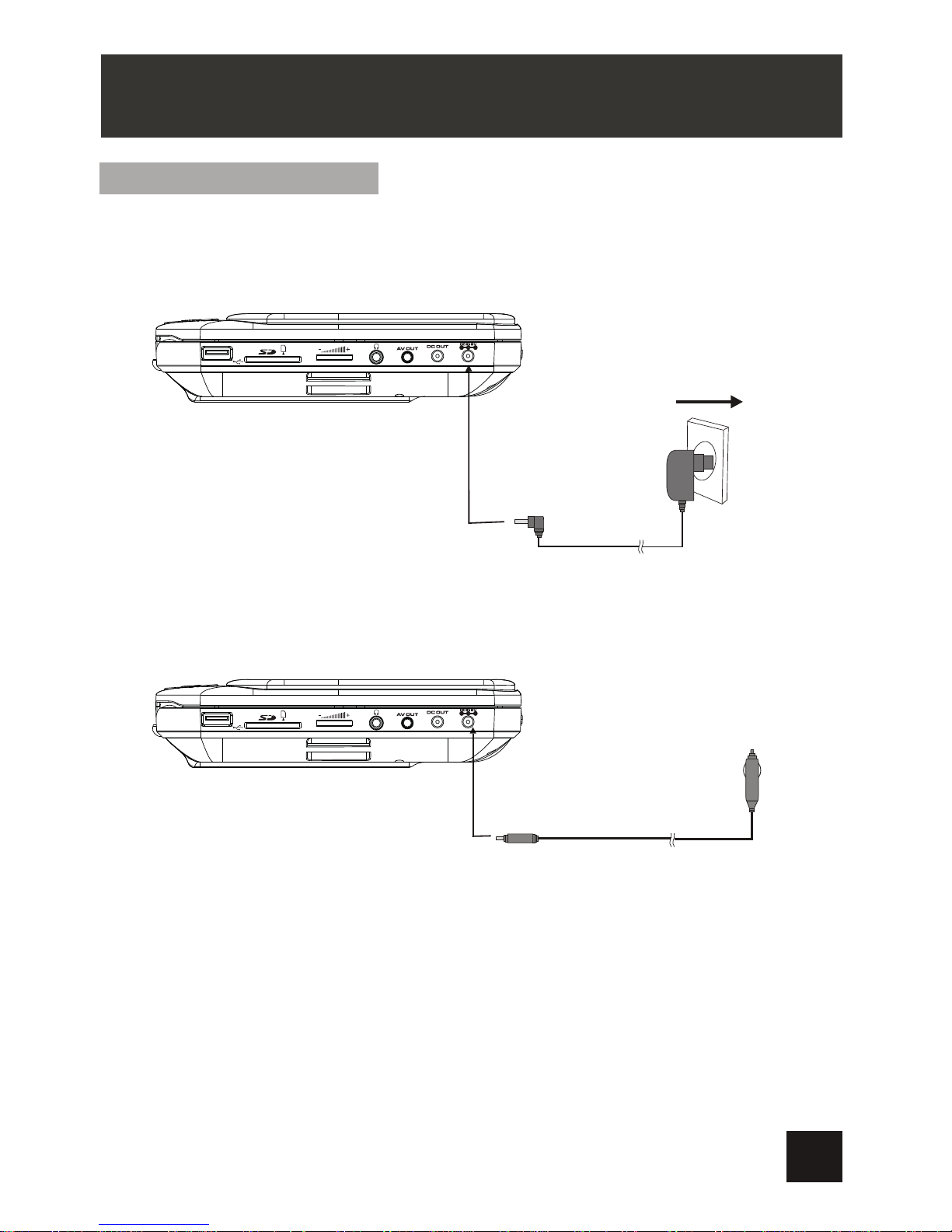
Powering and installation
Plug one endof theAC/DC power adaptorinto the DCIN 9V jackon the rightof the
main unit, thenplug the otherend into theAC powerreceptacle. Please referto the
following illustration
If using carcigarette lighter adaptorto connect tothe power:
Plug one endof the cigarettelighter adaptor intothe DC IN9V jack onthe unit, plug
the other endinto the carcigarette lighter socket.See illustration below.
SYSTEM CONNECTION
Warning:
This model andits enclosed caradaptor are onlycompatible with 9~12Vvehicles.
It is notcompatible with 24vvehicles.
Please note:
Do not connectthe unit tothe car viacar adaptor beforethe engine hasbeen started.
Disconnect the caradaptor when itis not inuse.
7
ON OFF
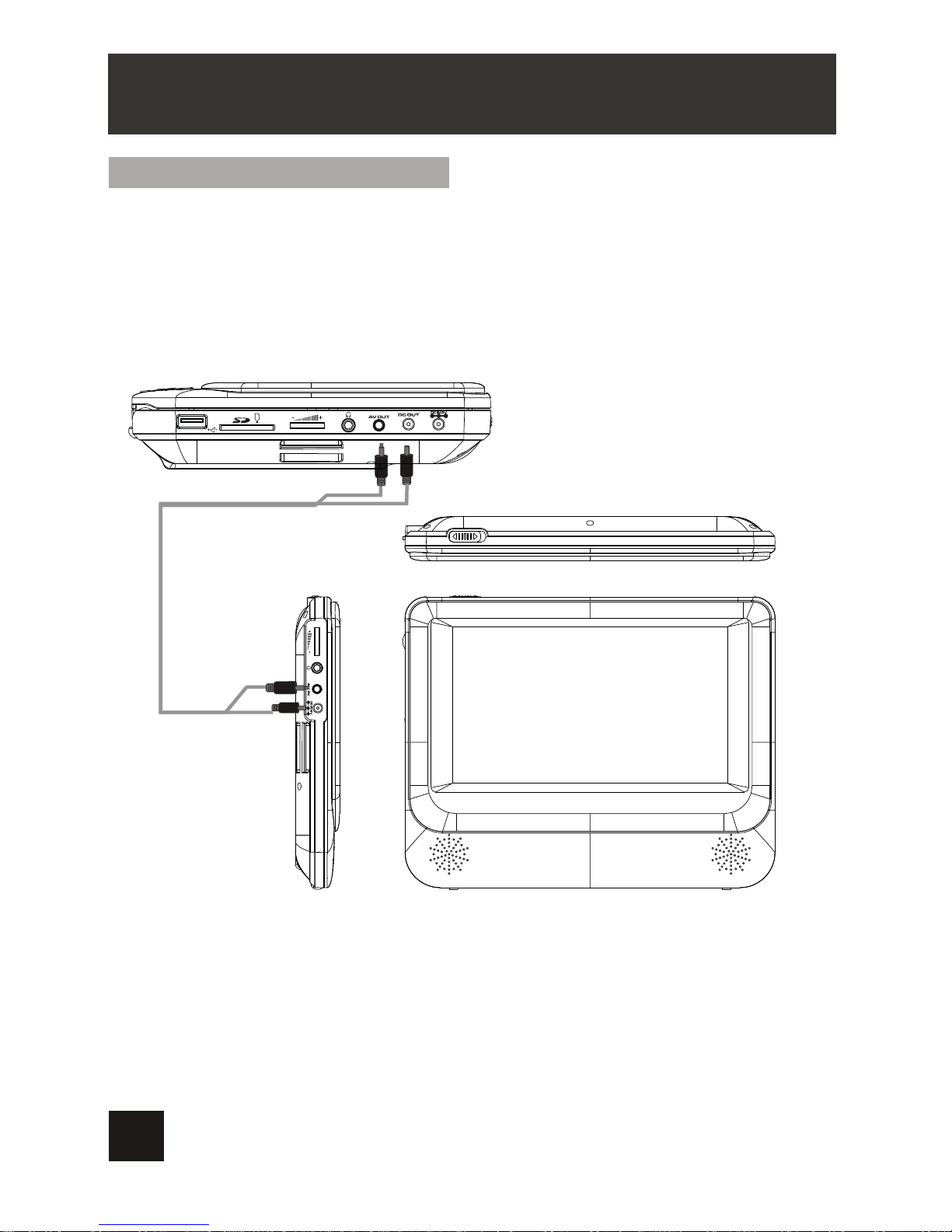
Connecting tothe Slave screen
The Main Unitcan be connectedto the Slave screen.
Connect the MainUnit to poweroutlet viaAC/DC adaptor orcigarette lighter adaptor.
Then connect MainUnit's DC Outjack to Slave screen's DC IN9V jack witha DC/AV
cable.
Also use theDC/AV cableto connect MainUnit's AV OUT toSlave screen’s AV IN .
Please refer tothe illustration below.
Note:The Slave screenis designed to run off powerfrom the car charger only.The
AC/DC wall adapteris for chargingthe main screenonly.
SYSTEM CONNECTION
8

AMPLIFIER
TV
SUBWOOFER
Left front speaker Right front speaker
Center speaker
Left rear speaker Right rear speaker
Notice:There is no 5.1channel in the unit,however, after connectingto APM itis available to
output audio in5.1 channel
AUDIO IN
VIDEO IN
AV CABLE
Audio and Video Signal Output
The Main Unitcan transmit audio and video signalsto the external receiver,
such as aTV or an amplifier.
1. Refer theowner's manual ofthe external receiveras well
2. Make sureall necessary connectionshave been properlymade before connect
the power.
3.If the playerwill not beused for along period oftime, disconnect thepower and
remove the batteryfrom the remotecontrol
These cables are
not included in package
SYSTEM CONNECTION
9
Indice
Altri manuali Olin Lettore DVD


